Hey.
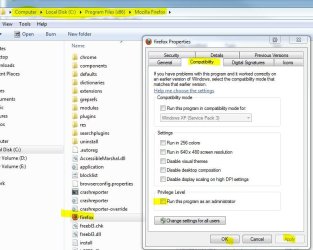
Sometime during the last week was Mozilla Firefox into USC (user account control device) list, which means that I have to press yes every time I open a new window. I'm using Windows 7 (64bit) (Home Premium I think). This is not a vital, yet incredibly annoying when you want to hurry up a bit. Would like to know how to remove Firefox from the list or just check may be that it's okay "Allows you the following program can be used to make changes to your computer." ii mean seriously to have that run 24/7 is sooo annying.
My thx to who ever can fix this.
Sometime during the last week was Mozilla Firefox into USC (user account control device) list, which means that I have to press yes every time I open a new window. I'm using Windows 7 (64bit) (Home Premium I think). This is not a vital, yet incredibly annoying when you want to hurry up a bit. Would like to know how to remove Firefox from the list or just check may be that it's okay "Allows you the following program can be used to make changes to your computer." ii mean seriously to have that run 24/7 is sooo annying.
My thx to who ever can fix this.
My Computer
- OS
- Windows 7