UAC - (palm face)

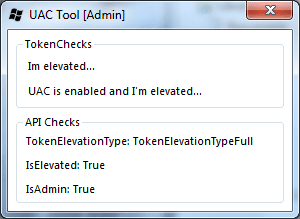
Oh yes it does, I'm sorry perhaps I should take a lesson on following direction :x

uac.png

Sorry about that. Any ideas?
 

My Computer My Computer

OS
Windows 7 32-bit Build 7100
Sorry about that. Any ideas?

Download ProcessHacker from the forum: http://www.sevenforums.com/projects/18338-processhacker.html


Download


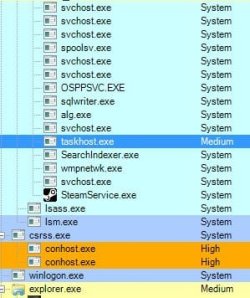
After its installed make sure its elevated by going Hacker > Show Details of All Processes

You will see all the processes running on your machine with their elevation type listed under the collum called Integrity

ProcUAC.JPG

System = System
High = Elevated (Admin Mode)
Medium = Standard (User Mode)
Low = Restricted (Guest Mode)

Open one application your having issues (like wow) and take a screenshot of the ProcessHacker main window, preferably one running the application normally then another by right-clicking the shortcut/exe and selecting Run As Admin...The first time its run you should see it listed as Medium and the second running as Admin listed with High

Steven
 
Sorry for the slow response, I do not have a column labeled "Integrity" and I've tried looking in the options and view settings.. no where can I actually turn this on.

Edit: Nevermind I had to manually turn the option on.
 

My Computer My Computer

OS
Windows 7 32-bit Build 7100
You were absolutely correct. Here are the screenshots.

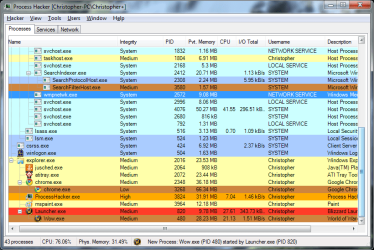
This is without run as admin. Now Wow.exe never actually loads, it just pretends to load then never actually does so I had to be quick with my work here.

notadmin.png

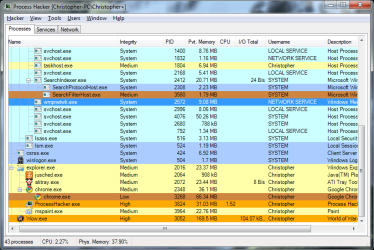
Here is with admin, just like you said the Integrity level is High.

admin.png
 

My Computer My Computer

OS
Windows 7 32-bit Build 7100
Did you install any drivers that coincided with the sudden need to run as admin?

A while ago when using build 7201, I installed some beta-sound drivers and suddenly everything needed to be run as admin.

Unfortunately my solution won't help you - I simply scrapped 7201 and went back to using 7100 :(

(where the same drivers worked flawlessly :rolleyes:)
 

My Computer My Computer

Computer type
PC/Desktop
Computer Manufacturer/Model Number
Systems by SmartEyeball
OS
8 Pro x64
CPU
i7 3770K 4.6GHz
Motherboard
ASUS P8Z77 WS
Memory
16GB G.Skill Trident X 2666mhz
Graphics Card(s)
x2 EVGA 780 Ti Superclocked SLI
Sound Card
SB X-FI Surround 5.1 PRO USB / ATH-AD900 Headphones
Monitor(s) Displays
x3 Dell U2410 / 58" Samsung
Screen Resolution
5760*1200/ 1920*1200
Hard Drives
2x Intel 520 240GB (RAID 0) * 2x WD Caviar Blacks 2TB (RAID 0) * 2TB WD Caviar Black * Sony Optirac DVD
PSU
Silverstone Strider Evolution 1200W
Case
Thermaltake Level 10 GT Snow Edition
Cooling
Noctua NH-D14
Keyboard
Topre Realforce // Ducky Shine MX Black // Filco Ninja TKL
Mouse
Thermaltake Theron (Highly Recommended) + Razer Imperator
Antivirus
MSE
Browser
IE, FF, WaterFox
Other Info
GT Extreme V2 Sim Racing Cockpit + 40" LCD and K/B Mouse stand ▼
Fanatec CSR Elite Wheel + Clubsport V1 Pedals + CSR shifter/7G-H ▼Saitek X52 Pro ▼ TrackIR 5 Pro
Buttkicker v2 Seat Rumbler with Dedicated 5.1 and Sub Woofer attached to frame ▼
=
Bloody Big Grin

My Computer My Computer

Computer Manufacturer/Model Number
me and myself
OS
vista x64/ win 7 x64
CPU
phenom 9950 BE
Motherboard
ASUS M2A-VM HDMI
Memory
8 gb
Graphics Card(s)
nvidia gts 250
Sound Card
realtek HD onboard
Monitor(s) Displays
dual hd 19" tft
Screen Resolution
1440x900
Hard Drives
2 x 500 gb WDC
1 x 500 gb Seagate
1 x 1000 gb Seagate
1 80 gb raptor
1 usb 160 gb
Cooling
standard issue
Keyboard
logitech g11
Mouse
usb wireless MS laser 6000
Internet Speed
18 mb (according to my provider :)
I will just try the other method petrossa.

And no I don't think that'd help simply because I'm already using build 7100 lol.
 

My Computer My Computer

OS
Windows 7 32-bit Build 7100
The method doesn't work, it actually just prevents me from running the program at all.

This is just getting silly, Windows 7 is now driving me nuts with it's crazy thought that I'm an idiot.
 

My Computer My Computer

OS
Windows 7 32-bit Build 7100
A little update on the problem.

Well I fixed it, turns out it wasn't the UAC and it was me just being stupid. I have an ATi video card and I run ATT (ATi Tray Tools) and there is an option is General Options called "Agressive 3D Detection." This option in Windows 7 doesn't work correctly and requires it to be ran as admin.

So if anyone else has the problem I had, just untick that option and you'll be good to go.
 

My Computer My Computer

OS
Windows 7 32-bit Build 7100
Bleeb if you are fixed could you post that so the admins know to mark it solved

Ken
 

My Computer My Computer

Computer Manufacturer/Model Number
HP Pavillion dv-7 1005 Tx
OS
Win 8 Release candidate 8400
CPU
[email protected]
Memory
4 gigs
Graphics Card(s)
Nvidia 9600M
Sound Card
HD built-in
Monitor(s) Displays
17" Wxga
Screen Resolution
1440x900
Cooling
none
Internet Speed
45Mb down 5Mb up
Back
Top