- Local time
- 2:12 PM
- Messages
- 4,563
Hello all, I have an interesting issue.
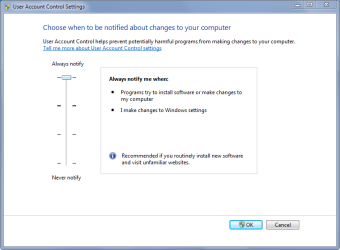
So I prefer to have my uac set to the highest setting: Which is always notify.
I noticed that sometimes when I check the setting, it will be at the default (not off) Level 2, notify when programs make changes to this pc on secure desktop.
So I set it to the highest, click ok and reboot. Its still set to the highest setting and I go on my way. I check it several days(weeks even) later and UAC is on the default setting again.
So I am curious, UAC at the highest setting is supposed to prompt whenever UAC settings are about to be changed, but this is not happening. It does when I initiate it, but not otherwise apparently.
I know what your thinking, and I am absolutely sure its not malware. I don't know if its a older program I have that's doing it or what. Still, it should not be able to.
So questions:
1.) What could be causing this?
2.) Is there a way in group policy I could disable the uac setting screen so it could not be changed? Or lock it down to the always notify option?
I have searched the net and have not found any information on this.
Thank you.
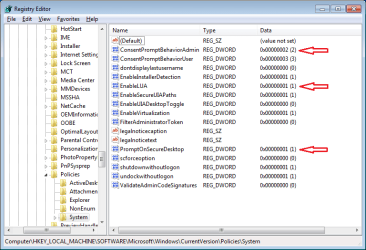
1st image is what I want,
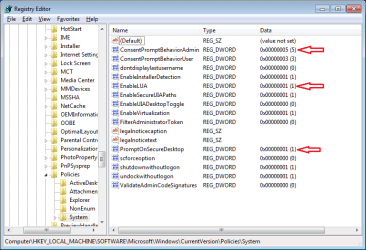
2nd image is what happens after a few weeks.
Event viewer shows nothing.
So I prefer to have my uac set to the highest setting: Which is always notify.
I noticed that sometimes when I check the setting, it will be at the default (not off) Level 2, notify when programs make changes to this pc on secure desktop.
So I set it to the highest, click ok and reboot. Its still set to the highest setting and I go on my way. I check it several days(weeks even) later and UAC is on the default setting again.
So I am curious, UAC at the highest setting is supposed to prompt whenever UAC settings are about to be changed, but this is not happening. It does when I initiate it, but not otherwise apparently.
I know what your thinking, and I am absolutely sure its not malware. I don't know if its a older program I have that's doing it or what. Still, it should not be able to.
So questions:
1.) What could be causing this?
2.) Is there a way in group policy I could disable the uac setting screen so it could not be changed? Or lock it down to the always notify option?
I have searched the net and have not found any information on this.
Thank you.
1st image is what I want,
2nd image is what happens after a few weeks.
Event viewer shows nothing.
Attachments

My Computer
At a glance
Windows 10 ProAMD Ryzen 5 2400G Processor with Radeon RX Ve...G.SKILL Ripjaws V Series 16GB (2 x 8GB) 288-P...2047MB NVIDIA GeForce GTX 1060 6GB (EVGA)
- Computer type
- PC/Desktop
- Computer Manufacturer/Model Number
- Custom Built
- OS
- Windows 10 Pro
- CPU
- AMD Ryzen 5 2400G Processor with Radeon RX Vega 11 Graphics
- Motherboard
- ASRock X470 Master SLI/AC AM4 AMD Promontory X470 SATA 6Gb/s
- Memory
- G.SKILL Ripjaws V Series 16GB (2 x 8GB) 288-Pin DDR4 SDRAM D
- Graphics Card(s)
- 2047MB NVIDIA GeForce GTX 1060 6GB (EVGA)
- Sound Card
- Motherboard Built in
- Monitor(s) Displays
- Acer R240HY bidx 23.8-Inch IPS HDMI DVI VGA (1920 x 1080) Wi
- Screen Resolution
- 1920 x 1080
- Hard Drives
- 1TB Sandisk SSD PLUS (Main drive)
500 GB Seagate 7200 RPM (Games)
500 GB Western Digital 7200 RPM (Virtual Machines)
- PSU
- CORSAIR TX Series TX650M 650W 80+ Gold Modular Power Supply
- Case
- CORSAIR CARBIDE SPEC-02 Mid-Tower Gaming Case, Red LED Fan
- Cooling
- 220mm, two 120mm, and four 60mm fans
- Keyboard
- Wired Dell keyboard
- Mouse
- Wireless Logitech mouse
- Internet Speed
- 250mb down, 30mb up
- Antivirus
- Panda Cloud Antivirus
- Browser
- Chrome-ish x64
- Other Info
- Your awesome for reading this.