Solved UAC security question

andrew129260

IT Support Pro
Guru
VIP
Local time
12:43 PM
Messages
4,563
Hello all, I have an interesting issue.

So I prefer to have my uac set to the highest setting: Which is always notify.

I noticed that sometimes when I check the setting, it will be at the default (not off) Level 2, notify when programs make changes to this pc on secure desktop.

So I set it to the highest, click ok and reboot. Its still set to the highest setting and I go on my way. I check it several days(weeks even) later and UAC is on the default setting again.

So I am curious, UAC at the highest setting is supposed to prompt whenever UAC settings are about to be changed, but this is not happening. It does when I initiate it, but not otherwise apparently.

I know what your thinking, and I am absolutely sure its not malware. I don't know if its a older program I have that's doing it or what. Still, it should not be able to.

So questions:

1.) What could be causing this?

2.) Is there a way in group policy I could disable the uac setting screen so it could not be changed? Or lock it down to the always notify option?

I have searched the net and have not found any information on this.

Thank you.

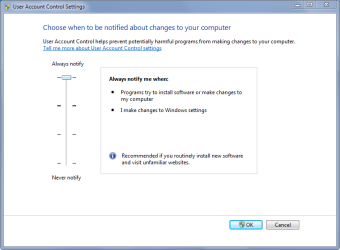
1st image is what I want,

2nd image is what happens after a few weeks.

Event viewer shows nothing.
 

Attachments
  • uac i prefer.PNG
    uac i prefer.PNG
    39.7 KB · Views: 0
  • uac that changes randomly.PNG
    uac that changes randomly.PNG
    39.7 KB · Views: 0

My Computer

Computer type
PC/Desktop
Computer Manufacturer/Model Number
Custom Built
OS
Windows 10 Pro
CPU
AMD Ryzen 5 2400G Processor with Radeon RX Vega 11 Graphics
Motherboard
ASRock X470 Master SLI/AC AM4 AMD Promontory X470 SATA 6Gb/s
Memory
G.SKILL Ripjaws V Series 16GB (2 x 8GB) 288-Pin DDR4 SDRAM D
Graphics Card(s)
2047MB NVIDIA GeForce GTX 1060 6GB (EVGA)
Sound Card
Motherboard Built in
Monitor(s) Displays
Acer R240HY bidx 23.8-Inch IPS HDMI DVI VGA (1920 x 1080) Wi
Screen Resolution
1920 x 1080
Hard Drives
1TB Sandisk SSD PLUS (Main drive)
500 GB Seagate 7200 RPM (Games)
500 GB Western Digital 7200 RPM (Virtual Machines)
PSU
CORSAIR TX Series TX650M 650W 80+ Gold Modular Power Supply
Case
CORSAIR CARBIDE SPEC-02 Mid-Tower Gaming Case, Red LED Fan
Cooling
220mm, two 120mm, and four 60mm fans
Keyboard
Wired Dell keyboard
Mouse
Wireless Logitech mouse
Internet Speed
250mb down, 30mb up
Antivirus
Panda Cloud Antivirus
Browser
Chrome-ish x64
Other Info
Your awesome for reading this.

Hello Andrew,

Interesting. Is this all happening in the same user account?

One possibility is a Windows Update resetting it back to default.
 

My Computer

Computer type
PC/Desktop
Computer Manufacturer/Model Number
Self built custom
OS
64-bit Windows 11 Pro for Workstations
CPU
Intel i7-8700K OC'd to 5 GHz
Motherboard
ASUS ROG Maximus XI Formula Z390
Memory
64 GB (4x16GB) G.SKILL TridentZ RGB DDR4 3600 MHz
Graphics Card(s)
ASUS ROG-STRIX-GTX1080TI-O11G-GAMING
Sound Card
Integrated
Monitor(s) Displays
2 x Samsung Odyssey G7 27"
Screen Resolution
2560x1440
Hard Drives
1TB Samsung 990 PRO M.2,
4TB Samsung 990 PRO PRO M.2,
TerraMaster F8 SSD Plus NAS
PSU
Seasonic Prime Titanium 850W
Case
Thermaltake Core P3
Cooling
Corsair Hydro H115i
Keyboard
Logitech wireless K800
Mouse
Logitech MX Master 4
Internet Speed
2 Gb/s Download and 100 Mb/s Upload
Antivirus
Malwarebyte Anti-Malware Premium
Browser
Google Chrome
Other Info
Logitech Z625 speaker system,
Logitech BRIO 4K Pro webcam,
HP Color LaserJet Pro MFP M477fdn,
APC SMART-UPS RT 1000 XL - SURT1000XLI,
Galaxy S23 Plus phone

My Computer

Computer type
PC/Desktop
Computer Manufacturer/Model Number
Self Built
OS
Win 10 Pro x64
CPU
Intel I5-2500K @3.3GHz
Motherboard
Asrock P67 Extreme4
Memory
16GB G.Skill Ripjaws X (4x4GB)
Graphics Card(s)
EVGA GeForce 750 Ti SC 2GB
Sound Card
ASUS Xonar DG 5.1 Channels 24-bit 96KHz PCI Interface Sound
Monitor(s) Displays
auria eq2367
Screen Resolution
1920 x 1080
Hard Drives
250GB Samsung 850 EVO SSD
1TB WD Blue
1TB Hitachi
PSU
SeaSonic X 650W 80 Plus Gold
Case
Corsair Obsidian 750D
Cooling
Corsair H60, Three 140mm case fans
Keyboard
Logitech Wireless Keyboard K520
Mouse
Logitech Wireless Mouse M310
Internet Speed
Wave Broadband ~ 100 dn 5 up
Antivirus
Windows Defender, Malwarebytes Premium
Browser
Edge, IE11, Chrome
Other Info
Laptop specs: HP g7-1365dx /
CPU: AMD A6-3420M APU with Radeon(tm) HD Graphics /
RAM: Crucial 8Gb (2x4Gb) /
SSD: Crucial M4-CT128M4SSD2 ATA Device/ FW 000F /
GFX: AMD Radeon HD 6520G /
OS: Windows 10 Pro x64
Hello Andrew,

Interesting. Is this all happening in the same user account?

One possibility is a Windows Update resetting it back to default.

Yes it is, thanks for the response. My fiance has her standard user account on this machine, I run as admin. I am almost always doing admin things, (which is why I want uac set to the highest since I run as admin all the time.) I have some group policy objects applied to her. But nothing involving uac.

Not sure why it's doing that, maybe this will help with what you want though,

How do I change the behavior of User Account Control by using Group Policy?

Thanks derekimo, I saw that but unfortunately it doesn't seem like any of the options there are what I need. It does not seem like there is any way to grey out the entire uac settings box. Or force to the specific always on. There is a force on, but I believe thats for the default setting and I see no way to specify to always notify.

I have the following software running on startup if this helps:

Teamviewer
Panda cloud AV
Malwarebytes pro

Thats it.


I am trying to remember if/when this started occurring. One of the reasons I notice it is because I go into task scheduler and services and management console a lot, so when my uac settings are set to always notify, uac prompts me. At the default it doesn't.

SFC is good.

I am starting to wonder if this started happening after I created her standard account....but at the time same time I thought it was before that.....

The good news is uac is not being turned off, but its just odd.
 

My Computer

Computer type
PC/Desktop
Computer Manufacturer/Model Number
Custom Built
OS
Windows 10 Pro
CPU
AMD Ryzen 5 2400G Processor with Radeon RX Vega 11 Graphics
Motherboard
ASRock X470 Master SLI/AC AM4 AMD Promontory X470 SATA 6Gb/s
Memory
G.SKILL Ripjaws V Series 16GB (2 x 8GB) 288-Pin DDR4 SDRAM D
Graphics Card(s)
2047MB NVIDIA GeForce GTX 1060 6GB (EVGA)
Sound Card
Motherboard Built in
Monitor(s) Displays
Acer R240HY bidx 23.8-Inch IPS HDMI DVI VGA (1920 x 1080) Wi
Screen Resolution
1920 x 1080
Hard Drives
1TB Sandisk SSD PLUS (Main drive)
500 GB Seagate 7200 RPM (Games)
500 GB Western Digital 7200 RPM (Virtual Machines)
PSU
CORSAIR TX Series TX650M 650W 80+ Gold Modular Power Supply
Case
CORSAIR CARBIDE SPEC-02 Mid-Tower Gaming Case, Red LED Fan
Cooling
220mm, two 120mm, and four 60mm fans
Keyboard
Wired Dell keyboard
Mouse
Wireless Logitech mouse
Internet Speed
250mb down, 30mb up
Antivirus
Panda Cloud Antivirus
Browser
Chrome-ish x64
Other Info
Your awesome for reading this.
Have you checked the Event Viewer logs to see if Windows is documenting anything regarding the UAC setting changes? Windows is usually good on keeping track of system-wide changes.
 

My Computer

Computer type
PC/Desktop
Computer Manufacturer/Model Number
N/A (custom-built)
OS
Windows 7 Ultimate x64 SP1
CPU
Intel Core i7 2700K @ 3.5GHz (TurboBoost disabled)
Motherboard
ASUS P8Z68-V/GEN3
Memory
16GB (4x4GB) Kingston HyperX DDR3 1600MHz @ 1333MHz
Graphics Card(s)
Nvidia EVGA GeForce GTX 1060 6GB
Sound Card
Realtek High Definition Audio (motherboard integrated)
Monitor(s) Displays
NEC Multisync EX231W
Screen Resolution
1920x1080 @ 60Hz via DVI-D
Hard Drives
2x Western Digital 1TB SATA3 Caviar Black Internal HDD // 1x WD 500GB USB 3.0 "My Passport Essential" External HDD // 1x WD 1TB USB 3.0 "My Passport Essential" External HDD // 2x WD 2TB USB 3.0 "My Passport Essential" External HDD
PSU
Corsair Professional Series Gold AX850
Case
Antec 300
Cooling
Air-cooling
Keyboard
Steelseries 6Gv2
Mouse
Steelseries Sensei RAW Glossy, Logitech M500
Internet Speed
DSL (AT&T)
Antivirus
Microsoft Security Essentials
Browser
Pale Moon, Mozilla Firefox 12, Opera 12, Chromium, IE9
Other Info
Virtual Machines (VirtualBox):
* Japanese Windows XP Professional SP3
* Japanese Windows 7 Professional SP1
This might help to ferret out the offending app...
...or maybe not :-(

Let's start with the standard UAC states (e.g. states that can be set by the UAC slider).

Using the numbers found in the Data column for the registry Value Names of interest, we get the following pattern. (edit: to be clear, I'm not suggesting that people change the UAC levels via the regedit. The screenshots of the registry via regedit were originally intended as info needed to modify the AutoIt script mentioned later on. The script can change the UAC back to some desired level, but it requires admin rights to do that - so that function was removed. The link just below this edit shows how best to change the UAC notification levels.)

http://www.sevenforums.com/tutorials/299-user-account-control-uac-change-notification-settings.html


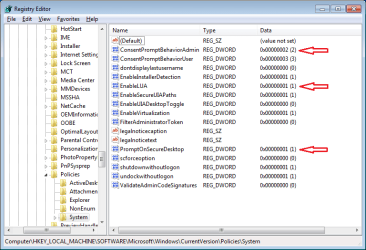
Always Notify is "211"
1-ALWAYS.png


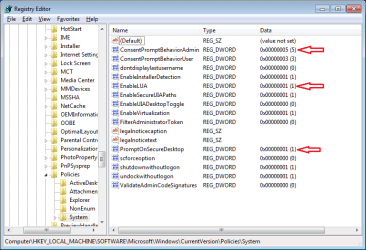
Default is "511"
2-default.png


Secure Desktop OFF is "510"
3-secure-desktop-OFF.png


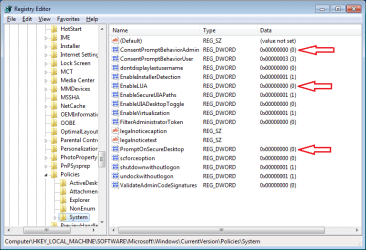
Never Notify is "000"
4-NEVER.png


The UAC slider is a live monitor of some changes, but you probably do not want to leave that open all of the time. Plus, you will not know when the change happened unless you are sitting right there when it changes. This AutoIt script should help with that. The script only reads the registry info. It does not make any changes.


I used regedit to simulate whatever app is making this change to the UAC. Whatever app it is, it should require elevated privileges to be able to write to that area of the registry..

Hopefully, the "Time of change" in the title of the AutoIt message box is self explanatory. Maybe the message box will be all that you need to see to know exactly what app caused the change. If you were away from the computer when the change happened, then the message box should be waiting for you when you get back - even if the computer went to sleep.

If need be, armed with the "Time of change", you can look thru the Windows Event logs and/or you can run LastActivityView - View the latest computer activity in Windows operating system and look back to the events near the "Time of change". (The download link is near the bottom of that webpage.)

I show how to compile the script in the first video, but you do not need to do that. I would suggest putting that AU3 text file directly in the All users startup folder.


You will need to install AutoIt to be able to make use of the text version of the script.

If you don't want to install AutoIt, then use the compiled version that is attached to this post. (Virustotal scan for the compiled version). Two of those hits are because I compressed the EXE with UPX.

You might notice in the first video that the first line of the script mentions an older version of AutoIt. I went ahead and tested the script with the newer version - so I removed that comment line from the script. The compiled version attached to this post was made using the older version of AutoIt for reasons that I'll not bore you with.

I'll understand if you don't want to use the script at all - compiled or as text.


I doubt that it is an infection, but you can never know (source):
Nick Harbour's team completed the DEFCON race in just over six hours; the fastest team managed completion in about two-and-a-half-hours. Nick Harbour's team came out on top when the viruses were tested and all 10 of his modified viruses eluded virus detection.
 

Attachments

Last edited:

My Computer

Computer type
Laptop
Computer Manufacturer/Model Number
Employer provided Dell Latitude
OS
W7 Pro SP1 64bit
CPU
i7
Memory
8GB
Graphics Card(s)
Intel HD Graphics
Hard Drives
crappy SSD
Antivirus
Employer mandated Symantec Endpoint Protection
Browser
Pale Moon 64bit, IE11 64bit & Chrome 64bit
One possibility is a Windows Update resetting it back to default.
I would have said it is Windows Update too.....have you been able to check that?
 

My Computer

Computer type
PC/Desktop
Computer Manufacturer/Model Number
Golden Mk. I.4
OS
Windows 10 Pro x64 ; Xubuntu x64
CPU
Intel i7 860 @ 2.80 GHz O/C'ed to 4.0GHz
Motherboard
Gigabyte P55A-UD3R Rev.1. Award BIOS F13
Memory
16GB Corsair Vengance DDR3 @ 661 MHz Dual Channel (9-9-9-24)
Graphics Card(s)
EVGA NVidia GTX 560 1024MB
Sound Card
Realtek Integrated
Monitor(s) Displays
Dual Samsung SyncMaster 2494HS
Screen Resolution
1920*1080 and 1920*1080
Hard Drives
1*Samsung 840 EVO 120GB SSD;
1*OCZ Vertex 2 60GB SSD;
2*Samsung F3 SpinPoint 1TB in RAID0;
1*Samsung F1 SpinPoint 1TB;
2*Western Digital 1TB External USB 3.0
1*Western Digital 500GB External USB 3.0
1*Seagate 500GB External USB 2.0
PSU
Thermaltake ToughPower QFan 750W
Case
Thermaltake Element S VK60001W2Z
Cooling
Corsair H60 Water Cooling, 2*230mm and 2*80mm case fans
Keyboard
Logitech G110
Mouse
Logitech MX518
Wow, thanks to everyone! :)

I appreciate all the help here, especially user name issues thank you so much! I will start monitoring it with this and will see what happens. Thanks again!
 

My Computer

Computer type
PC/Desktop
Computer Manufacturer/Model Number
Custom Built
OS
Windows 10 Pro
CPU
AMD Ryzen 5 2400G Processor with Radeon RX Vega 11 Graphics
Motherboard
ASRock X470 Master SLI/AC AM4 AMD Promontory X470 SATA 6Gb/s
Memory
G.SKILL Ripjaws V Series 16GB (2 x 8GB) 288-Pin DDR4 SDRAM D
Graphics Card(s)
2047MB NVIDIA GeForce GTX 1060 6GB (EVGA)
Sound Card
Motherboard Built in
Monitor(s) Displays
Acer R240HY bidx 23.8-Inch IPS HDMI DVI VGA (1920 x 1080) Wi
Screen Resolution
1920 x 1080
Hard Drives
1TB Sandisk SSD PLUS (Main drive)
500 GB Seagate 7200 RPM (Games)
500 GB Western Digital 7200 RPM (Virtual Machines)
PSU
CORSAIR TX Series TX650M 650W 80+ Gold Modular Power Supply
Case
CORSAIR CARBIDE SPEC-02 Mid-Tower Gaming Case, Red LED Fan
Cooling
220mm, two 120mm, and four 60mm fans
Keyboard
Wired Dell keyboard
Mouse
Wireless Logitech mouse
Internet Speed
250mb down, 30mb up
Antivirus
Panda Cloud Antivirus
Browser
Chrome-ish x64
Other Info
Your awesome for reading this.
You are welcome.

I just realized that the first four screenshot are not needed in my post above. I originally wrote the script in a way that will set the UAC back to whatever you wanted. Those first 4 screenshots were part of my info on how to edit the script to have it automatically change the UAC back to the desired level.

...then I read where you have a non-admin user on this computer. Having the script set the UAC means that it must run with elevated privileges. So I abandoned that part of the script and stuck with the core function of monitoring.

Let's hope that the script helps to find the offending app. My UAC stays at the highest level without any problem.
 

My Computer

Computer type
Laptop
Computer Manufacturer/Model Number
Employer provided Dell Latitude
OS
W7 Pro SP1 64bit
CPU
i7
Memory
8GB
Graphics Card(s)
Intel HD Graphics
Hard Drives
crappy SSD
Antivirus
Employer mandated Symantec Endpoint Protection
Browser
Pale Moon 64bit, IE11 64bit & Chrome 64bit
......Let's hope that the script helps to find the offending app. My UAC stays at the highest level without any problem.


The fact that a program is able to do this without me being notified is what concerns me, it feels like a security hole..

And thanks for the registry info. I am sure others as well as myself enjoyed it.

One possibility is a Windows Update resetting it back to default.
I would have said it is Windows Update too.....have you been able to check that?

Yes I have checked, and I have not noticed it happening after that. But that's just it, I am not sure when its happening. Thanks to username issues script, that should hopefully pin the cause of it.
 
Last edited:

My Computer

Computer type
PC/Desktop
Computer Manufacturer/Model Number
Custom Built
OS
Windows 10 Pro
CPU
AMD Ryzen 5 2400G Processor with Radeon RX Vega 11 Graphics
Motherboard
ASRock X470 Master SLI/AC AM4 AMD Promontory X470 SATA 6Gb/s
Memory
G.SKILL Ripjaws V Series 16GB (2 x 8GB) 288-Pin DDR4 SDRAM D
Graphics Card(s)
2047MB NVIDIA GeForce GTX 1060 6GB (EVGA)
Sound Card
Motherboard Built in
Monitor(s) Displays
Acer R240HY bidx 23.8-Inch IPS HDMI DVI VGA (1920 x 1080) Wi
Screen Resolution
1920 x 1080
Hard Drives
1TB Sandisk SSD PLUS (Main drive)
500 GB Seagate 7200 RPM (Games)
500 GB Western Digital 7200 RPM (Virtual Machines)
PSU
CORSAIR TX Series TX650M 650W 80+ Gold Modular Power Supply
Case
CORSAIR CARBIDE SPEC-02 Mid-Tower Gaming Case, Red LED Fan
Cooling
220mm, two 120mm, and four 60mm fans
Keyboard
Wired Dell keyboard
Mouse
Wireless Logitech mouse
Internet Speed
250mb down, 30mb up
Antivirus
Panda Cloud Antivirus
Browser
Chrome-ish x64
Other Info
Your awesome for reading this.
Once an app has elevated privileges, it can silently change lots of things in the registry - including incoming and outgoing firewall rules.

It would have been nice/better if the offending app had told the user that it was going to lower security settings. If we don't find the offending app, we can try locking down that part of the registry via permissions, But that is a last resort since doing so can cause other issues.

Let your fiancee know to tell you if she sees something other that Always notify if the computer restarts.
 

My Computer

Computer type
Laptop
Computer Manufacturer/Model Number
Employer provided Dell Latitude
OS
W7 Pro SP1 64bit
CPU
i7
Memory
8GB
Graphics Card(s)
Intel HD Graphics
Hard Drives
crappy SSD
Antivirus
Employer mandated Symantec Endpoint Protection
Browser
Pale Moon 64bit, IE11 64bit & Chrome 64bit
Username issues you are the man!

Thank to your script I discovered what it was!

Its panda antivirus. :)

1.) Set uac to its highest level, always notify.
2.) Download the test eicar.com file from Download ° EICAR - European Expert Group for IT-Security
3.) When panda detects the threat, it goes down to default uac level.

At least for me. Does it do it for you?

I regularly test my av software to make sure its working and that is why every couple of weeks this happened.

If you confirm it, I will send this data to panda security and inform them. I have confirmed it on virtual machine, but just wanted to make sure.
 

My Computer

Computer type
PC/Desktop
Computer Manufacturer/Model Number
Custom Built
OS
Windows 10 Pro
CPU
AMD Ryzen 5 2400G Processor with Radeon RX Vega 11 Graphics
Motherboard
ASRock X470 Master SLI/AC AM4 AMD Promontory X470 SATA 6Gb/s
Memory
G.SKILL Ripjaws V Series 16GB (2 x 8GB) 288-Pin DDR4 SDRAM D
Graphics Card(s)
2047MB NVIDIA GeForce GTX 1060 6GB (EVGA)
Sound Card
Motherboard Built in
Monitor(s) Displays
Acer R240HY bidx 23.8-Inch IPS HDMI DVI VGA (1920 x 1080) Wi
Screen Resolution
1920 x 1080
Hard Drives
1TB Sandisk SSD PLUS (Main drive)
500 GB Seagate 7200 RPM (Games)
500 GB Western Digital 7200 RPM (Virtual Machines)
PSU
CORSAIR TX Series TX650M 650W 80+ Gold Modular Power Supply
Case
CORSAIR CARBIDE SPEC-02 Mid-Tower Gaming Case, Red LED Fan
Cooling
220mm, two 120mm, and four 60mm fans
Keyboard
Wired Dell keyboard
Mouse
Wireless Logitech mouse
Internet Speed
250mb down, 30mb up
Antivirus
Panda Cloud Antivirus
Browser
Chrome-ish x64
Other Info
Your awesome for reading this.
I tried to download the sample...
...it is deleted by IE11's SmartScreen Filter.

I turn off that filter & download again...
...the sample is deleted by Windows Defender.

I disable Windows Defender...
...now the website stopped responding.
...I'll try the https connection.

I'll test it when I can :-)
 

My Computer

Computer type
Laptop
Computer Manufacturer/Model Number
Employer provided Dell Latitude
OS
W7 Pro SP1 64bit
CPU
i7
Memory
8GB
Graphics Card(s)
Intel HD Graphics
Hard Drives
crappy SSD
Antivirus
Employer mandated Symantec Endpoint Protection
Browser
Pale Moon 64bit, IE11 64bit & Chrome 64bit
As you can see in the video below, I'm using the default settings. Remember when I told you (at least I think that it was you) that Panda Cloud Antivirus (PCA) triggered on cookies and that I did not want those that I support calling me every time that they saw that. PCA lowered the UAC when it found a cookie :-(

The quick scan did not touch the desktop?
(which already had the eicar.com sample on it)

I tested several more times...
...each time ending the Virtual Machine (VM).
The VM is frozen, so it reverted to a clean state.
IE's filter was turned off.
Windows Defender was disabled.
The sample was downloaded to the desktop via https.


For one of those tests, I got this video:
(skip to 2:30 if you are in a hurry)

It is not one of my better videos since I forgot to open the UAC GUI before installing PCA.

PCA was installed.
A quick scan was run.
A cookie was found.
The UAC level was lowered.
I set the UAC to high.

Not shown in the video:
I restarted the VM.
Opened the UAC GUI
Started recording a second video.
Right clicked on the sample.
(figuring that PCA would kick in when I accessed the sample file's properties)
PCA did kick in...
...but alas, the sample file's properties window hid the UAC window
...so the video did not record the UAC level change.
But the UAC level was lowered.
I dumped that video.

I tried a few more times to record PCA killing the eicar.com sample and I saw some things that did not look right. I could not get PCA to kill the eicar.com sample in more than one subsequent test. I'll see if I can get that on video.


edit:
It is possible that I was rushing things. Maybe I checked the properties of the eicar.com sample before PCA's services got started (but I also hope that such is not possible). I could not get the "failure" on video.

I thought about showing a constant ping to one of the many servers that Panda sends submission to - to prove connectivity for the VM... but then I recalled that it only submits unknowns. It does have a local database for some checks. Right?

Here is a video with more detail. The boot at the start is to show that the W7 pro 64bit VM was restarted after setting the UAC to high. However, the move from default to high does not require a restart. I also opted to restart (just for fun) after installing PCA.
 
Last edited:

My Computer

Computer type
Laptop
Computer Manufacturer/Model Number
Employer provided Dell Latitude
OS
W7 Pro SP1 64bit
CPU
i7
Memory
8GB
Graphics Card(s)
Intel HD Graphics
Hard Drives
crappy SSD
Antivirus
Employer mandated Symantec Endpoint Protection
Browser
Pale Moon 64bit, IE11 64bit & Chrome 64bit
Last edited:

My Computer

Computer type
PC/Desktop
Computer Manufacturer/Model Number
Custom Built
OS
Windows 10 Pro
CPU
AMD Ryzen 5 2400G Processor with Radeon RX Vega 11 Graphics
Motherboard
ASRock X470 Master SLI/AC AM4 AMD Promontory X470 SATA 6Gb/s
Memory
G.SKILL Ripjaws V Series 16GB (2 x 8GB) 288-Pin DDR4 SDRAM D
Graphics Card(s)
2047MB NVIDIA GeForce GTX 1060 6GB (EVGA)
Sound Card
Motherboard Built in
Monitor(s) Displays
Acer R240HY bidx 23.8-Inch IPS HDMI DVI VGA (1920 x 1080) Wi
Screen Resolution
1920 x 1080
Hard Drives
1TB Sandisk SSD PLUS (Main drive)
500 GB Seagate 7200 RPM (Games)
500 GB Western Digital 7200 RPM (Virtual Machines)
PSU
CORSAIR TX Series TX650M 650W 80+ Gold Modular Power Supply
Case
CORSAIR CARBIDE SPEC-02 Mid-Tower Gaming Case, Red LED Fan
Cooling
220mm, two 120mm, and four 60mm fans
Keyboard
Wired Dell keyboard
Mouse
Wireless Logitech mouse
Internet Speed
250mb down, 30mb up
Antivirus
Panda Cloud Antivirus
Browser
Chrome-ish x64
Other Info
Your awesome for reading this.
UPDATE:

Panda has confirmed this bug. They are going to work on fixing it.

Thanks to username issues and everyone else who has responded to this.
 

My Computer

Computer type
PC/Desktop
Computer Manufacturer/Model Number
Custom Built
OS
Windows 10 Pro
CPU
AMD Ryzen 5 2400G Processor with Radeon RX Vega 11 Graphics
Motherboard
ASRock X470 Master SLI/AC AM4 AMD Promontory X470 SATA 6Gb/s
Memory
G.SKILL Ripjaws V Series 16GB (2 x 8GB) 288-Pin DDR4 SDRAM D
Graphics Card(s)
2047MB NVIDIA GeForce GTX 1060 6GB (EVGA)
Sound Card
Motherboard Built in
Monitor(s) Displays
Acer R240HY bidx 23.8-Inch IPS HDMI DVI VGA (1920 x 1080) Wi
Screen Resolution
1920 x 1080
Hard Drives
1TB Sandisk SSD PLUS (Main drive)
500 GB Seagate 7200 RPM (Games)
500 GB Western Digital 7200 RPM (Virtual Machines)
PSU
CORSAIR TX Series TX650M 650W 80+ Gold Modular Power Supply
Case
CORSAIR CARBIDE SPEC-02 Mid-Tower Gaming Case, Red LED Fan
Cooling
220mm, two 120mm, and four 60mm fans
Keyboard
Wired Dell keyboard
Mouse
Wireless Logitech mouse
Internet Speed
250mb down, 30mb up
Antivirus
Panda Cloud Antivirus
Browser
Chrome-ish x64
Other Info
Your awesome for reading this.
~~~
By the way, what screen video recorder do you use?

cam.png

Installed in the root of the system drive (instead of the Programs Files folders). I tried a newer version of CamStudio and there was something about it that I did not like. I'm not sure where CamStudio 2.0 can be safely downloaded from... I cannot test right now.
 

My Computer

Computer type
Laptop
Computer Manufacturer/Model Number
Employer provided Dell Latitude
OS
W7 Pro SP1 64bit
CPU
i7
Memory
8GB
Graphics Card(s)
Intel HD Graphics
Hard Drives
crappy SSD
Antivirus
Employer mandated Symantec Endpoint Protection
Browser
Pale Moon 64bit, IE11 64bit & Chrome 64bit
The uac issue with panda is a bug, panda confirmed and will be fixed with its new full version release. The whole interface is being redone and will have several performance improvements.

Panda Cloud Antivirus 2.9 Beta
 

My Computer

Computer type
PC/Desktop
Computer Manufacturer/Model Number
Custom Built
OS
Windows 10 Pro
CPU
AMD Ryzen 5 2400G Processor with Radeon RX Vega 11 Graphics
Motherboard
ASRock X470 Master SLI/AC AM4 AMD Promontory X470 SATA 6Gb/s
Memory
G.SKILL Ripjaws V Series 16GB (2 x 8GB) 288-Pin DDR4 SDRAM D
Graphics Card(s)
2047MB NVIDIA GeForce GTX 1060 6GB (EVGA)
Sound Card
Motherboard Built in
Monitor(s) Displays
Acer R240HY bidx 23.8-Inch IPS HDMI DVI VGA (1920 x 1080) Wi
Screen Resolution
1920 x 1080
Hard Drives
1TB Sandisk SSD PLUS (Main drive)
500 GB Seagate 7200 RPM (Games)
500 GB Western Digital 7200 RPM (Virtual Machines)
PSU
CORSAIR TX Series TX650M 650W 80+ Gold Modular Power Supply
Case
CORSAIR CARBIDE SPEC-02 Mid-Tower Gaming Case, Red LED Fan
Cooling
220mm, two 120mm, and four 60mm fans
Keyboard
Wired Dell keyboard
Mouse
Wireless Logitech mouse
Internet Speed
250mb down, 30mb up
Antivirus
Panda Cloud Antivirus
Browser
Chrome-ish x64
Other Info
Your awesome for reading this.

My Computer

Computer type
PC/Desktop
Computer Manufacturer/Model Number
Custom Built
OS
Windows 10 Pro
CPU
AMD Ryzen 5 2400G Processor with Radeon RX Vega 11 Graphics
Motherboard
ASRock X470 Master SLI/AC AM4 AMD Promontory X470 SATA 6Gb/s
Memory
G.SKILL Ripjaws V Series 16GB (2 x 8GB) 288-Pin DDR4 SDRAM D
Graphics Card(s)
2047MB NVIDIA GeForce GTX 1060 6GB (EVGA)
Sound Card
Motherboard Built in
Monitor(s) Displays
Acer R240HY bidx 23.8-Inch IPS HDMI DVI VGA (1920 x 1080) Wi
Screen Resolution
1920 x 1080
Hard Drives
1TB Sandisk SSD PLUS (Main drive)
500 GB Seagate 7200 RPM (Games)
500 GB Western Digital 7200 RPM (Virtual Machines)
PSU
CORSAIR TX Series TX650M 650W 80+ Gold Modular Power Supply
Case
CORSAIR CARBIDE SPEC-02 Mid-Tower Gaming Case, Red LED Fan
Cooling
220mm, two 120mm, and four 60mm fans
Keyboard
Wired Dell keyboard
Mouse
Wireless Logitech mouse
Internet Speed
250mb down, 30mb up
Antivirus
Panda Cloud Antivirus
Browser
Chrome-ish x64
Other Info
Your awesome for reading this.
Panda Cloud Antivirus FREE 3.0.1 still has this annoying issue!
It drove me crazy then I realized it was Panda.... a few weeks later I've found this thread to confirm the issue, which has NOT been fixed in the free cloud version. :(

Not only this, Panda also doesn't allow me to hide drive D: (reg key: HKEY_CURRENT_USER\Software\Microsoft\Windows\CurrentVersion\Policies\Explorer\NoDrives ) always reverting it to default value 0. After reboot randomly I see again drive D: and registry key restored to default (!).
 

My Computer

Computer type
Laptop
Computer Manufacturer/Model Number
MSI GX660-262it
OS
Windows 7 Home Premium x64 SP1
CPU
Intel Core i7 840QM
Memory
8GB DDR3 1333MHz
Graphics Card(s)
ATI Mobility HD 7970M 2GB DDR5
Screen Resolution
1920x1080
Hard Drives
Intel SSDSA2CT040G3
Hybrid ST750LX0ST750LX003
Antivirus
360 Internet Security
Browser
IE10
Back
Top