uefi ssd USB windows 7 x64 ultimate install error 0xc000000d

sofrustrated

New member
Local time
7:12 PM
Messages
9
Hello,

I'm trying to do a clean install of windows ultimate x64 on my dell Inspiron 20 3043 via USB on a new ssd.

So, this is a new machine. I pulled the disk drive and installed a new sandisk ultra 128gb ssd.

The bios is InsydeH20 version A04

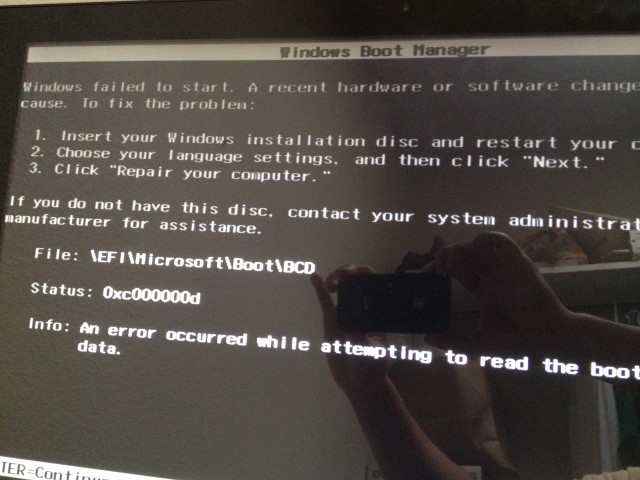
When I boot up and choose uefi USB I install, It goes straight to the a black screen with windows boot manager, error 0xc000000d. I can't even get the windows install screen.

I've read as many forum threads as I can and I've done the following.

I created the USB using Rufus 1.4.0
GPT partition
fat32
default cluster size

(if I use any mbr option, the bios won't recognize the USB drive)

What am I missing!? I have 2 brand new ssd's (both sandisk ultra 128). With one I played w every option from using diskpart to disk management. There's several threads suggesting how to set up the ssd via windows install, but I haven't even gotten that far.

Ultimately, I'd like to duel boot windows 7 & 8 (since... the new computer is basically a giant tablet).

I'm posting here after hours of frustration. Thank you in advance for any suggestions.
 

My Computer My Computer

At a glance

windows 7 ultimate x64
Computer type
PC/Desktop
Computer Manufacturer/Model Number
dell Inspiron 20 3043
OS
windows 7 ultimate x64
Oh! and yes, I've disabled fast boot and secure boot. And there is no CSM or legacy boot options in the bios.
 
Last edited:

My Computer My Computer

At a glance

windows 7 ultimate x64
Computer type
PC/Desktop
Computer Manufacturer/Model Number
dell Inspiron 20 3043
OS
windows 7 ultimate x64
sofrustrated said:
(if I use any mbr option, the bios won't recognize the USB drive)

Check your USB drive, a UEFI bootable USB drive will install to GPT or MBR set HD Drive.
 

My Computer My Computer

At a glance

ME/XP/Vista/Win7
OS
ME/XP/Vista/Win7
Do you have the latest BIOS firmware Update?

Can we see the settings choices for CSM, UEFI, Legacy BIOS, Legacy Boot, and Secure Boot?

Sometimes BIOS may need to be reset to Defaults, possibly for "Other OS" then settings checked again after.
 
theog: are there such things as uefi compatible usb pen drives? I've tried to install windows 7 with 3 different usb pen drives on this new machine. Windows 8.1 boots and installs via rufus/GPT UEFI with the usb pen drives I have on this new machine.

I have another system with uefi and I am able to get to the windows 7 installation screen with the same usb drives (3 different usb drives).

gregrocker: I did as you suggested. I updated from InsydeH20 A04 to InsydeH20 A06. (To do this, I had to reinstall windows 8.1 on the original disk drive via usb gpt uefi install). Now my bios is upgraded but I still end up with the same windows boot manager screen. I cannot get to the installation screen.

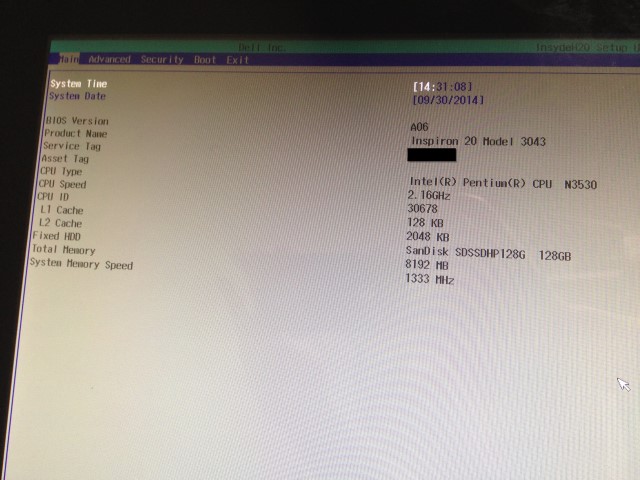
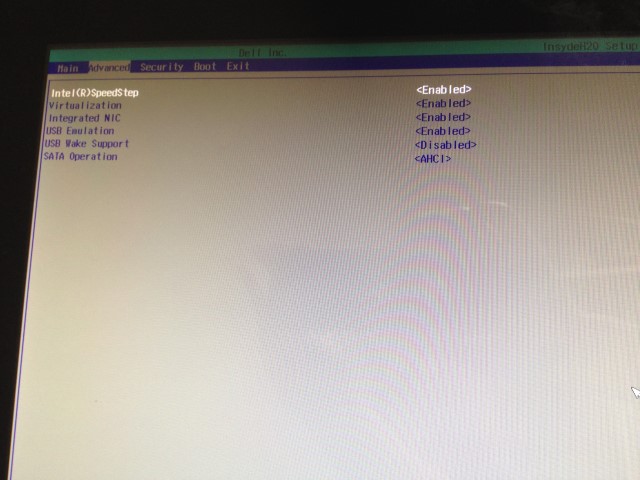
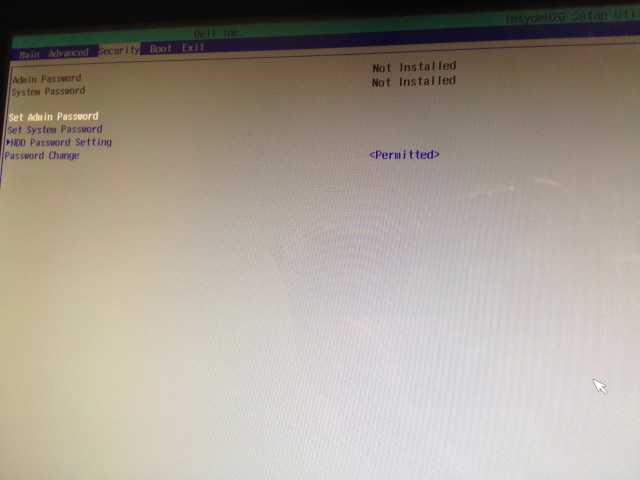
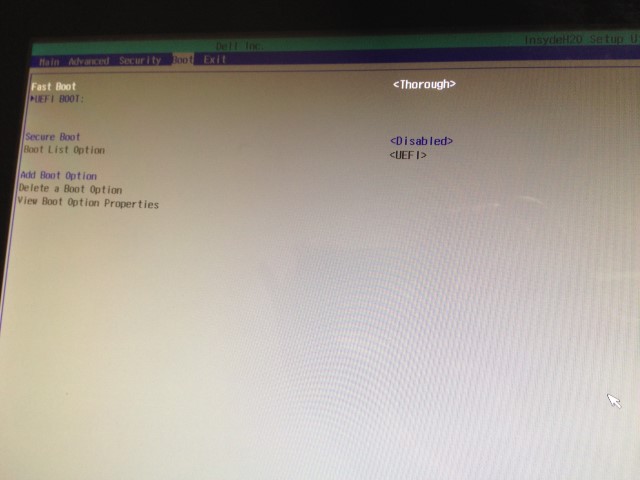
As requested here are pictures of the bios settings:
5yNEHIS.jpg

djZJcID.jpg

X3FSqPT.jpg

bpcmnML.jpg


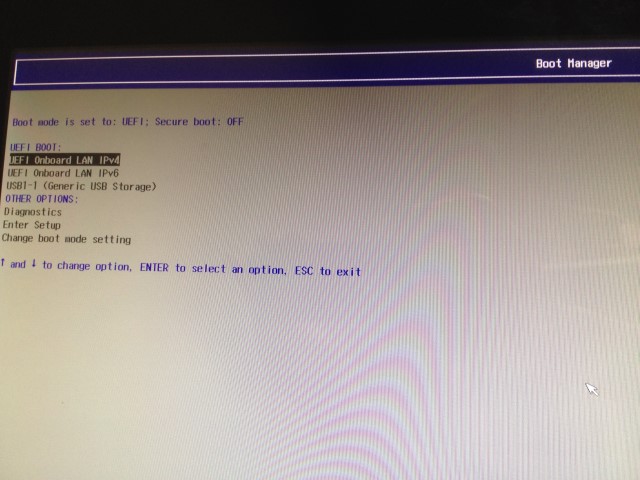
This is the boot options/boot manager screen. I can get to this screen hitting f12 during bootup. You can see that the bios detects the USB pen drive. This picture shows USB pen drive with Windows 7 ultimate x64 GPT uefi via rufus.

WLDcebl.jpg


And here's the screen that boots and I get stuck on. This boots immediately. I cannot get into the installation screen.
G1vLZeO.jpg
 
Last edited:

My Computer My Computer

At a glance

windows 7 ultimate x64
Computer type
PC/Desktop
Computer Manufacturer/Model Number
dell Inspiron 20 3043
OS
windows 7 ultimate x64
How can I tell if my UEFI/BIOS is Windows 8 only?

You provided a link to Dell, but I am assuming that is only a list of "official" supported devices that can be downgraded to windows 7.

Reading the link, it allows for windows 8 Pro users to downgrade to windows 7. However, even with access to windows 8 pro, I still don't have a boot option for Legacy/Legacy Rom. On the pictures I provided, The Boot List Options is grayed out.

Would updating the Bios to more friendly boot options be advisable?
 

My Computer My Computer

At a glance

windows 7 ultimate x64
Computer type
PC/Desktop
Computer Manufacturer/Model Number
dell Inspiron 20 3043
OS
windows 7 ultimate x64
I've not found one that can't install Win7 yet. It comes down to the settings. If UEFI fails then legacy always works.

What about trying disk?

Have you tried another flash stick or wiping yours to try a newly downloaded ISO for your version from http://msft.digitalrivercontent.net/win/X17-58997.iso, then reformat using only Option One from http://www.eightforums.com/tutorials/15458-uefi-bootable-usb-flash-drive-create-windows.html?

It isn't exactly clear that is the actual USB stick in F12 BIOS boot menu since it's not labeled with the stick brand and also isn't explicitly labeled UEFI.

If disk and new stick with fresh ISO don't work then look deeper into the BIOS for more settings. What other choices are offered for the two UEFI listings here:

bpcmnML.jpg


You may also want to slow down the Fast Boot to see if you get messages.

If you want to you can proceed now to Bypass UEFI to Install WIn7
 
Last edited:
Sorry for the late reply, I took a few days to try all possibilities before I updated this thread.

gregrocker:

For the bios fast boot options, there are 3:

Thorough
Minimal
Auto

And, though the wording is confusing, I tested all three options.

As for trying disk, the bios does not recognize any external dvd drive. I tried the following external dvd drives:

Samsung SE208
LG GP50
Asus SDRW-08D2S

I tried all of them, with all boot options, they don't even show up in bios. I even burned both W7 and W8 dvds, but I didn't even have a chance to get that far. The bios just does not even recognize them.

In bios, under the "Boot" Page

Fast Boot: Thorough, Minimal, Auto

UEFI Boot: Lists boot order. HD, Lan Boot, and if I add a USB, usb shows here. External DVD will not show here. No other options, no legacy option.

Secure Boot: Disable/Enable

Boot List Option: UEFI (greyed out, cannot change)

Add Boot Option: No idea what this does, it brings up a screen to add a name for a boot option, and to list a path for boot

During boot up, if I hit F12. A list of boot options displays. You can see the 2 UEFI Lan boot options (photos posted above) and USB (when one is plugged in).

I have tried SEVERAL brands of USB, all usb 2.0, no USB 3.0. I've tried, kingston, corsair, PNY, and "generic". Yes, some of the display a "name" under the boot options. I used rufus to format and create W7 installs.

I tried every option under rufus MBR for bios/uefi, MBR for UEFI, GPT for UEFI.

With those options, under fast boot, I tried all three options, thorough, auto, minimal.

I used my original W7 disk, I used the link you provided, I even tried different versions of W7.

I used my original W7 disk, I used the link you provided, I even tried different versions of W7.

I tried using both SSD and regular disk. Both disks were empty/wiped/cleaned.

I tried using disk part/disk management to make the ssd/HD to use MBR.

The furthest I get is the screen that I posted "Windows Boot Manager... Windows failed to start". That screen posts immediately.

The guides that were linked here were helpful, but they were guides that I was already familiar with. I tried preparing both the USBs and my disks in the suggested ways.

The only thing I have not tried is loading windows 7 from another computer, and then installing it in the new one.

Does anyone have any other suggestions?
 

My Computer My Computer

At a glance

windows 7 ultimate x64
Computer type
PC/Desktop
Computer Manufacturer/Model Number
dell Inspiron 20 3043
OS
windows 7 ultimate x64
How am I supposed to "Bypass UEFI to Install WIn7" when I can't even get into the install screen?

As stated before, any usb pen drive option I have tried out goes straight to this screen:

G1vLZeO.jpg


I get to that screen before any windows install screens, I'm not even sure how it posts so quickly, it doesn't even have time to "boot" anything.

For disk/dvd options, I can't even go that far. The bios does not recognize any external dvd drives.
 

My Computer My Computer

At a glance

windows 7 ultimate x64
Computer type
PC/Desktop
Computer Manufacturer/Model Number
dell Inspiron 20 3043
OS
windows 7 ultimate x64
Please be aware that the blue link is a clickable shortcut to a tutorial explaining the steps to Bypass UEFI to Install WIn7 . It has never failed to work when UEFI has not been successful.

The preliminary steps to reset the BIOS, then enable Legacy or CSM, boot the Win7 installation media as a non-UEFI device, should clear that screen completely and it should not come back after you proceed with wiping the HD and formatting an Active Primary partition.

If not please post back another photo of the error given.
 
I did realize that was a link... I have explained before that I have read that thread, including many others, on how to install W7 with uefi.

"Boot into BIOS setup, if this is a new Win8 PC look for a setting to disable Secure Boot. Then enable Legacy BIOS or Compatibility Support Module (CSM). This should remove any EFI Boot Disk from BIOS Boot order. Set DVD drive first to boot, HDD second. Then set SATA controller to AHCI. Save changes and Exit."

I have disabled Secure Boot. I have shown pictures to prove this.
There are no options for "legacy bios or CSM". I have shown pictures to prove this.
I have set boot order to USB first, HDD second. I had previously stated that I tried out 3 external DVD drives. None of the drives were recognized by the bios. I gave model numbers of the drives, they were all new current generation external dvd drives.
I have SATA set to AHCI

"Then boot into installer DVD or flash stick burned or written using tool and latest ISO for your licensed OS version here.
At first installer screen Press Shift + F10 to open a Command Box, type"

This assumes that I can even get into the "first installer screen". I have stated that I cannot. The first screen I see is the screen that I posted before:

G1vLZeO.jpg
 

My Computer My Computer

At a glance

windows 7 ultimate x64
Computer type
PC/Desktop
Computer Manufacturer/Model Number
dell Inspiron 20 3043
OS
windows 7 ultimate x64
What choices are available when you choose Boot List Option here?

bpcmnML.jpg


How about when you choose "Change Boot Mode Setting" from here:

WLDcebl.jpg


Have you read the Manual on the PC's Support Downloads webpage to see if it gives more information about Adding a Boot Option?
 
Under Boot list options (1st picture); the option is disabled. There is no way to change that.

Under Change Boot Mode Setting; it enables/disables Secure boot mode. Those are the only options.

Manual from PC Support Download does not address anything about boot options. (The manual mentions something about "entering service tags" in the bios. I tried that option, no other option besides entering the new service tag becomes available.)
 

My Computer My Computer

At a glance

windows 7 ultimate x64
Computer type
PC/Desktop
Computer Manufacturer/Model Number
dell Inspiron 20 3043
OS
windows 7 ultimate x64
The operable setting should be the first UEFI Boot setting, which when selected opens a tab showing it is currently set to UEFI. There needs to be a way to change that to Legacy. I don't see why would there would be the setting otherwise.

Is there any help text which appears when you highlight that setting but don't select it so that the popup opens? Are you missing any other settings at all that might affect it?

I mentioned in my first post that sometimes it requires resetting BIOS to defaults, especially if there's an Other OS defaults choice. I don't see where that page has been posted. Did you do this yet?
 
I have mentioned multiple times that there are no legacy or CSM options in any of the bios settings. I have literally gone through every setting, every popup, every dialogue box.

I mentioned that there are setting that are grayed out. There is literally no way to expand options on certain settings.

I have checked every help dialogue box. This bios is very minimal. The "help" usually brings up a screen that does nothing but repeat the title of what it is designed to help.

There is an option for "load optimal defaults". It does not do much, since there aren't many bios settings available to begin with. It does not make any new options available. In fact, the only thing it changes, is set "fast boot" to "minimal" (since, there's really no reason to change any other bios settings that are not relating to boot).

There are no "Other OS" choices anywhere in the bios, which is why there are no pictures of it.
 

My Computer My Computer

At a glance

windows 7 ultimate x64
Computer type
PC/Desktop
Computer Manufacturer/Model Number
dell Inspiron 20 3043
OS
windows 7 ultimate x64
@Sofrustrated Did you manage to solve this problem. I ran to the same issue with a Dell inspiron 20. I can't seem to find a solution for it.
 

My Computer My Computer

At a glance

windows 7 64 bit
Computer type
PC/Desktop
OS
windows 7 64 bit
Last edited:
Question for SoFrustrated ..... please reply

sofrustrated .... I too am so frustrated as I just bought the same Dell All-In_One Inspiron 20 model 3043 and also would like to roll it back to Windows 7. Besides not liking Windows 8.1, I am wanting to install Windows 7 on it for my mom's sake. She is older and I wanted it to be just the same operating system as she currently has on her PC. So anyway, I too am wondering if you made any progress on this. I looked at all of your messages and screen shots and mine are exactly the same and I have gone through all of the processes as described and get nothing but a hanging "Starting Windows" screen with a red bar at the top if I use the DVD of Windows 7 or I get the same error message as you have in your screen shot using the as mentioned setup of a USB drive. I'd REALLY like to know ASAP because I am to the point of returning this machine since it is still within it's 30 day return policy. I have never had something like this stump me and I'm stubborn so I'd really like to make it work. That and it seems to be a nice, simple machine for my mother to use in her assisted living situation (only one power cord if I go with a wireless keyboard and mouse). Thanks a lot in advance, I can give you a direct email if you need.

RUkiddingME
aka Bob
 

My Computer My Computer

At a glance

Win7 Pro 64bit
Computer type
PC/Desktop
OS
Win7 Pro 64bit
Back
Top