UEFI (Unified Extensible Firmware Interface) - Install Windows 7 with

How to Install Windows 7 Using the "Unified Extensible Firmware Interface" (UEFI)


   Information
In addition to better interoperability, UEFI firmware provides several technical advantages:
  • Compatibility with operating systems that support only BIOS
  • Ability to boot from large disks
  • CPU-independent architecture
  • CPU-independent drivers
  • Flexible pre-OS environment
  • Modular design
Two of the most notable Windows features for UEFI systems are the following:
  • Multicast deployment, which enables large scale network-based image deployment in manufacturing and enterprise settings.
  • Fast boot and resume from hibernation, which improves user experience.
The rich UEFI interface provides ample room for innovation in the development of operating system features. Along with the other members of the Unified EFI Forum, Microsoft is investigating the following:
  • Rootkit prevention
  • Network authentication
-Microsoft Corporation
This method can also be used for the UEFI installation of Windows 8, Windows Server 2008 SP1, Windows Server 2008 R2, and Windows Vista SP1.

   Note
You will need to satisfy the following requirements in order to proceed:

  • A Windows 7 compatible system
  • A Windows 7 x64-bit installation media. 32-bit is not supported.
  • A UEFI v2.0+ compliant PC. Check your chipset manufacturer/firmware documentation.
  • A blank, partition-free, hard disk for installation.
   Warning

  • Disabling UEFI will make the system unbootable as there is no MBR on the disks.
  • You CANNOT make a sector-by-sector copy of GPT disks. The Disk and Partition GUIDs will no longer be unique. This must never happen. You can make a sector-by-sector copy of the contents of ESP or basic data partitions.
  • Disable secure boot before installing Windows 7.


Here's How:

1. Do step 2 or 3 below depending on what installation Media you are using.

2. If using a Retail 64-bit Windows 7 Installation DVD A) Insert the DVD, restart the computer, and go to step 4 below.
3. If using a 64-bit Windows 7 Installation USB Flash Drive with UEFI A) If you have not already, you will need to create a Windows 7 installation bootable USB flash drive for UEFI from either a Windows 7 installation ISO or DVD.

B) Connect the USB, restart the computer, and go to step 4 below.
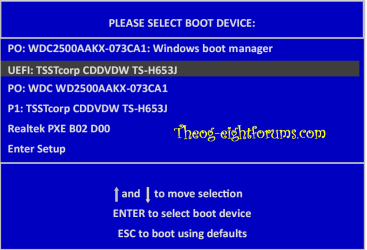
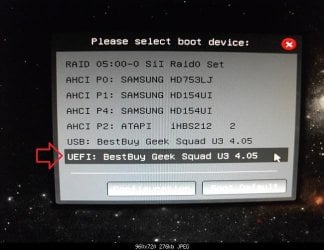
4. Press whatever key (ex: F11) it shows to boot to your motherboard's boot menu, and select to boot from the DVD or UEFI USB. (see screenshot below) UEFI_USB_Boot_Menu.jpg
5. Do steps 3 to 7 in the tutorial link below. http://www.sevenforums.com/tutorials/1649-clean-install-windows-7-a.html
6. Delete all partitions/volumes on the disk # (ex: Disk 0) that you want to install Windows 7 as UEFI on until that disk # shows as unallocated space. (see screenshot below) Step7.jpg
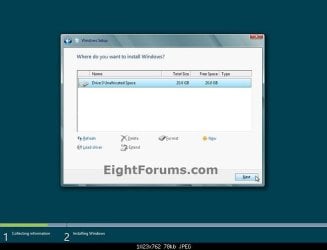
7. When you are finished, click/tap on New, Apply (for full size of disk), and OK. (see screenshot above)

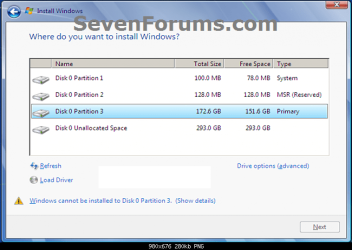
8. You will notice that the disk has now been formatted as GPT with 3 partitions. Select the "Primary" partition 3, and click/tap on Next. (see screenshot below)
NOTE: You might receive a "Windows can't be installed on drive 0" warning, but as long as you can click on the Next button, you're fine.
   Note
The 3 partitions are:
  • Partition 1 - System - The EFI System partition that contains the NTLDR, HAL, Boot.txt, and other files that are needed to boot the system, such as drivers.
  • Partition 2 - MSR - The Microsoft Reserved (MSR) partition that reserves space on each disk drive for subsequent use by operating system software.
  • Partition 3 - Primary - Where Windows is to be installed to.

    It is imperative that these 3 partitions remain in the exact order as they are


Windows7.PNG
9. You can now finish doing the steps in either tutorial below.

10. That's it. You have successfully installed Windows 7 on an UEFI system.


External Links:


Windows and GPT FAQ
Unified Extensible Firmware Interface - Wikipedia, the free encyclopedia
UEFI and Windows
 
Last edited by a moderator:
Hi all,
I've done a UEFI install of Win7, 64 bit into a OCZ 120GB SSD.
When I use diskpart to list volume, I found only two partitions instead of three..
In other word, the 128MB MSR partition is missing.

I got only this OCZ SSD and two raid volume (created in MBR) controlled via an Adaptec Raid Controller on my pc.

MY questions are:
1. how can I get the 128MB partition back?

2. Will this missing of 128MB likely casued by the two raid volume which was created using my previous pc running BIOS/MBR?

Tony

Sir,
It does not show it anywhere. It is Microsoft Reserved Partition. Please read Windows and GPT FAQ already quoted in this thread. You may use Gparted Live CD to boot from and see it as an unknown partition flagged as msftres
 

My Computer My Computer

At a glance

Windows 7 Home Premium 32bitPentium HT 3.42.5GBAti Radeon sapphire x1950 pro
Computer Manufacturer/Model Number
Self built
OS
Windows 7 Home Premium 32bit
CPU
Pentium HT 3.4
Motherboard
Intel
Memory
2.5GB
Graphics Card(s)
Ati Radeon sapphire x1950 pro
Sound Card
none
Monitor(s) Displays
hp
Hard Drives
Western digital
PSU
cis
Case
advent
Cooling
akasa
While it's been a while since this was pointed, it has only been brouhgt to my attention recently.

Personally speaking, I would say that deleting all partitions and recreating it is the safest method. GPT partitioning is quite a little bit complicated since it is dependent on unique IDs. It's been a while since I manipulated with GPT disks, so I forgot if it is safe to manipulate only the data partition (e.g. formatting it) and still boot safely.

Sir,

I'll appreciate any advice on my question related to UEFI in Windows 8 forum here Windows 8 won't allow me to add a second hard drive
 

My Computer My Computer

At a glance

Windows 7 Home Premium 32bitPentium HT 3.42.5GBAti Radeon sapphire x1950 pro
Computer Manufacturer/Model Number
Self built
OS
Windows 7 Home Premium 32bit
CPU
Pentium HT 3.4
Motherboard
Intel
Memory
2.5GB
Graphics Card(s)
Ati Radeon sapphire x1950 pro
Sound Card
none
Monitor(s) Displays
hp
Hard Drives
Western digital
PSU
cis
Case
advent
Cooling
akasa
secure boot

I bought two Dells with i5,1T and all the 'stuff' i thought they would have for an upgrade, 2 years ago.
Now I find secure boot is not part of either. So now I have to stay with Win 7 or buy 2 new ones.
Thank you for your help but I don't see a way out of this and I am too old for all that.
I can't express my feelings for M$, Dell and the rest of the clan.
 

My Computer My Computer

At a glance

Windows 7 Home premium 64 bitIntel R i5 3.3Ghz6 GBNvidea GT 420
Computer Manufacturer/Model Number
Dell
OS
Windows 7 Home premium 64 bit
CPU
Intel R i5 3.3Ghz
Motherboard
Dell 2.6
Memory
6 GB
Graphics Card(s)
Nvidea GT 420
Sound Card
Nvidea Hi Def
Monitor(s) Displays
Dell pnp
Hard Drives
Seagate 931 GB
PSU
Dell xps 8300
Case
Dell Balck
Cooling
unknown
While it's been a while since this was pointed, it has only been brouhgt to my attention recently.

Personally speaking, I would say that deleting all partitions and recreating it is the safest method. GPT partitioning is quite a little bit complicated since it is dependent on unique IDs. It's been a while since I manipulated with GPT disks, so I forgot if it is safe to manipulate only the data partition (e.g. formatting it) and still boot safely.

Sir,

I'll appreciate any advice on my question related to UEFI in Windows 8 forum here Windows 8 won't allow me to add a second hard drive

Since there are no Logical parttions on the data drive I don't know why it is being rejected by Win8 if you have assured only the Win8 HD is set to boot.

You can always remove EFI Boot disk from BIOS boot order, enable Legacy BIOS (or similar setting) in BIOS setup, wipe the Win8 HD to reinstall to an MBR disk to avoid the conflict.
 
I bought two Dells with i5,1T and all the 'stuff' i thought they would have for an upgrade, 2 years ago.
Now I find secure boot is not part of either. So now I have to stay with Win 7 or buy 2 new ones.
Thank you for your help but I don't see a way out of this and I am too old for all that.
I can't express my feelings for M$, Dell and the rest of the clan.

What is the problem staying with Win7? It is easily the best OS ever and doesn't require fumbling with a touch-button GUI that isn't meant for desktops.
 
options

You are right I guess. Historically you could upgrade if the pc had guts so i planned on it. Also, there is a date by which support stops and it would have noved ahead with Win 8. When M$ pulled the rug I go upset. It is the principle. Also, I am disabled so I have tv and had pc -I have lost interest in it now. Never too old to be a child.
Chrome notebook to spite my face.
 

My Computer My Computer

At a glance

Windows 7 Home premium 64 bitIntel R i5 3.3Ghz6 GBNvidea GT 420
Computer Manufacturer/Model Number
Dell
OS
Windows 7 Home premium 64 bit
CPU
Intel R i5 3.3Ghz
Motherboard
Dell 2.6
Memory
6 GB
Graphics Card(s)
Nvidea GT 420
Sound Card
Nvidea Hi Def
Monitor(s) Displays
Dell pnp
Hard Drives
Seagate 931 GB
PSU
Dell xps 8300
Case
Dell Balck
Cooling
unknown
One thing does the Asus Zenbook UX32VD have UEFI ?
 

My Computer My Computer

At a glance

Windows 7 Home Premium 64BitCore i7 740QM @ 1.73Mhz6GBATI Radeon 5870HD
Computer Manufacturer/Model Number
Alienware m17x R2
OS
Windows 7 Home Premium 64Bit
CPU
Core i7 740QM @ 1.73Mhz
Motherboard
Dell
Memory
6GB
Graphics Card(s)
ATI Radeon 5870HD
Sound Card
ATI High Definition Audio
Monitor(s) Displays
BENQ
Screen Resolution
1920 x 1080
Hard Drives
Two 500GB 7200rpm SATA Hard Drive with RAID
Keyboard
Logitech G110
Internet Speed
15000Kbps
Sorry, I'm terrible when it comes to the technical side of computers. My computer is brand new custom built by a friend the motherboard I'm certain has EFI or UEFI compatibility. The problem I'm experiencing is that I can not reach command line or control panel as the computer is currently stuck in the partition selection stage.

I remember in the old days you could enter command line via BIOS however I'm not certain how to reach that any longer especially with how fast the computer loads.

Would the problem fix if I were to hook the hard drive up to another computer and format it from there using command line? Just confused on how things changed when I was just reformatting to the exact same version.
 
Last edited by a moderator:

My Computer My Computer

At a glance

Windows 7 Professional 64bit
OS
Windows 7 Professional 64bit
What is it you need the Command Line for. If it's really needed you can back out of the install by clicking the Red X, reboot into Installer System Recovery Options.

Do you have the EFI boot disk set to boot first in BIOS setup, and other settings for EFI correctly set. You may need to consult the Manual on the mobo or PC's Support Downloads webpage.

If you'd like to bypass EFI then enable Legacy BIOS, set DVD drive to boot first, wipe the HD with Diskpart Clean Command
 

My Computer My Computer

At a glance

Windows 7 Professional 64bit
OS
Windows 7 Professional 64bit
http://www.sevenforums.com/tutorials/1649-clean-install-windows-7-a-43.html

Last page of this thread would help explain my predicament. Not sure if the recovery option would work in my case as I'm using a bootable USB and the recovery option says I'm using an outdated version of windows. Even though windows 7 x64 a few months ago is the same windows 7 x64 it is now.

Normally when you have that error it means eiither the installer, repair CD or OS lacks SP1. You can burn the latest from step 1 of Clean Reinstall - Factory OEM Windows 7.

I need you to explain what the problem is more clearly, not reply by referring me to a tutorial's unspecified comments.
 
Last edited by a moderator:
Well from start to finish, I acquired some malware which I'm not very fond of dealing with so I figured a clean re-format would solve it without the hassle. I downloaded from the Microsoft website windows 7 professional 64bit and put it in my USB as a boot disc. After formatting the computer I got stuck in multiple locations but currently it's stuck at partition allocation stage where it's not giving me the option of creating new, formatting, deleting, or selecting primary partition as they are all in "GPT" format rather than "MBR". The problem I'm facing with that is I've NO idea how to change that when I can not enter the computer's control panel or command line.

Considering taking it to a professional just because the problem seems to not have a direct answer online and it may save me money on headache medicine anyway.
 

My Computer My Computer

At a glance

Windows 7 Professional 64bit
OS
Windows 7 Professional 64bit
Well from start to finish, I acquired some malware which I'm not very fond of dealing with so I figured a clean re-format would solve it without the hassle. I downloaded from the Microsoft website windows 7 professional 64bit and put it in my USB as a boot disc. After formatting the computer I got stuck in multiple locations but currently it's stuck at partition allocation stage where it's not giving me the option of creating new, formatting, deleting, or selecting primary partition as they are all in "GPT" format rather than "MBR". The problem I'm facing with that is I've NO idea how to change that when I can not enter the computer's control panel or command line.

Considering taking it to a professional just because the problem seems to not have a direct answer online and it may save me money on headache medicine anyway.

Your USB Pendrive need to formated FAT32.
USB tutorial.PNG

Use option two in this tutorial:
http://www.sevenforums.com/tutorials/2432-usb-windows-7-installation-key-drive-create.html?ltr=U

Than boot from the UEFI drive.

untitled0001-1.PNG
 

My Computer My Computer

At a glance

ME/XP/Vista/Win7
OS
ME/XP/Vista/Win7
I dont' see in the SPecs that that mobo has an EFI BIOS. Study your Manual to be sure: ASRock > Z77 Extreme4

What settings did you change?

ASRock Z77

ASRock said:
■Premium Gold Caps
■Digi Power Design, 8 + 4 Power Phase Design
■Supports Dual Channel DDR3 2800+(OC)
■2 x PCIe 3.0 x16 Slots, Supports AMD Quad CrossFireX™, CrossFireX™ and NVIDIA® Quad SLI™, SLI™
■PCIE Gigabit LAN
■Supports Intel® HD Graphics with Built-in Visuals
■Multi VGA Output options : DVI-D, D-Sub, HDMI
■Combo Cooler Option (C.C.O.)
■7.1 CH HD Audio with Content Protection (Realtek ALC898 Audio Codec), Supports THX TruStudio™
Supports ASRock XFast RAM, XFast LAN, XFast USB, OMG, Internet Flash, No-K OC, Dehumidifier, UEFI System Browser
■Supports Intel® Smart Connect, Intel® Rapid Start, Lucid Virtu Universal MVP
■Free Bundle : CyberLink MediaEspresso 6.5 Trial, ASRock MAGIX Multimedia Suite
 

My Computer My Computer

At a glance

ME/XP/Vista/Win7
OS
ME/XP/Vista/Win7
Theog has determined your mobo has an EFI BIOS and given you the extra steps required to format the flash stick installer so you can install per this tutorial we're in now.

If you would rather install normally to an MBR disk without using EFI here are steps for that:

Unplug all other HD's and peripherals,

Boot into BIOS setup by tapping the key given on first boot screen. Enable Legacy BIOS if present. Next check BIOS Boot order for an EFI Boot Disk and if present remove it, set DVD drive first to boot, HD second. Then set SATA controller to AHCI. Save changes and Exit.

Then boot into installer DVD or flash stick burned or written using tool and latest ISO for your licensed here.

At first installer screen Press Shift + F10 to open a Command Box, type:

DISKPART
LIST DISK
SELECT DISK 0 (after confirming Windows 7 target HD #)
CLEAN
CREATE PARTITION PRIMARY SIZE=102400 (for 100gb partition, adjust as desired)
FORMAT FS=NTFS LABEL="WINDOWS 7"
ACTIVE
EXIT
EXIT

Next click Install Now to Clean Install Windows 7 to the partition you created. If it fails then report back at which step and the verbatim error message.

In addition read over these steps to understand the tools and methods which work best to get and maintain a perfect Clean Reinstall - Factory OEM Windows 7. The steps are the same for retail.
 
Hi all

Found this thread while searching on my issue.

I picked up a new lappy at amazing price, Toshiba Sat L855-S5383 with i7-3630QM and 8GB RAM for $599 from TigerDirect.

Unfortunately, it came with the dreaded metro crap pre-installed. :p

I did know this beforehand, but figured I'd be able to install 7, but am having some issues.

I was having issues booting from the 7 installation disk, it would freeze about 30-45 seconds in, no matter what disk I used (I tried 3).

Then I played with the BIOS settings and switched from UEFI to CSM (compatibility support mode) and then I was able to install Windows 7 no issue.

Should I be able to install 7 in UEFI mode? And will there be a performance hit if I am running it in CSM instead.

I bought the lappy for performance, it's a top-end mobile third-gen i7 (so obviously Ivy Bridge chipset) and I put an M4 in it, so don't want to hamper what should be outrageous performance.

TIA

Loobster
 

My Computer My Computer

At a glance

Windows 7 x64i7-3630QM8GB
Computer Manufacturer/Model Number
Toshiba Satellite L855-S5383
OS
Windows 7 x64
CPU
i7-3630QM
Memory
8GB
Hard Drives
128GB M4
Win 7 to 8

Hello and excuse me for disrupting the harmony of the thread at this point.
I had started the thread and get your replies in my inbox and just wanted to ask one question.
I don't have secure boot on my Win 7 so won't have it withWin 8.
I am considering installing the $40 Win 8.
The question is, I have Office 2010 with the prod keys which came preinstalled with my Dell. If I do a clean install so I have no clutter in Win 8 from Win 7 will I be able to get the Office I paid for back again or will I lose it -it seems I paid for it but maybe only for Win 7. The advisor found no problem with office when I ran it.
There are no other programs of concern to me.
If I upgrade, I will bring the clutter from Windows 7, correct?
Your answer will help me decide whether to perfom a clean installation or an upgrade.
I should delete all apartitons too, correct? I sent a prnt scrn of my disc management to show you i have other partitons.
Once again alologize for the interuption and thank you for your kind advice.
Peter
 

Attachments

  • partitions.png
    partitions.png
    32.4 KB · Views: 541

My Computer My Computer

At a glance

Windows 7 Home premium 64 bitIntel R i5 3.3Ghz6 GBNvidea GT 420
Computer Manufacturer/Model Number
Dell
OS
Windows 7 Home premium 64 bit
CPU
Intel R i5 3.3Ghz
Motherboard
Dell 2.6
Memory
6 GB
Graphics Card(s)
Nvidea GT 420
Sound Card
Nvidea Hi Def
Monitor(s) Displays
Dell pnp
Hard Drives
Seagate 931 GB
PSU
Dell xps 8300
Case
Dell Balck
Cooling
unknown
Last edited by a moderator:

My Computer My Computer

At a glance

ME/XP/Vista/Win7
OS
ME/XP/Vista/Win7
Tutorial has been updated and made easier to follow along. :)
 

My Computer My Computer

At a glance

64-bit Windows 11 Pro for WorkstationsIntel i7-8700K OC'd to 5 GHz64 GB (4x16GB) G.SKILL TridentZ RGB DDR4 3600...ASUS ROG-STRIX-GTX1080TI-O11G-GAMING
Computer type
PC/Desktop
Computer Manufacturer/Model Number
Self built custom
OS
64-bit Windows 11 Pro for Workstations
CPU
Intel i7-8700K OC'd to 5 GHz
Motherboard
ASUS ROG Maximus XI Formula Z390
Memory
64 GB (4x16GB) G.SKILL TridentZ RGB DDR4 3600 MHz
Graphics Card(s)
ASUS ROG-STRIX-GTX1080TI-O11G-GAMING
Sound Card
Integrated
Monitor(s) Displays
2 x Samsung Odyssey G7 27"
Screen Resolution
2560x1440
Hard Drives
1TB Samsung 990 PRO M.2,
4TB Samsung 990 PRO PRO M.2,
TerraMaster F8 SSD Plus NAS
PSU
Seasonic Prime Titanium 850W
Case
Thermaltake Core P3
Cooling
Corsair Hydro H115i
Keyboard
Logitech wireless K800
Mouse
Logitech MX Master 4
Internet Speed
2 Gb/s Download and 100 Mb/s Upload
Antivirus
Malwarebyte Anti-Malware Premium
Browser
Google Chrome
Other Info
Logitech Z625 speaker system,
Logitech BRIO 4K Pro webcam,
HP Color LaserJet Pro MFP M477fdn,
APC SMART-UPS RT 1000 XL - SURT1000XLI,
Galaxy S23 Plus phone
Back
Top