UEFI (Unified Extensible Firmware Interface) - Install Windows 7 with

How to Install Windows 7 Using the "Unified Extensible Firmware Interface" (UEFI)


   Information
In addition to better interoperability, UEFI firmware provides several technical advantages:
  • Compatibility with operating systems that support only BIOS
  • Ability to boot from large disks
  • CPU-independent architecture
  • CPU-independent drivers
  • Flexible pre-OS environment
  • Modular design
Two of the most notable Windows features for UEFI systems are the following:
  • Multicast deployment, which enables large scale network-based image deployment in manufacturing and enterprise settings.
  • Fast boot and resume from hibernation, which improves user experience.
The rich UEFI interface provides ample room for innovation in the development of operating system features. Along with the other members of the Unified EFI Forum, Microsoft is investigating the following:
  • Rootkit prevention
  • Network authentication
-Microsoft Corporation
This method can also be used for the UEFI installation of Windows 8, Windows Server 2008 SP1, Windows Server 2008 R2, and Windows Vista SP1.

   Note
You will need to satisfy the following requirements in order to proceed:

  • A Windows 7 compatible system
  • A Windows 7 x64-bit installation media. 32-bit is not supported.
  • A UEFI v2.0+ compliant PC. Check your chipset manufacturer/firmware documentation.
  • A blank, partition-free, hard disk for installation.
   Warning

  • Disabling UEFI will make the system unbootable as there is no MBR on the disks.
  • You CANNOT make a sector-by-sector copy of GPT disks. The Disk and Partition GUIDs will no longer be unique. This must never happen. You can make a sector-by-sector copy of the contents of ESP or basic data partitions.
  • Disable secure boot before installing Windows 7.


Here's How:

1. Do step 2 or 3 below depending on what installation Media you are using.

2. If using a Retail 64-bit Windows 7 Installation DVD A) Insert the DVD, restart the computer, and go to step 4 below.
3. If using a 64-bit Windows 7 Installation USB Flash Drive with UEFI A) If you have not already, you will need to create a Windows 7 installation bootable USB flash drive for UEFI from either a Windows 7 installation ISO or DVD.

B) Connect the USB, restart the computer, and go to step 4 below.
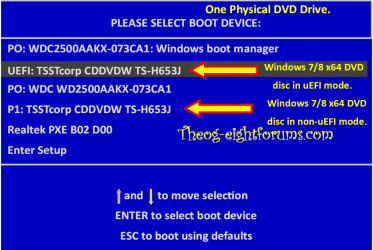
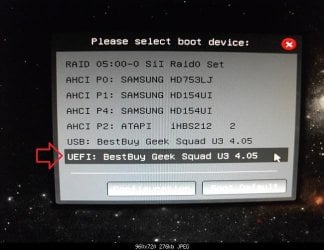
4. Press whatever key (ex: F11) it shows to boot to your motherboard's boot menu, and select to boot from the DVD or UEFI USB. (see screenshot below) UEFI_USB_Boot_Menu.jpg
5. Do steps 3 to 7 in the tutorial link below. http://www.sevenforums.com/tutorials/1649-clean-install-windows-7-a.html
6. Delete all partitions/volumes on the disk # (ex: Disk 0) that you want to install Windows 7 as UEFI on until that disk # shows as unallocated space. (see screenshot below) Step7.jpg
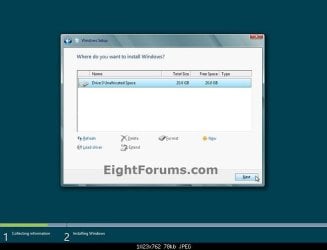
7. When you are finished, click/tap on New, Apply (for full size of disk), and OK. (see screenshot above)

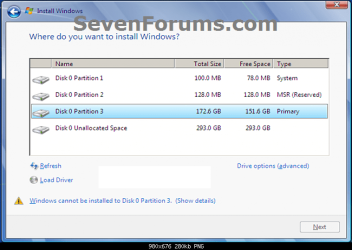
8. You will notice that the disk has now been formatted as GPT with 3 partitions. Select the "Primary" partition 3, and click/tap on Next. (see screenshot below)
NOTE: You might receive a "Windows can't be installed on drive 0" warning, but as long as you can click on the Next button, you're fine.
   Note
The 3 partitions are:
  • Partition 1 - System - The EFI System partition that contains the NTLDR, HAL, Boot.txt, and other files that are needed to boot the system, such as drivers.
  • Partition 2 - MSR - The Microsoft Reserved (MSR) partition that reserves space on each disk drive for subsequent use by operating system software.
  • Partition 3 - Primary - Where Windows is to be installed to.

    It is imperative that these 3 partitions remain in the exact order as they are


Windows7.PNG
9. You can now finish doing the steps in either tutorial below.

10. That's it. You have successfully installed Windows 7 on an UEFI system.


External Links:


Windows and GPT FAQ
Unified Extensible Firmware Interface - Wikipedia, the free encyclopedia
UEFI and Windows
 
Last edited by a moderator:
Hello Cheesum,

From your screenshots, you have successfully installed Windows 7 with UEFI. :)
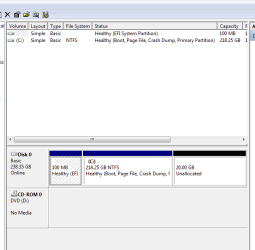
Out of pure curiosity since I haven't bother with UEFI so far, why doesn't the Ceesum's Disk management screenshot show 3 partitions. I would have thought to see a partition other than EFI called MSR or something similar?


Hello Michael, :)

The MSR is a reserved partition that does not receive a partition ID, so that's why it doesn't show up in Disk Management. It cannot store user data.

In addition:

Windows and GPT FAQ


Microsoft Reserved Partition

Q. What is a Microsoft Reserved Partition (MSR)?

A. The Microsoft Reserved Partition (MSR) reserves space on each disk drive for subsequent use by operating system software. GPT disks do not allow hidden sectors. Software components that formerly used hidden sectors now allocate portions of the MSR for component-specific partitions. For example, converting a basic disk to a dynamic disk causes the MSR on that disk to be reduced in size and a newly created partition holds the dynamic disk database. The MSR has the Partition GUID:
DEFINE_GUID (PARTITION_MSFT_RESERVED_GUID, 0xE3C9E316L, 0x0B5C,
0x4DB8, 0x81, 0x7D, 0xF9, 0x2D, 0xF0, 0x02, 0x15, 0xAE)

Q. What disks require an MSR?

A. Every GPT disk must contain an MSR. The order of partitions on the disk should be ESP (if any), OEM (if any) and MSR followed by primary data partition(s). It is particularly important that the MSR be created before other primary data partitions.

Q. Who creates the MSR?

A. The MSR must be created when disk-partitioning information is first written to the drive. If the manufacturer partitions the disk, the manufacturer must create the MSR at the same time. If Windows partitions the disk during setup, Windows creates the MSR.

Q. Why must the MSR be created when the disk is first partitioned?

A. After the disk is partitioned, there will be no free space left to create an MSR.


Q. How big is the MSR?


A. When initially created, the size of the MSR depends on the size of the disk drive:
  • On drives less than 16GB in size, the MSR is 32MB
  • On drives greater than or equal two 16GB, the MSR is 128 MB.
As the MSR is divided into other partitions, it becomes smaller.
 
Last edited:

My Computer My Computer

At a glance

64-bit Windows 11 Pro for WorkstationsIntel i7-8700K OC'd to 5 GHz64 GB (4x16GB) G.SKILL TridentZ RGB DDR4 3600...ASUS ROG-STRIX-GTX1080TI-O11G-GAMING
Computer type
PC/Desktop
Computer Manufacturer/Model Number
Self built custom
OS
64-bit Windows 11 Pro for Workstations
CPU
Intel i7-8700K OC'd to 5 GHz
Motherboard
ASUS ROG Maximus XI Formula Z390
Memory
64 GB (4x16GB) G.SKILL TridentZ RGB DDR4 3600 MHz
Graphics Card(s)
ASUS ROG-STRIX-GTX1080TI-O11G-GAMING
Sound Card
Integrated
Monitor(s) Displays
2 x Samsung Odyssey G7 27"
Screen Resolution
2560x1440
Hard Drives
1TB Samsung 990 PRO M.2,
4TB Samsung 990 PRO PRO M.2,
TerraMaster F8 SSD Plus NAS
PSU
Seasonic Prime Titanium 850W
Case
Thermaltake Core P3
Cooling
Corsair Hydro H115i
Keyboard
Logitech wireless K800
Mouse
Logitech MX Master 4
Internet Speed
2 Gb/s Download and 100 Mb/s Upload
Antivirus
Malwarebyte Anti-Malware Premium
Browser
Google Chrome
Other Info
Logitech Z625 speaker system,
Logitech BRIO 4K Pro webcam,
HP Color LaserJet Pro MFP M477fdn,
APC SMART-UPS RT 1000 XL - SURT1000XLI,
Galaxy S23 Plus phone
i want re-instal my laptop.
im using Windows 7 Ultimate x64 and i want change to Windows 7 Professional x64 bit by using UEFI.
when i check what the requirement to using UEFI is :

  • A Windows 7 compatible system
  • A Windows 7 x64-bit installation media. 32-bit is not supported.
  • A UEFI v2.0+ compliant PC. Check your chipset manufacturer/firmware documentation.
  • A blank, partition-free, hard disk for installation
then my question is :

1. How to check my laptop using UEFI v2.0+ compliant PC easily and how to check what are my chipset manufacturer ?
2. Is any problem if i change BIOS to UEFI ?
 

My Computer My Computer

At a glance

Windows 7 Professional x64AMD Brazos Dual Core E-350 1.6 GHZ2 GBRadeon HD 6310M
Computer type
Laptop
Computer Manufacturer/Model Number
Asus X43U
OS
Windows 7 Professional x64
CPU
AMD Brazos Dual Core E-350 1.6 GHZ
Motherboard
ASUSTek Computer Inc. (ASUS K43U)
Memory
2 GB
Graphics Card(s)
Radeon HD 6310M
Screen Resolution
1366 x 768
Antivirus
avast! Internet Security
Browser
Mozilla Firefox
Hello Nobodies, and welcome to Seven Forums.

What brand and model number is your laptop?

We'll be happy to look it up and see. :)
 

My Computer My Computer

At a glance

64-bit Windows 11 Pro for WorkstationsIntel i7-8700K OC'd to 5 GHz64 GB (4x16GB) G.SKILL TridentZ RGB DDR4 3600...ASUS ROG-STRIX-GTX1080TI-O11G-GAMING
Computer type
PC/Desktop
Computer Manufacturer/Model Number
Self built custom
OS
64-bit Windows 11 Pro for Workstations
CPU
Intel i7-8700K OC'd to 5 GHz
Motherboard
ASUS ROG Maximus XI Formula Z390
Memory
64 GB (4x16GB) G.SKILL TridentZ RGB DDR4 3600 MHz
Graphics Card(s)
ASUS ROG-STRIX-GTX1080TI-O11G-GAMING
Sound Card
Integrated
Monitor(s) Displays
2 x Samsung Odyssey G7 27"
Screen Resolution
2560x1440
Hard Drives
1TB Samsung 990 PRO M.2,
4TB Samsung 990 PRO PRO M.2,
TerraMaster F8 SSD Plus NAS
PSU
Seasonic Prime Titanium 850W
Case
Thermaltake Core P3
Cooling
Corsair Hydro H115i
Keyboard
Logitech wireless K800
Mouse
Logitech MX Master 4
Internet Speed
2 Gb/s Download and 100 Mb/s Upload
Antivirus
Malwarebyte Anti-Malware Premium
Browser
Google Chrome
Other Info
Logitech Z625 speaker system,
Logitech BRIO 4K Pro webcam,
HP Color LaserJet Pro MFP M477fdn,
APC SMART-UPS RT 1000 XL - SURT1000XLI,
Galaxy S23 Plus phone
Hello Nobodies, and welcome to Seven Forums.

What brand and model number is your laptop?

We'll be happy to look it up and see. :)
Brand : ASUS
Model : X43U
 

My Computer My Computer

At a glance

Windows 7 Professional x64AMD Brazos Dual Core E-350 1.6 GHZ2 GBRadeon HD 6310M
Computer type
Laptop
Computer Manufacturer/Model Number
Asus X43U
OS
Windows 7 Professional x64
CPU
AMD Brazos Dual Core E-350 1.6 GHZ
Motherboard
ASUSTek Computer Inc. (ASUS K43U)
Memory
2 GB
Graphics Card(s)
Radeon HD 6310M
Screen Resolution
1366 x 768
Antivirus
avast! Internet Security
Browser
Mozilla Firefox

My Computer My Computer

At a glance

64-bit Windows 11 Pro for WorkstationsIntel i7-8700K OC'd to 5 GHz64 GB (4x16GB) G.SKILL TridentZ RGB DDR4 3600...ASUS ROG-STRIX-GTX1080TI-O11G-GAMING
Computer type
PC/Desktop
Computer Manufacturer/Model Number
Self built custom
OS
64-bit Windows 11 Pro for Workstations
CPU
Intel i7-8700K OC'd to 5 GHz
Motherboard
ASUS ROG Maximus XI Formula Z390
Memory
64 GB (4x16GB) G.SKILL TridentZ RGB DDR4 3600 MHz
Graphics Card(s)
ASUS ROG-STRIX-GTX1080TI-O11G-GAMING
Sound Card
Integrated
Monitor(s) Displays
2 x Samsung Odyssey G7 27"
Screen Resolution
2560x1440
Hard Drives
1TB Samsung 990 PRO M.2,
4TB Samsung 990 PRO PRO M.2,
TerraMaster F8 SSD Plus NAS
PSU
Seasonic Prime Titanium 850W
Case
Thermaltake Core P3
Cooling
Corsair Hydro H115i
Keyboard
Logitech wireless K800
Mouse
Logitech MX Master 4
Internet Speed
2 Gb/s Download and 100 Mb/s Upload
Antivirus
Malwarebyte Anti-Malware Premium
Browser
Google Chrome
Other Info
Logitech Z625 speaker system,
Logitech BRIO 4K Pro webcam,
HP Color LaserJet Pro MFP M477fdn,
APC SMART-UPS RT 1000 XL - SURT1000XLI,
Galaxy S23 Plus phone
Nevermind I read some more and now understand. Man i feel dumb right now.
 

Attachments

  • msinfo 32.PNG
    msinfo 32.PNG
    8.1 KB · Views: 946
  • Disk Management.PNG
    Disk Management.PNG
    9.1 KB · Views: 971
Last edited:

My Computer My Computer

At a glance

Microsoft Windows 7 Ultimate 64-bit 7601 Mult...CPU Type HexaCore Intel Core i7, 4000 MHz (40...32.00 GB2x NVIDIA GeForce GTX 780 Ti (3 GB)
Computer type
PC/Desktop
Computer Manufacturer/Model Number
Homemade
OS
Microsoft Windows 7 Ultimate 64-bit 7601 Multiprocessor Free Service Pack 1
CPU
CPU Type HexaCore Intel Core i7, 4000 MHz (40 x 100)
Motherboard
ASUSTeK COMPUTER INC. P9X79E-WS
Memory
32.00 GB
Graphics Card(s)
2x NVIDIA GeForce GTX 780 Ti (3 GB)
Sound Card
On board Realtek
Monitor(s) Displays
Asus VG278HE [27" LCD] (CBLMTF297494)
Screen Resolution
1920 x 1080 x 32 bits (4294967296 colors) @ 144 Hz
Hard Drives
Samsung SSD 840 EVO 1TB SCSI Disk Device (1000 GB, SATA-III)
PSU
Antec 1500 Platinum
Case
Cooler Master
Cooling
Cooler Master: Nepton 240M
Mouse
Rat 7
Internet Speed
Timewarner 50MB down 5 MB Up
Antivirus
Commodo Internet Security
Browser
Mozilla Firefox
Other Info
Motorala SBG6580 Modem
Windows 7 and Windows 8
FL Studio 11
Reason 7
Hello y'all I'm new on this on this Forum and I really need Help I'm actually on Win8 64bits and I want to be on Windows 7 64Bit, I using Rufus to create my USB boot with GPT partition ,File system is in FAT 32, Cluster size is 4096 Default .
I disable Secureboot in BIOS before installing Windows 7 but it block on the Windows stating screen .

Using Leneovo Ideapad Z500 Intelcore i5 3230m

I Hope someone could help me .... Sorry for my bad English


Some more info : Boot monde : UEFI
USB boot : Enabled
Secure Boot : disabled
 

My Computer My Computer

At a glance

Windows 8 64bitIntel core i5 3230 CPU @ 2.60Ghz61144 MbNvidia Geforeve
Computer type
Laptop
Computer Manufacturer/Model Number
Lenovp
OS
Windows 8 64bit
CPU
Intel core i5 3230 CPU @ 2.60Ghz
Motherboard
Intel
Memory
61144 Mb
Graphics Card(s)
Nvidia Geforeve
Antivirus
Avast
Browser
Fireifox
Hello Dorynous, and welcome to Seven Forums.

Double check using the tutorial below to see if you have all the preparation done.

Downgrade Windows 8 to Windows 7

Hope this helps for now, :)
Shawn
 

My Computer My Computer

At a glance

64-bit Windows 11 Pro for WorkstationsIntel i7-8700K OC'd to 5 GHz64 GB (4x16GB) G.SKILL TridentZ RGB DDR4 3600...ASUS ROG-STRIX-GTX1080TI-O11G-GAMING
Computer type
PC/Desktop
Computer Manufacturer/Model Number
Self built custom
OS
64-bit Windows 11 Pro for Workstations
CPU
Intel i7-8700K OC'd to 5 GHz
Motherboard
ASUS ROG Maximus XI Formula Z390
Memory
64 GB (4x16GB) G.SKILL TridentZ RGB DDR4 3600 MHz
Graphics Card(s)
ASUS ROG-STRIX-GTX1080TI-O11G-GAMING
Sound Card
Integrated
Monitor(s) Displays
2 x Samsung Odyssey G7 27"
Screen Resolution
2560x1440
Hard Drives
1TB Samsung 990 PRO M.2,
4TB Samsung 990 PRO PRO M.2,
TerraMaster F8 SSD Plus NAS
PSU
Seasonic Prime Titanium 850W
Case
Thermaltake Core P3
Cooling
Corsair Hydro H115i
Keyboard
Logitech wireless K800
Mouse
Logitech MX Master 4
Internet Speed
2 Gb/s Download and 100 Mb/s Upload
Antivirus
Malwarebyte Anti-Malware Premium
Browser
Google Chrome
Other Info
Logitech Z625 speaker system,
Logitech BRIO 4K Pro webcam,
HP Color LaserJet Pro MFP M477fdn,
APC SMART-UPS RT 1000 XL - SURT1000XLI,
Galaxy S23 Plus phone
Hello

I just try your tutorial and I got the same problem,I use eleveted powershell in Windows 8 and I got it False , I go to the next step '4' , I boot from my UFI USB Flash Drive Transcend...
After loading files, I got a lil colored line and stuck on the 'Starting Windows Screen'... (after 15mins nothing happen)
No sign of work by the USBFlash Drive.

I don't really know what to do
 

My Computer My Computer

At a glance

Windows 8 64bitIntel core i5 3230 CPU @ 2.60Ghz61144 MbNvidia Geforeve
Computer type
Laptop
Computer Manufacturer/Model Number
Lenovp
OS
Windows 8 64bit
CPU
Intel core i5 3230 CPU @ 2.60Ghz
Motherboard
Intel
Memory
61144 Mb
Graphics Card(s)
Nvidia Geforeve
Antivirus
Avast
Browser
Fireifox
hello brink i have a doubt here.. uhhh i have ASUS N76VB with UEFI BIOS compatible that comes with windows 8 ONLY compatible CD (drivers) , but i dont like win 8 soo... where can i find drivers for my laptop (win7 drivers) and also i have 1 more question about UEFI bios. In bios menu it has 'Launch PXE OpROM' option.. soo when i install windows 7 in UEFI MODE should i need to enable or disable this option ? :)

Thank you in advance
Anec :)
 

My Computer My Computer

At a glance

windows 7 ultimate x64 SP1Intel® Core™ i7 3630QM Processor12GB DDR3 SD RAM 1600MHzNVIDIA® GeForce® GT 740M 4GB
Computer type
Laptop
Computer Manufacturer/Model Number
Asus
OS
windows 7 ultimate x64 SP1
CPU
Intel® Core™ i7 3630QM Processor
Motherboard
Asus N76VB
Memory
12GB DDR3 SD RAM 1600MHz
Graphics Card(s)
NVIDIA® GeForce® GT 740M 4GB
Hard Drives
1TB 5400 RPM
Antivirus
Avira
Browser
Google Chrome
Hello

I just try your tutorial and I got the same problem,I use eleveted powershell in Windows 8 and I got it False , I go to the next step '4' , I boot from my UFI USB Flash Drive Transcend...
After loading files, I got a lil colored line and stuck on the 'Starting Windows Screen'... (after 15mins nothing happen)
No sign of work by the USBFlash Drive.

I don't really know what to do

Are you booting the DVD/USB in UEFI mode?
 

My Computer My Computer

At a glance

ME/XP/Vista/Win7
OS
ME/XP/Vista/Win7
hello brink i have a doubt here.. uhhh i have ASUS N76VB with UEFI BIOS compatible that comes with windows 8 ONLY compatible CD (drivers) , but i dont like win 8 soo... where can i find drivers for my laptop (win7 drivers) and also i have 1 more question about UEFI bios. In bios menu it has 'Launch PXE OpROM' option.. soo when i install windows 7 in UEFI MODE should i need to enable or disable this option ? :)

Thank you in advance
Anec :)

Hello Anec, and welcome to Eight Forums.

Not sure about the 'Launch PXE OpROM' setting since I haven't had anything with it to test with.

The ASUS N76VB does have Windows 8 and Windows 7 listed for the OS in the specs below.
N76VB - Notebooks & Ultrabooks - ASUSHowever, considering that ASUS only has Windows 8 drivers available for that model, you may be better off sticking with Windows 8. If you install Windows 7, you may have generic drivers without all the features used for some devices. N76VB - Notebooks & Ultrabooks - ASUS
 

My Computer My Computer

At a glance

64-bit Windows 11 Pro for WorkstationsIntel i7-8700K OC'd to 5 GHz64 GB (4x16GB) G.SKILL TridentZ RGB DDR4 3600...ASUS ROG-STRIX-GTX1080TI-O11G-GAMING
Computer type
PC/Desktop
Computer Manufacturer/Model Number
Self built custom
OS
64-bit Windows 11 Pro for Workstations
CPU
Intel i7-8700K OC'd to 5 GHz
Motherboard
ASUS ROG Maximus XI Formula Z390
Memory
64 GB (4x16GB) G.SKILL TridentZ RGB DDR4 3600 MHz
Graphics Card(s)
ASUS ROG-STRIX-GTX1080TI-O11G-GAMING
Sound Card
Integrated
Monitor(s) Displays
2 x Samsung Odyssey G7 27"
Screen Resolution
2560x1440
Hard Drives
1TB Samsung 990 PRO M.2,
4TB Samsung 990 PRO PRO M.2,
TerraMaster F8 SSD Plus NAS
PSU
Seasonic Prime Titanium 850W
Case
Thermaltake Core P3
Cooling
Corsair Hydro H115i
Keyboard
Logitech wireless K800
Mouse
Logitech MX Master 4
Internet Speed
2 Gb/s Download and 100 Mb/s Upload
Antivirus
Malwarebyte Anti-Malware Premium
Browser
Google Chrome
Other Info
Logitech Z625 speaker system,
Logitech BRIO 4K Pro webcam,
HP Color LaserJet Pro MFP M477fdn,
APC SMART-UPS RT 1000 XL - SURT1000XLI,
Galaxy S23 Plus phone
Thank you for fast reply brink but.. when i install windows 8 in UEFI mode on every startup it shows scanning and repairing drive 100% . It's not get stuck but its really annoying. Otherwise , when i install win 8 in non-uefi mode everything is OK. Soo.. what you think , where is the problem ?.. which part caused to shows this message (ofc. windows is new and fresh copy and HDD is checked - everything is fine). I will be glad if you have any solution about this.
Thank you again, Anec
 

My Computer My Computer

At a glance

windows 7 ultimate x64 SP1Intel® Core™ i7 3630QM Processor12GB DDR3 SD RAM 1600MHzNVIDIA® GeForce® GT 740M 4GB
Computer type
Laptop
Computer Manufacturer/Model Number
Asus
OS
windows 7 ultimate x64 SP1
CPU
Intel® Core™ i7 3630QM Processor
Motherboard
Asus N76VB
Memory
12GB DDR3 SD RAM 1600MHz
Graphics Card(s)
NVIDIA® GeForce® GT 740M 4GB
Hard Drives
1TB 5400 RPM
Antivirus
Avira
Browser
Google Chrome
Hello

I just try your tutorial and I got the same problem,I use eleveted powershell in Windows 8 and I got it False , I go to the next step '4' , I boot from my UFI USB Flash Drive Transcend...
After loading files, I got a lil colored line and stuck on the 'Starting Windows Screen'... (after 15mins nothing happen)
No sign of work by the USBFlash Drive.

I don't really know what to do

Are you booting the DVD/USB in UEFI mode?


I think that i'm booting USB in UEFI mode cause I can see it in boot manager
- EFI:
EFI USB Device (JetFlashTranscend 4GB) thats my USB device creat with Rufus

My boot Mode is on UEFI and USBBoot is Enabled in BIOS
 

My Computer My Computer

At a glance

Windows 8 64bitIntel core i5 3230 CPU @ 2.60Ghz61144 MbNvidia Geforeve
Computer type
Laptop
Computer Manufacturer/Model Number
Lenovp
OS
Windows 8 64bit
CPU
Intel core i5 3230 CPU @ 2.60Ghz
Motherboard
Intel
Memory
61144 Mb
Graphics Card(s)
Nvidia Geforeve
Antivirus
Avast
Browser
Fireifox
Hello

I just try your tutorial and I got the same problem,I use eleveted powershell in Windows 8 and I got it False , I go to the next step '4' , I boot from my UFI USB Flash Drive Transcend...
After loading files, I got a lil colored line and stuck on the 'Starting Windows Screen'... (after 15mins nothing happen)
No sign of work by the USBFlash Drive.

I don't really know what to do

Are you booting the DVD/USB in UEFI mode?


I think that i'm booting USB in UEFI mode cause I can see it in boot manager
- EFI:
EFI USB Device (JetFlashTranscend 4GB) thats my USB device creat with Rufus

My boot Mode is on UEFI and USBBoot is Enabled in BIOS

USB screenshot in Step four.

DVD screenshot

Windows 8 Downgrade-006 SB for posting.PNG
 

My Computer My Computer

At a glance

ME/XP/Vista/Win7
OS
ME/XP/Vista/Win7

My Computer My Computer

At a glance

Windows 8 64bitIntel core i5 3230 CPU @ 2.60Ghz61144 MbNvidia Geforeve
Computer type
Laptop
Computer Manufacturer/Model Number
Lenovp
OS
Windows 8 64bit
CPU
Intel core i5 3230 CPU @ 2.60Ghz
Motherboard
Intel
Memory
61144 Mb
Graphics Card(s)
Nvidia Geforeve
Antivirus
Avast
Browser
Fireifox
Nothing change block on 'Windows starting' screen so I gonna stay on Win8 for now ... :( Thanks for your help
 

My Computer My Computer

At a glance

Windows 8 64bitIntel core i5 3230 CPU @ 2.60Ghz61144 MbNvidia Geforeve
Computer type
Laptop
Computer Manufacturer/Model Number
Lenovp
OS
Windows 8 64bit
CPU
Intel core i5 3230 CPU @ 2.60Ghz
Motherboard
Intel
Memory
61144 Mb
Graphics Card(s)
Nvidia Geforeve
Antivirus
Avast
Browser
Fireifox
Nothing change block on 'Windows starting' screen so I gonna stay on Win8 for now ... :( Thanks for your help

Post a screen shot of Boot Override & One Time Boot Menu with your USB drive plugged in.
 

My Computer My Computer

At a glance

ME/XP/Vista/Win7
OS
ME/XP/Vista/Win7

My Computer My Computer

At a glance

Windows 8 64bitIntel core i5 3230 CPU @ 2.60Ghz61144 MbNvidia Geforeve
Computer type
Laptop
Computer Manufacturer/Model Number
Lenovp
OS
Windows 8 64bit
CPU
Intel core i5 3230 CPU @ 2.60Ghz
Motherboard
Intel
Memory
61144 Mb
Graphics Card(s)
Nvidia Geforeve
Antivirus
Avast
Browser
Fireifox
Back
Top