UKASH Virus .....again :(

darrenj1471

If you're getting the same virus 3 times in a row . Might want to get a different Anti-virus software. A lot of people here use MSE
 

My Computer

Computer Manufacturer/Model Number
Custom Built
OS
Windows 7 Ultimate 32-Bit & Windows 7 Ultimate 64-Bit
CPU
Intel Core i7 CPU 950 @ 3.07GHz
Motherboard
ASUS P6T DELUXE V2
Memory
OCZ 6GB (3 x 2GB) 240-Pin DDR3 SDRAM DDR3 1600 OCZ3X1600R2
Graphics Card(s)
ATI Radeon HD 5700 Series
Sound Card
OnBoard
Hard Drives
WD6400AACS-00M3B0 (640GB SATA )
PSU
CORSAIR 850w
Case
NZXT LEXA
Cooling
Intel Stock Heatsink Fan
Keyboard
Microsoft Wireless Laser Keyboard 7000
Mouse
Microsoft Wireless Laser Mouse 7000
darrenj1471,

First of all, make sure the latest version of FRST64 in on the external drive, and that there are no other fixlist.txt files on it. Otherwise, this will not work.

Please do the following...
Open Notepad (Start > All Programs > Accessories > Notepad)

Copy/paste all the contents of the quote box below to Notepad (do not copy the word 'Quote').
Save it on the external drive as: fixlist.txt

start
HKU\darren\...\Winlogon: [Shell] explorer.exe,C:\Users\darren\AppData\Roaming\skype.dat [139264 2011-11-16] () <==== ATTENTION
C:\Users\darren\AppData\Roaming\skype.dat
C:\Users\darren\AppData\Roaming\skype.ini
C:\ProgramData\ezsidmv.dat
TDL4: custom:26000022 <===== ATTENTION!
SaveMbr: Drive=0
end

WARNING: This script is written specifically for darrenj1471, for use on this particular computer.
Running the script on another computer may cause damage to the Operating System!!

Run FRST again, but this time press the Fix button just once, and wait.

When done, the tool makes a log on the external drive. This time it is called: Fixlog.txt

Boot the computer into normal mode and post back on what happens.

Please post Fixlog.txt in your reply.

Also, an mbrdump.txt file is created on your external drive!
Please zip this file, and attach it to your reply.

Need to go out to get some chow. Will be back here later.
 

My Computer

Computer type
PC/Desktop
Computer Manufacturer/Model Number
An ol' eMachines
OS
Windows 7 Home Premium
Internet Speed
Fine for me...I'm retired!
If the Desktop does not load, press the Windows key and the R key.
In the Open area of the Run box, type in: explorer.exe
Press: OK

or,

Press the keys: Ctrl Alt Del
Task Manager appears
Click the Applications tab, then click: New Task (at the bottom)
Type: explorer.exe
Click: OK
 

My Computer

Computer type
PC/Desktop
Computer Manufacturer/Model Number
An ol' eMachines
OS
Windows 7 Home Premium
Internet Speed
Fine for me...I'm retired!
darrenj1471,

Glad you are back into Windows...no genious here. :focus:

Please stay low keyed in the use of the computer. Have to check the info from the Boot Configutation Data (BCD) to see what further action is needed.

Also, please do not run any other programs for now. Don't want you to return to square one again...

Thanks for your patience.
 

My Computer

Computer type
PC/Desktop
Computer Manufacturer/Model Number
An ol' eMachines
OS
Windows 7 Home Premium
Internet Speed
Fine for me...I'm retired!
darrenj1471,

Please go to the 64-bit ListParts Download
Save to the USB drive.

Boot to the System Recovery Options as done before, and select: Command Prompt

Run ListParts by typing x:\listparts64 in the Command Prompt and pressing: Enter
(x - replace with the letter of the USB drive!)

When the tool opens click Yes to disclaimer.
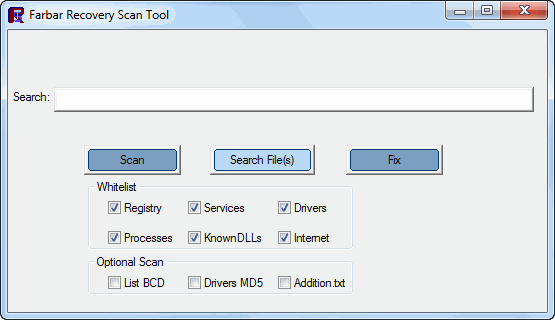
Place a check on: List BCD
Press: Scan

When done, at the Command Prompt, type exit, and press: Enter

Back at the System Recovery Options, press: Restart

Let the computer boot normally and post in your reply the Result.txt that appears in the USB drive.
 

My Computer

Computer type
PC/Desktop
Computer Manufacturer/Model Number
An ol' eMachines
OS
Windows 7 Home Premium
Internet Speed
Fine for me...I'm retired!
Will do the above in a few hours when I get back from work, as an fyi I booted to Windows last night, wrote my last post above and then closed the pc as it was late so Ive not opened any programs or used the PC since that post.

Will post that results text later , cheers
 

My Computer

OS
windows 7 64 bit
That's fine.

Will be in and out, but, will check every so often.

For time difference, are you in the USA, or in GB?
 

My Computer

Computer type
PC/Desktop
Computer Manufacturer/Model Number
An ol' eMachines
OS
Windows 7 Home Premium
Internet Speed
Fine for me...I'm retired!
Also, will you check the USB drive and see if an Addition.txt file exists there.
It is produced by FRST when it is initially run.

If not produced, please use FRST64 as before, and check List.BCD and Addition.txt box under Optional Scans:

FRST2.gif

(Image courtesy of BleepingComputer.)

Then post the Addition.txt in you reply.

Need to find out what Partition Type there is.
 

My Computer

Computer type
PC/Desktop
Computer Manufacturer/Model Number
An ol' eMachines
OS
Windows 7 Home Premium
Internet Speed
Fine for me...I'm retired!
I even went back and run FRST again and checked both boxes and all it says was FRST.txt was created. I don't see any Additions.txt file
 

My Computer

OS
windows 7 64 bit
If you ran the FRST from the desktop. The file will be located on the Desktop.
 

My Computer

Computer Manufacturer/Model Number
Custom Built
OS
Windows 7 Ultimate 32-Bit & Windows 7 Ultimate 64-Bit
CPU
Intel Core i7 CPU 950 @ 3.07GHz
Motherboard
ASUS P6T DELUXE V2
Memory
OCZ 6GB (3 x 2GB) 240-Pin DDR3 SDRAM DDR3 1600 OCZ3X1600R2
Graphics Card(s)
ATI Radeon HD 5700 Series
Sound Card
OnBoard
Hard Drives
WD6400AACS-00M3B0 (640GB SATA )
PSU
CORSAIR 850w
Case
NZXT LEXA
Cooling
Intel Stock Heatsink Fan
Keyboard
Microsoft Wireless Laser Keyboard 7000
Mouse
Microsoft Wireless Laser Mouse 7000
You might be getting this virus because either/or both Flash and Java have not been updated. Both of these are quite vulnerable to infection! UKASH is a 'Backdoor Trojan'... it steals your passwords and any sensitive/critical (banking, credit cards, etc) information stored on your computer.

Download CKScanner by askey127 from HERE
Important - Save it to your desktop.
Doubleclick CKScanner.exe and click Search For Files.
After a very short time, when the cursor hourglass disappears, click Save List To File.
A message box will verify the file saved.
Double-click the CKFiles.txt icon on your desktop and copy/paste the contents in your next reply.
 

My Computer

Computer type
PC/Desktop
Computer Manufacturer/Model Number
Bruce ... somewhere in his 40's
OS
Windows 7 Ultimate 32bit SP1
CPU
Intel(R) Core(TM)2 Quad CPU @ 2.40GHz, 2400 MHz
Motherboard
INTEL/D975XBX2
Memory
4 GB
Graphics Card(s)
ATI Radeon HD 2600 Pro
Monitor(s) Displays
Samsung SyncMaster 914v
Screen Resolution
1280 x 1024
Hard Drives
2/500GB each ... ST3500630AS ATA Device.
One is not connected
PSU
Rocketfish 700 W
Case
G.Skill Gigabyte Chassis
Keyboard
Standard PS/2 Keyboard
Mouse
Microsoft PS/2 Mouse
Internet Speed
DSL
Antivirus
Avira Internet Security
Browser
IE 11
Other Info
ATI HDMI Audio
darrenj1471,

Is there a FRST or FRST64 folder on the external drive? Doubt it, but, if there is one, is Addition.txt in it?
You are running FRST from the Desktop...

Please go to the TDSSKiller Download
Select the .exe version
Double-click on TDSSKiller.exe to run the program.

When the TDSSKiller console opens, click on: Change Parameters
Under Additional Options, place a check in the box next to: Detect TDLFS File System
Click: OK

Press: Start Scan

•If a suspicious object is detected by this program, the default action is Skip. Leave this action as is, and click on: Continue
•If malicious objects are found, they show in the Scan results.
Ensure Cure (the default action) is selected, then click: Continue > Reboot now, to finish the cleaning process.
(Note: If Cure is not available, select Skip, >>Do not select: Delete<<)

When done, the tool creates a log on the disk with the Windows Operating System, normally C:\

Logs have a name like:
C:\TDSSKiller.X.X.X_05.28.2013_15.31.43_log.txt

Please attach the TDSSKiller log in your reply.
 

My Computer

Computer type
PC/Desktop
Computer Manufacturer/Model Number
An ol' eMachines
OS
Windows 7 Home Premium
Internet Speed
Fine for me...I'm retired!
I searched the whole computer for addition.txt and 2 results show, both with date stamps ie : FRST_28-05-2013_19-39-46.txt

is that it?
 

My Computer

OS
windows 7 64 bit
CKfiles.txt created and only contains:
CKScanner 2.3 - Additional Security Risks - These are not necessarily bad
scanner sequence 3.RP.11.SENACD
----- EOF -----
 

My Computer

OS
windows 7 64 bit
Finally, I have AVG running and figured that was good? Do I need to uninstall AVG and get MSE?
 

My Computer

OS
windows 7 64 bit
Back
Top