UKASH Virus .....again :(

Good Job!!! :D

BTW, FRST_28-05-2013_19-39-46.txt is the report fromthe last time you ran the program, today. Do post it anyway.


~~~~
Then, run TDSSKiller once again, and this time, when presented with the TDSS File System entry in Threats Detected, select: Delete

Please attach the new TDSSKiller log in your reply if it show any entries. If it shows the following, just let us know it reported no entries:
Detected object count: 0


~~~~
Next, please use the Malwarebytes Anti-Rootkit Download
Save to the Desktop (easy to find)

Right-click the downloaded file and select: Extract here...
In the MBAR folder that appears on the Desktop, open it, and double-click the MBAR application.

At the main program console click: Next

At the Update Database prompt, click: Update
When the update is done, click: Next


At the Scan System prompt, under Scan targets, check: Drivers, Sectors, and System (If these items are already checked, that's fine.) Now, click on the SCAN button!

The results from the scan are shown as follows (Just an example)(Image courtesy of BleepingComputer):
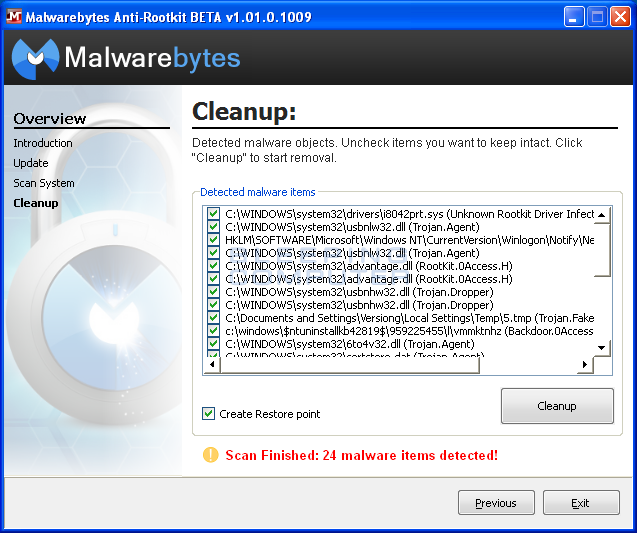


If any threats are reported, click on the Cleanup button to remove them.

Reboot the computer.

Do another scan with Malwarebytes Anti-Rootkit to verify that no threats remain.

If they do, then click Cleanup once more, and repeat the process.

When done, go to the MBAR folder on the Desktop, and look for two reports:
1. system-log.txt
2. mbar-log-2013-05-28 (20-13-32).txt
(corresponds to mbar-log-year-month-day (hour-minute-second).txt)

Please attach the mbar-log and the system-log in your reply.


~~~~
As far as an Antivirus Program goes, if the computer has gotten infected 3 times with Ukash, it may be a good idea to uninstall AVG, and download MSE instead. Another issue to consider is the website used.
Is this a reputable site??


~~~~
To uninstall AVG, go to Start > Control Panel > Programs and Features, select AVG, and click: Uninstall

You need to make sure AVG is all gone, otherwise down the road there may be problems.

VistaKing can guide you thorugh the process to totally remove AVG better than what I can.
 

My Computer

Computer type
PC/Desktop
Computer Manufacturer/Model Number
An ol' eMachines
OS
Windows 7 Home Premium
Internet Speed
Fine for me...I'm retired!
Here is the AVG2013 removal tool ( if you want to go that route )

:ar: http://download.avg.com/filedir/util/avgrem/avg_remover_stf_x86_2013_3341.exe

Or you you could go the RevoUninstaller route

Download the RevoUninstaller Pro its a 30-day trial

:ar: http://www.revouninstaller.com/download-professional-version.php

Please download and install Revo Uninstaller Pro
Right click Revo Uninstaller choose Run as administrator to run it.
From the list of programs double click on AVG to remove
When prompted if you want to uninstall click Yes.
Be sure the Advanced option is selected then click Next.
The program will run, If prompted again click Yes
when the built-in uninstaller is finished click on Next.
Once the program has searched for leftovers click Next.
Check/tick the bolded items only on the list then click Delete
when prompted click on Yes and then on next.
put a check on any folders that are found and select delete
when prompted select yes then on next
Once done click Finish.
 

My Computer

Computer Manufacturer/Model Number
Custom Built
OS
Windows 7 Ultimate 32-Bit & Windows 7 Ultimate 64-Bit
CPU
Intel Core i7 CPU 950 @ 3.07GHz
Motherboard
ASUS P6T DELUXE V2
Memory
OCZ 6GB (3 x 2GB) 240-Pin DDR3 SDRAM DDR3 1600 OCZ3X1600R2
Graphics Card(s)
ATI Radeon HD 5700 Series
Sound Card
OnBoard
Hard Drives
WD6400AACS-00M3B0 (640GB SATA )
PSU
CORSAIR 850w
Case
NZXT LEXA
Cooling
Intel Stock Heatsink Fan
Keyboard
Microsoft Wireless Laser Keyboard 7000
Mouse
Microsoft Wireless Laser Mouse 7000
darrenj1471,

Awaiting for the mbar-log and the system-log in your reply, as requested in Post #41.

We are not done.
 

My Computer

Computer type
PC/Desktop
Computer Manufacturer/Model Number
An ol' eMachines
OS
Windows 7 Home Premium
Internet Speed
Fine for me...I'm retired!
Apologies I wasnt home yesterday evening, will do the next steps tonight (your day time), thanks
 

My Computer

OS
windows 7 64 bit
Also , @VistaKing, which route do you recomend to uninstall AVG as youve given two options, the latter of which seems more effort :) Im happy with either but if both same Id choose the easier one :)
 

My Computer

OS
windows 7 64 bit
Easiest way...

Start > Control Panel > Programs and Features, select AVG, and click: Uninstall

If you run into problems, use VistaKing's suggestion: AVG2013 removal tool
 

My Computer

Computer type
PC/Desktop
Computer Manufacturer/Model Number
An ol' eMachines
OS
Windows 7 Home Premium
Internet Speed
Fine for me...I'm retired!
The tool should be good. The removal process from Control Panel doesn't remove the registry keys from the program. The Removal tool and the RevoUninstaller Pro do.

You could use the tool . Doesn't have much steps as just Right clicking on the Tool choosing Run as administrator and it good to go.
 

My Computer

Computer Manufacturer/Model Number
Custom Built
OS
Windows 7 Ultimate 32-Bit & Windows 7 Ultimate 64-Bit
CPU
Intel Core i7 CPU 950 @ 3.07GHz
Motherboard
ASUS P6T DELUXE V2
Memory
OCZ 6GB (3 x 2GB) 240-Pin DDR3 SDRAM DDR3 1600 OCZ3X1600R2
Graphics Card(s)
ATI Radeon HD 5700 Series
Sound Card
OnBoard
Hard Drives
WD6400AACS-00M3B0 (640GB SATA )
PSU
CORSAIR 850w
Case
NZXT LEXA
Cooling
Intel Stock Heatsink Fan
Keyboard
Microsoft Wireless Laser Keyboard 7000
Mouse
Microsoft Wireless Laser Mouse 7000
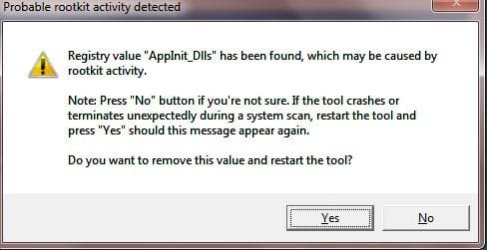
Err, when I double click mbar.exe in the folder I am getting the message below, please advise:
 

Attachments

  • Capture.JPG
    Capture.JPG
    33.1 KB · Views: 10

My Computer

OS
windows 7 64 bit
darrenj1471

If you Right click on
e5i4pd.png
choose Run as administrator
 

My Computer

Computer Manufacturer/Model Number
Custom Built
OS
Windows 7 Ultimate 32-Bit & Windows 7 Ultimate 64-Bit
CPU
Intel Core i7 CPU 950 @ 3.07GHz
Motherboard
ASUS P6T DELUXE V2
Memory
OCZ 6GB (3 x 2GB) 240-Pin DDR3 SDRAM DDR3 1600 OCZ3X1600R2
Graphics Card(s)
ATI Radeon HD 5700 Series
Sound Card
OnBoard
Hard Drives
WD6400AACS-00M3B0 (640GB SATA )
PSU
CORSAIR 850w
Case
NZXT LEXA
Cooling
Intel Stock Heatsink Fan
Keyboard
Microsoft Wireless Laser Keyboard 7000
Mouse
Microsoft Wireless Laser Mouse 7000
What happens when you press on the Yes button ?
 

My Computer

Computer Manufacturer/Model Number
Custom Built
OS
Windows 7 Ultimate 32-Bit & Windows 7 Ultimate 64-Bit
CPU
Intel Core i7 CPU 950 @ 3.07GHz
Motherboard
ASUS P6T DELUXE V2
Memory
OCZ 6GB (3 x 2GB) 240-Pin DDR3 SDRAM DDR3 1600 OCZ3X1600R2
Graphics Card(s)
ATI Radeon HD 5700 Series
Sound Card
OnBoard
Hard Drives
WD6400AACS-00M3B0 (640GB SATA )
PSU
CORSAIR 850w
Case
NZXT LEXA
Cooling
Intel Stock Heatsink Fan
Keyboard
Microsoft Wireless Laser Keyboard 7000
Mouse
Microsoft Wireless Laser Mouse 7000
Yep continue to the tool. You want to click Next then Update let it update until it says Success : Database is up to date " then click Next. On the scan window make sure everything is checked under " Scan Targets "

Things to be checked Drivers/Sectors/System then click Scan
 

My Computer

Computer Manufacturer/Model Number
Custom Built
OS
Windows 7 Ultimate 32-Bit & Windows 7 Ultimate 64-Bit
CPU
Intel Core i7 CPU 950 @ 3.07GHz
Motherboard
ASUS P6T DELUXE V2
Memory
OCZ 6GB (3 x 2GB) 240-Pin DDR3 SDRAM DDR3 1600 OCZ3X1600R2
Graphics Card(s)
ATI Radeon HD 5700 Series
Sound Card
OnBoard
Hard Drives
WD6400AACS-00M3B0 (640GB SATA )
PSU
CORSAIR 850w
Case
NZXT LEXA
Cooling
Intel Stock Heatsink Fan
Keyboard
Microsoft Wireless Laser Keyboard 7000
Mouse
Microsoft Wireless Laser Mouse 7000
Did you reboot when MBAR was done?

Also, was there a Linux distribution on the system, at some point?

If you have RogueKiller on the computer, please remove it and once again Download RogueKiller (Official website)
Select the x64 (64-bit) version for your system.
Click the applicable button to download.
Save to the Desktop.

Close all windows and browsers.
Right-click and select: Run as Administrator

At the program console, wait for the prescan to finish. (Under Status, it says: Prescan finished)

Press: SCAN

When done, a report opens on the Desktop: RKreport.txt

Please provide the RKreport.txt (Mode: Scan) in your reply.
 

My Computer

Computer type
PC/Desktop
Computer Manufacturer/Model Number
An ol' eMachines
OS
Windows 7 Home Premium
Internet Speed
Fine for me...I'm retired!
Yes your instructions said run mbar, clean anything found , reboot, scan again and thats what I did and then pasted logs. is there something wrong?

I am only vaguely aware of what the linux os is so no its not something ive ever used or installed.

will remove and install rogue later. thanks
 

My Computer

OS
windows 7 64 bit
There is an MBR showing which is different, but, that does not mean it is bad.

Will await your posting RogueKiller results...:)
 

My Computer

Computer type
PC/Desktop
Computer Manufacturer/Model Number
An ol' eMachines
OS
Windows 7 Home Premium
Internet Speed
Fine for me...I'm retired!
Back
Top