Solved Unable to boot to Win7 after removing HD

SebaCueto

New member
Local time
8:57 PM
Messages
9
Hi everyone,
My problem is as follows.
I installed Win7 Prof. 32 bits on my 1TB HD.
After that I decided to remove my 250GB HD.
Now I cannot boot to Win7 anymore, it keeps asking to insert a boot drive. For some reason, the BCD was saved on my 250GB disk, but I don´t want to use it anymore, I need that 1TB disk to be independant.

I´ve already tried booting from the Win7 DVD and using the bootsect command wth different parameters, but that did not solve my issue.
I tried the automatic boot repair contained in the DVD as well, with the same outcome.

Is there a way I can make my Win7 boot with that 250GB disk unplugged?

Thank you for your help.
 

My Computer My Computer

At a glance

Windows 7 Professional 32bitCore 2 Duo E84002x1GB OCZ Platinum DDR2Radeon HD4870
Computer type
PC/Desktop
Computer Manufacturer/Model Number
custom
OS
Windows 7 Professional 32bit
CPU
Core 2 Duo E8400
Motherboard
Asus P5k Premium
Memory
2x1GB OCZ Platinum DDR2
Graphics Card(s)
Radeon HD4870
Antivirus
Microsoft Security Essentials

My Computer My Computer

At a glance

Windows 10 Pro x64 ; Xubuntu x64Intel i7 860 @ 2.80 GHz O/C'ed to 4.0GHz16GB Corsair Vengance DDR3 @ 661 MHz Dual Cha...EVGA NVidia GTX 560 1024MB
Computer type
PC/Desktop
Computer Manufacturer/Model Number
Golden Mk. I.4
OS
Windows 10 Pro x64 ; Xubuntu x64
CPU
Intel i7 860 @ 2.80 GHz O/C'ed to 4.0GHz
Motherboard
Gigabyte P55A-UD3R Rev.1. Award BIOS F13
Memory
16GB Corsair Vengance DDR3 @ 661 MHz Dual Channel (9-9-9-24)
Graphics Card(s)
EVGA NVidia GTX 560 1024MB
Sound Card
Realtek Integrated
Monitor(s) Displays
Dual Samsung SyncMaster 2494HS
Screen Resolution
1920*1080 and 1920*1080
Hard Drives
1*Samsung 840 EVO 120GB SSD;
1*OCZ Vertex 2 60GB SSD;
2*Samsung F3 SpinPoint 1TB in RAID0;
1*Samsung F1 SpinPoint 1TB;
2*Western Digital 1TB External USB 3.0
1*Western Digital 500GB External USB 3.0
1*Seagate 500GB External USB 2.0
PSU
Thermaltake ToughPower QFan 750W
Case
Thermaltake Element S VK60001W2Z
Cooling
Corsair H60 Water Cooling, 2*230mm and 2*80mm case fans
Keyboard
Logitech G110
Mouse
Logitech MX518
I believe that´s the problem too.
I´ll have that image ready for you as soon as I get home.
Thank you!
 

My Computer My Computer

At a glance

Windows 7 Professional 32bitCore 2 Duo E84002x1GB OCZ Platinum DDR2Radeon HD4870
Computer type
PC/Desktop
Computer Manufacturer/Model Number
custom
OS
Windows 7 Professional 32bit
CPU
Core 2 Duo E8400
Motherboard
Asus P5k Premium
Memory
2x1GB OCZ Platinum DDR2
Graphics Card(s)
Radeon HD4870
Antivirus
Microsoft Security Essentials

My Computer My Computer

At a glance

Windows 7 Professional 32bitCore 2 Duo E84002x1GB OCZ Platinum DDR2Radeon HD4870
Computer type
PC/Desktop
Computer Manufacturer/Model Number
custom
OS
Windows 7 Professional 32bit
CPU
Core 2 Duo E8400
Motherboard
Asus P5k Premium
Memory
2x1GB OCZ Platinum DDR2
Graphics Card(s)
Radeon HD4870
Antivirus
Microsoft Security Essentials
Yes, it sounds similar.....but its better to look at your Disk Management screen before you attempt anything, to be 100% sure.
 

My Computer My Computer

At a glance

Windows 10 Pro x64 ; Xubuntu x64Intel i7 860 @ 2.80 GHz O/C'ed to 4.0GHz16GB Corsair Vengance DDR3 @ 661 MHz Dual Cha...EVGA NVidia GTX 560 1024MB
Computer type
PC/Desktop
Computer Manufacturer/Model Number
Golden Mk. I.4
OS
Windows 10 Pro x64 ; Xubuntu x64
CPU
Intel i7 860 @ 2.80 GHz O/C'ed to 4.0GHz
Motherboard
Gigabyte P55A-UD3R Rev.1. Award BIOS F13
Memory
16GB Corsair Vengance DDR3 @ 661 MHz Dual Channel (9-9-9-24)
Graphics Card(s)
EVGA NVidia GTX 560 1024MB
Sound Card
Realtek Integrated
Monitor(s) Displays
Dual Samsung SyncMaster 2494HS
Screen Resolution
1920*1080 and 1920*1080
Hard Drives
1*Samsung 840 EVO 120GB SSD;
1*OCZ Vertex 2 60GB SSD;
2*Samsung F3 SpinPoint 1TB in RAID0;
1*Samsung F1 SpinPoint 1TB;
2*Western Digital 1TB External USB 3.0
1*Western Digital 500GB External USB 3.0
1*Seagate 500GB External USB 2.0
PSU
Thermaltake ToughPower QFan 750W
Case
Thermaltake Element S VK60001W2Z
Cooling
Corsair H60 Water Cooling, 2*230mm and 2*80mm case fans
Keyboard
Logitech G110
Mouse
Logitech MX518
How many partitions are on 1TB drive?
Did you do "startup repair" (only 1TB drive attached) from DVD already?
 

My Computer My Computer

At a glance

Microsoft Windows 7 Home Premium 64-bits 7601...Intel(R) Core(TM) i3 CPU M 370 @ 2.40GHz4,00 GBATI Mobility Radeon HD 5400 Series
Computer type
Laptop
Computer Manufacturer/Model Number
ACER ASPIRE 5742G
OS
Microsoft Windows 7 Home Premium 64-bits 7601 Multiprocessor Free Service Pack 1
CPU
Intel(R) Core(TM) i3 CPU M 370 @ 2.40GHz
Motherboard
Acer Aspire 5742G
Memory
4,00 GB
Graphics Card(s)
ATI Mobility Radeon HD 5400 Series
Sound Card
(1) AMD High Definition Audio Device (2) Realtek High Defi
Screen Resolution
1366 x 768 x 32 bits (4294967296 colors) @ 60 Hz
Hard Drives
WDC WD5000BEVT-22ZAT0
Hi Kaktussoft!
2 partitions on that 1TB HD (100GB for OS, and the rest for data).
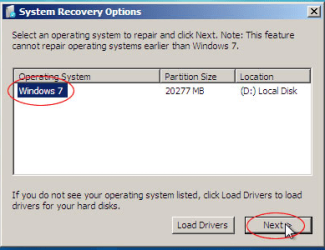
And yes, I have tried "startup repair" (only 1TB drive attached) from DVD already and what I found funny is that when I attempt to do that, it doesn´t "find" my OS on that HD to recover... I don´t know if I´m making myself clear, but on this screen (SEE ATTACHED) My OS doesn´t show on the list.
One final observation: My HD is not connected on the first SATA port of the Motherboard.

Thank you!
 

Attachments

  • Capturar.PNG
    Capturar.PNG
    32.4 KB · Views: 33

My Computer My Computer

At a glance

Windows 7 Professional 32bitCore 2 Duo E84002x1GB OCZ Platinum DDR2Radeon HD4870
Computer type
PC/Desktop
Computer Manufacturer/Model Number
custom
OS
Windows 7 Professional 32bit
CPU
Core 2 Duo E8400
Motherboard
Asus P5k Premium
Memory
2x1GB OCZ Platinum DDR2
Graphics Card(s)
Radeon HD4870
Antivirus
Microsoft Security Essentials
1TB HD (100GB for OS) is a primary partition? Is it marked active?
 

My Computer My Computer

At a glance

Microsoft Windows 7 Home Premium 64-bits 7601...Intel(R) Core(TM) i3 CPU M 370 @ 2.40GHz4,00 GBATI Mobility Radeon HD 5400 Series
Computer type
Laptop
Computer Manufacturer/Model Number
ACER ASPIRE 5742G
OS
Microsoft Windows 7 Home Premium 64-bits 7601 Multiprocessor Free Service Pack 1
CPU
Intel(R) Core(TM) i3 CPU M 370 @ 2.40GHz
Motherboard
Acer Aspire 5742G
Memory
4,00 GB
Graphics Card(s)
ATI Mobility Radeon HD 5400 Series
Sound Card
(1) AMD High Definition Audio Device (2) Realtek High Defi
Screen Resolution
1366 x 768 x 32 bits (4294967296 colors) @ 60 Hz
Hard Drives
WDC WD5000BEVT-22ZAT0
I believe so, it was working fine. Then I removed my 250GB disk and it doesn´t boot anymore.
I believe the info for my Win7 boot was saved on the 250GB MBR, since it was on the SATA0 port. As I removed it, I was unable to boot to Win7 anymore.
But I can confirm that information you requested as soon as I get home tonight.

Thanks;
 

My Computer My Computer

At a glance

Windows 7 Professional 32bitCore 2 Duo E84002x1GB OCZ Platinum DDR2Radeon HD4870
Computer type
PC/Desktop
Computer Manufacturer/Model Number
custom
OS
Windows 7 Professional 32bit
CPU
Core 2 Duo E8400
Motherboard
Asus P5k Premium
Memory
2x1GB OCZ Platinum DDR2
Graphics Card(s)
Radeon HD4870
Antivirus
Microsoft Security Essentials
Post screenshot later please (as asked in #2 )
 

My Computer My Computer

At a glance

Microsoft Windows 7 Home Premium 64-bits 7601...Intel(R) Core(TM) i3 CPU M 370 @ 2.40GHz4,00 GBATI Mobility Radeon HD 5400 Series
Computer type
Laptop
Computer Manufacturer/Model Number
ACER ASPIRE 5742G
OS
Microsoft Windows 7 Home Premium 64-bits 7601 Multiprocessor Free Service Pack 1
CPU
Intel(R) Core(TM) i3 CPU M 370 @ 2.40GHz
Motherboard
Acer Aspire 5742G
Memory
4,00 GB
Graphics Card(s)
ATI Mobility Radeon HD 5400 Series
Sound Card
(1) AMD High Definition Audio Device (2) Realtek High Defi
Screen Resolution
1366 x 768 x 32 bits (4294967296 colors) @ 60 Hz
Hard Drives
WDC WD5000BEVT-22ZAT0
Can you plug back in the other HD to boot Win7 so you can post back the screenshot of Disk Management - Post a Screen Capture Image which will tell us what we need to know? Make sure the 250gb HD is set first to boot in BIOS setup when you do this.

If not unplug all other HD's, boot into System Recovery Options on the Win7 DVD or System Repair Disk to confirm that the Win7 partition or it's 100mb SYstem Reserved partition (preferred if you have it) is Partition Marked Active.

Then close the Command Box, return to Recovery Options to run Startup Repair - Run up to 3 Separate Times until Win7 starts.

The Win7 installer is available in Step 5 of Troubleshooting Windows 7 Failure to Start which also links to the Partition Wizard boot disk which can provide a disk map so you can see what you're doing to Mark Partition Active, post back a camera snap of the full drive map and listings for us to help better.
 
Hi everybody, sorry for the late response...
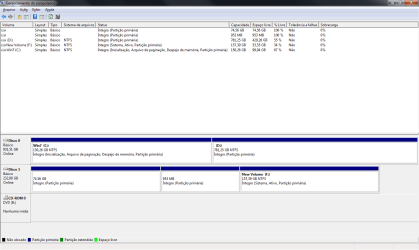
So, I booted from my 250HD again, and here is my Disk Mgmnt screenshot.
Thank you!

Edit: The 74,56GB partition is for Ubuntu, and the 953MB partition is for SWAP for Linux as well.
Both on Disk1.
 

Attachments

  • aghhfhed.png
    aghhfhed.png
    23.3 KB · Views: 8

My Computer My Computer

At a glance

Windows 7 Professional 32bitCore 2 Duo E84002x1GB OCZ Platinum DDR2Radeon HD4870
Computer type
PC/Desktop
Computer Manufacturer/Model Number
custom
OS
Windows 7 Professional 32bit
CPU
Core 2 Duo E8400
Motherboard
Asus P5k Premium
Memory
2x1GB OCZ Platinum DDR2
Graphics Card(s)
Radeon HD4870
Antivirus
Microsoft Security Essentials
F holds the System flag which signifies which partition is booting Win7, and is marked Active which points to the partition intended to boot Win7.

To repair this, Mark C Partition Active in Disk Mgmt, power down to remove the 250gb HD, then boot into Win7 installer or Repair CD to run Startup Repair - Run up to 3 Separate Times until Win7 starts and the System flag is on C.

You can then plug back in the other HD, back up its data and wipe it using Diskpart Clean Command to get it cleanest to repartition in Disk Mgmt. Partition or Volume - Create New
 
I guess I'll bow out of this thread.:rolleyes:

Seba follow the advice and and you'll be OK. Post back if you need more help.
 

My Computer My Computer

At a glance

Windows 10 Pro x64 ; Xubuntu x64Intel i7 860 @ 2.80 GHz O/C'ed to 4.0GHz16GB Corsair Vengance DDR3 @ 661 MHz Dual Cha...EVGA NVidia GTX 560 1024MB
Computer type
PC/Desktop
Computer Manufacturer/Model Number
Golden Mk. I.4
OS
Windows 10 Pro x64 ; Xubuntu x64
CPU
Intel i7 860 @ 2.80 GHz O/C'ed to 4.0GHz
Motherboard
Gigabyte P55A-UD3R Rev.1. Award BIOS F13
Memory
16GB Corsair Vengance DDR3 @ 661 MHz Dual Channel (9-9-9-24)
Graphics Card(s)
EVGA NVidia GTX 560 1024MB
Sound Card
Realtek Integrated
Monitor(s) Displays
Dual Samsung SyncMaster 2494HS
Screen Resolution
1920*1080 and 1920*1080
Hard Drives
1*Samsung 840 EVO 120GB SSD;
1*OCZ Vertex 2 60GB SSD;
2*Samsung F3 SpinPoint 1TB in RAID0;
1*Samsung F1 SpinPoint 1TB;
2*Western Digital 1TB External USB 3.0
1*Western Digital 500GB External USB 3.0
1*Seagate 500GB External USB 2.0
PSU
Thermaltake ToughPower QFan 750W
Case
Thermaltake Element S VK60001W2Z
Cooling
Corsair H60 Water Cooling, 2*230mm and 2*80mm case fans
Keyboard
Logitech G110
Mouse
Logitech MX518
Thank you for your help Golden, I'll try that Greg.
Thanks
 

My Computer My Computer

At a glance

Windows 7 Professional 32bitCore 2 Duo E84002x1GB OCZ Platinum DDR2Radeon HD4870
Computer type
PC/Desktop
Computer Manufacturer/Model Number
custom
OS
Windows 7 Professional 32bit
CPU
Core 2 Duo E8400
Motherboard
Asus P5k Premium
Memory
2x1GB OCZ Platinum DDR2
Graphics Card(s)
Radeon HD4870
Antivirus
Microsoft Security Essentials
It worked!, and I had to run the recovery tool only twice.
Thanks a lot Kaktussoft, Greg and Golden, I gotta say your work is flawless!
 

My Computer My Computer

At a glance

Windows 7 Professional 32bitCore 2 Duo E84002x1GB OCZ Platinum DDR2Radeon HD4870
Computer type
PC/Desktop
Computer Manufacturer/Model Number
custom
OS
Windows 7 Professional 32bit
CPU
Core 2 Duo E8400
Motherboard
Asus P5k Premium
Memory
2x1GB OCZ Platinum DDR2
Graphics Card(s)
Radeon HD4870
Antivirus
Microsoft Security Essentials
:thumbsup:
 

My Computer My Computer

At a glance

Windows 10 Pro x64 ; Xubuntu x64Intel i7 860 @ 2.80 GHz O/C'ed to 4.0GHz16GB Corsair Vengance DDR3 @ 661 MHz Dual Cha...EVGA NVidia GTX 560 1024MB
Computer type
PC/Desktop
Computer Manufacturer/Model Number
Golden Mk. I.4
OS
Windows 10 Pro x64 ; Xubuntu x64
CPU
Intel i7 860 @ 2.80 GHz O/C'ed to 4.0GHz
Motherboard
Gigabyte P55A-UD3R Rev.1. Award BIOS F13
Memory
16GB Corsair Vengance DDR3 @ 661 MHz Dual Channel (9-9-9-24)
Graphics Card(s)
EVGA NVidia GTX 560 1024MB
Sound Card
Realtek Integrated
Monitor(s) Displays
Dual Samsung SyncMaster 2494HS
Screen Resolution
1920*1080 and 1920*1080
Hard Drives
1*Samsung 840 EVO 120GB SSD;
1*OCZ Vertex 2 60GB SSD;
2*Samsung F3 SpinPoint 1TB in RAID0;
1*Samsung F1 SpinPoint 1TB;
2*Western Digital 1TB External USB 3.0
1*Western Digital 500GB External USB 3.0
1*Seagate 500GB External USB 2.0
PSU
Thermaltake ToughPower QFan 750W
Case
Thermaltake Element S VK60001W2Z
Cooling
Corsair H60 Water Cooling, 2*230mm and 2*80mm case fans
Keyboard
Logitech G110
Mouse
Logitech MX518
Back
Top