Unable to boot windows, repair, or restore

Curb71

New member
Local time
10:56 AM
Messages
4
I have a Dell desktop and it's barely over a year old and today it would not start. I've tried Startup Repair about 5 times and get an error. I've tried system restore and it found a restore point but failed to complete the process. I'll attach some pictures I took of the errors. I'm pretty computer literate, or at least like to think so. Please give me some more ideas on what I can do to get this to boot back up and/or fix the problem.
I get this BSOD for a split second after it hangs up for a long time in the "Windows loading" screen then the computer reboots and hangs up on the Dell logo screen.

View attachment 350521

I am able to open a command prompt. I have not tried nor know much about what I can do if I boot into safe mode or bios.

View attachment 350522
View attachment 350523
View attachment 350524
 
Last edited by a moderator:

My Computer My Computer

At a glance

Windows 7 x64i7-4770 Processor (8M Cache, up to 3.9 GHz)DG8X9 8GB Dual Channel DDR3 at 1600MhzW84W5 1 GB NVIDIA GeForce GT 635 DDR3
Computer type
PC/Desktop
Computer Manufacturer/Model Number
Dell XPS 8700
OS
Windows 7 x64
CPU
i7-4770 Processor (8M Cache, up to 3.9 GHz)
Memory
DG8X9 8GB Dual Channel DDR3 at 1600Mhz
Graphics Card(s)
W84W5 1 GB NVIDIA GeForce GT 635 DDR3
Hard Drives
C: Samsung 120gb SSD
Internal: KPF74 1TB 7200 rpm SATA 6Gb/s Hard Drive
Antivirus
AVG
Browser
Chrome
A 0xD1 with iastorA.sys ....

Intel Rapid Storage sometimes fails. It is not very rare.

Boot into the BISO, check the storage controller mode (IDE or AHCI). Let us know.
 

My Computer My Computer

At a glance

Microsoft Windows 10 Pro Insider Preview 64-bitIntel(R) Core(TM) i3-4130 CPU @ 3.40GHzCorsair Vengence 4GB x2 (8.00GB Dual-Channel ...2047MB GeForce GTS 450 (ZOTAC International)
Computer type
PC/Desktop
Computer Manufacturer/Model Number
Self Assembled
OS
Microsoft Windows 10 Pro Insider Preview 64-bit
CPU
Intel(R) Core(TM) i3-4130 CPU @ 3.40GHz
Motherboard
Gigabyte Technology Co., Ltd. B85M-D3H
Memory
Corsair Vengence 4GB x2 (8.00GB Dual-Channel DDR3 @ 798MHz)
Graphics Card(s)
2047MB GeForce GTS 450 (ZOTAC International)
Sound Card
Onboard (Realtek High Definition Audio)
Monitor(s) Displays
LG Flatron E2040T
Screen Resolution
1600x900
Hard Drives
Western Digital 1 TB
Seagate 500 GB
PSU
Corsair VS550
Case
Cooler Master K380
Cooling
Cooler Master Seidon 120V Plus
Keyboard
Logitech MK260r
Mouse
Logitech MK260r
Internet Speed
PMPL Broadband
Antivirus
Windows Defender + MBAM
Browser
Firefox
Other Info
Dell Studio 15" Laptop
A 0xD1 with iastorA.sys ....

Intel Rapid Storage sometimes fails. It is not very rare.

Boot into the BISO, check the storage controller mode (IDE or AHCI). Let us know.

In BIOS I found "Onboard Device Configuration" and in there is SATA Mode and it is AHCI with no option to edit it or change it to IDE. I also just replaced the SSD and reinstalled the OS and still it was "unable to start".
 

My Computer My Computer

At a glance

Windows 7 x64i7-4770 Processor (8M Cache, up to 3.9 GHz)DG8X9 8GB Dual Channel DDR3 at 1600MhzW84W5 1 GB NVIDIA GeForce GT 635 DDR3
Computer type
PC/Desktop
Computer Manufacturer/Model Number
Dell XPS 8700
OS
Windows 7 x64
CPU
i7-4770 Processor (8M Cache, up to 3.9 GHz)
Memory
DG8X9 8GB Dual Channel DDR3 at 1600Mhz
Graphics Card(s)
W84W5 1 GB NVIDIA GeForce GT 635 DDR3
Hard Drives
C: Samsung 120gb SSD
Internal: KPF74 1TB 7200 rpm SATA 6Gb/s Hard Drive
Antivirus
AVG
Browser
Chrome
At which point of the reinstall it was unable to start? Just after teh OS is installed, or after installing the drivers?

Also, remove the HDD and try to boot with the SSD only. Does it boot?
 

My Computer My Computer

At a glance

Microsoft Windows 10 Pro Insider Preview 64-bitIntel(R) Core(TM) i3-4130 CPU @ 3.40GHzCorsair Vengence 4GB x2 (8.00GB Dual-Channel ...2047MB GeForce GTS 450 (ZOTAC International)
Computer type
PC/Desktop
Computer Manufacturer/Model Number
Self Assembled
OS
Microsoft Windows 10 Pro Insider Preview 64-bit
CPU
Intel(R) Core(TM) i3-4130 CPU @ 3.40GHz
Motherboard
Gigabyte Technology Co., Ltd. B85M-D3H
Memory
Corsair Vengence 4GB x2 (8.00GB Dual-Channel DDR3 @ 798MHz)
Graphics Card(s)
2047MB GeForce GTS 450 (ZOTAC International)
Sound Card
Onboard (Realtek High Definition Audio)
Monitor(s) Displays
LG Flatron E2040T
Screen Resolution
1600x900
Hard Drives
Western Digital 1 TB
Seagate 500 GB
PSU
Corsair VS550
Case
Cooler Master K380
Cooling
Cooler Master Seidon 120V Plus
Keyboard
Logitech MK260r
Mouse
Logitech MK260r
Internet Speed
PMPL Broadband
Antivirus
Windows Defender + MBAM
Browser
Firefox
Other Info
Dell Studio 15" Laptop
At which point of the reinstall it was unable to start? Just after teh OS is installed, or after installing the drivers?

Also, remove the HDD and try to boot with the SSD only. Does it boot?

It crashes when installing drivers and windows updates. Dell's website finds my computer based on the Service Tag and tells me which drivers to install but since I bought the computer I added the SSD, added a bluray burner, and upgraded the video card. How do I know which drivers are or aren't for my computer ?
The computer boots with or without the HDD since that is just a storage drive.
 

My Computer My Computer

At a glance

Windows 7 x64i7-4770 Processor (8M Cache, up to 3.9 GHz)DG8X9 8GB Dual Channel DDR3 at 1600MhzW84W5 1 GB NVIDIA GeForce GT 635 DDR3
Computer type
PC/Desktop
Computer Manufacturer/Model Number
Dell XPS 8700
OS
Windows 7 x64
CPU
i7-4770 Processor (8M Cache, up to 3.9 GHz)
Memory
DG8X9 8GB Dual Channel DDR3 at 1600Mhz
Graphics Card(s)
W84W5 1 GB NVIDIA GeForce GT 635 DDR3
Hard Drives
C: Samsung 120gb SSD
Internal: KPF74 1TB 7200 rpm SATA 6Gb/s Hard Drive
Antivirus
AVG
Browser
Chrome
For the SSD and Bluray, you dont need any driver. Use teh mi

For the graphics card, install it from Drivers - Download NVIDIA Drivers

From Dell, take only the chipset, audio and network.

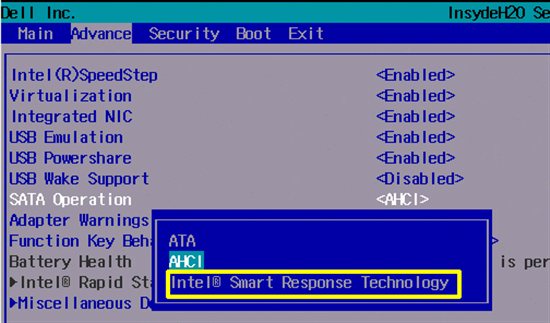
When all the drivers are collected, boot to the BIOS. Disable Intel Rapid Storage/Smart Response.

Now do another clean install and apply only these drivers. See how it goes.
 

My Computer My Computer

At a glance

Microsoft Windows 10 Pro Insider Preview 64-bitIntel(R) Core(TM) i3-4130 CPU @ 3.40GHzCorsair Vengence 4GB x2 (8.00GB Dual-Channel ...2047MB GeForce GTS 450 (ZOTAC International)
Computer type
PC/Desktop
Computer Manufacturer/Model Number
Self Assembled
OS
Microsoft Windows 10 Pro Insider Preview 64-bit
CPU
Intel(R) Core(TM) i3-4130 CPU @ 3.40GHz
Motherboard
Gigabyte Technology Co., Ltd. B85M-D3H
Memory
Corsair Vengence 4GB x2 (8.00GB Dual-Channel DDR3 @ 798MHz)
Graphics Card(s)
2047MB GeForce GTS 450 (ZOTAC International)
Sound Card
Onboard (Realtek High Definition Audio)
Monitor(s) Displays
LG Flatron E2040T
Screen Resolution
1600x900
Hard Drives
Western Digital 1 TB
Seagate 500 GB
PSU
Corsair VS550
Case
Cooler Master K380
Cooling
Cooler Master Seidon 120V Plus
Keyboard
Logitech MK260r
Mouse
Logitech MK260r
Internet Speed
PMPL Broadband
Antivirus
Windows Defender + MBAM
Browser
Firefox
Other Info
Dell Studio 15" Laptop
For the SSD and Bluray, you dont need any driver. Use teh mi

For the graphics card, install it from Drivers - Download NVIDIA Drivers

From Dell, take only the chipset, audio and network.

When all the drivers are collected, boot to the BIOS. Disable Intel Rapid Storage/Smart Response.

Now do another clean install and apply only these drivers. See how it goes.

I'm not able to find Intel Rapid Storage/Smart Response in BIOS. I'll try another fresh install and only install the minimal drivers as you mentioned.
 

My Computer My Computer

At a glance

Windows 7 x64i7-4770 Processor (8M Cache, up to 3.9 GHz)DG8X9 8GB Dual Channel DDR3 at 1600MhzW84W5 1 GB NVIDIA GeForce GT 635 DDR3
Computer type
PC/Desktop
Computer Manufacturer/Model Number
Dell XPS 8700
OS
Windows 7 x64
CPU
i7-4770 Processor (8M Cache, up to 3.9 GHz)
Memory
DG8X9 8GB Dual Channel DDR3 at 1600Mhz
Graphics Card(s)
W84W5 1 GB NVIDIA GeForce GT 635 DDR3
Hard Drives
C: Samsung 120gb SSD
Internal: KPF74 1TB 7200 rpm SATA 6Gb/s Hard Drive
Antivirus
AVG
Browser
Chrome
OK, go for it.

But if Intel Rapid Storage is enabled in the BIOS, then the clean install will gather iastor.sys automatically.

urNGB.jpg


2555.rapid_5F00_bios1.jpg
 

My Computer My Computer

At a glance

Microsoft Windows 10 Pro Insider Preview 64-bitIntel(R) Core(TM) i3-4130 CPU @ 3.40GHzCorsair Vengence 4GB x2 (8.00GB Dual-Channel ...2047MB GeForce GTS 450 (ZOTAC International)
Computer type
PC/Desktop
Computer Manufacturer/Model Number
Self Assembled
OS
Microsoft Windows 10 Pro Insider Preview 64-bit
CPU
Intel(R) Core(TM) i3-4130 CPU @ 3.40GHz
Motherboard
Gigabyte Technology Co., Ltd. B85M-D3H
Memory
Corsair Vengence 4GB x2 (8.00GB Dual-Channel DDR3 @ 798MHz)
Graphics Card(s)
2047MB GeForce GTS 450 (ZOTAC International)
Sound Card
Onboard (Realtek High Definition Audio)
Monitor(s) Displays
LG Flatron E2040T
Screen Resolution
1600x900
Hard Drives
Western Digital 1 TB
Seagate 500 GB
PSU
Corsair VS550
Case
Cooler Master K380
Cooling
Cooler Master Seidon 120V Plus
Keyboard
Logitech MK260r
Mouse
Logitech MK260r
Internet Speed
PMPL Broadband
Antivirus
Windows Defender + MBAM
Browser
Firefox
Other Info
Dell Studio 15" Laptop
Back
Top