Unable to change Power settings

simonjhutton

New member
Local time
10:03 PM
Messages
2
Hi, I have been having some issues changing the power settings on my Dell desktop running Windows 7 Ultimate. When i go into Control Panel and then into Power settings all i get is a little red circle with a x in it. Any ideas?
Untitled | Flickr - Photo Sharing!
 

My Computer My Computer

At a glance

Windows 7 Ultimate
OS
Windows 7 Ultimate
Have you tried booting in Safe Mode?
 

My Computer My Computer

At a glance

Windows 7 Home Premium x64 SP1Intel Core i3 M350 @ 2.27 GHzKingston TSB1066D3S7DR8/2GIntel HD Graphics
Computer Manufacturer/Model Number
Toshiba Satellite A665-S6050
OS
Windows 7 Home Premium x64 SP1
CPU
Intel Core i3 M350 @ 2.27 GHz
Motherboard
Toshiba NWQAA
Memory
Kingston TSB1066D3S7DR8/2G
Graphics Card(s)
Intel HD Graphics
Sound Card
Realtek High Definition Audio
Monitor(s) Displays
Generic PnP Monitor _-_ Samsung 160AT06-U01 16" LCD
Hard Drives
Seagate 500 GB HD
PSU
Toshiba Smart Battery(Lithium-ion) w/ Adapter
Case
Laptop
Cooling
Stock Fan

My Computer My Computer

At a glance

Originally Win 7 Hm Prem x64 Ver 6.1.7600 Bui...Intel i3 530 2.93GHz, 2933MHz 2 Cores 4 Logic...6GB of 1,333MHz DDR3 SDRAM32MB Intel Graphics Media Accelerator HD IGChip
Computer type
PC/Desktop
Computer Manufacturer/Model Number
Gateway DX4831-01e (Mid-Tower Desktop)
OS
Originally Win 7 Hm Prem x64 Ver 6.1.7600 Build 7601-SP1 | Upgraded to Windows 10 December 14, 2019
CPU
Intel i3 530 2.93GHz, 2933MHz 2 Cores 4 Logical Processors
Motherboard
Gateway H57M01 133 megahertz
Memory
6GB of 1,333MHz DDR3 SDRAM
Graphics Card(s)
32MB Intel Graphics Media Accelerator HD IGChip
Sound Card
Realtek High Definition Audio
Monitor(s) Displays
Gateway HX2000 20inch TFT active matrix TN
Screen Resolution
1600 x 900 x 59 hertz
Hard Drives
WDC WD10EADS-00M2B0 [HDD] (1000.20 GB) -- drive 0,
HL-DT-ST DVDRAM GH41N [CD-ROM dr]
Four card readers, and Four USB 2.0
PSU
300watts.
Case
Mid-Tower Desktop
Cooling
Stock from Gateway
Keyboard
Natural Ergonomic Keyboard 4000, see Other Info
Mouse
Orig. Gateway wore out now using Insignia USB wired optical
Internet Speed
Vz FIOS 10ms png 57.64Mbps down 65.53Mbps up Speedtest.org
Antivirus
Zamana Anti-logger with Anti-malware, MSE, Windows Firewall,
Browser
IE11.0.9600.19399-Upd ver11.0.135, Firefox 68.0.1 x64
Other Info
System Specs by Belarc.

BIOS: American Megatrends Inc. P01-A0 11/17/2009

Replaced the MS 'Natural' Standard PS/2 Enhanced 101-102 Keyboard with a new Natural Ergonomic Keyboard 4000 on August 1st 2014.

Canon Pixma MG3222 Printer.

Updated to IE11 on 12102015 | Fios Quantum Router g1100

Additional AV: SpywareBlaster, manual Mbam, SAS
Have ran SFC Scannow 3 times with a reboot between runs but still no luck with Power Settings. Have ran malware and virus scans and all clear. Really don't want to do a reinstall of Windows, got too many programs that'd need reinstalling :(
 

My Computer My Computer

At a glance

Windows 7 Ultimate
OS
Windows 7 Ultimate
Well, a repair installation (or clean install) will help, but it may affect some programs.

Another option is to try something like REIMAGE, that only restores files that are missing or corrupted.
 

My Computer My Computer

At a glance

Windows 7 HP / Ultimate x64Core i5 / X4 955 BE4GB DDR3 1333Mhz / 8GB DDR3 1600MhzHD5470 / HD5670
Computer Manufacturer/Model Number
Dell / Custom
OS
Windows 7 HP / Ultimate x64
CPU
Core i5 / X4 955 BE
Motherboard
OEM / Gigabyte 880GM-USB3
Memory
4GB DDR3 1333Mhz / 8GB DDR3 1600Mhz
Graphics Card(s)
HD5470 / HD5670
Sound Card
Onboard
Monitor(s) Displays
FullHD 15" / Dell 22" WS
Screen Resolution
1920x1080 / 1680x1050
Hard Drives
320GB / 1.5TB
PSU
CM
Case
CM
Cooling
CM, Antec
Keyboard
Logitech
Mouse
Logitech
Please answer:
Is the Power Options applet the only Control Panel applet affected like that?
Are you using an Administrator account to access power options?


Lets see if we can get into Power options another way, go to http://www.sevenforums.com/tutorials/950-power-plan-restore-default-settings.html Option two.
1.) Copy/paste powercfg.cpl into the Search or run box (preferred) if you have a run box.

2.) R-click on your Desktop l-click on personalization l-click on Screensaver last on the right, at the bottom click on Change Power Settings.

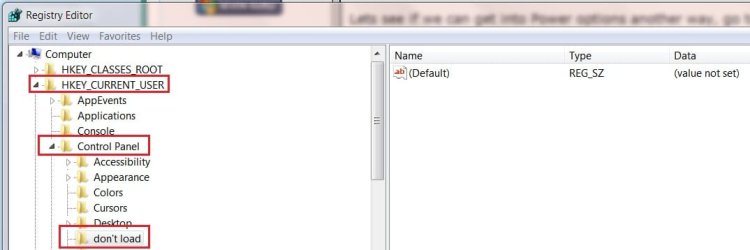
3.) Lets check a registry setting. Copy/paste Regedit.exe into the Search or run box (preferred) if you have a run box.

Once the registry editor is open click on HKEY_CURRENT_USER; Then \Control Panel, Then \don't load
Do you see any values in the right hand pane other than what is shown here?
reg dont load.jpg

4.) If none of this works try creating a new http://www.sevenforums.com/tutorials/2974-user-accounts.html with Administrative rights, or you could try to change the one you already have: http://www.sevenforums.com/tutorials/103538-user-account-type-change.html
The user account you now have may not have proper rights or is corrupt.

EDIT:
5.) Just thought of http://www.sevenforums.com/tutorials/49819-icon-cache-rebuild.html, and if that does not help try repairing the http://www.sevenforums.com/tutorials/19449-default-file-type-associations-restore.html


Not just yet, but you may have to consider doing the Repair Install , which is not as destructive as the Clean Install .
 
Last edited:

My Computer My Computer

At a glance

Originally Win 7 Hm Prem x64 Ver 6.1.7600 Bui...Intel i3 530 2.93GHz, 2933MHz 2 Cores 4 Logic...6GB of 1,333MHz DDR3 SDRAM32MB Intel Graphics Media Accelerator HD IGChip
Computer type
PC/Desktop
Computer Manufacturer/Model Number
Gateway DX4831-01e (Mid-Tower Desktop)
OS
Originally Win 7 Hm Prem x64 Ver 6.1.7600 Build 7601-SP1 | Upgraded to Windows 10 December 14, 2019
CPU
Intel i3 530 2.93GHz, 2933MHz 2 Cores 4 Logical Processors
Motherboard
Gateway H57M01 133 megahertz
Memory
6GB of 1,333MHz DDR3 SDRAM
Graphics Card(s)
32MB Intel Graphics Media Accelerator HD IGChip
Sound Card
Realtek High Definition Audio
Monitor(s) Displays
Gateway HX2000 20inch TFT active matrix TN
Screen Resolution
1600 x 900 x 59 hertz
Hard Drives
WDC WD10EADS-00M2B0 [HDD] (1000.20 GB) -- drive 0,
HL-DT-ST DVDRAM GH41N [CD-ROM dr]
Four card readers, and Four USB 2.0
PSU
300watts.
Case
Mid-Tower Desktop
Cooling
Stock from Gateway
Keyboard
Natural Ergonomic Keyboard 4000, see Other Info
Mouse
Orig. Gateway wore out now using Insignia USB wired optical
Internet Speed
Vz FIOS 10ms png 57.64Mbps down 65.53Mbps up Speedtest.org
Antivirus
Zamana Anti-logger with Anti-malware, MSE, Windows Firewall,
Browser
IE11.0.9600.19399-Upd ver11.0.135, Firefox 68.0.1 x64
Other Info
System Specs by Belarc.

BIOS: American Megatrends Inc. P01-A0 11/17/2009

Replaced the MS 'Natural' Standard PS/2 Enhanced 101-102 Keyboard with a new Natural Ergonomic Keyboard 4000 on August 1st 2014.

Canon Pixma MG3222 Printer.

Updated to IE11 on 12102015 | Fios Quantum Router g1100

Additional AV: SpywareBlaster, manual Mbam, SAS
Back
Top