Unable to change Wecome Screen Photo/Icon

Indian

New member
Local time
4:36 PM
Messages
25
Location
Gahanna, Ohio
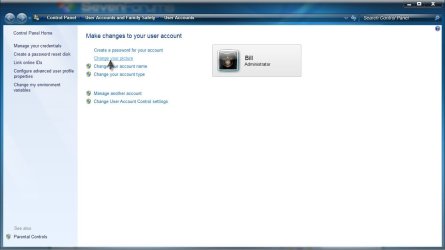
Clicking on Start Menu then clicking on small photo at top of Start Menu takes me to User Accounts (as does going to Control Panel/User Accounts), clicking on “Change Your Picture” I select a different photo. The photo changes at the top of the Start Menu but on shutdown and boot up the previous photo is the same. In what folder is the selected photo stored? I believe I copied a photo and renamed it Welcome.jpg but searching my hard drive I cannot find this file. Any ideas how to fix this problem so that the small selected photo at the top of the start menu is he same on the Welcome Screen? Thanks.
 

My Computer My Computer

At a glance

Windows 7 Pro3 GB
Computer Manufacturer/Model Number
Home Built
OS
Windows 7 Pro
Motherboard
Intel DQ965GF
Memory
3 GB
Monitor(s) Displays
Dell (1)
Hard Drives
2
The default pictures are stored in C:\ProgramData\Microsoft\User Account Pictures\Default Pictures

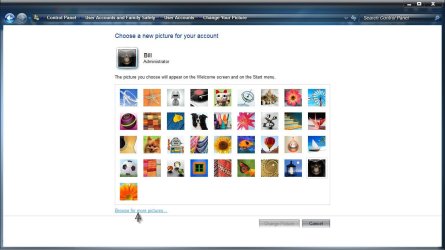
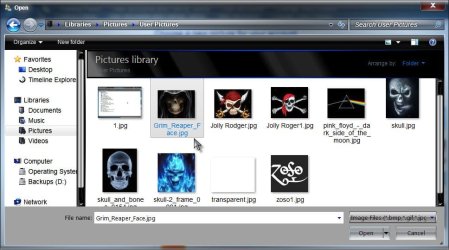
You can either store the image you want in C:\ProgramData\Microsoft\User Account Pictures , or when you choose the user picture, just browse to the location you save the picture to (the pictures library for instance).

Change.jpg

Browse.jpg

Users.jpg

I actually have removed my user picture using the NoUserPicture.exe

http://www.sevenforums.com/customization/43663-remove-user-picture-start-menu.html

A Guy
 

My Computer My Computer

At a glance

Windows 10 Home x64INTEL Core i5-750 Quad-Core 3.37GHzHyperX Fury Black Series 8GB (2 x 4GB) 1866MhzEVGA GeForce GTX 750 Superclocked 1GB 128-Bit...
Computer type
PC/Desktop
OS
Windows 10 Home x64
CPU
INTEL Core i5-750 Quad-Core 3.37GHz
Motherboard
ASUS P7P55D
Memory
HyperX Fury Black Series 8GB (2 x 4GB) 1866Mhz
Graphics Card(s)
EVGA GeForce GTX 750 Superclocked 1GB 128-Bit GDDR5
Monitor(s) Displays
LG 32MA68HY 32" IPS
Screen Resolution
1920 x 1080
Hard Drives
Samsung 840 Evo 120GB, SEAGATE 500GB Barracuda® 7200.12, SATA 3 Gb/s, 7200 RPM, 16MB cache
PSU
ANTEC TruePower New TP-550, 80 PLUS, 550W
Case
ANTEC Three Hundred Illusion
Cooling
COOLER MASTER Hyper 212 Plus, 4 x 120mm 1 x 140mm Noctua's
Internet Speed
85 + Mbps
Antivirus
Avast
Browser
Vivaldi
Does NoUserPicture.exe remove the welcome screen photo? The photo I use is in a photo folder and not the path described above. I have removed the photo and it still remains on the welcome screen. I can change the start menu photo but this action does not change the welcome screen photo. I believe the start menu photo automatically is suppose to be the welcome screen photo.
 
Last edited:

My Computer My Computer

At a glance

Windows 7 Pro3 GB
Computer Manufacturer/Model Number
Home Built
OS
Windows 7 Pro
Motherboard
Intel DQ965GF
Memory
3 GB
Monitor(s) Displays
Dell (1)
Hard Drives
2

My Computer My Computer

At a glance

64-bit Windows 11 Pro for WorkstationsIntel i7-8700K OC'd to 5 GHz64 GB (4x16GB) G.SKILL TridentZ RGB DDR4 3600...ASUS ROG-STRIX-GTX1080TI-O11G-GAMING
Computer type
PC/Desktop
Computer Manufacturer/Model Number
Self built custom
OS
64-bit Windows 11 Pro for Workstations
CPU
Intel i7-8700K OC'd to 5 GHz
Motherboard
ASUS ROG Maximus XI Formula Z390
Memory
64 GB (4x16GB) G.SKILL TridentZ RGB DDR4 3600 MHz
Graphics Card(s)
ASUS ROG-STRIX-GTX1080TI-O11G-GAMING
Sound Card
Integrated
Monitor(s) Displays
2 x Samsung Odyssey G7 27"
Screen Resolution
2560x1440
Hard Drives
1TB Samsung 990 PRO M.2,
4TB Samsung 990 PRO PRO M.2,
TerraMaster F8 SSD Plus NAS
PSU
Seasonic Prime Titanium 850W
Case
Thermaltake Core P3
Cooling
Corsair Hydro H115i
Keyboard
Logitech wireless K800
Mouse
Logitech MX Master 4
Internet Speed
2 Gb/s Download and 100 Mb/s Upload
Antivirus
Malwarebyte Anti-Malware Premium
Browser
Google Chrome
Other Info
Logitech Z625 speaker system,
Logitech BRIO 4K Pro webcam,
HP Color LaserJet Pro MFP M477fdn,
APC SMART-UPS RT 1000 XL - SURT1000XLI,
Galaxy S23 Plus phone
Back
Top