Solved Unable to configure network properties

KevinStorm

New member
Local time
7:21 PM
Messages
11
network properties.jpg
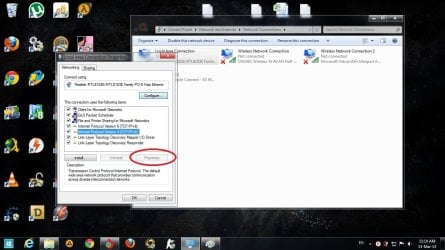
as you can see the properties button does not lit up and remains grey out although i click on IPV4, why is this happening? i was open it a few years ago
 

My Computer

OS
Windows 7 Ultimate 32bit

My Computer

Computer type
PC/Desktop
Computer Manufacturer/Model Number
Bruce ... somewhere in his 40's
OS
Windows 7 Ultimate 32bit SP1
CPU
Intel(R) Core(TM)2 Quad CPU @ 2.40GHz, 2400 MHz
Motherboard
INTEL/D975XBX2
Memory
4 GB
Graphics Card(s)
ATI Radeon HD 2600 Pro
Monitor(s) Displays
Samsung SyncMaster 914v
Screen Resolution
1280 x 1024
Hard Drives
2/500GB each ... ST3500630AS ATA Device.
One is not connected
PSU
Rocketfish 700 W
Case
G.Skill Gigabyte Chassis
Keyboard
Standard PS/2 Keyboard
Mouse
Microsoft PS/2 Mouse
Internet Speed
DSL
Antivirus
Avira Internet Security
Browser
IE 11
Other Info
ATI HDMI Audio
Jacee

For him to do that he would have to press Properties . By his image that button is greyed out .

@KevinStorm

Try the Group Policy Editor ( only available on Ultimate, Professional, and Enterprise editions of Windows 7 )

Open up a start menu by clicking on :orb: type in gpedit.msc in the Search box or press :orb: key on your keyboard and press R to open up the run window and type in gpedit.msc .

Navigate to
Code:
User Configuration
Administrative Templates
Network
Network Connections

Look for Prohibit access to properties of a LAN connection on the right hand side and see its disabled .
 
Last edited:

My Computer

Computer Manufacturer/Model Number
Custom Built
OS
Windows 7 Ultimate 32-Bit & Windows 7 Ultimate 64-Bit
CPU
Intel Core i7 CPU 950 @ 3.07GHz
Motherboard
ASUS P6T DELUXE V2
Memory
OCZ 6GB (3 x 2GB) 240-Pin DDR3 SDRAM DDR3 1600 OCZ3X1600R2
Graphics Card(s)
ATI Radeon HD 5700 Series
Sound Card
OnBoard
Hard Drives
WD6400AACS-00M3B0 (640GB SATA )
PSU
CORSAIR 850w
Case
NZXT LEXA
Cooling
Intel Stock Heatsink Fan
Keyboard
Microsoft Wireless Laser Keyboard 7000
Mouse
Microsoft Wireless Laser Mouse 7000
i have disabled it,then i took a reboot but it's still greyed out. any ideas?
 

My Computer

OS
Windows 7 Ultimate 32bit
I noticed the shield icon next to one of your desktop icons which makes me think you might not have access/privelages to change the settings. Try enabling built-in administrator account. Do you have any programs that control your network settings, like wifi?
 

My Computer

Computer Manufacturer/Model Number
Me
OS
Windows 7 Pro x64
CPU
Intel Core i7 920
Motherboard
ASUS P6T Deluxe V2
Memory
Corsair XMS3 12GB (3x2GB) DDR3 1333
Graphics Card(s)
EVGA GTX 470 1280MB GDDR5 DX11
Monitor(s) Displays
ASUS VW246H | ACER AL2216W
Screen Resolution
3600x1080
Hard Drives
1x Corsair Vertex 3 SSD (120GB)
1x Corsair Vertex 2 SSD (60GB)
2x Western Digital Black (500GB/1TB)
1x External WD Green eSATA (1TB)
PSU
Corsair 850HX
Case
Velocity Micro FullTower
Keyboard
Logitech G110
Mouse
Logitech G500
Internet Speed
http://www.speedtest.net/result/1226664359.png
Antivirus
MSE
Browser
Chrome
Other Info
Logitech Z-5500 5.1 Surround Sound
Logitech C260 Webcam
Creative Fatal1ty Headset
Kevin Storm

Try this out

1 Reset TCP/IP -> netsh int ip reset <log> (log is needed, ex.
“C:\ResetIP.txt”) don't reboot

2: uninstall-“Client for Microsoft Networks”- reboot
3. Reinstall “Internet Protocol (TCP/IP)” -> Add protocol, click on “Have
disk…” and browse to “C:\%WinDir%\inf\nettcpip.inf” *
   Note
%WinDir% is Windows folder


4. Reinstall -> “Client for Microsoft Networks”
add a Client afterwards, it will show in the list
 

My Computer

Computer Manufacturer/Model Number
Custom Built
OS
Windows 7 Ultimate 32-Bit & Windows 7 Ultimate 64-Bit
CPU
Intel Core i7 CPU 950 @ 3.07GHz
Motherboard
ASUS P6T DELUXE V2
Memory
OCZ 6GB (3 x 2GB) 240-Pin DDR3 SDRAM DDR3 1600 OCZ3X1600R2
Graphics Card(s)
ATI Radeon HD 5700 Series
Sound Card
OnBoard
Hard Drives
WD6400AACS-00M3B0 (640GB SATA )
PSU
CORSAIR 850w
Case
NZXT LEXA
Cooling
Intel Stock Heatsink Fan
Keyboard
Microsoft Wireless Laser Keyboard 7000
Mouse
Microsoft Wireless Laser Mouse 7000
If what VistaKing doesn't solve it
Download this batch file: View attachment TcpIP_reset.bat
Open an elevated command prompt (right clcik command prompt, run as administrator)
Launch the batch file you downloaded
exit command prompt and
reboot

Code:
; netsh int ip reset %UserProfile%\Downloads\Reset_IP.txt
netsh int ipv4 reset %UserProfile%\Downloads\Reset_IPv4.txt
netsh int ipv6 reset %UserProfile%\Downloads\Reset_IPv6.txt
netsh winsock reset

essentially what VistaKing suggested, but with two more steps
 

My Computer

Computer type
Laptop
Computer Manufacturer/Model Number
HP Pavilion dv6-6c10us
OS
x64 (6.3.9600) Win8.1 Pro & soon dual boot x64 (6.1.7601) Win7_SP1 HomePrem
CPU
AMD A6-3420M APU with Radeon(tm) HD Graphics
Motherboard
Hewlett-Packard 1805
Memory
6.00 GB
Graphics Card(s)
AMD Radeon(TM) HD 6520G
Sound Card
(1) AMD High Definition Audio Device (2) IDT High Definiti
Monitor(s) Displays
HP W2072a 20" LCD (1600 x 900) @ 60 Hz
Screen Resolution
1366 x 768 x 32 bits (4294967296 colors) @ 60 Hz
Hard Drives
ST640LM0 00 HM641JI SATA Disk Device
Keyboard
Logitech k520 wireless KB
Mouse
Logitech m320 wireless mouse (bundled with KB)
Internet Speed
15/5 | 54 MB Wireless 'n'
Antivirus
Realtime: Defender or Avast | On-demand: Malwarebytes, ESET
Browser
IE 11 on Win8, IE 10 on win 7
Other Info
Media: [Gimp, Audacity, VLC] || Comm: [WEmail 2012, Skype] || Productivity: [OpenOffice,| Textpad] || Utils: [Sysinternals, cCleaner, Speccy, Defraggler]
thank you, Vistaking i can now click properties. and thank you for everyone who helped in this thread

thank you very much
 

My Computer

OS
Windows 7 Ultimate 32bit
You might want to check your system for Malware - just in case.
Run a full system scan with your real-time Anti-Virus application.
Then...

Download AdwCleaner
:info: The default save location is your Downloads folder.
:note: AdwCleaner is a standalone executable, there is nothing to install.
  1. Navigate to your Downloads folder
    .
  2. Right-click on adwcleaner.exe--> select Run As Administrator to launch the application
    .
  3. Click on Delete button

    picture.php

  4. Confirm each deletion with OK
    .
  5. Your computer will be rebooted automatically.
    --> A text file will open after the restart.
    --> Please post the content of that logfile in a post on this thread
:note: You can find the logfile at C:\AdwCleaner[Sn].txt as well - n is the order number.
 

My Computer

Computer type
Laptop
Computer Manufacturer/Model Number
HP Pavilion dv6-6c10us
OS
x64 (6.3.9600) Win8.1 Pro & soon dual boot x64 (6.1.7601) Win7_SP1 HomePrem
CPU
AMD A6-3420M APU with Radeon(tm) HD Graphics
Motherboard
Hewlett-Packard 1805
Memory
6.00 GB
Graphics Card(s)
AMD Radeon(TM) HD 6520G
Sound Card
(1) AMD High Definition Audio Device (2) IDT High Definiti
Monitor(s) Displays
HP W2072a 20" LCD (1600 x 900) @ 60 Hz
Screen Resolution
1366 x 768 x 32 bits (4294967296 colors) @ 60 Hz
Hard Drives
ST640LM0 00 HM641JI SATA Disk Device
Keyboard
Logitech k520 wireless KB
Mouse
Logitech m320 wireless mouse (bundled with KB)
Internet Speed
15/5 | 54 MB Wireless 'n'
Antivirus
Realtime: Defender or Avast | On-demand: Malwarebytes, ESET
Browser
IE 11 on Win8, IE 10 on win 7
Other Info
Media: [Gimp, Audacity, VLC] || Comm: [WEmail 2012, Skype] || Productivity: [OpenOffice,| Textpad] || Utils: [Sysinternals, cCleaner, Speccy, Defraggler]
If you don't have a real-time Anti-Virus application, you might want to run a full regiment of Malware scans.


On Demand scans

Real time protection (use only one)

Bootable Offline scanners:
 

My Computer

Computer type
Laptop
Computer Manufacturer/Model Number
HP Pavilion dv6-6c10us
OS
x64 (6.3.9600) Win8.1 Pro & soon dual boot x64 (6.1.7601) Win7_SP1 HomePrem
CPU
AMD A6-3420M APU with Radeon(tm) HD Graphics
Motherboard
Hewlett-Packard 1805
Memory
6.00 GB
Graphics Card(s)
AMD Radeon(TM) HD 6520G
Sound Card
(1) AMD High Definition Audio Device (2) IDT High Definiti
Monitor(s) Displays
HP W2072a 20" LCD (1600 x 900) @ 60 Hz
Screen Resolution
1366 x 768 x 32 bits (4294967296 colors) @ 60 Hz
Hard Drives
ST640LM0 00 HM641JI SATA Disk Device
Keyboard
Logitech k520 wireless KB
Mouse
Logitech m320 wireless mouse (bundled with KB)
Internet Speed
15/5 | 54 MB Wireless 'n'
Antivirus
Realtime: Defender or Avast | On-demand: Malwarebytes, ESET
Browser
IE 11 on Win8, IE 10 on win 7
Other Info
Media: [Gimp, Audacity, VLC] || Comm: [WEmail 2012, Skype] || Productivity: [OpenOffice,| Textpad] || Utils: [Sysinternals, cCleaner, Speccy, Defraggler]
Back
Top