
Unable to connect to any wireless networks other than my own.

btdyq5

New member
Local time
9:50 PM
Messages
3
Hello all,

I am having an issue with my Toshiba laptop with Windows 7. When I am at my apartment my computer automatically detects my home wireless network and connects without issue. However, any time I take my laptop somewhere else, like a public hotspot or my network at work, I am prevented from connecting. The adapter finds networks without any problems, but I just can't ever connect to them. When I tried to troubleshoot the problem it said: "none of the networks you have previously connected to are in range." I saw a thread on this forum about a similar problem, and tried the advice that was given (uninstalling the adapter/network, but not the driver, and then rebooting the system), to no avail. I've also tried disabling and re-enabling the adapter, but nothing has helped. At this point when I run diagnostics it just tells me that Windows can't fix the problem. Does anybody know what's up here? Thanks in advance!
 

My Computer My Computer

At a glance

Windows 7. I'm assuming it's the home premium...
Computer Manufacturer/Model Number
Toshiba
OS
Windows 7. I'm assuming it's the home premium but I'm not sure
Hello all,

I am having an issue with my Toshiba laptop with Windows 7. When I am at my apartment my computer automatically detects my home wireless network and connects without issue. However, any time I take my laptop somewhere else, like a public hotspot or my network at work, I am prevented from connecting. The adapter finds networks without any problems, but I just can't ever connect to them. When I tried to troubleshoot the problem it said: "none of the networks you have previously connected to are in range." I saw a thread on this forum about a similar problem, and tried the advice that was given (uninstalling the adapter/network, but not the driver, and then rebooting the system), to no avail. I've also tried disabling and re-enabling the adapter, but nothing has helped. At this point when I run diagnostics it just tells me that Windows can't fix the problem. Does anybody know what's up here? Thanks in advance!

You can't always rely on the auto settings to connect to wireless networks.

Often times you need to go to "Manage Wireless Networks" which is in the Network and Sharing Center.

You can right click on the network icon "lower right on the task bar" to get to the network and sharing center. Once there you can look to the left side and open up "Manage Wireless Networks".

Once there you can type in the SSID "name of network you are connecting too" and also the password for network you are attempting to connect to.

You will need the wireless password for this.

You should also designate the type of security, for Windows 7 it's best to use WPA-2 personal with AES encryption, but all these settings depends on the network you connecting too. You can also put check marks to allow a connection when the network is in range.
 

Attachments

  • wireless set up.PNG
    wireless set up.PNG
    55.6 KB · Views: 210

My Computer My Computer

At a glance

Windows 7 Ult, Windows 8.1 Pro,Q9650-4.275GHz, E8600 4.5GHz, E6750-3.8GHzG.Skill PC2 9600 1200Mhz 5 5 5 15 2TGTX480
Computer type
PC/Desktop
Computer Manufacturer/Model Number
Home built
OS
Windows 7 Ult, Windows 8.1 Pro,
CPU
Q9650-4.275GHz, E8600 4.5GHz, E6750-3.8GHz
Motherboard
Evga 780i FTW
Memory
G.Skill PC2 9600 1200Mhz 5 5 5 15 2T
Graphics Card(s)
GTX480
Sound Card
Asus Xonar D2
Monitor(s) Displays
HannsG
Screen Resolution
1680X1050
Hard Drives
GSkill Phoenix Pro 120GB SSD
PSU
ThermalTake Toughpower 1000Watt modular
Case
ThermalTake XaserV
Cooling
Xigmatek S1283
Keyboard
Logitech G15
Mouse
Logitech G9
Internet Speed
T1
Thank you for your reply! I have actually already tried to connect via the way you described (manually typing in the network info) in the manage networks section, but it did not solve the problem :(
 

My Computer My Computer

At a glance

Windows 7. I'm assuming it's the home premium...
Computer Manufacturer/Model Number
Toshiba
OS
Windows 7. I'm assuming it's the home premium but I'm not sure
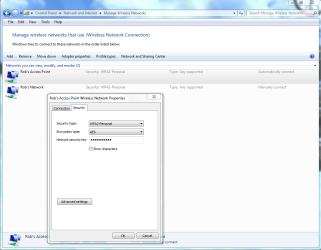
This is the standard procedure for connecting to wireless networks, although you would need to obtain the proper connection settings SSID, password, type of security, encryption, type of wireless B, G, N, from the person's network you are attempting to connect too.

It also can help to go into the settings for your particular network adaptor and make some changes there depending on the type of network you are trying to connect too.

If one setting is off it's not going to work so it can be a little tricky until you get it set up and working.
 

My Computer My Computer

At a glance

Windows 7 Ult, Windows 8.1 Pro,Q9650-4.275GHz, E8600 4.5GHz, E6750-3.8GHzG.Skill PC2 9600 1200Mhz 5 5 5 15 2TGTX480
Computer type
PC/Desktop
Computer Manufacturer/Model Number
Home built
OS
Windows 7 Ult, Windows 8.1 Pro,
CPU
Q9650-4.275GHz, E8600 4.5GHz, E6750-3.8GHz
Motherboard
Evga 780i FTW
Memory
G.Skill PC2 9600 1200Mhz 5 5 5 15 2T
Graphics Card(s)
GTX480
Sound Card
Asus Xonar D2
Monitor(s) Displays
HannsG
Screen Resolution
1680X1050
Hard Drives
GSkill Phoenix Pro 120GB SSD
PSU
ThermalTake Toughpower 1000Watt modular
Case
ThermalTake XaserV
Cooling
Xigmatek S1283
Keyboard
Logitech G15
Mouse
Logitech G9
Internet Speed
T1
Well the wireless network I'm attempting to connect to is unsecured, so I'm assuming that no passwords, security encryption, etc. are necessary as long as I have the name of the network to which I am attempting to connect (it pops up on the little list of available networks and has excellent strength).

Do you have any more information about the 'if one setting is off it's not going to work' bit? I kinda suspected the problem might be something of that nature, since I can connect to my home wifi network without any problem. I was kinda wondering if I somehow managed to set up my adapter to only connect to one preferred network or something, but being a complete ludite I have no clue how to check on this or resolve it...
 

My Computer My Computer

At a glance

Windows 7. I'm assuming it's the home premium...
Computer Manufacturer/Model Number
Toshiba
OS
Windows 7. I'm assuming it's the home premium but I'm not sure
Well the wireless network I'm attempting to connect to is unsecured, so I'm assuming that no passwords, security encryption, etc. are necessary as long as I have the name of the network to which I am attempting to connect (it pops up on the little list of available networks and has excellent strength).

Do you have any more information about the 'if one setting is off it's not going to work' bit? I kinda suspected the problem might be something of that nature, since I can connect to my home wifi network without any problem. I was kinda wondering if I somehow managed to set up my adapter to only connect to one preferred network or something, but being a complete ludite I have no clue how to check on this or resolve it...

No I don't believe it's a problem with your adaptor's settings.

If it's an unsecured network you still would need to know specifics about the network in order to connect to it. I also can't connect to the unsecured networks in my area for this reason.

The reason being that just because it's unsecured doesn't mean it's not using a password to connect with. If they aren't using any type of security like WPA2 to connect with then it would show up as unsecured but they could still have a password set up.
 

My Computer My Computer

At a glance

Windows 7 Ult, Windows 8.1 Pro,Q9650-4.275GHz, E8600 4.5GHz, E6750-3.8GHzG.Skill PC2 9600 1200Mhz 5 5 5 15 2TGTX480
Computer type
PC/Desktop
Computer Manufacturer/Model Number
Home built
OS
Windows 7 Ult, Windows 8.1 Pro,
CPU
Q9650-4.275GHz, E8600 4.5GHz, E6750-3.8GHz
Motherboard
Evga 780i FTW
Memory
G.Skill PC2 9600 1200Mhz 5 5 5 15 2T
Graphics Card(s)
GTX480
Sound Card
Asus Xonar D2
Monitor(s) Displays
HannsG
Screen Resolution
1680X1050
Hard Drives
GSkill Phoenix Pro 120GB SSD
PSU
ThermalTake Toughpower 1000Watt modular
Case
ThermalTake XaserV
Cooling
Xigmatek S1283
Keyboard
Logitech G15
Mouse
Logitech G9
Internet Speed
T1
Back
Top