Unable to connect to bluetooth devices

Locketi

New member
Local time
11:45 PM
Messages
19
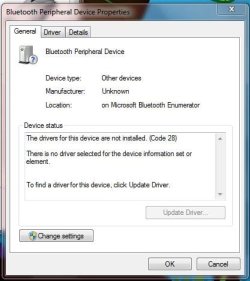
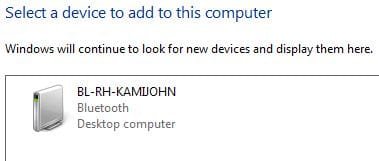
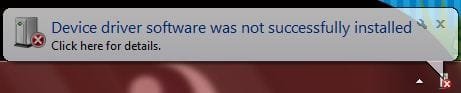
Tried to connect my sister's computer and then my phone. They both paired "successfully" but with the computer it said that I was unable to install drivers and on my phone it said "paired but not connected". Another odd thing is it's showing the computer as a desktop, but it's a laptop the same model as mine but her's is still windows vista.

I updated to Win 7 with a full/clean install so is there a driver that I should re-install or update?
 

Attachments
  • notsc.JPG
    notsc.JPG
    13.8 KB · Views: 14
  • blu.JPG
    blu.JPG
    34 KB · Views: 32
  • bt.JPG
    bt.JPG
    20.3 KB · Views: 18
  • desk.JPG
    desk.JPG
    15.3 KB · Views: 18
  • not compt.JPG
    not compt.JPG
    29.1 KB · Views: 10
Last edited:

My Computer My Computer

Computer Manufacturer/Model Number
XPS M1530
OS
Windows 7 Ultimate 32bit
CPU
Intel Mobile Core 2 Duo T8100 @ 2.10GHz
Motherboard
Dell Inc. 0D500F (Microprocessor)
Memory
4GB
Graphics Card(s)
NVIDIA GeForce 8400M GS
Sound Card
HD
Monitor(s) Displays
Generic PnP Monitor
Screen Resolution
1280x800@60Hz
Hard Drives
244GB Western Digital WDC WD2500BEVS-75UST0 ATA Device (SATA)
Keyboard
HID device
Mouse
HID compliant
Depending on make and model of some mobile phones, phone manufacturer may not have or will not update the driver for those types of phones for windows 7. They want you to buy a new phone...same thing happened when vista rolled out and a lot of printers wouldn't work with the OS. You can call you mobile service provider and ask them about the compatibility issue.
 

My Computer My Computer

Computer Manufacturer/Model Number
Custom built
OS
Windows 7 Ultimate 64 bit
CPU
AMD Phenom II X4 965 Black Edition
Motherboard
Gigabyte GA-MA790X-DS4
Memory
GSkill 4 X 2 GB PC 8500
Graphics Card(s)
XFX Radeon HD 6790 D
Sound Card
On board RealTek HD
Monitor(s) Displays
Dual monitors:Samsung SyncMaster S20B300
Screen Resolution
1600 X 900
Hard Drives
Seagate Barracuda 1TB (primary)
Seagate Barracuda 2 X 320 GB
PSU
Ultra X4 750 watt fully modular
Case
Thermaltake Overseer RX 1 full tower
Cooling
Core-Contact 92 mm CPU Cooler
Keyboard
Logitech G510
Mouse
Razor DeathAdder
Internet Speed
50/5 Mbps UL/DL
Other Info
Optical: Super Muliti DVD burner w/lightscribe, Hauppauge WinTV HVR-1800
Depending on make and model of some mobile phones, phone manufacturer may not have or will not update the driver for those types of phones for windows 7. They want you to buy a new phone...same thing happened when vista rolled out and a lot of printers wouldn't work with the OS. You can call you mobile service provider and ask them about the compatibility issue.

Oh... gotcha gotcha! But would it make sense that my sister's computer won't connect even though we have the same computer only hers has the original OS (windows vista) and mine was upgraded to Windows 7?
 

My Computer My Computer

Computer Manufacturer/Model Number
XPS M1530
OS
Windows 7 Ultimate 32bit
CPU
Intel Mobile Core 2 Duo T8100 @ 2.10GHz
Motherboard
Dell Inc. 0D500F (Microprocessor)
Memory
4GB
Graphics Card(s)
NVIDIA GeForce 8400M GS
Sound Card
HD
Monitor(s) Displays
Generic PnP Monitor
Screen Resolution
1280x800@60Hz
Hard Drives
244GB Western Digital WDC WD2500BEVS-75UST0 ATA Device (SATA)
Keyboard
HID device
Mouse
HID compliant
mmmm seems like a driver issue, i would check for updates, i had an issue with mine, and normal driver update wouldnt resolve it, and had to get a driver program to resolve. and also have you changed your settings to auto get updates online for drivers within win 7?
 

My Computer My Computer

Computer Manufacturer/Model Number
Windows 7 Ultimate 64-bit
OS
Windows 7 Ultimate N 64-bit
CPU
AMD Black Edition - AMD Phenom X4 2.5 GHz Processor
Motherboard
Bio Star
Memory
8GB DDR2 800MHZ BRANDED
Graphics Card(s)
Palti NVIDIA GeForce GTX 460
Monitor(s) Displays
3D 23.6" & 22"
Screen Resolution
1920x1080@120Hz
Hard Drives
313GB SAMSUNG SAMSUNG HD321KJ
PSU
OCZ 600W StealthXStream PSU, PowerWhisper, Active PFC
Internet Speed
22793
mmmm seems like a driver issue, i would check for updates, i had an issue with mine, and normal driver update wouldnt resolve it, and had to get a driver program to resolve. and also have you changed your settings to auto get updates online for drivers within win 7?

Thought so... My computer is set to update automatically, but I just checked and there were a few "important updates" that hadn't been installed! I'm installing those updates and maybe that'll help. If it doesn't, do you have have any suggestions on where to download drivers?
 

My Computer My Computer

Computer Manufacturer/Model Number
XPS M1530
OS
Windows 7 Ultimate 32bit
CPU
Intel Mobile Core 2 Duo T8100 @ 2.10GHz
Motherboard
Dell Inc. 0D500F (Microprocessor)
Memory
4GB
Graphics Card(s)
NVIDIA GeForce 8400M GS
Sound Card
HD
Monitor(s) Displays
Generic PnP Monitor
Screen Resolution
1280x800@60Hz
Hard Drives
244GB Western Digital WDC WD2500BEVS-75UST0 ATA Device (SATA)
Keyboard
HID device
Mouse
HID compliant
yeah try a driver program as said to check this as M$ doesnt have the best support for bluetooth.
 

My Computer My Computer

Computer Manufacturer/Model Number
Windows 7 Ultimate 64-bit
OS
Windows 7 Ultimate N 64-bit
CPU
AMD Black Edition - AMD Phenom X4 2.5 GHz Processor
Motherboard
Bio Star
Memory
8GB DDR2 800MHZ BRANDED
Graphics Card(s)
Palti NVIDIA GeForce GTX 460
Monitor(s) Displays
3D 23.6" & 22"
Screen Resolution
1920x1080@120Hz
Hard Drives
313GB SAMSUNG SAMSUNG HD321KJ
PSU
OCZ 600W StealthXStream PSU, PowerWhisper, Active PFC
Internet Speed
22793
Back
Top