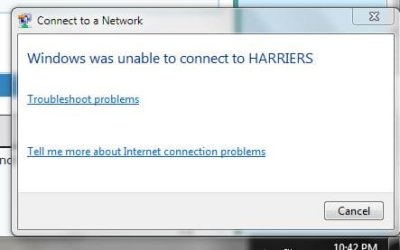
Unable to connect to Wifi, but was able to connect to LAN

nikhilshet

New member
Local time
1:29 AM
Messages
7
Hi,

Hope you are all doing good. From past few days I am not able to connect to any wireless networks on my laptop which is running windows 7 64-bit. I didn't change/install anything, it stopped working suddenly. I was able to connect to LAN and it's working perfectly fine. All other devices (phones and others computers) are able to connect to my Wi-Fi networks. I tried many things like re-installing my Wi-Fi adapter drivers, reset my router, clearing the Wi-Fi networks and adding them, many reboots, and few steps like clearing DNS and other settings as per the instructions on the Microsoft website. Can you please review and advise a good solution. Please let me know if you need any further info.

Thank you in advance.

Thanks,
Nikhil.
 

My Computer My Computer

At a glance

Windows 7 Home Premiun 64-bit
OS
Windows 7 Home Premiun 64-bit
Welcome to Seven Forum.

Go to Control panel --> Network and Internet /Network and Sharing center.
On the left panel, select "Change adapter settings".
Click on "Local Area Connection", and then right click select "Disable"
Click on the "Wireless Network Connection" and right click connect.
Maybe you login have failed.

Do the wireless connection next to the router, as it can be detected clearly.


If still unable to connect; post again if someone can assist you further.
 

My Computer My Computer

At a glance

Windows 7 x64
Computer type
Laptop
Computer Manufacturer/Model Number
Toshiba L630 and L735
OS
Windows 7 x64
Hard Drives
240 GB SSD
Thank you Eric3742, I tried the steps you provided and still I am not able to connect to any wireless networks.

Thanks,
Nikhil.
 

My Computer My Computer

At a glance

Windows 7 Home Premiun 64-bit
OS
Windows 7 Home Premiun 64-bit
Thanks Samuria, Here you go... PFA.

Thanks,
Nikhil.
 

Attachments

My Computer My Computer

At a glance

Windows 7 Home Premiun 64-bit
OS
Windows 7 Home Premiun 64-bit
The test shows you get out to the net
1 <1 ms <1 ms <1 ms 192.168.1.1
2 9 ms 9 ms 8 ms 96.120.4.53
3 9 ms 8 ms 8 ms xe-4-3-0-sur01.N4atlanta.ga.atlanta.comcast.net [68.85.173.209]
4 9 ms 9 ms 9 ms xe-7-1-2-0-ar01.b0atlanta.ga.atlanta.comcast.net [68.86.106.133]
5 11 ms 10 ms 20 ms lag-5.ear2.b0atlanta2.Level3.net [4.68.71.45]
6 95 ms 94 ms 95 ms ae-127-3513.edge6.London1.Level3.net [4.69.166.65]
7 95 ms 95 ms 95 ms CLARANET.edge6.London1.Level3.net [212.113.9.106]
8 95 ms 96 ms 95 ms tengige0-0-1-0-t6-ar14.router.uk.clara.net [195.157.3.106]
9 95 ms 95 ms 95 ms cns1.uk.vianw.net [194.119.131.66]

There are so many stations close to you that wireless is going to be hit and miss.
disable ipv6 set your dns to 208.67.220.220 & 208.67.222.222

disable Cisco AnyConnect Secure Mobility Agent for Windows REG_SZ "C:\Program Files (x86)\Cisco\Cisco AnyConnect Secure Mobility Client\vpnui.exe" -minimized

If its proven you get out what error do you see that makes you think your not connected?
 

My Computer My Computer

At a glance

win 8 32 bit
Computer type
PC/Desktop
OS
win 8 32 bit
Thanks samuria, I am able to connect to the internet via LAN but not via Wi-Fi. I tried disabling ipv6 and set the dns as per your instructions, but still I am not able to connect to the internet. I am attaching the latest reg file.

Thanks,
Nikhil.
 

Attachments

  • reg.txt
    reg.txt
    27.5 KB · Views: 0
  • Capture.JPG
    Capture.JPG
    20.6 KB · Views: 5
  • Capture1.JPG
    Capture1.JPG
    36.2 KB · Views: 0

My Computer My Computer

At a glance

Windows 7 Home Premiun 64-bit
OS
Windows 7 Home Premiun 64-bit
Back
Top