Unable to delete file of ZERO byte size

FredTastic

New member
Member
Local time
1:26 PM
Messages
78
Location
Olympia, WA
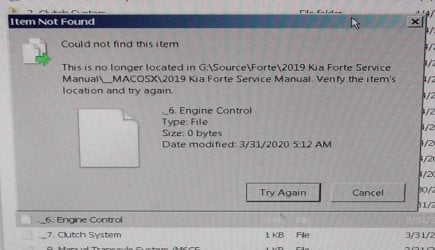
I have an odd file of 0 bytes which despite repeated tries, I can't delete. Every time I try, WE says it can't find the file. See pic. The file in question is right below the error message in WE. PC is dual boot, 7 64 bit home on one ssd (the main os) & 7 64 bit pro on another. Doesn't matter which OS I try, get the same errors. How can I delete this file? Tried "taking ownership", didn't matter.


Just tried scanning the file w/M$ Security Essentials, also says it can't find the file.


TIA
 

Attachments
  • S1160001.JPG
    S1160001.JPG
    145.7 KB · Views: 2
Last edited:

My Computer My Computer

At a glance

7 Home 64 bit, 7 Pro 64 bit
Computer type
PC/Desktop
OS
7 Home 64 bit, 7 Pro 64 bit
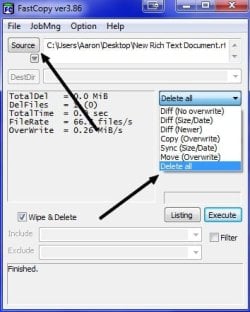
Lets see if I can be of some assistance. Try the program Fast Copy. In the program chose the problematic source file and in the drop down list chose the Delete all option. Now hit the Execute button.

Download FastCopy - MajorGeeks
 

Attachments

  • fbgrfeded.jpg
    fbgrfeded.jpg
    27 KB · Views: 15

My Computer My Computer

At a glance

Windows 7 Ultimate x64
Computer type
PC/Desktop
OS
Windows 7 Ultimate x64
I think you can CHKDSK /f G: from command prompt, and that will recover a drive with a file of zero bytes.
 

My Computer My Computer

At a glance

Windows 7 x64, Vista x64, 8.1 smartphoneIntel E8400 65W 64-bitDDR2 2 x 2GB, 1GB x 2XFX Radeon HD5750
Computer type
PC/Desktop
OS
Windows 7 x64, Vista x64, 8.1 smartphone
CPU
Intel E8400 65W 64-bit
Motherboard
Gigabyte EP45-UD3LR
Memory
DDR2 2 x 2GB, 1GB x 2
Graphics Card(s)
XFX Radeon HD5750
Sound Card
AMD High Definition Audio; Realtek High Definition Audio
Monitor(s) Displays
iiyama prolite X2377HDS
Screen Resolution
1920 x 1080
Hard Drives
500GB 7200 rpm Seagate ST3500413AS 16MB, 500GB 5400 rpm Toshiba MQ02ABF050H 32MB, 200GB 7200 rpm Seagate ST3200820AS 8MB, 2TB 7200 rpm Western Digital WD20EZRX 64MB
PSU
Enermax Liberty Modular
Case
Antec P193 Midi Tower
Keyboard
Mionix ZIBAL 60
Mouse
Razer USB 2.0 Diamondback Mouse or Huion Graphics Tablet
Browser
Internet Explorer, Lunascape, Firefox, Opera, Avast Safezone
I think you can CHKDSK /f G: from command prompt, and that will recover a drive with a file of zero bytes.

:thumbsup:

It can be a logical drive issue that check disk will fix.
 

My Computers My Computers

  • At a glance

    Windows 7 HP 64i5 6600K - 800MHz to 4200MHz4+4G GSkill DDR4 3000IG - Intel 530
    Computer type
    PC/Desktop
    Computer Manufacturer/Model Number
    custom build
    OS
    Windows 7 HP 64
    CPU
    i5 6600K - 800MHz to 4200MHz
    Motherboard
    GA-Z170-HD3P
    Memory
    4+4G GSkill DDR4 3000
    Graphics Card(s)
    IG - Intel 530
    Monitor(s) Displays
    Samsung 226BW
    Screen Resolution
    1680x1050
    Hard Drives
    (1) -1 SM951 – 128GB M.2 AHCI PCIe SSD drive for Windows 7 and Lubuntu
    (2) -1 WD SATA 3 - 1T for Data
    (3) -1 WD SATA 3 - 1T for backup
    PSU
    Thermaltake 450W TR2 gold
    Keyboard
    Old and good Chicony mechanical keyboard
    Mouse
    Logitech mX performance - 9 buttons (had to disable some)
    Internet Speed
    500Mb/s
    Browser
    Firefox 64
    Other Info
    TinyWall firewall
  • At a glance

    Windows 7 Proi7-4500U 800MHz to 3.0GHz(4+4)G DDR3 1600IG intel 4400 + NVIDIA GeForce GT 745M
    Computer type
    Laptop
    System Manufacturer/Model Number
    Asus Q550LF
    OS
    Windows 7 Pro
    CPU
    i7-4500U 800MHz to 3.0GHz
    Motherboard
    Asus Q550LF
    Memory
    (4+4)G DDR3 1600
    Graphics Card(s)
    IG intel 4400 + NVIDIA GeForce GT 745M
    Sound Card
    Realtek
    Monitor(s) Displays
    LG Display LP156WF4-SPH1
    Screen Resolution
    1920 x 1080
    Hard Drives
    BX500 120G SSD for Windows and programs +
    1T HDD for data
    Internet Speed
    500 Mb/s
    Browser
    Firefox
    Other Info
    TinyWall firewall
Thanks for the replies. Tried running CHKDSK /f G: from command prompt, also tried properties/tools/error check, neither removed the bad file. I've dl'd Fast Copy. I basically have two 2 TB hdd's which contain my important files & mirror (raid-ish) using Second Copy. This file is on the "source" drive. The file IS deletable on the "destination" drive. I am concerned about running Fast Copy on that source drive, since I cannot lose the content on that drive. It looks like Fast Copy is mainly for copying large #'s of files quickly. Can I be sure that running Fast Copy will NOT endanger any other files on that source drive if I try it to delete the one file? Also, I see Fast Copy has a "portable" Version, which I also dl'd, but it doesn't just "run" when the .exe is clicked, but tries to install. I thought PORTABLE meant you don't have to install?


If anyone has any other possible solutions which don't require a 3rd party program, please pass them on.


Thanks again.
 

My Computer My Computer

At a glance

7 Home 64 bit, 7 Pro 64 bit
Computer type
PC/Desktop
OS
7 Home 64 bit, 7 Pro 64 bit
Back
Top