Unable to display menu in WLM

Tropix

New member
Local time
2:38 PM
Messages
4
I know this issue has been raised many time previously.
I really wouldnt be re posting it if the replies I have found corrected the problem.
This plea for help is a result of me not finding what I need to fix the problem.

The problem is that I cannot bring up the Tools Menu. I have no little arrows arround the Help icon, the ALT key does not bring up any option for it, Right clicking doesnt help and I cant find anything in the existing menus.
My objective is to point WLM to my mail directory - which is not the default.

I am using - Windows 7 and
- WLM Version 2011 (Build 15.4.3508.1109)

Can this be resolved?

Thanks
 

My Computer My Computer

At a glance

Windows 7
OS
Windows 7
Hello Tropix,

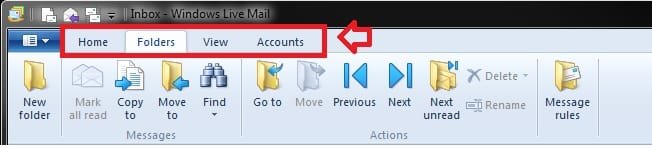
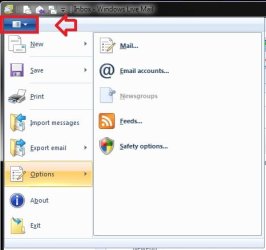
In Windows Live Mail 2011, the traditional Menu bar has been replaced with the ribbon bar tabs, and the drop down menu. You would just need to click on one of the tabs or the drop down menu arrow as in the screenshot below for these options now.

ribbon-bar-tabs.jpg

Menu.jpg

Hope this helps,
Shawn
 

My Computer My Computer

At a glance

64-bit Windows 11 Pro for WorkstationsIntel i7-8700K OC'd to 5 GHz64 GB (4x16GB) G.SKILL TridentZ RGB DDR4 3600...ASUS ROG-STRIX-GTX1080TI-O11G-GAMING
Computer type
PC/Desktop
Computer Manufacturer/Model Number
Self built custom
OS
64-bit Windows 11 Pro for Workstations
CPU
Intel i7-8700K OC'd to 5 GHz
Motherboard
ASUS ROG Maximus XI Formula Z390
Memory
64 GB (4x16GB) G.SKILL TridentZ RGB DDR4 3600 MHz
Graphics Card(s)
ASUS ROG-STRIX-GTX1080TI-O11G-GAMING
Sound Card
Integrated
Monitor(s) Displays
2 x Samsung Odyssey G7 27"
Screen Resolution
2560x1440
Hard Drives
1TB Samsung 990 PRO M.2,
4TB Samsung 990 PRO PRO M.2,
TerraMaster F8 SSD Plus NAS
PSU
Seasonic Prime Titanium 850W
Case
Thermaltake Core P3
Cooling
Corsair Hydro H115i
Keyboard
Logitech wireless K800
Mouse
Logitech MX Master 4
Internet Speed
2 Gb/s Download and 100 Mb/s Upload
Antivirus
Malwarebyte Anti-Malware Premium
Browser
Google Chrome
Other Info
Logitech Z625 speaker system,
Logitech BRIO 4K Pro webcam,
HP Color LaserJet Pro MFP M477fdn,
APC SMART-UPS RT 1000 XL - SURT1000XLI,
Galaxy S23 Plus phone
I know this issue has been raised many time previously.
I really wouldnt be re posting it if the replies I have found corrected the problem.
This plea for help is a result of me not finding what I need to fix the problem.

The problem is that I cannot bring up the Tools Menu. I have no little arrows arround the Help icon, the ALT key does not bring up any option for it, Right clicking doesnt help and I cant find anything in the existing menus.
My objective is to point WLM to my mail directory - which is not the default.

I am using - Windows 7 and
- WLM Version 2011 (Build 15.4.3508.1109)

Can this be resolved?

Thanks
Is this mail directory (Now called a folder) of yours originally created by Windows Live Mail or some other program?

If it was created by some other program, like Outlook Express, then I can tell you how to get these emails into Windows Live Mail.

If they were created with WLM then I can tell you how to move the default WLM storage folder, that is if you do want to move it, and then include these other emails it to that storage folder or to the original storage folder.

What you want to do is fairly simple once you know how.
 

My Computer My Computer

At a glance

Windows 7 Pro x64i5 76016GBNvidia GTS450
Computer Manufacturer/Model Number
Built be Me
OS
Windows 7 Pro x64
CPU
i5 760
Motherboard
Asus P7P55D-E Pro
Memory
16GB
Graphics Card(s)
Nvidia GTS450
Sound Card
On board
Monitor(s) Displays
Dell 2007WFP Dell 1800FP
Screen Resolution
1680x1050 1280x1024
Hard Drives
Seagate 250GB & 750GB
WD 1TB
PSU
Antec 750
Case
In Win
Cooling
Cooler Master Hyper 212+
Keyboard
IBM
Mouse
MS
Brink,
Thankyou for the solution.
Although I visited that area on several occasion it did not occur the me that these settings would be under the heading of Mintanence ans Troubleshooting.

Shootist,
Thankyou for your reply.
I was trying to connect to the saved mail I have from a previous version of WLM that I keep on a seperate drive.

The problem is now solved.

Thanks for the good work guys!!
 

My Computer My Computer

At a glance

Windows 7
OS
Windows 7
Glad we could help Tropix. :)
 

My Computer My Computer

At a glance

64-bit Windows 11 Pro for WorkstationsIntel i7-8700K OC'd to 5 GHz64 GB (4x16GB) G.SKILL TridentZ RGB DDR4 3600...ASUS ROG-STRIX-GTX1080TI-O11G-GAMING
Computer type
PC/Desktop
Computer Manufacturer/Model Number
Self built custom
OS
64-bit Windows 11 Pro for Workstations
CPU
Intel i7-8700K OC'd to 5 GHz
Motherboard
ASUS ROG Maximus XI Formula Z390
Memory
64 GB (4x16GB) G.SKILL TridentZ RGB DDR4 3600 MHz
Graphics Card(s)
ASUS ROG-STRIX-GTX1080TI-O11G-GAMING
Sound Card
Integrated
Monitor(s) Displays
2 x Samsung Odyssey G7 27"
Screen Resolution
2560x1440
Hard Drives
1TB Samsung 990 PRO M.2,
4TB Samsung 990 PRO PRO M.2,
TerraMaster F8 SSD Plus NAS
PSU
Seasonic Prime Titanium 850W
Case
Thermaltake Core P3
Cooling
Corsair Hydro H115i
Keyboard
Logitech wireless K800
Mouse
Logitech MX Master 4
Internet Speed
2 Gb/s Download and 100 Mb/s Upload
Antivirus
Malwarebyte Anti-Malware Premium
Browser
Google Chrome
Other Info
Logitech Z625 speaker system,
Logitech BRIO 4K Pro webcam,
HP Color LaserJet Pro MFP M477fdn,
APC SMART-UPS RT 1000 XL - SURT1000XLI,
Galaxy S23 Plus phone
Back
Top