Solved Unable to download any .exe files from any browser

pa1rocks

New member
Local time
2:34 AM
Messages
10
Hello Experts,

I'm using Windows 7 x64 bit OS from past few days i have been encountering with downloading any .exe files from any browser. I just tried with IE, Mozilla, Chrome and Safari but the result is same.

I have tried to download Yahoo Messenger but encountered with below error, not only with yahoo but any software which I'm trying to download its ending with same result

Below are the errors which i have just copied from Mozilla and IE

------------------------------------------------------------------------------------------------------


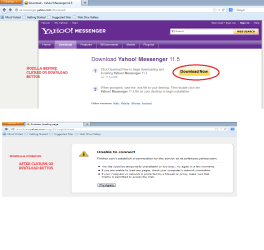
Firefox can't establish a connection to the server at rd.software.yahoo.com.


The site could be temporarily unavailable or too busy. Try again in a few
moments.
If you are unable to load any pages, check your computer's network
connection.
If your computer or network is protected by a firewall or proxy, make sure
that Firefox is permitted to access the Web.

----------------------------------------------------------------------------------------------
IE

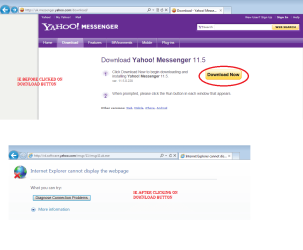
Internet Explorer cannot display the webpage


What you can try:

-----------------------------------------------------------------------------

Using below links i tried to fix the issue by myself but which didnt happened

Unable to download .exe files - Microsoft Community

Downloaded exe fix registry files from below link and tried to merge but it encountered with below error

Solved: unable to download .exe files - Tech Support Guy Forums

FIX: EXE or LNK files will not open or not working in Windows 7


I have disabled and antivirus and tried to run this reg file, which didnt worked also tried to do a clean boot also ended with no result.


Please do let me know if you need any more details


Pa1
 
Last edited by a moderator:

My Computer My Computer

At a glance

Windows 7 Ultimate x64
OS
Windows 7 Ultimate x64
Are you sure you have no virus or Trojan Is your antivirus program updated and ran scans?
If you can get on another computer using a flash drive. Download Malwarebytes and run a full scan
Also what AV. Are you using
Also download Superantispyware pro from another computer and run a full scan
First determine if it is a virus or spyware causing this
 

My Computer My Computer

At a glance

Windows 7 Pro 32/64 bit and Windows 10 Pro 32...4gigsAMD Radeon HD and Nvidia
Computer type
PC/Desktop
Computer Manufacturer/Model Number
Dell Computers
OS
Windows 7 Pro 32/64 bit and Windows 10 Pro 32 Bit/64bit
Memory
4gigs
Graphics Card(s)
AMD Radeon HD and Nvidia
Monitor(s) Displays
Samsung 24". INC 19". Dell 22 ". Dell 17" & 19"
Hello pa1rocks Welcome to the Seven Forums!

I tend to agree with some of the replies seen on the MS Community discussion thread there about executables needed to be zipped up in either a zip or rar archive type file with the various browsers seeing security measures put inplace to prevent unintended malware infection. As for the FireFox browser you may also want to review their support page about this seen at What to do if you can't download or save files | Firefox Help

For simply not being able to run any exe type file another reference provides different possible soluttions one being for 2000 and XP while the other two are for all versions seen at Windows - Unable to run executable files (. Exe)

Solution #3 covers both the 64bit as well as 32bit Windows XP, Vista, and 7 with advice on downloading the scr form of rts associations or Lan protocols in pdf form.

Besides any malware as robinb9 suggested one question to ask here would be about a problem that can occur when you have more then one user account on the machine and not being seen as logged into the admin account and denied access.

Someone else at the Tom's Hardware site also ran into a similar problem of not seeing web pages for downloads open correctly with a different solution of copying and pasting the url on Opera when having problems with FF. [Solved] Download *.exe with Firefox failes - Internet-Applications - Applications
 

My Computers My Computers

  • At a glance

    W7 Ultimate x64/W10 Pro x64/W11 Pro Triple Bo...AMD Phenom II X4 975 Deneb 3.6ghz - 965 2nd r...Kingston Hyper X DDR3 1600 1.5v 16gb - Hyper ...MSI HD Radeon 5750 1gb - MSI HD Radeon 6450 o...
    Computer type
    PC/Desktop
    Computer Manufacturer/Model Number
    Custom builds = 2
    OS
    W7 Ultimate x64/W10 Pro x64/W11 Pro Triple Boot - Main PC W7 Remote PC Micro ATX W7 Pro x64/W11 Pro
    CPU
    AMD Phenom II X4 975 Deneb 3.6ghz - 965 2nd remote pc
    Motherboard
    Gigabyte GA-790XTA-UD4-Gigabyte GA-880GM-D2H remote pc
    Memory
    Kingston Hyper X DDR3 1600 1.5v 16gb - Hyper X Fury 8gb 2nd
    Graphics Card(s)
    MSI HD Radeon 5750 1gb - MSI HD Radeon 6450 on mini tower
    Sound Card
    Creative Labs X-Fi Xtreme Audio P - Realtek onooard 2nd case
    Monitor(s) Displays
    ASUS VW199T-P 19" HP 2082a Main-HP 2082a 20" remote pc
    Screen Resolution
    Asus 1440x900 - HP 1600x900
    Hard Drives
    WD Black 1TB HD per OS W7, W10, and pending W11 presently on 500gb OS Drive - Pending Triple 1TB HDs for Spanned Storage/backup volume
    Single 2TB external USB enclosure, single 1TB System 7 Host/Boot drive, Pending 8TB external HD for system image b
    PSU
    Corsair 750TX - primary / Corsair CX600 - second
    Case
    Antec 900-2 - SSD compatible / NZXT Vulcan mini tower
    Cooling
    Zalman CNPS9900A
    Keyboard
    AZIO L70 Backlit Letters Gaming - ONN Cordless/USB
    Mouse
    MSI DS200 Programmable, Logitech Cordless
    Internet Speed
    30mbps upgrade - primary hard wired - mini tower usb WiFi
    Antivirus
    GFI VIPRE Internet Security 2014 on W7 2016 beta on W10,
    Browser
    Cyberfox, WaterFox 64bit FF variants, FireFox x64, Pale Moon
    Other Info
    Accomdata fan cooled usb 2.0 PIDE/Sata II, III external enclosure.
    Sambient usb/eSata PATA/Sata II, III external enclosure.
  • At a glance

    W7 Pro x64/W11 ProAMD Deneb 3.6ghz - 965Kingston Hyper X Fury 8gbMSI HD Radeon 6450 DVI Output
    Computer type
    PC/Desktop
    System Manufacturer/Model Number
    CUSTOM ASSEMBLY
    OS
    W7 Pro x64/W11 Pro
    CPU
    AMD Deneb 3.6ghz - 965
    Motherboard
    Gigabyte GA-880GM-D2H remote pc
    Memory
    Kingston Hyper X Fury 8gb
    Graphics Card(s)
    MSI HD Radeon 6450 DVI Output
    Sound Card
    Realtek onooard Creative or Other separate PENDING
    Monitor(s) Displays
    VIZIO 32" LCD TV Separate LCD Pending
    Screen Resolution
    1600x1080
    Hard Drives
    WD 500GB OS Host/Boot WD Green 1TB Storage/Backup
    PSU
    Corsair 600W - THERMALTAKE 600W spare case
    Case
    NZXT Vulcan mini tower
    Cooling
    Twin 120mm Top Fans - 240mm Side Cover
    Keyboard
    ONN Cordless/USB Logitech Cordless
    Mouse
    ONN USB/Cordless - Logitech Cordless
    Internet Speed
    DSL 5G
    Browser
    MS Edge, FireFox, WaterFox x64, FireFox Nightly
    Other Info
    OS Testing-Remote Access to Main TeamViewer
Hi Robin,

Appreciate your response, I have got Microsoft essentials running on my system and it gets updated automatically. Yeah, i have run the full AV on my system and couldn't able to find anything ....of course what ever it has found we have removed those items and my system is clean and updated.Do you want me to try installing any other antiware or spyware on my system? If yes please could you suggest me the best one.

Thank you.
 

My Computer My Computer

At a glance

Windows 7 Ultimate x64
OS
Windows 7 Ultimate x64
If there is concern for virus or Malware, or if you haven't run a scan for Malware in a while then I would recommend MalwareBytes(free).
other possibilities are that your firewall is blocking the download. There is risk with this, but to rule out the firewall you can disable it temporarily visit the TRUSTED site and attempt the download. If you are using any PeerToPeer software close it and all of its processes before diabling your firewall.
Also have a look at your AV settings.

If all else fails, default to assuming that you have some sort of Virus or Malware, find it, and kill it dead.
 

My Computer My Computer

At a glance

Windows 7 Home Premium 64bitIntel *will update* (slipped my mind) (2 core)6GB
Computer Manufacturer/Model Number
HP Pavilion p6204y
OS
Windows 7 Home Premium 64bit
CPU
Intel *will update* (slipped my mind) (2 core)
Memory
6GB
Hard Drives
Seagate Barrcuda 750Gb
Case
Stock
Hello pa1rocks Welcome to the Seven Forums!

I tend to agree with some of the replies seen on the MS Community discussion thread there about executables needed to be zipped up in either a zip or rar archive type file with the various browsers seeing security measures put inplace to prevent unintended malware infection. As for the FireFox browser you may also want to review their support page about this seen at What to do if you can't download or save files | Firefox Help

For simply not being able to run any exe type file another reference provides different possible soluttions one being for 2000 and XP while the other two are for all versions seen at Windows - Unable to run executable files (. Exe)

Solution #3 covers both the 64bit as well as 32bit Windows XP, Vista, and 7 with advice on downloading the scr form of rts associations or Lan protocols in pdf form.

Besides any malware as robinb9 suggested one question to ask here would be about a problem that can occur when you have more then one user account on the machine and not being seen as logged into the admin account and denied access.

Someone else at the Tom's Hardware site also ran into a similar problem of not seeing web pages for downloads open correctly with a different solution of copying and pasting the url on Opera when having problems with FF. [Solved] Download *.exe with Firefox failes - Internet-Applications - Applications


Hello Nighthawk,

Thanks for your warm welcome. :D

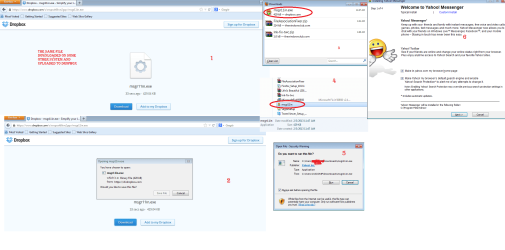
Its just not about the firefox or IE or Chrome..... i can able to download and run exe files from dropbox links but i couldnt able to download from any of the direct links. Just to give an example.

Yesterday i was trying to download Yahoo Messenger from Yahoo website then it resulted in error please find the below attached screenshots from both Mozilla and also from IE
0

0


The same file we have downloaded into another system and uploaded into Dropbox and downloaded on to my system and tried to install it and it did worked out. Please find the below attached screenshot in a sequence

0


So i guess it wont be an issue with administrator or to save the exe files... its just not allowing me to download any of the exe files ..... for the same i have reset ted both the browsers.

I hope this information could help you more to get a better understanding on my issue.

Thanks and waiting for your reply.

Pa1
 

Attachments

  • IE_Error.png
    IE_Error.png
    36.5 KB · Views: 6
  • Mozilla_error.png
    Mozilla_error.png
    32.9 KB · Views: 5
  • Dropbox.png
    Dropbox.png
    94.1 KB · Views: 7
Last edited:

My Computer My Computer

At a glance

Windows 7 Ultimate x64
OS
Windows 7 Ultimate x64
I got this also a few days ago, I could not download or open anything, what fixed it for me was to run sfc /scannow and then it fixed something because it worked after that.
 

My Computer My Computer

At a glance

Windows 7 Home Premium x64Intel Core i7 860 (Lynnfield)Corsair Vengeance 9,9,9,24 1600Mhz 1.50v 2x4GAsus nVidia 560 GTX
Computer type
PC/Desktop
OS
Windows 7 Home Premium x64
CPU
Intel Core i7 860 (Lynnfield)
Motherboard
Asus P7P55D (LGA1156)
Memory
Corsair Vengeance 9,9,9,24 1600Mhz 1.50v 2x4G
Graphics Card(s)
Asus nVidia 560 GTX
Sound Card
Asus Xonar DG
Monitor(s) Displays
Acer P235H & NEC E201W
Screen Resolution
1920x1080 & 900x1600
Hard Drives
2
PSU
Corsair 650 Modular
Case
Corsair 800D
Cooling
Corsair H80 with Noctua fans
Keyboard
Ducky Shine
Mouse
tT Theron
Internet Speed
100/100
Browser
IE10

My Computer My Computer

At a glance

Windows 10 Home x64INTEL Core i5-750 Quad-Core 3.37GHzHyperX Fury Black Series 8GB (2 x 4GB) 1866MhzEVGA GeForce GTX 750 Superclocked 1GB 128-Bit...
Computer type
PC/Desktop
OS
Windows 10 Home x64
CPU
INTEL Core i5-750 Quad-Core 3.37GHz
Motherboard
ASUS P7P55D
Memory
HyperX Fury Black Series 8GB (2 x 4GB) 1866Mhz
Graphics Card(s)
EVGA GeForce GTX 750 Superclocked 1GB 128-Bit GDDR5
Monitor(s) Displays
LG 32MA68HY 32" IPS
Screen Resolution
1920 x 1080
Hard Drives
Samsung 840 Evo 120GB, SEAGATE 500GB Barracuda® 7200.12, SATA 3 Gb/s, 7200 RPM, 16MB cache
PSU
ANTEC TruePower New TP-550, 80 PLUS, 550W
Case
ANTEC Three Hundred Illusion
Cooling
COOLER MASTER Hyper 212 Plus, 4 x 120mm 1 x 140mm Noctua's
Internet Speed
85 + Mbps
Antivirus
Avast
Browser
Vivaldi
I got this also a few days ago, I could not download or open anything, what fixed it for me was to run sfc /scannow and then it fixed something because it worked after that.

So you just scanned the complete system and it worked out? Which software you have used to scan the computer? Could you please provide me some link for the same.
 

My Computer My Computer

At a glance

Windows 7 Ultimate x64
OS
Windows 7 Ultimate x64
from the command prompt as admin:
sfc /scannow

This is a built in function
 

My Computer My Computer

At a glance

Windows 7 Home Premium 64bitIntel *will update* (slipped my mind) (2 core)6GB
Computer Manufacturer/Model Number
HP Pavilion p6204y
OS
Windows 7 Home Premium 64bit
CPU
Intel *will update* (slipped my mind) (2 core)
Memory
6GB
Hard Drives
Seagate Barrcuda 750Gb
Case
Stock
I got this also a few days ago, I could not download or open anything, what fixed it for me was to run sfc /scannow and then it fixed something because it worked after that.

So you just scanned the complete system and it worked out? Which software you have used to scan the computer? Could you please provide me some link for the same.

See link in my post above ;)

A Guy
 

My Computer My Computer

At a glance

Windows 10 Home x64INTEL Core i5-750 Quad-Core 3.37GHzHyperX Fury Black Series 8GB (2 x 4GB) 1866MhzEVGA GeForce GTX 750 Superclocked 1GB 128-Bit...
Computer type
PC/Desktop
OS
Windows 10 Home x64
CPU
INTEL Core i5-750 Quad-Core 3.37GHz
Motherboard
ASUS P7P55D
Memory
HyperX Fury Black Series 8GB (2 x 4GB) 1866Mhz
Graphics Card(s)
EVGA GeForce GTX 750 Superclocked 1GB 128-Bit GDDR5
Monitor(s) Displays
LG 32MA68HY 32" IPS
Screen Resolution
1920 x 1080
Hard Drives
Samsung 840 Evo 120GB, SEAGATE 500GB Barracuda® 7200.12, SATA 3 Gb/s, 7200 RPM, 16MB cache
PSU
ANTEC TruePower New TP-550, 80 PLUS, 550W
Case
ANTEC Three Hundred Illusion
Cooling
COOLER MASTER Hyper 212 Plus, 4 x 120mm 1 x 140mm Noctua's
Internet Speed
85 + Mbps
Antivirus
Avast
Browser
Vivaldi
Hi Robin,

Appreciate your response, I have got Microsoft essentials running on my system and it gets updated automatically. Yeah, i have run the full AV on my system and couldn't able to find anything ....of course what ever it has found we have removed those items and my system is clean and updated.Do you want me to try installing any other antiware or spyware on my system? If yes please could you suggest me the best one.

Thank you.
Malwareybtes at Malwarebytes : Free anti-malware download
Superantispyware at SUPERAntiSpyware | Remove Malware | Remove Spyware - AntiMalware, AntiSpyware, AntiAdware!
For Malwarebytes, I would also run and it is in Tools Tab once you install it, their Rootkit Tool
Again since you cannot download them from your computer, go to another one and download them and put them on a flash drive
 

My Computer My Computer

At a glance

Windows 7 Pro 32/64 bit and Windows 10 Pro 32...4gigsAMD Radeon HD and Nvidia
Computer type
PC/Desktop
Computer Manufacturer/Model Number
Dell Computers
OS
Windows 7 Pro 32/64 bit and Windows 10 Pro 32 Bit/64bit
Memory
4gigs
Graphics Card(s)
AMD Radeon HD and Nvidia
Monitor(s) Displays
Samsung 24". INC 19". Dell 22 ". Dell 17" & 19"
Besides Malwarebytes the program I can easily suggest here would be giving the 30day trial of the VIPRE Internet Security 2013 a run. Download A Free Trial of VIPRE Internet Security | VIPRE Antivirus

You can temporarily disable any other av program, firewall, and other system protections when this one is on as it will find more things even on storage drives inside zip file downloads then any other program examined. The web filtering is also a plus as it will totally block out any sites where there is any doubt.

As for the images you posted it seems to look more like you had reached broken links for things like Yahoo messenger. Or you might need to be logged into an existing account when going to download from one of Yahoo's pages similar to what has been the case for downloading anything for the Windows Live Hotmail service up until 8 and the new Outlook.com upgrade MS is providing to replace WLM.

Another reference I can point you to explains how to prevent Windows from blocking downloads including the Windows firewall itself. Often if you have a separate firewall program installed there will be some option to uncheck that blocks certain types of downloads. How Do I Stop Windows From Blocking My Downloads? | eHow.com
 

My Computers My Computers

  • At a glance

    W7 Ultimate x64/W10 Pro x64/W11 Pro Triple Bo...AMD Phenom II X4 975 Deneb 3.6ghz - 965 2nd r...Kingston Hyper X DDR3 1600 1.5v 16gb - Hyper ...MSI HD Radeon 5750 1gb - MSI HD Radeon 6450 o...
    Computer type
    PC/Desktop
    Computer Manufacturer/Model Number
    Custom builds = 2
    OS
    W7 Ultimate x64/W10 Pro x64/W11 Pro Triple Boot - Main PC W7 Remote PC Micro ATX W7 Pro x64/W11 Pro
    CPU
    AMD Phenom II X4 975 Deneb 3.6ghz - 965 2nd remote pc
    Motherboard
    Gigabyte GA-790XTA-UD4-Gigabyte GA-880GM-D2H remote pc
    Memory
    Kingston Hyper X DDR3 1600 1.5v 16gb - Hyper X Fury 8gb 2nd
    Graphics Card(s)
    MSI HD Radeon 5750 1gb - MSI HD Radeon 6450 on mini tower
    Sound Card
    Creative Labs X-Fi Xtreme Audio P - Realtek onooard 2nd case
    Monitor(s) Displays
    ASUS VW199T-P 19" HP 2082a Main-HP 2082a 20" remote pc
    Screen Resolution
    Asus 1440x900 - HP 1600x900
    Hard Drives
    WD Black 1TB HD per OS W7, W10, and pending W11 presently on 500gb OS Drive - Pending Triple 1TB HDs for Spanned Storage/backup volume
    Single 2TB external USB enclosure, single 1TB System 7 Host/Boot drive, Pending 8TB external HD for system image b
    PSU
    Corsair 750TX - primary / Corsair CX600 - second
    Case
    Antec 900-2 - SSD compatible / NZXT Vulcan mini tower
    Cooling
    Zalman CNPS9900A
    Keyboard
    AZIO L70 Backlit Letters Gaming - ONN Cordless/USB
    Mouse
    MSI DS200 Programmable, Logitech Cordless
    Internet Speed
    30mbps upgrade - primary hard wired - mini tower usb WiFi
    Antivirus
    GFI VIPRE Internet Security 2014 on W7 2016 beta on W10,
    Browser
    Cyberfox, WaterFox 64bit FF variants, FireFox x64, Pale Moon
    Other Info
    Accomdata fan cooled usb 2.0 PIDE/Sata II, III external enclosure.
    Sambient usb/eSata PATA/Sata II, III external enclosure.
  • At a glance

    W7 Pro x64/W11 ProAMD Deneb 3.6ghz - 965Kingston Hyper X Fury 8gbMSI HD Radeon 6450 DVI Output
    Computer type
    PC/Desktop
    System Manufacturer/Model Number
    CUSTOM ASSEMBLY
    OS
    W7 Pro x64/W11 Pro
    CPU
    AMD Deneb 3.6ghz - 965
    Motherboard
    Gigabyte GA-880GM-D2H remote pc
    Memory
    Kingston Hyper X Fury 8gb
    Graphics Card(s)
    MSI HD Radeon 6450 DVI Output
    Sound Card
    Realtek onooard Creative or Other separate PENDING
    Monitor(s) Displays
    VIZIO 32" LCD TV Separate LCD Pending
    Screen Resolution
    1600x1080
    Hard Drives
    WD 500GB OS Host/Boot WD Green 1TB Storage/Backup
    PSU
    Corsair 600W - THERMALTAKE 600W spare case
    Case
    NZXT Vulcan mini tower
    Cooling
    Twin 120mm Top Fans - 240mm Side Cover
    Keyboard
    ONN Cordless/USB Logitech Cordless
    Mouse
    ONN USB/Cordless - Logitech Cordless
    Internet Speed
    DSL 5G
    Browser
    MS Edge, FireFox, WaterFox x64, FireFox Nightly
    Other Info
    OS Testing-Remote Access to Main TeamViewer
If there is concern for virus or Malware, or if you haven't run a scan for Malware in a while then I would recommend MalwareBytes(free).
other possibilities are that your firewall is blocking the download. There is risk with this, but to rule out the firewall you can disable it temporarily visit the TRUSTED site and attempt the download. If you are using any PeerToPeer software close it and all of its processes before diabling your firewall.
Also have a look at your AV settings.

If all else fails, default to assuming that you have some sort of Virus or Malware, find it, and kill it dead.


I have scanned my computer twice and also installed Malware bytes but still it didn't worked out. Is there any other way to check if any of the registry entries missing in my computer related to this download?
 

My Computer My Computer

At a glance

Windows 7 Ultimate x64
OS
Windows 7 Ultimate x64
I got this also a few days ago, I could not download or open anything, what fixed it for me was to run sfc /scannow and then it fixed something because it worked after that.

So you just scanned the complete system and it worked out? Which software you have used to scan the computer? Could you please provide me some link for the same.

See link in my post above ;)

A Guy


Yes thanks for those links..... I have completed the sfc /scannow option as well and to my surprise, even it didnt worked out. If you want i can provide you the details text file which got downloaded on to my desktop
 

My Computer My Computer

At a glance

Windows 7 Ultimate x64
OS
Windows 7 Ultimate x64
Hi Robin,

Appreciate your response, I have got Microsoft essentials running on my system and it gets updated automatically. Yeah, i have run the full AV on my system and couldn't able to find anything ....of course what ever it has found we have removed those items and my system is clean and updated.Do you want me to try installing any other antiware or spyware on my system? If yes please could you suggest me the best one.

Thank you.
Malwareybtes at Malwarebytes : Free anti-malware download
Superantispyware at SUPERAntiSpyware | Remove Malware | Remove Spyware - AntiMalware, AntiSpyware, AntiAdware!
For Malwarebytes, I would also run and it is in Tools Tab once you install it, their Rootkit Tool
Again since you cannot download them from your computer, go to another one and download them and put them on a flash drive


Yes, I did the same downloaded on some other computer and installed it on my computer and scanned it but nothing it has shown :huh:
 

My Computer My Computer

At a glance

Windows 7 Ultimate x64
OS
Windows 7 Ultimate x64
Besides Malwarebytes the program I can easily suggest here would be giving the 30day trial of the VIPRE Internet Security 2013 a run. Download A Free Trial of VIPRE Internet Security | VIPRE Antivirus

You can temporarily disable any other av program, firewall, and other system protections when this one is on as it will find more things even on storage drives inside zip file downloads then any other program examined. The web filtering is also a plus as it will totally block out any sites where there is any doubt.

As for the images you posted it seems to look more like you had reached broken links for things like Yahoo messenger. Or you might need to be logged into an existing account when going to download from one of Yahoo's pages similar to what has been the case for downloading anything for the Windows Live Hotmail service up until 8 and the new Outlook.com upgrade MS is providing to replace WLM.

Another reference I can point you to explains how to prevent Windows from blocking downloads including the Windows firewall itself. Often if you have a separate firewall program installed there will be some option to uncheck that blocks certain types of downloads. How Do I Stop Windows From Blocking My Downloads? | eHow.com


Well, I just quickly went into this link

How Do I Stop Windows From Blocking My Downloads? | eHow.com

and followed the steps explained over there and i can see my system settings are just default settings or looking same as they have explained in the link :(

any other clue on how to fix this?
 

My Computer My Computer

At a glance

Windows 7 Ultimate x64
OS
Windows 7 Ultimate x64
Some will disagree but I go on experience.
Either 1-set to a restore date earlier then when this began.
and/or
open msconfig go to the start up tab and deselect anything suspicious.
only if you are familiar with the registry, you can look for start items in HKLM and HKCU under microsoft\windows\current version\ run also run once and any other folder with run in the title.
Save the parts of the registry first just in case.

Finally if anything is a malware running, it will be found in your user folder. If anything refuses to delete and says it's running it's most likely the culprit, so open task manager and stop any running services\programs that have an odd name, if it's the one the usually spuriously named file will be deletable.

I hav'n't gone into much detail how to perform these steps, if you need help post back and we'll see what we can do.
 

My Computer My Computer

At a glance

Windows 7 home premium x64AMD FX-4100 AM3+ 3.6GHz 12MB Black EditionCrsair vengeance 12Gb DDR3 1600MHz CL9Asus GTX 560 1GB
Computer Manufacturer/Model Number
DIY
OS
Windows 7 home premium x64
CPU
AMD FX-4100 AM3+ 3.6GHz 12MB Black Edition
Motherboard
Asus M5A97 Pro
Memory
Crsair vengeance 12Gb DDR3 1600MHz CL9
Graphics Card(s)
Asus GTX 560 1GB
Sound Card
Realtek onboard
Monitor(s) Displays
Hanns G 1680x1050 native
Hard Drives
OCZ 128Gb Petrol ssd
2x500 Gb Samsung
PSU
OCZ StealthXstream II 500W
Internet Speed
8Mb or better
Some will disagree but I go on experience.
Either 1-set to a restore date earlier then when this began.
and/or
open msconfig go to the start up tab and deselect anything suspicious.
only if you are familiar with the registry, you can look for start items in HKLM and HKCU under microsoft\windows\current version\ run also run once and any other folder with run in the title.
Save the parts of the registry first just in case.

Finally if anything is a malware running, it will be found in your user folder. If anything refuses to delete and says it's running it's most likely the culprit, so open task manager and stop any running services\programs that have an odd name, if it's the one the usually spuriously named file will be deletable.

I hav'n't gone into much detail how to perform these steps, if you need help post back and we'll see what we can do.


I think now i'm left out with only one option.... I'll try to repair it with bootable cd and will if it works out or not
 

My Computer My Computer

At a glance

Windows 7 Ultimate x64
OS
Windows 7 Ultimate x64
Firefox can't establish a connection to the server at rd.software.yahoo.com.

The site could be temporarily unavailable or too busy. Try again in a few
moments.
If you are unable to load any pages, check your computer's network
connection.
If your computer or network is protected by a firewall or proxy, make sure
that Firefox is permitted to access the Web.

First, make sure that "Proxy server" isn't enabled:

1) Under “Tools” in the browser tool bar select “Internet Options”.
2) In the “Internet Options” window that pops up, click the “Connections” tab at the top.
3) Click “LAN Settings” near the bottom of the “Connections” section.
4) If the “Proxy server” checkbox is marked with a check, click it to deselect/uncheck it.
5) Click “Ok” to close the “Local Area Network (LAN) Settings” window.
6) Click “Ok” to close the “Internet Options” window.
Reboot
Make sure "Proxy server" is still disabled under your LAN Settings.
Test whether internet connectivity is restored.

If not enabled, then download AdWareCleaner AdwCleaner Download to your desktop
1.Right-click on adwcleaner.exe and select Run As Administrator to launch the application.
2.Click on Delete button.
3.Confirm each time with OK.
4.Your computer will be rebooted automatically. A text file will open after the restart. Please post the content of that logfile in your reply.
Note: You can find the logfile at C:\AdwCleaner[Sn].txt as well - n is the order number.
AdwareCleaner.jpg
 

My Computer My Computer

At a glance

Windows 7 Ultimate 32bit SP1Intel(R) Core(TM)2 Quad CPU @ 2.40GHz, 2400 MHz4 GBATI Radeon HD 2600 Pro
Computer type
PC/Desktop
Computer Manufacturer/Model Number
Bruce ... somewhere in his 40's
OS
Windows 7 Ultimate 32bit SP1
CPU
Intel(R) Core(TM)2 Quad CPU @ 2.40GHz, 2400 MHz
Motherboard
INTEL/D975XBX2
Memory
4 GB
Graphics Card(s)
ATI Radeon HD 2600 Pro
Monitor(s) Displays
Samsung SyncMaster 914v
Screen Resolution
1280 x 1024
Hard Drives
2/500GB each ... ST3500630AS ATA Device.
One is not connected
PSU
Rocketfish 700 W
Case
G.Skill Gigabyte Chassis
Keyboard
Standard PS/2 Keyboard
Mouse
Microsoft PS/2 Mouse
Internet Speed
DSL
Antivirus
Avira Internet Security
Browser
IE 11
Other Info
ATI HDMI Audio
Back
Top