Solved unable to dual boot 2 installation of windows 7 ultimate 64

Emcha

New member
Local time
1:25 AM
Messages
23
Until a week ago I used to have an asus p5q se with two installation of the same os on two different physical drives, giving me a dual win 7 ultimate 64 boot. One for gaming, the other for my daws. But I killed it after it ate my fourth video card in two years. And in case anyone asks, yes I am 110% sure that I had two installation of the same os on my computer, one was on my seagate barracuda, the other on one of my two WD Caviar black 500 GB.

Since I changed my computer to an asus p8p67 evo rev 3, I am unable to install my os's like I had in the past. Each time I install one on it's appropriate drive, the other is unusable, unseen from the other os installation, and there's no boot manager coming up when I start the computer.

Help would be greatly appreciate it before I start axing this new computer:mad:
 
Last edited:

My Computer My Computer

At a glance

windows 7 ultimate 64i5 2500kkingstone hyperx 1600 16 GBGtx 560 dc2 oc
Computer Manufacturer/Model Number
myself
OS
windows 7 ultimate 64
CPU
i5 2500k
Motherboard
p8p67 evo rev 3
Memory
kingstone hyperx 1600 16 GB
Graphics Card(s)
Gtx 560 dc2 oc
Sound Card
sound mixer Projectmix I/O
Monitor(s) Displays
dell
Hard Drives
2x 500 GB WD caviar black 7200
1x 1 TB WD caviar black 7200
1x 1 TB seagate freeagent usb 2.0
1x 80 GB seagate baracuda 7200
PSU
cooler master gx750w
Case
Cooler master cm 690 2 advance
Cooling
multiple fans

My Computer My Computer

At a glance

Windows 7 Ultimate SP1 64-BitIntel Core i7 870 @ 2.93GHz8Gb Dual-Channel DDR3 @ 664MHznVidia GeForce GTX 460 1024MB dedicated RAM
Computer Manufacturer/Model Number
HP Pavilion Elite 495UK
OS
Windows 7 Ultimate SP1 64-Bit
CPU
Intel Core i7 870 @ 2.93GHz
Motherboard
MSI 2A9C (CPU1)
Memory
8Gb Dual-Channel DDR3 @ 664MHz
Graphics Card(s)
nVidia GeForce GTX 460 1024MB dedicated RAM
Sound Card
Realtek HD Audio
Monitor(s) Displays
HP2310i
Screen Resolution
1920 x 1080
Hard Drives
1x1954GB Hitachi HDS22020ALA 330 (RAID), 1x1954GB Hitachi External for backup and storage
PSU
460W
Case
HP Elite
Cooling
Air cooled
Keyboard
Logitech K750 solar-powered keyboard
Mouse
Logitech Wireless M180 mouse
Internet Speed
2Mb
Other Info
Pure Avanti Flow Internet Radio with iPod Dock, 64Gb iPod, HP USB Speakers, Sony MDR-V500 Headphones, Sony Vaio F-Series Laptop
from the device manager?
 

My Computer My Computer

At a glance

windows 7 ultimate 64i5 2500kkingstone hyperx 1600 16 GBGtx 560 dc2 oc
Computer Manufacturer/Model Number
myself
OS
windows 7 ultimate 64
CPU
i5 2500k
Motherboard
p8p67 evo rev 3
Memory
kingstone hyperx 1600 16 GB
Graphics Card(s)
Gtx 560 dc2 oc
Sound Card
sound mixer Projectmix I/O
Monitor(s) Displays
dell
Hard Drives
2x 500 GB WD caviar black 7200
1x 1 TB WD caviar black 7200
1x 1 TB seagate freeagent usb 2.0
1x 80 GB seagate baracuda 7200
PSU
cooler master gx750w
Case
Cooler master cm 690 2 advance
Cooling
multiple fans
No.

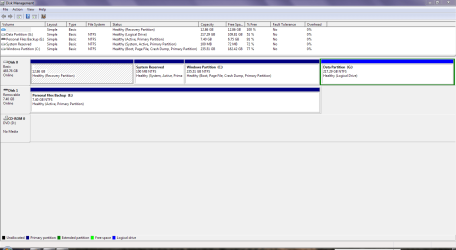
Click Start>Control Panel>System & Security>Administrative Tools>Create & Format Hard Disk Partitions.

DM.PNG

I'll be away from my computer for the rest of the day, but someone else should be along shortly to help out.
 

My Computer My Computer

At a glance

Windows 7 Ultimate SP1 64-BitIntel Core i7 870 @ 2.93GHz8Gb Dual-Channel DDR3 @ 664MHznVidia GeForce GTX 460 1024MB dedicated RAM
Computer Manufacturer/Model Number
HP Pavilion Elite 495UK
OS
Windows 7 Ultimate SP1 64-Bit
CPU
Intel Core i7 870 @ 2.93GHz
Motherboard
MSI 2A9C (CPU1)
Memory
8Gb Dual-Channel DDR3 @ 664MHz
Graphics Card(s)
nVidia GeForce GTX 460 1024MB dedicated RAM
Sound Card
Realtek HD Audio
Monitor(s) Displays
HP2310i
Screen Resolution
1920 x 1080
Hard Drives
1x1954GB Hitachi HDS22020ALA 330 (RAID), 1x1954GB Hitachi External for backup and storage
PSU
460W
Case
HP Elite
Cooling
Air cooled
Keyboard
Logitech K750 solar-powered keyboard
Mouse
Logitech Wireless M180 mouse
Internet Speed
2Mb
Other Info
Pure Avanti Flow Internet Radio with iPod Dock, 64Gb iPod, HP USB Speakers, Sony MDR-V500 Headphones, Sony Vaio F-Series Laptop
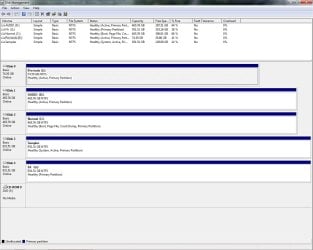
Alright, here it is

HDD config2.jpg

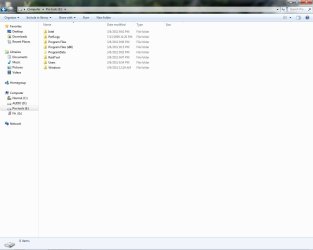
Also including a screeny of what my Pro tools HDD has on it, showing the installation of the os.

what's on my barracuda.jpg

The only thing I haven't tried is to install the os from my Normal HDD session while being logged in it. Ie to format the Pro tools HDD from within windows, and then using the installation disk while being in my windows session on my normal drive, to try and install it on my Pro tools drive.

Would that make any difference?
 

My Computer My Computer

At a glance

windows 7 ultimate 64i5 2500kkingstone hyperx 1600 16 GBGtx 560 dc2 oc
Computer Manufacturer/Model Number
myself
OS
windows 7 ultimate 64
CPU
i5 2500k
Motherboard
p8p67 evo rev 3
Memory
kingstone hyperx 1600 16 GB
Graphics Card(s)
Gtx 560 dc2 oc
Sound Card
sound mixer Projectmix I/O
Monitor(s) Displays
dell
Hard Drives
2x 500 GB WD caviar black 7200
1x 1 TB WD caviar black 7200
1x 1 TB seagate freeagent usb 2.0
1x 80 GB seagate baracuda 7200
PSU
cooler master gx750w
Case
Cooler master cm 690 2 advance
Cooling
multiple fans
You have a mess. Only the partition holding the System boot files should be marked Active.

Probably because data drives had been marked Active and you didn't unplug the other HD's when installing, the System boot files were derailed to Disk 3 which doesn't even hold an OS.

When you have separate HD's the best way to Multi Boot is to unplug all other HD's during install, then afterwards plug them back in and boot the other Win7 OS by using the one-time BIOS Boot Menu key. This keeps them independent to come and go as you please.

To sort this out, first mark C and E Active: Partition - Mark as Active (Method Two)

Next mark all partitions except E and C Inactive. Partition - Mark as Active, power down to unplug all other HD's except C, reboot into BIOS setup to set C first HD to boot (after DVD drive), boot it's installer's System Recovery Options to run Startup Repair 3 Separate Times until WIn7 starts and holds the System Active flags.

Now power down (always) to unplug C, plug in E and repeat the same process with it's installer until it starts and holds System Active flags.

Now you can plug in the other HD's. E will boot by default, so when you want to boot into C tap the one-time BIOS Boot Menu key (F8 on most Asus's) to trigger it to boot. If you find you don't like this arrangement, install EasyBCD to default HD OS to add the other to a WIndows Dual Boot.
 
Last edited:
Thanks for the info, before I start I have one question though. Is there any danger to the Data I have on the Audio drive and the Sample drive if I mark them inactive?
 

My Computer My Computer

At a glance

windows 7 ultimate 64i5 2500kkingstone hyperx 1600 16 GBGtx 560 dc2 oc
Computer Manufacturer/Model Number
myself
OS
windows 7 ultimate 64
CPU
i5 2500k
Motherboard
p8p67 evo rev 3
Memory
kingstone hyperx 1600 16 GB
Graphics Card(s)
Gtx 560 dc2 oc
Sound Card
sound mixer Projectmix I/O
Monitor(s) Displays
dell
Hard Drives
2x 500 GB WD caviar black 7200
1x 1 TB WD caviar black 7200
1x 1 TB seagate freeagent usb 2.0
1x 80 GB seagate baracuda 7200
PSU
cooler master gx750w
Case
Cooler master cm 690 2 advance
Cooling
multiple fans
Absolutely not. Marking Active only tells Windows which is supposed to be the System partition holding the OS boot files.

During install or repairs, it will look for the first Active partition to place the System boot files upon, or lacking a preceding Active partition it will mark the partition chosen for install.

Feel free to ask back if you get stuck or have any other questions. I will be around all day. We need to see if getting it configured correctly then solves the issue reported as additional steps may be required including possible reinstall of problem OS.
 
Cheers mate.
 

My Computer My Computer

At a glance

windows 7 ultimate 64i5 2500kkingstone hyperx 1600 16 GBGtx 560 dc2 oc
Computer Manufacturer/Model Number
myself
OS
windows 7 ultimate 64
CPU
i5 2500k
Motherboard
p8p67 evo rev 3
Memory
kingstone hyperx 1600 16 GB
Graphics Card(s)
Gtx 560 dc2 oc
Sound Card
sound mixer Projectmix I/O
Monitor(s) Displays
dell
Hard Drives
2x 500 GB WD caviar black 7200
1x 1 TB WD caviar black 7200
1x 1 TB seagate freeagent usb 2.0
1x 80 GB seagate baracuda 7200
PSU
cooler master gx750w
Case
Cooler master cm 690 2 advance
Cooling
multiple fans
Is there a way to tell the disk part? Since I have 2 WD Caviar black 500GB, how do I tell which one is the C: drive?
 

My Computer My Computer

At a glance

windows 7 ultimate 64i5 2500kkingstone hyperx 1600 16 GBGtx 560 dc2 oc
Computer Manufacturer/Model Number
myself
OS
windows 7 ultimate 64
CPU
i5 2500k
Motherboard
p8p67 evo rev 3
Memory
kingstone hyperx 1600 16 GB
Graphics Card(s)
Gtx 560 dc2 oc
Sound Card
sound mixer Projectmix I/O
Monitor(s) Displays
dell
Hard Drives
2x 500 GB WD caviar black 7200
1x 1 TB WD caviar black 7200
1x 1 TB seagate freeagent usb 2.0
1x 80 GB seagate baracuda 7200
PSU
cooler master gx750w
Case
Cooler master cm 690 2 advance
Cooling
multiple fans
When you call the partition into focus, next type the Command "Detail partition" which will hopefully give you enough information to choose.

You can also use free Partition Wizard bootable CD which is the most valuable tool we use here, to Modify>Set Active/Inactive. If you use PW CD, in place of doing Startup Repair you can also try clicking on the HD # to highlight it, then from Disk tab select Rebuild MBR, Apply, reboot. This may preclude the need to run 3 Startup Repairs to write the System boot files to the target partition/HD, plugged in alone.
 
Since I'm not used with either, I will simply unplugged one of the 500GB CB I have and see if the computer boots up if it doesn't it means I unhooked the wrong one :)

Thanks for all the help I'll post back when I have completed this.
 

My Computer My Computer

At a glance

windows 7 ultimate 64i5 2500kkingstone hyperx 1600 16 GBGtx 560 dc2 oc
Computer Manufacturer/Model Number
myself
OS
windows 7 ultimate 64
CPU
i5 2500k
Motherboard
p8p67 evo rev 3
Memory
kingstone hyperx 1600 16 GB
Graphics Card(s)
Gtx 560 dc2 oc
Sound Card
sound mixer Projectmix I/O
Monitor(s) Displays
dell
Hard Drives
2x 500 GB WD caviar black 7200
1x 1 TB WD caviar black 7200
1x 1 TB seagate freeagent usb 2.0
1x 80 GB seagate baracuda 7200
PSU
cooler master gx750w
Case
Cooler master cm 690 2 advance
Cooling
multiple fans
Take your time and do everything in slow motion inside the box. Patience is the watchword.
 
Thanks for the help on this thread Greg, I appreciate it.
 

My Computer My Computer

At a glance

Windows 7 Ultimate SP1 64-BitIntel Core i7 870 @ 2.93GHz8Gb Dual-Channel DDR3 @ 664MHznVidia GeForce GTX 460 1024MB dedicated RAM
Computer Manufacturer/Model Number
HP Pavilion Elite 495UK
OS
Windows 7 Ultimate SP1 64-Bit
CPU
Intel Core i7 870 @ 2.93GHz
Motherboard
MSI 2A9C (CPU1)
Memory
8Gb Dual-Channel DDR3 @ 664MHz
Graphics Card(s)
nVidia GeForce GTX 460 1024MB dedicated RAM
Sound Card
Realtek HD Audio
Monitor(s) Displays
HP2310i
Screen Resolution
1920 x 1080
Hard Drives
1x1954GB Hitachi HDS22020ALA 330 (RAID), 1x1954GB Hitachi External for backup and storage
PSU
460W
Case
HP Elite
Cooling
Air cooled
Keyboard
Logitech K750 solar-powered keyboard
Mouse
Logitech Wireless M180 mouse
Internet Speed
2Mb
Other Info
Pure Avanti Flow Internet Radio with iPod Dock, 64Gb iPod, HP USB Speakers, Sony MDR-V500 Headphones, Sony Vaio F-Series Laptop
Can you believe this the windows 7 ultimate 64 dvd I have (bought from the store to build this computer) can't do system repairs, it says it's incompatible with my version (installed) of windows... Going to try making a recovery disk from recdisk.exe see it that helps.
 

My Computer My Computer

At a glance

windows 7 ultimate 64i5 2500kkingstone hyperx 1600 16 GBGtx 560 dc2 oc
Computer Manufacturer/Model Number
myself
OS
windows 7 ultimate 64
CPU
i5 2500k
Motherboard
p8p67 evo rev 3
Memory
kingstone hyperx 1600 16 GB
Graphics Card(s)
Gtx 560 dc2 oc
Sound Card
sound mixer Projectmix I/O
Monitor(s) Displays
dell
Hard Drives
2x 500 GB WD caviar black 7200
1x 1 TB WD caviar black 7200
1x 1 TB seagate freeagent usb 2.0
1x 80 GB seagate baracuda 7200
PSU
cooler master gx750w
Case
Cooler master cm 690 2 advance
Cooling
multiple fans
This normally occurs because the either the disk or the installation don't have SP1. Which is it?
 
Both has it, the dvd states that it includes the service pack 1, and I'm fully updated on both boot.. had to have this happen right in the middle of the process of fixing my boot problems lol.
 

My Computer My Computer

At a glance

windows 7 ultimate 64i5 2500kkingstone hyperx 1600 16 GBGtx 560 dc2 oc
Computer Manufacturer/Model Number
myself
OS
windows 7 ultimate 64
CPU
i5 2500k
Motherboard
p8p67 evo rev 3
Memory
kingstone hyperx 1600 16 GB
Graphics Card(s)
Gtx 560 dc2 oc
Sound Card
sound mixer Projectmix I/O
Monitor(s) Displays
dell
Hard Drives
2x 500 GB WD caviar black 7200
1x 1 TB WD caviar black 7200
1x 1 TB seagate freeagent usb 2.0
1x 80 GB seagate baracuda 7200
PSU
cooler master gx750w
Case
Cooler master cm 690 2 advance
Cooling
multiple fans
Yes I can make a system repair disc, I was going to use the recdisk.exe but this seems better, unless it's exactly the same? recdisk.exe is found in windows->system32->recdisk.exe.

Are those the same thing?
 

My Computer My Computer

At a glance

windows 7 ultimate 64i5 2500kkingstone hyperx 1600 16 GBGtx 560 dc2 oc
Computer Manufacturer/Model Number
myself
OS
windows 7 ultimate 64
CPU
i5 2500k
Motherboard
p8p67 evo rev 3
Memory
kingstone hyperx 1600 16 GB
Graphics Card(s)
Gtx 560 dc2 oc
Sound Card
sound mixer Projectmix I/O
Monitor(s) Displays
dell
Hard Drives
2x 500 GB WD caviar black 7200
1x 1 TB WD caviar black 7200
1x 1 TB seagate freeagent usb 2.0
1x 80 GB seagate baracuda 7200
PSU
cooler master gx750w
Case
Cooler master cm 690 2 advance
Cooling
multiple fans
Back
Top