Solved Unable to extend a disk drive

Kumaranil1918

New member
Member
VIP
Local time
1:41 PM
Messages
153
Location
Cuttack,Orissa
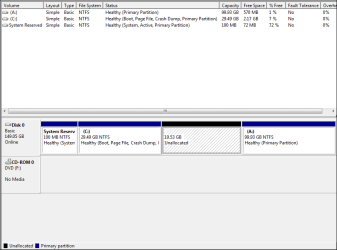
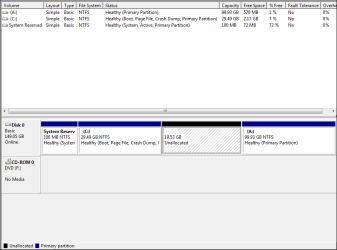
I had 19.53gb of S drive wich i formatted and deleted.Now i have 19.53gb of unallocated free space and i want to shrink it into 2 halves and extend my C drive with 1 half and exted my A drive with another half.I'm able to extend my C drive but i'm unable to extend my A drive.I don know what is the reason.Pls help me.I've uploaded the screenshot for your reference.
 

Attachments
  • Capture.PNG
    Capture.PNG
    11 KB · Views: 35
Last edited:

My Computer My Computer

Computer Manufacturer/Model Number
Compaq Presario CQ50-130US
OS
Windows 7 professional 32-bit
CPU
Intel(R) Pentium(R)Dual CPU [email protected] 2.00Ghz
Memory
2.00 GB
Monitor(s) Displays
Generic PnP Monitor
Screen Resolution
1280x800
Internet Speed
Lan
First of all the A:/ is reserved for a floppy drive never use that letter for a hdd, second in disk mgmt you can only extend to the right. There are other free 3 rd party programs such as Partition Wizard that will allow you to extend left. Hope this helps.
 

My Computer My Computer

Computer Manufacturer/Model Number
Dell XPS 730
OS
Windows 7 Home Premium 64 bit
CPU
Intel Core 2 quad Extreme Q9770 @ 3.2 GHz
Memory
4x2 GB Muskin 1600 MHz ram
Graphics Card(s)
NVidia GTX 250
Sound Card
Soundblaster X-Fi Fatality Champion
Monitor(s) Displays
2 Dell 2007WFP Ultrascans
Screen Resolution
3360 x 1050
Hard Drives
WD Black 1TB sata, 2-WD Black 500 sata, 2-Seagate 500 Go external
PSU
1000 Watt
Cooling
air
Keyboard
MS Natrual Keyboard Pro
Mouse
Logitech Wireless Trackball
Internet Speed
DSL Elite
First of all the A:/ is reserved for a floppy drive never use that letter for a hdd, second in disk mgmt you can only extend to the right. There are other free 3 rd party programs such as Partition Wizard that will allow you to extend left. Hope this helps.
Tanx for ur help.I wil try Partition Wizard and tel u d result later...
 

My Computer My Computer

Computer Manufacturer/Model Number
Compaq Presario CQ50-130US
OS
Windows 7 professional 32-bit
CPU
Intel(R) Pentium(R)Dual CPU [email protected] 2.00Ghz
Memory
2.00 GB
Monitor(s) Displays
Generic PnP Monitor
Screen Resolution
1280x800
Internet Speed
Lan
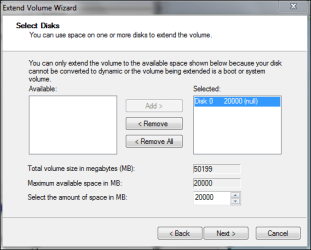
When i created S drive partition i used 20gb but only 19.53gb is showing to me i dont know where the remaining 0.47gb went.When i try to extend my C drive again 20gb is shown but after selecting again only 19.53gb is added to c drive.Y is 20gb doent get added completely .I've uploaded a screenshot for ur reference.
 

Attachments

  • Capture.PNG
    Capture.PNG
    11 KB · Views: 15
  • Extend wizard.PNG
    Extend wizard.PNG
    11.1 KB · Views: 10

My Computer My Computer

Computer Manufacturer/Model Number
Compaq Presario CQ50-130US
OS
Windows 7 professional 32-bit
CPU
Intel(R) Pentium(R)Dual CPU [email protected] 2.00Ghz
Memory
2.00 GB
Monitor(s) Displays
Generic PnP Monitor
Screen Resolution
1280x800
Internet Speed
Lan
It's because hdd manufacturer's count a gb as a 1000 mb's but in reality it is 1024 mb's so you lose alittle to overhead. Since you are extending C:/ to the unallocated space of 19.53 gb you are on the right track.
 

My Computer My Computer

Computer Manufacturer/Model Number
Dell XPS 730
OS
Windows 7 Home Premium 64 bit
CPU
Intel Core 2 quad Extreme Q9770 @ 3.2 GHz
Memory
4x2 GB Muskin 1600 MHz ram
Graphics Card(s)
NVidia GTX 250
Sound Card
Soundblaster X-Fi Fatality Champion
Monitor(s) Displays
2 Dell 2007WFP Ultrascans
Screen Resolution
3360 x 1050
Hard Drives
WD Black 1TB sata, 2-WD Black 500 sata, 2-Seagate 500 Go external
PSU
1000 Watt
Cooling
air
Keyboard
MS Natrual Keyboard Pro
Mouse
Logitech Wireless Trackball
Internet Speed
DSL Elite
It's because hdd manufacturer's count a gb as a 1000 mb's but in reality it is 1024 mb's so you lose alittle to overhead. Since you are extending C:/ to the unallocated space of 19.53 gb you are on the right track.

Tanx.. But it was an example to take screenshot.. I actually want to divide 19.53gb into 2halves and extend C: with 1half and A: drive with the other half.It is ok rite?
 

My Computer My Computer

Computer Manufacturer/Model Number
Compaq Presario CQ50-130US
OS
Windows 7 professional 32-bit
CPU
Intel(R) Pentium(R)Dual CPU [email protected] 2.00Ghz
Memory
2.00 GB
Monitor(s) Displays
Generic PnP Monitor
Screen Resolution
1280x800
Internet Speed
Lan
You should be able to use Windows Disk Management to extend C half way into the unallocated space.

But you will probably have to use Partition Wizard to add the other half to A, because the unallocated space is to the left of A, not to the right.

Since you have to use Partition Wizard, you may as well use it for the entire operation and forget about Disk Management.
 

My Computer My Computer

Computer type
PC/Desktop
Computer Manufacturer/Model Number
Ignatz Special; 4 speed manual gearbox; factory air conditioning; one of one
OS
Windows 7 Home Premium SP1, 64-bit
CPU
Intel Skylake i5-6600K, not overclocked
Motherboard
AsRock Z170M Extreme 4, micro ATX
Memory
8 GB HyperX DDR4-2666 (2 x 4 GB)
Graphics Card(s)
none; graphics are integrated on CPU
Sound Card
onboard: Realtek ALC1150; external: USB Behringer UF0-202
Monitor(s) Displays
Dell S2340M 23 inch IPS
Screen Resolution
1600 x 900
Hard Drives
System: Crucial MX100 series SSD, 128 GB;
Data: Samsung Spinpoint 103SJ, 1 TB;
Backup: WD Caviar Green WD30EZRX-00D8PB0, 3 TB
PSU
Rosewill SilentNight 500 watt fanless, semi-modular
Case
Antec Solo II
Cooling
Noctua NH-U12S; Noctua F12 intake, Noctua S12A exhaust
Keyboard
Microsoft 200 6JH-00001 USB
Mouse
Dell or Microsoft optical wired; USB
Antivirus
Microsoft Security Essentials and Malwarebytes Premium
Browser
Pale Moon
Other Info
All fans PWM; speeds at idle: CPU circa 500 rpm; intake circa 600 rpm; exhaust circa 600 rpm; CPU temps 27 idle and 47 C load in a warm room (27 C/81 F) when running Intel Extreme Tuning Utility stress test.
A word of warning: Before you use partition Wizard, make sure you make images of the partitions you manipulate. It is easy to make a mistake. I once lost a whole drive with 4 partitions (my mistake) - but I had my images. Else Partition Wizard is an excellent program.
 

My Computer My Computer

Computer Manufacturer/Model Number
HP, Dell, Gateway, Toshiba - 4 laptops and 2 desktops
OS
Vista, Windows7, Mint Mate, Zorin, Windows 8
CPU
from 1.6GHz Duo to i7
Monitor(s) Displays
2x HP w2207
Hard Drives
5x HDD, 7x SSD, 12x Externals
Keyboard
with trackball - no mices
Mouse
Trackball mice
Internet Speed
DSL 6000
A word of warning: Before you use partition Wizard, make sure you make images of the partitions you manipulate. It is easy to make a mistake. I once lost a whole drive with 4 partitions (my mistake) - but I had my images. Else Partition Wizard is an excellent program.

Tanx 4 ur warning but i completed my extension using EASEUS partition wizard in boot.
 

My Computer My Computer

Computer Manufacturer/Model Number
Compaq Presario CQ50-130US
OS
Windows 7 professional 32-bit
CPU
Intel(R) Pentium(R)Dual CPU [email protected] 2.00Ghz
Memory
2.00 GB
Monitor(s) Displays
Generic PnP Monitor
Screen Resolution
1280x800
Internet Speed
Lan
When i created S drive partition i used 20gb but only 19.53gb is showing to me i dont know where the remaining 0.47gb went.When i try to extend my C drive again 20gb is shown but after selecting again only 19.53gb is added to c drive.Y is 20gb doent get added completely .I've uploaded a screenshot for ur reference.


The difference is here in your screen shot...it's the conversion. 20GB converted to MB = 20480mb.
 

My Computer My Computer

Computer Manufacturer/Model Number
Custom built
OS
Windows 7 Ultimate 64 bit
CPU
AMD Phenom II X4 965 Black Edition
Motherboard
Gigabyte GA-MA790X-DS4
Memory
GSkill 4 X 2 GB PC 8500
Graphics Card(s)
XFX Radeon HD 6790 D
Sound Card
On board RealTek HD
Monitor(s) Displays
Dual monitors:Samsung SyncMaster S20B300
Screen Resolution
1600 X 900
Hard Drives
Seagate Barracuda 1TB (primary)
Seagate Barracuda 2 X 320 GB
PSU
Ultra X4 750 watt fully modular
Case
Thermaltake Overseer RX 1 full tower
Cooling
Core-Contact 92 mm CPU Cooler
Keyboard
Logitech G510
Mouse
Razor DeathAdder
Internet Speed
50/5 Mbps UL/DL
Other Info
Optical: Super Muliti DVD burner w/lightscribe, Hauppauge WinTV HVR-1800
Back
Top