Unable to install from USB

TroyE

New member
Local time
3:07 AM
Messages
2
Hi,

I've been trying to install windows 7 Pro from a USB for the poast 24 hours however always get stuck at the same point.
It will load and ask for the language, select that and then the usual message about drivers missing.
It is an HP ProDesk 400 G3 and trying to install Windows 7 Pro from the OEM ISO. I've tried the drivers from HP (obvioulsy extracted them), the IASTOR A & S, and nothing works. Eitther nothing is listed or errors when installing the driver. Also googled the issue and tried some of the methods, e.g. moving USB to different port whilst avoiding the USB3.0 ones.
Guess one option is to burn the ISO to a DVD and try that however any other ideas on how to fix it? Currently has Win10 installed but need to downgrade to Win7.

Thanks in advance.
 

My Computers My Computers

System One System Two

  • Computer type
    PC/Desktop
    Computer Manufacturer/Model Number
    HP
    OS
    Win 7 Pro, 32 bit
  • Computer type
    PC/Desktop
Possibly missing the appropriate usb 3 drivers so it cant locate the installation source on the usb.

Integrate usb3 support into the installation media

the simplest and quickest way
( including simplix updatepack is not a requirement, usb3 and nvme support is automatically integrated )

Update your Win 7 installation media

Alternatively

Exactly which oem iso do you have ?

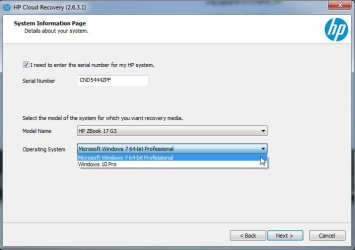
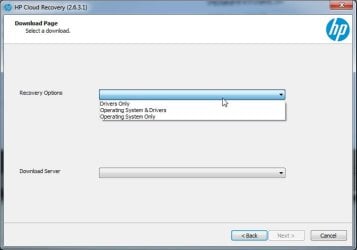
if you really want you could d/l the hp recovery/install media using the cloud recovery tool. Win7 media is available for the g3 according to this: It is very big
HP Cloud Recovery

something like this except you obviously select hp prodesk 400 g3 in the dropdown, though I suspect the recovery media is the same or near enough for all the g3 models :

HP-CLOUDRECOVERY.jpg

HP-CLOUD-RECOVERY2.jpg
 
Last edited:

My Computers My Computers

System One System Two

  • Computer type
    PC/Desktop
    OS
    7 X64
    CPU
    i5 8400
    Motherboard
    gigabyte b365m ds3h
    Memory
    2x8gb 3200mhz
    Hard Drives
    various
    PSU
    pure power 11 400w cm
    Case
    Coolermaster
    Cooling
    cryorig m9i
  • Computer type
    PC/Desktop
    OS
    7x64
    CPU
    g5400
    Motherboard
    ga b365m ds3h
    Memory
    8gb ddr4 2400
    PSU
    xfx pro 450w
Hi,

I've been trying to install windows 7 Pro from a USB for the poast 24 hours however always get stuck at the same point.
It will load and ask for the language, select that and then the usual message about drivers missing.
It is an HP ProDesk 400 G3 and trying to install Windows 7 Pro from the OEM ISO. I've tried the drivers from HP (obvioulsy extracted them), the IASTOR A & S, and nothing works. Eitther nothing is listed or errors when installing the driver. Also googled the issue and tried some of the methods, e.g. moving USB to different port whilst avoiding the USB3.0 ones.

Is the OEM iso from HP and did it came with the HP ProDesk 400 G3?
It is not clear if mouse and keyboard is working.
Did you set BIOS to CSM or equivalent to be compatible with Win 7?
Disable fast boot and secure boot (you can turn it on after installation)

Windows can be installed in two ways: Legacy-MBR or UEFI-GPT
To install as Legacy-MBR you must boot the installation drive as Legacy
To install as UEFI-GPT you must boot the installation drive as UEFI.

If you have a UEFI BIOS, you should install as UEFI-GPT
Detach any other drives (SATA or Power cable) from the MB.

During POST, press F12(?) to launch the boot menu. You will see two options for the USB drive. USB UEFI (Name) and USB (Name). Select USB UEFI (Name).
Go to install and delete ALL partitions on the main drive till you have one and only one unallocated space and then proceed.
 

My Computers My Computers

System One System Two

  • Computer type
    PC/Desktop
    Computer Manufacturer/Model Number
    custom build
    OS
    Windows 7 HP 64
    CPU
    i5 6600K - 800MHz to 4200MHz
    Motherboard
    GA-Z170-HD3P
    Memory
    4+4G GSkill DDR4 3000
    Graphics Card(s)
    IG - Intel 530
    Monitor(s) Displays
    Samsung 226BW
    Screen Resolution
    1680x1050
    Hard Drives
    (1) -1 SM951 – 128GB M.2 AHCI PCIe SSD drive for Windows 7 and Lubuntu
    (2) -1 WD SATA 3 - 1T for Data
    (3) -1 WD SATA 3 - 1T for backup
    PSU
    Thermaltake 450W TR2 gold
    Keyboard
    Old and good Chicony mechanical keyboard
    Mouse
    Logitech mX performance - 9 buttons (had to disable some)
    Internet Speed
    500Mb/s
    Browser
    Firefox 64
    Other Info
    TinyWall firewall
  • Computer type
    Laptop
    System Manufacturer/Model Number
    Asus Q550LF
    OS
    Windows 7 Pro
    CPU
    i7-4500U 800MHz to 3.0GHz
    Motherboard
    Asus Q550LF
    Memory
    (4+4)G DDR3 1600
    Graphics Card(s)
    IG intel 4400 + NVIDIA GeForce GT 745M
    Sound Card
    Realtek
    Monitor(s) Displays
    LG Display LP156WF4-SPH1
    Screen Resolution
    1920 x 1080
    Hard Drives
    BX500 120G SSD for Windows and programs +
    1T HDD for data
    Internet Speed
    500 Mb/s
    Browser
    Firefox
    Other Info
    TinyWall firewall
Last edited:

My Computers My Computers

System One System Two

  • Computer type
    PC/Desktop
    OS
    7 X64
    CPU
    i5 8400
    Motherboard
    gigabyte b365m ds3h
    Memory
    2x8gb 3200mhz
    Hard Drives
    various
    PSU
    pure power 11 400w cm
    Case
    Coolermaster
    Cooling
    cryorig m9i
  • Computer type
    PC/Desktop
    OS
    7x64
    CPU
    g5400
    Motherboard
    ga b365m ds3h
    Memory
    8gb ddr4 2400
    PSU
    xfx pro 450w
Tried the cloud recovery tool, entered product ID and came back as invalid. Checked HP site and says this product is not supported by cloud support.
 

My Computers My Computers

System One System Two

  • Computer type
    PC/Desktop
    Computer Manufacturer/Model Number
    HP
    OS
    Win 7 Pro, 32 bit
  • Computer type
    PC/Desktop
It doesnt matter.

It is better to use this:
Update your Win 7 installation media

Hp still have the driverpack for the hp 800-600-400-G3
https://ftp.hp.com/pub/softpaq/sp99001-99500/sp99219.exe
Driver Packs (64-bit) | HP Client Management Solutions

winpe 3
https://ftp.hp.com/pub/softpaq/sp87501-88000/sp87510.exe
HP Client Windows PE Driver Packs | HP Client Management Solutions

It is best to check what is inside the pack, because you might not need/want all of them.

For example,
If you are using my project, there is no need to include any usb3 drivers from the pack..
The pack also includes three graphics drivers - not necessary to include them they can be installed afterwards.
Also the audio drivers - no need to integrate , they can be installed afterwards if wanted.
 
Last edited:

My Computers My Computers

System One System Two

  • Computer type
    PC/Desktop
    OS
    7 X64
    CPU
    i5 8400
    Motherboard
    gigabyte b365m ds3h
    Memory
    2x8gb 3200mhz
    Hard Drives
    various
    PSU
    pure power 11 400w cm
    Case
    Coolermaster
    Cooling
    cryorig m9i
  • Computer type
    PC/Desktop
    OS
    7x64
    CPU
    g5400
    Motherboard
    ga b365m ds3h
    Memory
    8gb ddr4 2400
    PSU
    xfx pro 450w
Back
Top