
Unable to install Office 2010 beta

cclloyd9785

Master of Technology
Power User
Local time
6:36 PM
Messages
662
Location
Boston, MA
When I uninstalled 2010 Pro Plus, it said it was unable to complete, then i rebooted liek it told me, and all the programs were gone except for the office tools. Same for Project Pro beta. Now when I try to uninstall visio 2010 beta i get the message
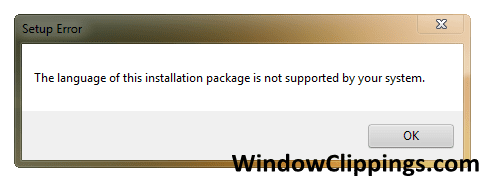

Setup Error.png


Any ideas on how to uninstall.
 

My Computer

Computer Manufacturer/Model Number
Toshiba Satellite L505D-S9565
OS
Windows 7 Home Premium x64, Mac OS X 10.6.2 x64
CPU
AMD Athlon X2 Dual-Core 2.1 GHz
Motherboard
Toshiba Built-In with Insyde H20 BIOS 1.40
Memory
4 GB DDR2 800 MHz
Graphics Card(s)
ATI Radeon HD Mobility 3100 Graphics 256MB to 1468 MB Shared
Sound Card
Realtek Mobile ALC272 HD Audio
Monitor(s) Displays
15.6" TFT LCD with TruBrite, Samsung 1080p HDTV
Screen Resolution
1366x768, 1920x1080
Hard Drives
❶:Main: Toshiba 250 GB SATA 5400 RPM
PSU
N/A
Case
N/A
Cooling
Built-in/Open window in winter :P
Keyboard
Built-in
Mouse
Build-in Symantics SmartTouch Pad
Internet Speed
55 MB/sec Down, 9 MB/sec Up
Other Info
❷:Backup: Seagate FreeAgent Desk USB 2.0 5400 RPM
❸:Media: Toshiba 640 GB USB 2.0 5400 RPM Portable Edition
You could try using something like Revo Uninstaller, which is a super uninstaller and see if that works. You can get it here.
 

My Computer

Computer type
PC/Desktop
Computer Manufacturer/Model Number
SuperBeast
OS
Windows 10 Tech Preview 9926 x64
CPU
AMD FX-8350
Motherboard
Gigabyte GA-990FXA-UD3
Memory
16GB DDR3 1333
Graphics Card(s)
Asus R9 290 DirectCU II OC, Gigabyte Windforce R9 290 OC
Sound Card
Integrated w/ Creative A250 2.1 speakers
Monitor(s) Displays
Main: Asus VN289H 28" Secondary: Acer G246HL 24"
Screen Resolution
1920x1080
Hard Drives
128 GB SanDisk Ultra Plus (Windows drive)

240 GB Crucial M500 SSD (Games drive)

1 TB WDC WD10EACS 7200RPM HDD (Data drive)

2 TB Seagate Expansion Desktop external HDD (Backup drive)
PSU
900w Antec HCG-900
Case
Raidmax Agusta Full ATX
Cooling
Corsair H80
Keyboard
Cooler Master Devastator MB24
Mouse
Cooler Master Devastator MS2K 1000/1600/2000 DPI
Internet Speed
100Mbps cable
Antivirus
Avast!
Browser
Chrome
Still got the same message, and wen i went to install the full version of office 2010, it said have to remove the old one, and there is no unisntall entry for it.
 

My Computer

Computer Manufacturer/Model Number
Toshiba Satellite L505D-S9565
OS
Windows 7 Home Premium x64, Mac OS X 10.6.2 x64
CPU
AMD Athlon X2 Dual-Core 2.1 GHz
Motherboard
Toshiba Built-In with Insyde H20 BIOS 1.40
Memory
4 GB DDR2 800 MHz
Graphics Card(s)
ATI Radeon HD Mobility 3100 Graphics 256MB to 1468 MB Shared
Sound Card
Realtek Mobile ALC272 HD Audio
Monitor(s) Displays
15.6" TFT LCD with TruBrite, Samsung 1080p HDTV
Screen Resolution
1366x768, 1920x1080
Hard Drives
❶:Main: Toshiba 250 GB SATA 5400 RPM
PSU
N/A
Case
N/A
Cooling
Built-in/Open window in winter :P
Keyboard
Built-in
Mouse
Build-in Symantics SmartTouch Pad
Internet Speed
55 MB/sec Down, 9 MB/sec Up
Other Info
❷:Backup: Seagate FreeAgent Desk USB 2.0 5400 RPM
❸:Media: Toshiba 640 GB USB 2.0 5400 RPM Portable Edition
Office 2010 Uninstall

As far as uninstalling 2010 Beta, it is the program from Hell. I was in the same boat when I went to install the RTM. I'll tell you what I used and it finally worked.
There will be more than one step to this. First you need a couple of files.
1. Ripoutoffice2007.zip (can be found by doing a search on the web)
2. Ms Install cleaner, msicuu2.exe. (can be found by doing a search on the web)

There is another one that you can use if you like. It is named clean2cr.zip also available via the web.

First I ran the uninstall from Win7 it failed just as you mentioned. I then used ripoutoffice2007 it worked on the 2010 Beta. Then I ran the MS Install cleaner. Ir got some more of it.

Wait, you are not done. I went through my directory tree and removed some stray files. Wait, you are not done. In Win7 there is more than one directory with Office entries. So you will have to check everywhere.

Now the final thing I done was regedit and search for Office. Found several entries. Two of which would not delete. But evidently they did not impede the 2010 Install.

If all else fails you can try this mish-mash. Good Luck
 

My Computer

Computer Manufacturer/Model Number
BGC (Bob's Garage Crew)
OS
win 7 X64 Ultimate SP1
CPU
I3770K
Motherboard
Asus P8Z77-V Deluxe
Memory
G Skill F3-14900CL9-4GBXL x 4
Graphics Card(s)
NVIDIA GeForce GTX670 + Intel 4000
Sound Card
Realtek HD 5.1 (MOB)
Monitor(s) Displays
Asus VW224T (1)
Screen Resolution
1920 x 1080
Hard Drives
SATA Corsair Force GT 2.5" 180GB (System) Sata 3
OCZ Vertex3 120GB
OCZ Vertex 2 120GB 2.5" SATA II
ST31000524AS 1000.2GB
WD15EARS (External)
PSU
CoolerMaster 1000 Watt
Case
CoolerMaster HAF X
Cooling
CPU -- CoolerMaster 520N
Keyboard
MS Wireless 3000 V2
Mouse
MS Wireless 3000 V2
Internet Speed
Cable
Antivirus
Norton Internet Security
Browser
IE9
Other Info
AMI Bios 1805
OC'd 3%
Still didnt work, and my regedit doesnt work right, it like doesnt let me into it for some reason unless im in safe mode. And what folders would I have to remove?
 

My Computer

Computer Manufacturer/Model Number
Toshiba Satellite L505D-S9565
OS
Windows 7 Home Premium x64, Mac OS X 10.6.2 x64
CPU
AMD Athlon X2 Dual-Core 2.1 GHz
Motherboard
Toshiba Built-In with Insyde H20 BIOS 1.40
Memory
4 GB DDR2 800 MHz
Graphics Card(s)
ATI Radeon HD Mobility 3100 Graphics 256MB to 1468 MB Shared
Sound Card
Realtek Mobile ALC272 HD Audio
Monitor(s) Displays
15.6" TFT LCD with TruBrite, Samsung 1080p HDTV
Screen Resolution
1366x768, 1920x1080
Hard Drives
❶:Main: Toshiba 250 GB SATA 5400 RPM
PSU
N/A
Case
N/A
Cooling
Built-in/Open window in winter :P
Keyboard
Built-in
Mouse
Build-in Symantics SmartTouch Pad
Internet Speed
55 MB/sec Down, 9 MB/sec Up
Other Info
❷:Backup: Seagate FreeAgent Desk USB 2.0 5400 RPM
❸:Media: Toshiba 640 GB USB 2.0 5400 RPM Portable Edition
you still have some "old bits" of beta installed. It took me several hours to clean out every remnant. Sort of seek and destroy. Once you get everything cleaned out it will install
 

My Computer

Computer type
PC/Desktop
Computer Manufacturer/Model Number
custom build
OS
WinXP / Win 7 / Win 8.1 64bit Dual Boot
CPU
i7-4770K
Motherboard
Asus Z87-A
Memory
16 gb G.Skill Ripjaws
Graphics Card(s)
on board 4600
Sound Card
On Board Soundmax HD
Monitor(s) Displays
Dell 19" Flat Panel
Screen Resolution
1280x1024
Hard Drives
Samsung 840 Pro 512gb SSD
WD1001 Caviar Win 7 Boot
WD500 Caviar Win XP Boot
2xWD500 Caviar (Raid 0)
WD750 Caviar (Backup)
PSU
Aerocool StrikeX 800w x2
Case
Aerocool Strike X
Cooling
Air
Keyboard
Microsoft Wireless
Mouse
Microsoft Wireless
Internet Speed
Cable
Other Info
Asus 12x Blu-ray writer
Do you think it would just be easier to do a fresh install?

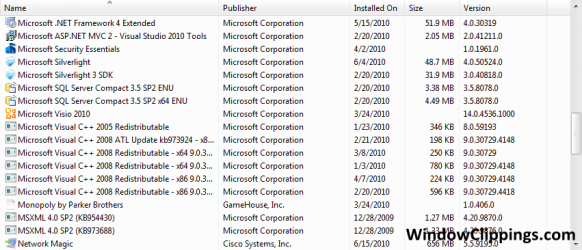
I also have installed/unistalled about 50+ programs since i installed windows 7. And would like to know what all those programs are that r only <1MB-5MB

ShellView.png
 

My Computer

Computer Manufacturer/Model Number
Toshiba Satellite L505D-S9565
OS
Windows 7 Home Premium x64, Mac OS X 10.6.2 x64
CPU
AMD Athlon X2 Dual-Core 2.1 GHz
Motherboard
Toshiba Built-In with Insyde H20 BIOS 1.40
Memory
4 GB DDR2 800 MHz
Graphics Card(s)
ATI Radeon HD Mobility 3100 Graphics 256MB to 1468 MB Shared
Sound Card
Realtek Mobile ALC272 HD Audio
Monitor(s) Displays
15.6" TFT LCD with TruBrite, Samsung 1080p HDTV
Screen Resolution
1366x768, 1920x1080
Hard Drives
❶:Main: Toshiba 250 GB SATA 5400 RPM
PSU
N/A
Case
N/A
Cooling
Built-in/Open window in winter :P
Keyboard
Built-in
Mouse
Build-in Symantics SmartTouch Pad
Internet Speed
55 MB/sec Down, 9 MB/sec Up
Other Info
❷:Backup: Seagate FreeAgent Desk USB 2.0 5400 RPM
❸:Media: Toshiba 640 GB USB 2.0 5400 RPM Portable Edition
If it's going to take more than an hour or two to fix, and everything I've read about getting rid of the beta version suggests it is, reinstalling windows and all your programs would probably be much faster and less frustrating
 
Back
Top