- Local time
- 5:34 PM
- Messages
- 207
Hi, I have a home wired LAN with the following configuration:
1) A Win 7x64 PC (static IP)
2) A Win 8.1x64 LAPTOP (static IP)
3) A Synology NAS (static IP)
3) A TP-LINK TL-R600VPN Wired Router connected to a cablemodem (internet access WAN) and to the switch.
4) A Trendnet 8 port switch connected to the 3 clients (PC, Laptop and NAS) and to the router (TP-LINK)
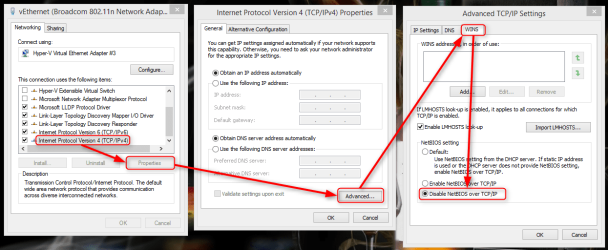
I have created a Windows Homegroup (Home/Private) from either the PC or Laptop going step by step as per these instructions and making sure that in both the PC and Laptop all requirements are met (required services, adapter settings, etc). The Homegroup is created successfully but the following issue arises:
- From the PC I can access shared files in the Laptop (by going to Windows Explorer/Network for example). From the PC I can also access the NAS shared files.
- From the Laptop, even though the Homegroup shows "Joined", I cannot access any shared file in the PC or NAS (it will show Error 53, network path not found). If I try to map a network drive (to directly access a shared folder in either the PC or NAS), it will also display an error saying that the network path cannot be found. However from the laptop I can access the NAS using the browser (Firefox, IE, etc).

So what is preventing the access to shared folders in the LAN from the laptop?
Thanks for any clue.
1) A Win 7x64 PC (static IP)
2) A Win 8.1x64 LAPTOP (static IP)
3) A Synology NAS (static IP)
3) A TP-LINK TL-R600VPN Wired Router connected to a cablemodem (internet access WAN) and to the switch.
4) A Trendnet 8 port switch connected to the 3 clients (PC, Laptop and NAS) and to the router (TP-LINK)
I have created a Windows Homegroup (Home/Private) from either the PC or Laptop going step by step as per these instructions and making sure that in both the PC and Laptop all requirements are met (required services, adapter settings, etc). The Homegroup is created successfully but the following issue arises:
- From the PC I can access shared files in the Laptop (by going to Windows Explorer/Network for example). From the PC I can also access the NAS shared files.
- From the Laptop, even though the Homegroup shows "Joined", I cannot access any shared file in the PC or NAS (it will show Error 53, network path not found). If I try to map a network drive (to directly access a shared folder in either the PC or NAS), it will also display an error saying that the network path cannot be found. However from the laptop I can access the NAS using the browser (Firefox, IE, etc).
So what is preventing the access to shared folders in the LAN from the laptop?
Thanks for any clue.
Last edited:
My Computer
- Computer type
- PC/Desktop
- Computer Manufacturer/Model Number
- Dell Dimension 8200/Personal Build
- OS
- Windows XP Professional SP3/Windows 7 Ultimate x64
- CPU
- Intel Pentium 4 3.06GHz Northwood/Intel Core i7 3770K
- Motherboard
- North Bridge:Intel Tehama i850(E)/Asus P8Z77-V Deluxe
- Memory
- 2 Gb RDRAM Dual Channel/GSkill 32GB DDR3 1866
- Graphics Card(s)
- ATI ALL-IN-WONDER X800 XT AGP/MSI GTX 660 Ti PE
- Sound Card
- Voyetra Turtle Beach Santa Cruz PCI/Onboard Realtek HD
- Monitor(s) Displays
- Viewsonic VP230mb ViewPanel
- Screen Resolution
- 1600x1200 32bit
- Hard Drives
- Western Digital 500Gb IDE drive (main drive) (XP PC)/Samsung 512GB 840 Pro Series SSD main+Western Digital Caviar Black 2 TB SATA III 7200 RPM 64 MB Cache as 2nd internal (Win 7 PC)
- PSU
- Dell OEM/Thermaltake Toughpower Grand 850W TPG-850M
- Case
- Dell OEM/Corsair Obsidian 650DW-1 Midtower
- Cooling
- Dell OEM/Noctua NH-D14
- Keyboard
- Dell Multimedia keyboard
- Mouse
- Logitech Cordless MouseMan® Optical M-RM63