Unable to remove unwanted adware Crazy Score

rosphite1

New member
Local time
2:34 PM
Messages
4
I recently noticed Google Chrome populating its first page from Google Search with Crazy Score ads.
This soon evolved to populating other pages with Crazy Score ads in the margins
Now when I click on anywhere in a web page in Google Chrome it opens another web page of ads - usually with audio
If I need to click on a link in a webpage i need to do so 3 times before the correct link is activated. The other 2 times open ad pages.
Occasionally when i click in a web page it opens a web page with audio that says i'm infected with a virus and need to follow the links [which i don't]. This page completely locks Google Chrome and can only be reactivated by closing Chrome using the "End Process" from the task menu.

I only use IE for hotmail and do not have this problem with IE

Crazy Score is not in the Control Panel> Programs so it cannot be uninstalled.
Crasy Score is not in Chrome Extensions either.

I run Avast (paid) that does not detect it.
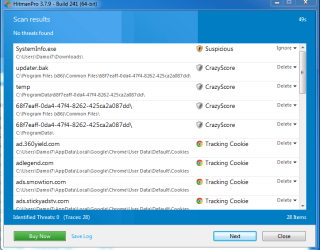
HitmanPro detects and cleans it but it comes back on reboot
Adwcleaner detects and cleans it but it comes back on reboot
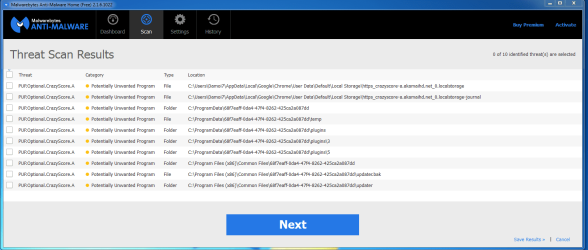
Malwarebytes detects and cleans it but it comes back on reboot

I've restored the system to long before I ever noticed anything and ran malwarebytes straight afterwards
It detected it again and i've attached a snip of the report
I did the same with HitmanPro and file attached

Can anyone help get rid of this thing, please?
 

Attachments
  • malware Crazy Score.PNG
    malware Crazy Score.PNG
    42.4 KB · Views: 4
  • HitMan Crasy Score.PNG
    HitMan Crasy Score.PNG
    24.2 KB · Views: 4

My Computer My Computer

At a glance

Microsoft Windows 7 Home Premium 64-bit 7601 ...Intel(R) Core(TM) i7-4790K CPU @ 4.00GHz16.00 GB(1) NVIDIA GeForce 210 (2) Intel(R) HD Graphi...
Computer type
PC/Desktop
Computer Manufacturer/Model Number
custom
OS
Microsoft Windows 7 Home Premium 64-bit 7601 Multiprocessor Free Service Pack 1
CPU
Intel(R) Core(TM) i7-4790K CPU @ 4.00GHz
Motherboard
ASUSTeK COMPUTER INC. Z97I-PLUS
Memory
16.00 GB
Graphics Card(s)
(1) NVIDIA GeForce 210 (2) Intel(R) HD Graphics 4600
Sound Card
(1) NVIDIA High Definition Audio (2) Realtek High Definiti
Screen Resolution
(1) 1920 x 1080 x 32 bits (4294967296 colors) @ 60 Hz (2)
Hard Drives
Samsung SSD 840 EVO 250GB ATA Device
Antivirus
Avast
Browser
Chrome

My Computer My Computer

At a glance

Vista, Windows7, Mint Mate, Zorin, Windows 8from 1.6GHz Duo to i7
Computer Manufacturer/Model Number
HP, Dell, Gateway, Toshiba - 4 laptops and 2 desktops
OS
Vista, Windows7, Mint Mate, Zorin, Windows 8
CPU
from 1.6GHz Duo to i7
Monitor(s) Displays
2x HP w2207
Hard Drives
5x HDD, 7x SSD, 12x Externals
Keyboard
with trackball - no mices
Mouse
Trackball mice
Internet Speed
DSL 6000
@whs He already did that.

A similar thing happend to me. The soultion for me was just to change to Firefox.
 
Last edited by a moderator:

My Computer My Computer

At a glance

Windows 10 Pro x64AMD Ryzen 5 1600 @ [email protected]G.Skill Flare X 16GB (2x8GB) DDR4-2400 @ 2666MHzSapphire Radeon Vega 56 NITRO+
Computer type
PC/Desktop
Computer Manufacturer/Model Number
me!
OS
Windows 10 Pro x64
CPU
AMD Ryzen 5 1600 @ [email protected]
Motherboard
ASUS B350 PRIME-PLUS
Memory
G.Skill Flare X 16GB (2x8GB) DDR4-2400 @ 2666MHz
Graphics Card(s)
Sapphire Radeon Vega 56 NITRO+
Sound Card
None
Monitor(s) Displays
ASUS VG248QZ
Screen Resolution
1920x1080
Hard Drives
Samsung 850 EVO 250GB*, 1TB Seagate Constellation ES, 2x Samsung 840 250GB in RAID0*

*Thanks ICIT2LOL for supplying me with all of these drives!
PSU
Corsair VS550
Case
Corsair Crystal 460X
Cooling
AMD Wraith Spire
Keyboard
Ducky Shine 6 w/ MX Browns and PBT keycaps
Mouse
Xtrfy M1-Ice
Internet Speed
100MBit/s down, 20MBit/s up
Antivirus
Bitdefender
Browser
Google Chrome
I had that nasty virus on my pc too, and I switched to Opera.
 

My Computer My Computer

At a glance

OpenBSD 6.8AMD A10-7850K APU @ 4300MHz8GB G-Skill Ripjaws @ 2133MHzI have an APU
Computer type
PC/Desktop
Computer Manufacturer/Model Number
Custom Build
OS
OpenBSD 6.8
CPU
AMD A10-7850K APU @ 4300MHz
Motherboard
ASRock FM2A58M-VG3+ R2.0
Memory
8GB G-Skill Ripjaws @ 2133MHz
Graphics Card(s)
I have an APU
Monitor(s) Displays
LG 24M35
Screen Resolution
1920x1080@74Hz
Hard Drives
931GB Seagate ST31000524NS 45W8867 59Y1812IBM
PSU
Cooler Master 750W
Case
Bitfenix NOVA
Cooling
120mm fan
Keyboard
Microsoft Digital Media Keyboard 1.0A
Mouse
Logitech G403
Internet Speed
40Mbps
Browser
Firefox
Other Info
Headset: Audio-Technica M50X

My Computer My Computer

At a glance

Windows 10 Pro. 64/ version 1709 Windows 7 Pr...Intel i7-6800K @ 4.3Corsair Platinum 16 gig @2400EVGA GTX 1070 OC
Computer type
PC/Desktop
Computer Manufacturer/Model Number
Home made Desktop
OS
Windows 10 Pro. 64/ version 1709 Windows 7 Pro/64
CPU
Intel i7-6800K @ 4.3
Motherboard
ASUS X-99 Deluxe II
Memory
Corsair Platinum 16 gig @2400
Graphics Card(s)
EVGA GTX 1070 OC
Monitor(s) Displays
Asus 27" LED LCD/VE278Q
Screen Resolution
1920-1080 or 1280-720 HDMI
Hard Drives
INTEL SSD 730-240 Gb Sata 3.0/
PSU
EVGA Platium 1200W
Case
Phanteks Luxe Tempered Glass 8 fans/ one radiator
Cooling
XSPC/ Water Cooled CPU
Keyboard
Das 4 Professional
Mouse
Logitech M705/MX Anywhere 2-S
Internet Speed
100 mbits
Antivirus
Microsoft Security Essentials/ Malwarebytes Premium 3.0/ SAS
Browser
I.E. 11 default/Firefox/ ISP Time Warner Cable/Spectrum
Other Info
LG BluRay Burner/
Sound system-KLipsch-THX/
Icy Dock ssd Hot Swap bays.
You're going to have to 'disable ad-ons' in Google Chrome ... How to disable add-ons/extensions in your browser?

Then Run ESET ....

  1. Hold down Control and click on the following link to open ESET OnlineScan in a new window.
    ESET OnlineScan
  2. Click the
    esetOnline.png
    button.
  3. For alternate browsers only: (Microsoft Internet Explorer users can skip these steps)
    1. Click on
      esetSmartInstall.png
      to download the ESET Smart Installer. Save it to your desktop.
    2. Double click on the
      esetSmartInstallDesktopIcon.png
      icon on your desktop.
  4. Check
    esetAcceptTerms.png
  5. Click the
    esetStart.png
    button.
  6. Accept any security warnings from your browser.
  7. Check
    esetScanArchives.png
  8. Push the Start button.
  9. ESET will then download updates for itself, install itself, and begin scanning your computer. Please be patient as this can take some time.
  10. When the scan completes, push
    esetListThreats.png
  11. Push
    esetExport.png
    , and save the file to your desktop using a unique name, such as ESETScan. Include the contents of this report in your next reply.
  12. Push the
    esetBack.png
    button.
  13. Push
    esetFinish.png
 

My Computer My Computer

At a glance

Windows 7 Ultimate 32bit SP1Intel(R) Core(TM)2 Quad CPU @ 2.40GHz, 2400 MHz4 GBATI Radeon HD 2600 Pro
Computer type
PC/Desktop
Computer Manufacturer/Model Number
Bruce ... somewhere in his 40's
OS
Windows 7 Ultimate 32bit SP1
CPU
Intel(R) Core(TM)2 Quad CPU @ 2.40GHz, 2400 MHz
Motherboard
INTEL/D975XBX2
Memory
4 GB
Graphics Card(s)
ATI Radeon HD 2600 Pro
Monitor(s) Displays
Samsung SyncMaster 914v
Screen Resolution
1280 x 1024
Hard Drives
2/500GB each ... ST3500630AS ATA Device.
One is not connected
PSU
Rocketfish 700 W
Case
G.Skill Gigabyte Chassis
Keyboard
Standard PS/2 Keyboard
Mouse
Microsoft PS/2 Mouse
Internet Speed
DSL
Antivirus
Avira Internet Security
Browser
IE 11
Other Info
ATI HDMI Audio
Jacee some how I lost your instruction. It might be on another computer so I copy/past them again on this computer.

@rosphite1

I would suggest you follow Jacee's instructions, she is a expert on such matters.
 

My Computer My Computer

At a glance

Windows 10 Pro. 64/ version 1709 Windows 7 Pr...Intel i7-6800K @ 4.3Corsair Platinum 16 gig @2400EVGA GTX 1070 OC
Computer type
PC/Desktop
Computer Manufacturer/Model Number
Home made Desktop
OS
Windows 10 Pro. 64/ version 1709 Windows 7 Pro/64
CPU
Intel i7-6800K @ 4.3
Motherboard
ASUS X-99 Deluxe II
Memory
Corsair Platinum 16 gig @2400
Graphics Card(s)
EVGA GTX 1070 OC
Monitor(s) Displays
Asus 27" LED LCD/VE278Q
Screen Resolution
1920-1080 or 1280-720 HDMI
Hard Drives
INTEL SSD 730-240 Gb Sata 3.0/
PSU
EVGA Platium 1200W
Case
Phanteks Luxe Tempered Glass 8 fans/ one radiator
Cooling
XSPC/ Water Cooled CPU
Keyboard
Das 4 Professional
Mouse
Logitech M705/MX Anywhere 2-S
Internet Speed
100 mbits
Antivirus
Microsoft Security Essentials/ Malwarebytes Premium 3.0/ SAS
Browser
I.E. 11 default/Firefox/ ISP Time Warner Cable/Spectrum
Other Info
LG BluRay Burner/
Sound system-KLipsch-THX/
Icy Dock ssd Hot Swap bays.
rosphite1,

Crazy Score can be a tricky one...

If you want to try a faster approach, please use the tool: Zoek

However, temporarily disable your AV program so it does not interfere.
Info on how to disable your security applications > How To Temporarily Disable Your Anti-virus, Firewall And Anti-malware Programs - Security Mini-Guides

Zoek Download > http://download.bleepingcomputer.com/smeenk/zoek.exe

When the download appears, save to the Desktop.
On the Desktop, right-click the Zoek.exe file and select: Run as Administrator
(Give it a few seconds to appear.)

Next, copy/paste the entire script inside the code box below to the input field of Zoek:
Code:
createsrpoint;
autoclean;
emptyalltemp;
ipconfig /flushdns;b

Now...
Close any open Browsers.
Click the Run script button, and wait. It takes a few minutes to run all the script.

When the tool finishes, the zoek-results.log is opened in Notepad.
The log is also found on the systemdrive, normally C:\
If a reboot is needed, the log is opened after the reboot.

:ar: Please attach the zoek-results.log in your reply.

Also, please provide an update on how the computer is behaving after running the above script.
 

My Computer My Computer

At a glance

Windows 7 Home Premium
Computer type
PC/Desktop
Computer Manufacturer/Model Number
An ol' eMachines
OS
Windows 7 Home Premium
Internet Speed
Fine for me...I'm retired!
It is as dangerous as it sounds, which is a big threat to both your computer and privacy. It can corrupt the target machine by all means once infected. The redirect virus can add its malicious add-ons and extension to your browsers like Google, IE, Firefox, etc.

Here are removal steps to help you remove it completely from your PC:

Step 1: Clear away all the cookies of this redirect virus.

Internet Explorer: Select Tools -> Safety -> Delete browsing history, click Delete button to clean up all the cookies.

Step 2: Remove all add-ons and extensions of with this redirect virus.

Internet Explorer: Click on Tools > Manage Add-ons.

Step 3: Erase all the files associated with this redirect virus.

%AppData%Local[random].exe
C:\Documents and Settings\LocalService\Local Settings\Temporary Internet Files\.exe

Step 4: Delete the registry entries injected by this redirect virus.

Go to the Start menu and select Run. Type regedit into the Run dialog box and press OK to start Registry Editor. Search for and delete the following registry entries injected by this redirect virus:


HKEY_CURRENT_USERSoftwareMicrosoftWindowsCurrentVersionRun “[RANDOM]”
HKEY_CURRENT_USER\Software\Classes\exefile\shell\open\command “IsolatedCommand” = ‘”%1? %
HKEY_CURRENT_USER\Software\Classes\exefile\shell\runas\command “(Default)” = ‘”%1? %

Sources from:
How to Immediately Remove Crazy Score Adware? | Quick Malware Removal

Hope the information can help you!
 

My Computer My Computer

At a glance

Windows 7
Computer type
PC/Desktop
OS
Windows 7
Back
Top