
- Local time
- 2:18 PM
- Messages
- 78
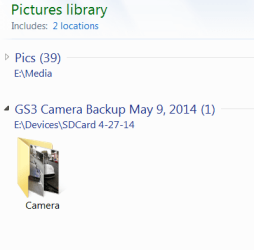
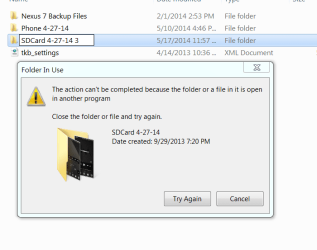
So I recently found out why I couldn't rename the backup folder of my phone's SD Card. It's because a folder of phone camera pictures in the SD Card backup folder is included in the library "Pictures". When I try to rename the SD Card backup folder, or the Camera pictures folder, I get the error that a file or folder is open in another program.
Adding phone camera backup folder to the Library. (it's filled with photos)
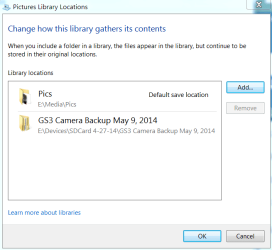
ok so it's there
trying to rename the folder that the camera backup folder is inside. I get an error.
and I get this error if I try to rename the actual photo folder
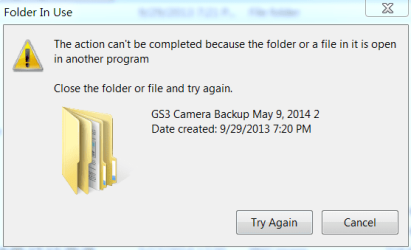
I don't have the backup folder open in any other program, so it must be a result of having it in a library. This doesn't happen ALL the time, just most of the time.
I'm curious to know if any of you know how to fix this?
It's not a huge problem as I can certainly live without it being in the library, but it's certainly annoying.
Thank you everyone
Adding phone camera backup folder to the Library. (it's filled with photos)
ok so it's there
trying to rename the folder that the camera backup folder is inside. I get an error.
and I get this error if I try to rename the actual photo folder
I don't have the backup folder open in any other program, so it must be a result of having it in a library. This doesn't happen ALL the time, just most of the time.
I'm curious to know if any of you know how to fix this?
It's not a huge problem as I can certainly live without it being in the library, but it's certainly annoying.
Thank you everyone
My Computer
- Computer type
- PC/Desktop
- Computer Manufacturer/Model Number
- I made her myself :)
- OS
- Windows 7 Professional
- CPU
- Intel i5-4670k
- Motherboard
- Asus Z87-Pro
- Memory
- G.SKILL Ripjaws X Series 16GB 1600mhz (F3-1600C9D-16GXM)
- Graphics Card(s)
- EVGA GTX770 SC ACX 2gb
- Monitor(s) Displays
- Acer H236HLbid 23" ips 5ms GTG
- Screen Resolution
- 1080p
- Hard Drives
- -128gb Samsung 840 Pro (C drive with OS)
-1tb WD Black 7200rpm 64mb WD1002FAEX (music, programs, files, etc.)
-120gb Samsung 840 evo (games)
- PSU
- SeaSonic M12II 750watt
- Case
- Coolermaster HAF 922 all black, usb 3.0
- Cooling
- CPU: CM hyper 212 evo with push-pull Cougar Vortex fans
- Keyboard
- CM Storm QuickFire TK (brown switch mechanical)
- Mouse
- perixx mx-2000
- Internet Speed
- 21Mb/s down, 2Mb/s up (on a good day)
- Antivirus
- Malwarebytes and Microsoft Security Essentials
- Browser
- Chrome
- Other Info
- Fans on case: front 200mm in, top 200mm out, x2 side 120mm in (cougar vortex), rear 120mm out
I've never seen my cpu go above 40c and my card above 60c even with intense games or benchmarks
I don't overclock anything, as I rely on this machine too much for other things to risk it getting fried.


