
Unable to safely eject external drives etc

lister

New member
Power User
Local time
3:56 AM
Messages
259
Any ideas what I should do here.....

I can attach and use external devices - but when I try to safely eject there is nothing there - in other words, right click icon on system tray but the device is not listed.

Any suggestions with what could be the problem here? Thanks
 

My Computer

Computer Manufacturer/Model Number
Panasonic Toughbook CF F9
OS
Windows 7 Panasonic CF F9 (used to have CF F8)
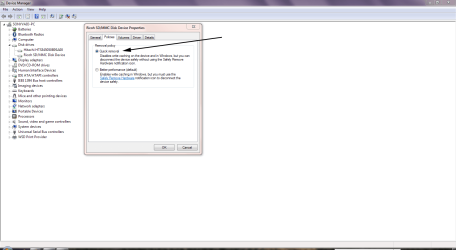
Have you tried opening Windows Explorer, right-clicking the drive icons and seeing if you have the Eject option from there?

Don't forget, you can always go into Device Manager, select the drive, click the Policies tab and choose the Quick Removal option.

http://www.sevenforums.com/tutorials/10392-write-caching-enable-disable.html

Eject.PNG

This impacts slightly on disk performance, but lets you remove the drive without going for the Eject option first.
 

My Computer

Computer Manufacturer/Model Number
HP Pavilion Elite 495UK
OS
Windows 7 Ultimate SP1 64-Bit
CPU
Intel Core i7 870 @ 2.93GHz
Motherboard
MSI 2A9C (CPU1)
Memory
8Gb Dual-Channel DDR3 @ 664MHz
Graphics Card(s)
nVidia GeForce GTX 460 1024MB dedicated RAM
Sound Card
Realtek HD Audio
Monitor(s) Displays
HP2310i
Screen Resolution
1920 x 1080
Hard Drives
1x1954GB Hitachi HDS22020ALA 330 (RAID), 1x1954GB Hitachi External for backup and storage
PSU
460W
Case
HP Elite
Cooling
Air cooled
Keyboard
Logitech K750 solar-powered keyboard
Mouse
Logitech Wireless M180 mouse
Internet Speed
2Mb
Other Info
Pure Avanti Flow Internet Radio with iPod Dock, 64Gb iPod, HP USB Speakers, Sony MDR-V500 Headphones, Sony Vaio F-Series Laptop
Back
Top