

Hi all
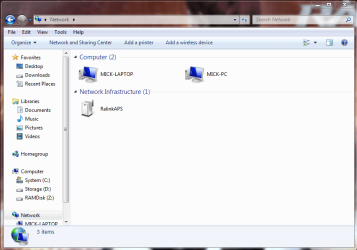
On my (Hardwired) Win 7 desktop and a wireless Win 8 laptop I can see my RT-AC68U router in the network (1st image) also showing my win 7 laptop is connected, however I am unable to see the Router on my wireless Win 7 Laptop (2nd image) although I am connected to the router and can use the internet freely. There must be some settings in Win 7 to enable me to see it. I have a 2TB drive connected to the router containing may films and TV programs, it would be nice to view them on all devices. I've looked through the tutorials and used the search but but generally the search comes up with problems connecting to the router.
Edit: Just connected my spare Win 7 laptop and that can see the Router??? Baffled
On my (Hardwired) Win 7 desktop and a wireless Win 8 laptop I can see my RT-AC68U router in the network (1st image) also showing my win 7 laptop is connected, however I am unable to see the Router on my wireless Win 7 Laptop (2nd image) although I am connected to the router and can use the internet freely. There must be some settings in Win 7 to enable me to see it. I have a 2TB drive connected to the router containing may films and TV programs, it would be nice to view them on all devices. I've looked through the tutorials and used the search but but generally the search comes up with problems connecting to the router.
Edit: Just connected my spare Win 7 laptop and that can see the Router??? Baffled
Attachments

Last edited:
My Computer
At a glance
Windows 10 Pro x64Intel i7 5930k 3.5 O/C @ 4.2ghz32Gb Dominator Platinum (4x 8GB) 2666MHzAsus GeForce GTX980Ti Matrix Platinum 6Gb
- Computer type
- PC/Desktop
- Computer Manufacturer/Model Number
- Custom build using Mainly ASUS equipment
- OS
- Windows 10 Pro x64
- CPU
- Intel i7 5930k 3.5 O/C @ 4.2ghz
- Motherboard
- Asus Rampage V Extreme: BIOS 1902
- Memory
- 32Gb Dominator Platinum (4x 8GB) 2666MHz
- Graphics Card(s)
- Asus GeForce GTX980Ti Matrix Platinum 6Gb
- Sound Card
- Onboard Realtek HD (SPDIF)
- Monitor(s) Displays
- Primary: Asus PB287Q 28" 4K, Secondary: Samsung 55" 4k
- Screen Resolution
- 3840 x 2160
- Hard Drives
- 1 x SM-951 .M2 SSD 512Gb (System)
1 x Samsung 850 Pro 256Gb SSD (Games)
1 x OCZ Vector 150 240Gb SSD (Games)
3 x Western Digital Caviar Black 1TB S300 16mb 7200rpm :
1 x 10Gb RamDisk
- PSU
- Corsair CMPSU-850AX
- Case
- Coolermaster Stormtrooper
- Cooling
- Noctua NH-D14 SE2011
- Keyboard
- Apple Keyboard USB
- Mouse
- Logitech MX Master
- Internet Speed
- 76mb down /16mb up
- Antivirus
- ESET NOD V8
- Browser
- Firefox, Chrome, Opera, IE
- Other Info
- CPU Idle Temp = 36°
CPU Load Temp = 48° @100% for 40mins
Asus - RT-AC68U Router


