Unable to send emails using Windows Live Mail

Larry6

New member
Local time
7:20 PM
Messages
7
I am using Windows 7 Home Premium 64-bit OS and have set up my Hotmail, Gmail and ISP mail accounts in WLM. I am receiving emails ok but am unable to send any. Any advice would be much appreciated.
This is the error message I am receiving:

An unknown error has occurred.

Subject 'test'
Server: 'smtp.gmail.com'
Windows Live Mail Error ID: 0x800CCC0B
Protocol: SMTP
Port: 465
Secure(SSL): Yes

Also does it matter which account I set as the default account?
Many thanks
 
Last edited:

My Computer My Computer

OS
Windows7 Home Premium 64-bit
I just sent a test email from my hotmail.com account via WLM to my bellsouth.net e-ddress...no problem.

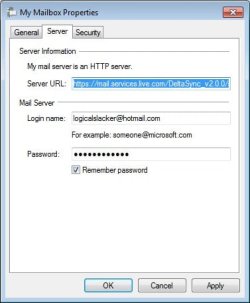
When I added my account, I typed my Hotmail e-ddress, password, and clicked "Make this my default email account, bu not "Manually config...." The server used is https://mail.services.live.com/DeltaSync_v2.0.0/sync.aspx
 

My Computer My Computer

Computer Manufacturer/Model Number
Dell Dimension E521
OS
64-bit Windows 7 Home Premium w/ SP1
CPU
AMD Athlon 64 X2 5600+ Brisbane 65nm Technology
Motherboard
Dell Inc 0HK980 (Socket M2)
Memory
4.00 GB Single-Channel DDR2 @ 200MHz
Graphics Card(s)
64MB NVIDIA GeForce 6150 LE
Sound Card
Sigmatel HD Audio
Monitor(s) Displays
Dell E176FP
Screen Resolution
1280 x 1024
Hard Drives
Internal 78 GB Western Digital; External USB 931GB HP
PSU
Dell, I guess?
Case
Dell CoolQuiet
Cooling
Fan
Keyboard
Dell Standard Keyboard
Mouse
Kensington One-Button USB
Internet Speed
1.5Mbps Max. Download / 256Kbps Max. Upload
Other Info
Kodak ESP 3250 All-In-One Printer; Altec Lansing BXR1220 USB-powered Speaker System; Westell 6100 DSL Modem; Tripplite Surge Protected Power Center
Thank you for that. I think maybe I will delete the accounts and start again. I'm not sure what you mean by the server you mentioned.
 

My Computer My Computer

OS
Windows7 Home Premium 64-bit
Here's a pic.:

WLMpropertiesdialog.jpg

The server was automatically set up.
 

My Computer My Computer

Computer Manufacturer/Model Number
Dell Dimension E521
OS
64-bit Windows 7 Home Premium w/ SP1
CPU
AMD Athlon 64 X2 5600+ Brisbane 65nm Technology
Motherboard
Dell Inc 0HK980 (Socket M2)
Memory
4.00 GB Single-Channel DDR2 @ 200MHz
Graphics Card(s)
64MB NVIDIA GeForce 6150 LE
Sound Card
Sigmatel HD Audio
Monitor(s) Displays
Dell E176FP
Screen Resolution
1280 x 1024
Hard Drives
Internal 78 GB Western Digital; External USB 931GB HP
PSU
Dell, I guess?
Case
Dell CoolQuiet
Cooling
Fan
Keyboard
Dell Standard Keyboard
Mouse
Kensington One-Button USB
Internet Speed
1.5Mbps Max. Download / 256Kbps Max. Upload
Other Info
Kodak ESP 3250 All-In-One Printer; Altec Lansing BXR1220 USB-powered Speaker System; Westell 6100 DSL Modem; Tripplite Surge Protected Power Center
Hi Larry6, the first thing you should do is access your Gmail settings and enable POP. Personally I don't use IMAP but if you need it to access your Gmail with other apps enable it also.
I sign-in to WLM with my Hotmail account (where my contacts are saved) wait till all folders are loaded then add my Gmail account. I then delete the Hotmail account.
 

My Computer My Computer

Computer Manufacturer/Model Number
Look in my Signature.
OS
Win7 H.Prem. 32bit+SP1
Thanks Roderunner but just abother question. Why do you delete your hotmail account? Sorry if this is a dumb question?
 

My Computer My Computer

OS
Windows7 Home Premium 64-bit
Hi Larry,
My Hotmail account is only used to sign-in to WLM where my contacts are saved, it also gives me Safe/Blocked sender filtering. Its only used for Mickey Mouse type of websites i.e. comparison sites. Gmail is more secure. I don't have to input addresses manually when sending mail.
 

My Computer My Computer

Computer Manufacturer/Model Number
Look in my Signature.
OS
Win7 H.Prem. 32bit+SP1
OK there must be something I'm missing here. I deleted all the accounts and decided to start again. I have added the hotmail account, it is not synchronizing ( waited over half an hour and nothing happened.), so then I tried receiving/sending messages and got the following error message:

Unable to send or receive messages for the Hotmail (youngr55) account.

Server Error: 0x80048849
Server: 'https://mail.services.live.com/DeltaSync_v2.0.0/Sync.aspx'
Windows Live Mail Error ID: 0x80048849

What am I doing wrong, please?
TIA
 

My Computer My Computer

OS
Windows7 Home Premium 64-bit
Now I have added 2 more accounts and am receiving emails from them but still unable to send.

The connection to the server has failed.

Subject 'test 25/4'
Server: 'mail.cherishedbooks.com.au'
Windows Live Mail Error ID: 0x800CCC0E
Protocol: SMTP
Port: 25
Secure(SSL): No
Socket Error: 10060
 

My Computer My Computer

OS
Windows7 Home Premium 64-bit
Hi Larry,
Your Hotmail account, if it has your correct name & password, will connect automatically.
Your ISP server looks wrong, try mail.cherishedbooks.au
-
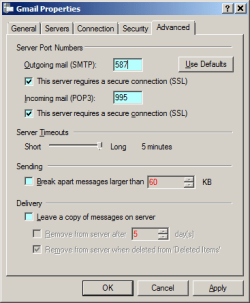
This is how your ISP & Gmail advanced tab should look like.

Untitled.png
 

My Computer My Computer

Computer Manufacturer/Model Number
Look in my Signature.
OS
Win7 H.Prem. 32bit+SP1
YAY!!!! Thank you. Finally got 2 working but still a no go with the hotmail. I can live with that anyway. :)
 

My Computer My Computer

OS
Windows7 Home Premium 64-bit
I knew you could do it. One final suggestion, if your ISP mail account does not have too many people using it, tell them to use your Gmail account. If, on the other hand, their are too many using your ISP account, try to set it to forward the mail to your Gmail account. If you set Gmail to archive mail when accessed by POP, you will NEVER lose any messages unless you delete them.
 

My Computer My Computer

Computer Manufacturer/Model Number
Look in my Signature.
OS
Win7 H.Prem. 32bit+SP1
I will keep that in mind Roderunner and thank you once again for your help (and everyone else too). :D
 

My Computer My Computer

OS
Windows7 Home Premium 64-bit
Back
Top