Unable to set Word 2010 as default program

jasonc

New member
Local time
7:23 AM
Messages
18
I have tried everything I know to get this to work but nothing seems to work.

I have Windows 7, and installed Office 2010 but when I try to open a file.docx file it opens in the old Word 2002 and not Word 2010.

I have right cliked the file and many other files and looked for Word 2010 but it is not there to select. Only the old Word 2002.

I have looked in control panel and looked at the file associations and there too I can not find Word 2010 when I try to alter the association of docx.

The only way I can open the file in Word 2010 is the long way and scrolling through each folder until I find the file I want to print or alter.

Any ideas anyone ?
 

My Computer

Computer type
PC/Desktop
Computer Manufacturer/Model Number
imedia S1300
OS
Windows 7 Home Premium 64bit
CPU
AMD Athlon(tm) II X4 605e
Screen Resolution
1440 x 900
Antivirus
AVG (auto update)
Browser
Firefox
Have you made the setting in your Word Options? If not, click on the Office logo at the top-left corner of the Word page, and click on Word Options at the very bottom. Click on Save, Save Documents, and in the "Save documents in this format" box, select: "Word 2010." When you're done, at the very bottom of the screen, IF you have this box, don't forget to check it: "Apply to all future documents." (This option appears on some Word Options pages but not all.)
 

My Computer

Computer Manufacturer/Model Number
HP Pavillion dv5t (generation 1)
OS
Vista 64 bit and 32 bit (SP2)
CPU
Intel(R) Core(TM)2 Duo Processor T9400 (2.53 GHz
Memory
4GB DDR2 System Memory (2 Dimm)
Graphics Card(s)
512 MB NVIDIA GeForce 9600M GT
Monitor(s) Displays
15.4" diagonal WSXGA+ High-Definition HP BrightView Widescre
Screen Resolution
1680 x 1050
Hard Drives
320GB 5400RPM SATA Hard Drive with HP ProtectSmart Hard Drive Protection
Keyboard
Built-in HP
Mouse
Built in - Synaptics TouchPad V6.5 on PS/2 Port
Internet Speed
Max
Other Info
~ Intel Next-Gen Wireless-N Mini-card w/Bluetooth ~ Blu-Ray ROM DVD+/-R/RW ~ Integ. HDTV Hybrid Tuner ~ 12 Cell Battery ~ MS Office (Home Premium) 2007 ~
I have opened Word 2010, all good so far, I create a dummy letter and use the 'save as' and select docx as the file type. the file saves ok in docx format as far as i can see. but when I double click the file on my desktop it opens in Word 2002 not Word 2010 !!

I right click the file and go to properties and click 'Change' in the General tab but can not find Word 2010, I navigate to 'C:\Program Files (x86)\Microsoft Office' and see

Clipart
MEDIA
Office10
Office12
Office14
Stationary
Templates

Looking in all of these I do not see Word 2010.

The only way I can start Word 2010 is via the shortcut link in my task bar.
the properties show this...

Target: "C:\Program Files (x86)\Common Files\microsoft shared\Virtualization Handler\CVH.EXE" "Microsoft Word 2010 9014006104090000"

Start in: C:\PROGRA~2\COMMON~1\MICROS~1\VIRTUA~1
 

My Computer

Computer type
PC/Desktop
Computer Manufacturer/Model Number
imedia S1300
OS
Windows 7 Home Premium 64bit
CPU
AMD Athlon(tm) II X4 605e
Screen Resolution
1440 x 900
Antivirus
AVG (auto update)
Browser
Firefox
Jason, the one thing you didn't say was that you changed the setting in
"Word Options." Did you click on the Office logo at the top-left corner of the Word page, click on Word Options at the very bottom, click on Save, Save Documents, and in the "Save documents in this format" box, select:
"Word 2010" ??????
 

My Computer

Computer Manufacturer/Model Number
HP Pavillion dv5t (generation 1)
OS
Vista 64 bit and 32 bit (SP2)
CPU
Intel(R) Core(TM)2 Duo Processor T9400 (2.53 GHz
Memory
4GB DDR2 System Memory (2 Dimm)
Graphics Card(s)
512 MB NVIDIA GeForce 9600M GT
Monitor(s) Displays
15.4" diagonal WSXGA+ High-Definition HP BrightView Widescre
Screen Resolution
1680 x 1050
Hard Drives
320GB 5400RPM SATA Hard Drive with HP ProtectSmart Hard Drive Protection
Keyboard
Built-in HP
Mouse
Built in - Synaptics TouchPad V6.5 on PS/2 Port
Internet Speed
Max
Other Info
~ Intel Next-Gen Wireless-N Mini-card w/Bluetooth ~ Blu-Ray ROM DVD+/-R/RW ~ Integ. HDTV Hybrid Tuner ~ 12 Cell Battery ~ MS Office (Home Premium) 2007 ~
Jason, the one thing you didn't say was that you changed the setting in
"Word Options." Did you click on the Office logo at the top-left corner of the Word page, click on Word Options at the very bottom, click on Save, Save Documents, and in the "Save documents in this format" box, select:
"Word 2010" ??????

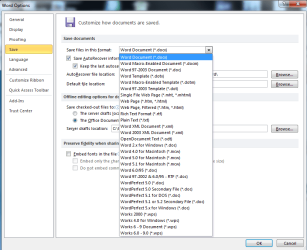
See attached image for screen shot of the Word 2010 options available to me.

There is no option in this for Word 2010....
 

Attachments

  • doc not save as Word 2010.png
    doc not save as Word 2010.png
    27.8 KB · Views: 163

My Computer

Computer type
PC/Desktop
Computer Manufacturer/Model Number
imedia S1300
OS
Windows 7 Home Premium 64bit
CPU
AMD Athlon(tm) II X4 605e
Screen Resolution
1440 x 900
Antivirus
AVG (auto update)
Browser
Firefox
I think this is a file association issue... Not a problem of how it's being saved...

But I have a question... You left the old version on the computer? Why?

Go to one of the 2010 documents and do Shift-right click... Select open with... There is a browse button on the window that opens... You'll have to browse to the Winword.exe for 2010... I don't have 2010, but the path for my 2007 Word is: C:\Program Files (x86)\Microsoft Office\Office12\Winword.exe

When it goes back to the select program window, make sure the "always use the selected program to open this kind of file" is checked, and then click ok.
 

My Computer

Computer type
PC/Desktop
Computer Manufacturer/Model Number
Dell Inspiron 530
OS
Windows 7 Professional 64 bit
Memory
8 GB
Graphics Card(s)
nVidia
Monitor(s) Displays
2
thats just it i can not find the Word 2010 programe to associate with the doc file...
 

My Computer

Computer type
PC/Desktop
Computer Manufacturer/Model Number
imedia S1300
OS
Windows 7 Home Premium 64bit
CPU
AMD Athlon(tm) II X4 605e
Screen Resolution
1440 x 900
Antivirus
AVG (auto update)
Browser
Firefox
The Office14 file is Office 2010.
 

My Computer

Computer type
PC/Desktop
Computer Manufacturer/Model Number
Packard Bell
OS
Windows 7 Home Premium 64bit
CPU
Intel(R) Core(TM) i3-2120 CPU @ 3.30GHz
Motherboard
Packard Bell IPISB-AG
Memory
3.00 GB
Graphics Card(s)
(1) Intel(R) HD Graphics (2) VNC Mirror Driver
Sound Card
Realtek High Definition Audio
Monitor(s) Displays
AIO LCD
Screen Resolution
1920 x 1080
Hard Drives
WDC WD10EADX-22TDHB0 ATA Device
Fixed hard disk media
4 partitions
931.51 GB
Keyboard
Wireless
Mouse
Wireless
Antivirus
Microsoft Security Essentials
Browser
IE; Firefox
Other Info
Also:
Samsung N220 Plus Netbook - Windows 7 Home
HP laptop
iPad 5
these are the files inside the folder Office14

OneNote (a folder)
NPSPWRAP.DLL
OSPP.HTM
OSPP.VBS
SLERROR.XML
 

My Computer

Computer type
PC/Desktop
Computer Manufacturer/Model Number
imedia S1300
OS
Windows 7 Home Premium 64bit
CPU
AMD Athlon(tm) II X4 605e
Screen Resolution
1440 x 900
Antivirus
AVG (auto update)
Browser
Firefox
Did you look in both the "Program Files (x86)" and the "Program Files" folders?

You said: "The only way I can open the file in Word 2010 is the long way and scrolling through each folder until I find the file I want to print or alter." so it sounds like you are able to open Word 2010... So Winword is located somewhere... You might try a search on your C: drive to find where it is located...

EDIT: You might want to think about reinstalling 2010....
 

My Computer

Computer type
PC/Desktop
Computer Manufacturer/Model Number
Dell Inspiron 530
OS
Windows 7 Professional 64 bit
Memory
8 GB
Graphics Card(s)
nVidia
Monitor(s) Displays
2
ok done a full C:\ search and only found one WINWORD.EXE, located in
C:\Program Files (x86)\Microsoft Office folder but this is Word 2002 !
 

My Computer

Computer type
PC/Desktop
Computer Manufacturer/Model Number
imedia S1300
OS
Windows 7 Home Premium 64bit
CPU
AMD Athlon(tm) II X4 605e
Screen Resolution
1440 x 900
Antivirus
AVG (auto update)
Browser
Firefox
HELP!!! Did you solve this problem? I'm having much the same problem only my laptop was supplied as an insurance claim so I cannot even take it to the shop for help.
The laptop came with Microsoft starter and Microsoft Office 2010 that prompts for a product key.
I installed an old version of MS Office I had and bought an upgrade to 2010 and installed that. It prompted me for the key and i entered he one that came with the upgrade. So I have all the 2010 programmes installed and working, but they did not automatically override the starter . I tried to change the association manually. In recommended programmes, I see MS Office 2010 (but if I choose that, it takes me to the activation screen where I have to put in a key. Now, the key won't work, neither does a key I found on the bottom o the laptop. I also see 'windows office client virtualization handler' if i choose that it takes me to word starter. Under other programmes I see MSoffice10 but it has a picture icon. It does not take me to word. I used browse to locate the word 2010 file WINWORD in the Office 14 folder programmes(x86) folder and selected it, but it would not show in the association window, and the association did not work. No other programme selections work either) I tried hiding the original MS office folder in the programmes folder and moved the one I'd installed from the programmes 86x folder to the programmes folder but that did not fix it. Also, advice earlier in this thread was to click on the MS icon in the top LH corner f a word page, but I cannot see such an icon in my word docs, some are 2003-7 doc files, others are docx. I am not a programmer but I can follow simple clear instructions that don;t assume a lot of technical knowledge. Can anyone help?
 

My Computer

OS
Windows 7 Pro OA 64 bit notebook
Back
Top