Unable to share folders in BOTH directions between two PCs

nuspieds

New member
Member
Local time
2:13 AM
Messages
53
Hi all,

My first main laptop was a Windows 7 Ultimate 64-Bit. I had no need to share so I remember "locking it down" as much as could as far as Windows 7 configuration is concerned.

Now I just recenlty purchased a second laptop and would like to share folders between the two. The second laptop is running Home Premium.

I am able to successfully setup shared folders on the second computer and can successfully access them from my main laptop. All is good.

However, though I can successfully setup shares on my main laptop, I cannot access them from my second computer. I get an "unable to access" type of error. I have also clicked on the "Diagnose" link and the analysis it says is that "File sharing is enabled on the computer, but it is not allowing connections on port 445."

I did the Windows Firewall check and the file and folder sharing features ARE enabled on my main computer, so I don't know what to do next. I'm also running Webroot AntiVirus 6 on the main laptop, if that should matter.

If you have any ideas as to what could be wrong or what else I can check, please let me know.

Thx!
 

My Computer My Computer

At a glance

Windows 7 Ultimate x64
OS
Windows 7 Ultimate x64
The Webroot Antivirus 6 is most likely causing this problem to occur. You might try to configure it to work better with sharing or uninstall it completely and check to see that sharing works. I'm not familor with your antivirus so I can't give you info on how to configure it.
 

My Computer My Computer

At a glance

Windows 7 Ult, Windows 8.1 Pro,Q9650-4.275GHz, E8600 4.5GHz, E6750-3.8GHzG.Skill PC2 9600 1200Mhz 5 5 5 15 2TGTX480
Computer type
PC/Desktop
Computer Manufacturer/Model Number
Home built
OS
Windows 7 Ult, Windows 8.1 Pro,
CPU
Q9650-4.275GHz, E8600 4.5GHz, E6750-3.8GHz
Motherboard
Evga 780i FTW
Memory
G.Skill PC2 9600 1200Mhz 5 5 5 15 2T
Graphics Card(s)
GTX480
Sound Card
Asus Xonar D2
Monitor(s) Displays
HannsG
Screen Resolution
1680X1050
Hard Drives
GSkill Phoenix Pro 120GB SSD
PSU
ThermalTake Toughpower 1000Watt modular
Case
ThermalTake XaserV
Cooling
Xigmatek S1283
Keyboard
Logitech G15
Mouse
Logitech G9
Internet Speed
T1
Both are running Webroot Antivirus. Even if I shutdown the Antivirus on the mail computer, I get the same error, so Webroot is not the issue.
 

My Computer My Computer

At a glance

Windows 7 Ultimate x64
OS
Windows 7 Ultimate x64
Did you check in the Network and Sharing Center under "Advanced sharing settings" to ensure file and folder sharing show as enabled in there as well? Additionally, are you setup on a homegroup or traditional workgroup sharing? Additionally, with a shared folder, if you right-click on it and go to Properties, if you go to the Sharing tab and click on permissions, are the expected users listed in the permissions?
 

My Computer My Computer

At a glance

Windows 7 Ultimate x64 SP1Intel Core i3 530 2.93 Ghz Clarkdale4 GB OCZ DDR3 1600 (PC12800) Low Voltage Desk...Nvidia GeForce GTX 550 Ti with 1 GB of RAM
OS
Windows 7 Ultimate x64 SP1
CPU
Intel Core i3 530 2.93 Ghz Clarkdale
Motherboard
ASRock P55 PRO/USB3 LGA 1156
Memory
4 GB OCZ DDR3 1600 (PC12800) Low Voltage Desktop Memory
Graphics Card(s)
Nvidia GeForce GTX 550 Ti with 1 GB of RAM
Sound Card
Realtek HD ALC892
Monitor(s) Displays
20'' eMachines E202HDbmd Glare Panel Widescreen
Screen Resolution
1600 x 900
Hard Drives
Western Digital 1 TB Caviar Black Edition (7200 RPM) SATA
Hitachi Deskstar 500 GB (7200 RPM) SATA
Samsung SpinPoint 400 GB (7200 RPM) SATA
PSU
Rosewill Xtreme Series RX750-D-B ATX12V v2.2 & EPS12V (750W)
Case
Cooler Master Centurion 534 RC-534-KKN2-GP Mid-Tower
Cooling
Standard Case Fans and Stock CPU Heatsink
Keyboard
Microsoft Wireless Optical Desktop Elite
Mouse
Microsoft Wireless Optical Desktop Elite
Internet Speed
7.1 Mbps Verizon DSL
Yes, the file/folder sharing features are enabled.

I have not setup anything in Homegroup other than what was automatically setup by Windows. Both laptops are in the same Workgroup.

Yes, the permissions are fine...I even went so far as to enable Everyone with full control and still no change.
 

My Computer My Computer

At a glance

Windows 7 Ultimate x64
OS
Windows 7 Ultimate x64
I'm having a similar nightmare. 3 PC's all running Ultimate. A can access B and C. B can access A and C but C can only access A not B!

So just one way on one system! Spent 2 days on it and its driving me nuts! I can the Username and password box every time even though password sharing is off!
 

My Computer My Computer

At a glance

Windows 7 Ultimate x32
OS
Windows 7 Ultimate x32
I'm having a similar nightmare...
As I had reported earlier, both PCs are running Webroot so it is likely not to be my culprit since file/folder sharing does work on one of the PCs.


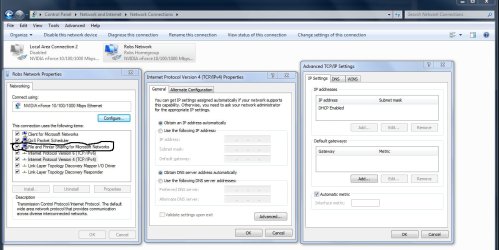
This has been confirmed as I have solved the problem as follows:
  1. Go to Start | Control Panel | Networking and Sharing Center
  2. Click on "Change adapter settings" on the left hand side
  3. Right-click on your network connection and select "Properties" from the pop-up menu
  4. In the "This connection uses the following items" box, select "File and Printer Sharing for Microsoft Networks"
On my second PC the item #5 was enabled/selected, but when I looked at my main PC, I noticed that the checkbox was empy! So I enabled the option and--bam!--it worked!!! Woohoo! I ws now able to connect from my second PC to my main! :party:

I stumbled onto this when I saw another post somewhere about checking out the TCP/IP configuration and I remembered whow to do that in Vista. But I didn't know the equivalent procedures in Win7, so while hunting around, I luckily stumbled onto the above!!! :D

Hopefully you are also missing this in your adapter configuration and then this solution would also work for you.
 
Last edited:

My Computer My Computer

At a glance

Windows 7 Ultimate x64
OS
Windows 7 Ultimate x64
I'm having a similar nightmare...
As I had reported earlier, both PCs are running Webroot so it is likely not to be my culprit since file/folder sharing does work on one of the PCs.


This has been confirmed as I have solved the problem as follows:
  1. Go to Start | Control Panel | Networking and Sharing Center
  2. Click on "Change adapter settings" on the left hand side
  3. Right-click on your network connection. Do not select anything from the pop-up menu. Rather, wait for the menu toolbar to appear right under the "File | Edit | View..." menu line
  4. Click on the "Change settings of this connection" menu toolbar
  5. In the "This connection uses the following items" box, select "File and Printer Sharing for Microsoft Networks"
On my second PC the item #5 was enabled/selected, but when I looked at my main PC, I noticed that the checkbox was empy! So I enabled the option and--bam!--it worked!!! Woohoo! I ws now able to connect from my second PC to my main! :party:

I stumbled onto this when I saw another post somewhere about checking out the TCP/IP configuration and I remembered whow to do that in Vista. But I didn't know the equivalent procedures in Win7, so while hunting around, I luckily stumbled onto the above!!! :D

Hopefully you are also missing this in your adapter configuration and then this solution would also work for you.

Sorry but your analogy is incorrect. All types of A/V software can and will cause these types of problems. :sarc: This fact has played itself out in this forum so many times I've lost count.
 

My Computer My Computer

At a glance

Windows 7 Ult, Windows 8.1 Pro,Q9650-4.275GHz, E8600 4.5GHz, E6750-3.8GHzG.Skill PC2 9600 1200Mhz 5 5 5 15 2TGTX480
Computer type
PC/Desktop
Computer Manufacturer/Model Number
Home built
OS
Windows 7 Ult, Windows 8.1 Pro,
CPU
Q9650-4.275GHz, E8600 4.5GHz, E6750-3.8GHz
Motherboard
Evga 780i FTW
Memory
G.Skill PC2 9600 1200Mhz 5 5 5 15 2T
Graphics Card(s)
GTX480
Sound Card
Asus Xonar D2
Monitor(s) Displays
HannsG
Screen Resolution
1680X1050
Hard Drives
GSkill Phoenix Pro 120GB SSD
PSU
ThermalTake Toughpower 1000Watt modular
Case
ThermalTake XaserV
Cooling
Xigmatek S1283
Keyboard
Logitech G15
Mouse
Logitech G9
Internet Speed
T1
I've never seen that box be unchecked by default. The only way that setting could have changed is because your A/V made it that way for some reason or you unchecked it. :sarc:

I've never once heard of this setting being unchecked so it's a new one on me.

You can also get there by right clicking your network connection and choose properties.

That would be one of the first places I would check for unchecked networking functions. Glad you got it working.

The other place is under the Advanced Sharing settings window like in the picture below, if it's not enabled here then it might also be unchecked in your IPv4 properties window.
 

Attachments

  • Home or work homegroup turn on file and printer sharing.jpg
    Home or work homegroup turn on file and printer sharing.jpg
    98.7 KB · Views: 75
  • IPv4 file and printer sharing was turned off.jpg
    IPv4 file and printer sharing was turned off.jpg
    121.4 KB · Views: 52

My Computer My Computer

At a glance

Windows 7 Ult, Windows 8.1 Pro,Q9650-4.275GHz, E8600 4.5GHz, E6750-3.8GHzG.Skill PC2 9600 1200Mhz 5 5 5 15 2TGTX480
Computer type
PC/Desktop
Computer Manufacturer/Model Number
Home built
OS
Windows 7 Ult, Windows 8.1 Pro,
CPU
Q9650-4.275GHz, E8600 4.5GHz, E6750-3.8GHz
Motherboard
Evga 780i FTW
Memory
G.Skill PC2 9600 1200Mhz 5 5 5 15 2T
Graphics Card(s)
GTX480
Sound Card
Asus Xonar D2
Monitor(s) Displays
HannsG
Screen Resolution
1680X1050
Hard Drives
GSkill Phoenix Pro 120GB SSD
PSU
ThermalTake Toughpower 1000Watt modular
Case
ThermalTake XaserV
Cooling
Xigmatek S1283
Keyboard
Logitech G15
Mouse
Logitech G9
Internet Speed
T1
I've never once seen that box unchecked by default. The only way that setting could have changed is because your A/V made it that way for some reason or you unchecked it. :sarc:

You can also get there by right clicking your network connection and choose properties. That would be one of the first places I would check for unchecked networking functions. Glad you got it working.

I don't know what it was that I visually saw that made me think that right-click then select Properties was different than the toolbar menu button! Right-clicking and selecting Properties has become second nature in Windows, so that's what I had done the very first time. But you're right: They're definitely equivalent! :D

I certainly didn't uncheck the box--I would have remembered. I do agree with you that an AV could uncheck something like ethat, but I'm still not ready to point the finger at Webroot, though, because like I said, it works fine on the second PC and it has Webroot installed.

However, at one point I did try PC Tools AV and it could have been that. But now that I think about it, what I really think it could be is my old configuration. That is, the difference between my second PC and my main PC is that my main PC was upgraded from Vista. So, perhaps that setting was inherited from my Vista configuration. The second PC, however, is a brand new PC.
 

My Computer My Computer

At a glance

Windows 7 Ultimate x64
OS
Windows 7 Ultimate x64
Upgrade installs cause problems like this all the time so I'm not surprized to hear it was an upgrade installation.

It can also happen if you didn't enable the setting under the Advanced sharing settings windows like in the picture above.

Easy mistake to make I'd say, not to mention there are two Advanced settings windows, one for Home-Work network and the other one is for the Public sharing settings.

I think I need to cover the basics more often, I have posted that picture about fifty times LOL, time to start posting it again.
 

My Computer My Computer

At a glance

Windows 7 Ult, Windows 8.1 Pro,Q9650-4.275GHz, E8600 4.5GHz, E6750-3.8GHzG.Skill PC2 9600 1200Mhz 5 5 5 15 2TGTX480
Computer type
PC/Desktop
Computer Manufacturer/Model Number
Home built
OS
Windows 7 Ult, Windows 8.1 Pro,
CPU
Q9650-4.275GHz, E8600 4.5GHz, E6750-3.8GHz
Motherboard
Evga 780i FTW
Memory
G.Skill PC2 9600 1200Mhz 5 5 5 15 2T
Graphics Card(s)
GTX480
Sound Card
Asus Xonar D2
Monitor(s) Displays
HannsG
Screen Resolution
1680X1050
Hard Drives
GSkill Phoenix Pro 120GB SSD
PSU
ThermalTake Toughpower 1000Watt modular
Case
ThermalTake XaserV
Cooling
Xigmatek S1283
Keyboard
Logitech G15
Mouse
Logitech G9
Internet Speed
T1
Yeah, I'm sure, but that has always been enabled, so even more of a reason I was perplexed. Also, remember the diagnosis report from Windows confirmed that sharing was enabled, but that the firewall/port 445 was not responding to requests.

All the more reason I started to head down the firewall path. Since Windows was acknolwedging that I did have sharing enabled, I naturally started to look elsewhere.
 

My Computer My Computer

At a glance

Windows 7 Ultimate x64
OS
Windows 7 Ultimate x64
Back
Top