Unable to update Internet Explorer, SFC unable to fix corruption

Uwajimaya

New member
Local time
1:37 PM
Messages
8
Hi there!

There are similar threads about this problem but since the solution is always system specific, I figured I'd start a new thread.

I'm having issues with a few Windows updates, sometimes they work sometimes they don't but the Internet Explorer update never works. I had IE9, uninstalled it, now I have IE8. Any attempt to update via Windows Update fails (it downloads, installs, but then fails and reverts back during restart)

I have run SFC which finds corrupt files but is unable to fix them. I have attached the CBS log. Hoping somebody can help me with this, it's driving me in-sane! :)

Thanks in advance!
 

My Computer My Computer

At a glance

Win 7 Ultimate x64 (SP1)Intel I5 2500K (overclocked)16GBAsus GeForce 980
Computer type
PC/Desktop
Computer Manufacturer/Model Number
custom build
OS
Win 7 Ultimate x64 (SP1)
CPU
Intel I5 2500K (overclocked)
Motherboard
ASRock Z68 Extreme3 Gen3
Memory
16GB
Graphics Card(s)
Asus GeForce 980
Sound Card
Onboard Audio
Hard Drives
Primary: SanDisk SSD
Secondary: WDC 500GB
Antivirus
Bitdefender Internet Security
Browser
Firefox, Chrome
One of the files it cannot fix, xlog.exe, has been reported as a trojan, please run a virus scan.

Roy
 

My Computer My Computer

At a glance

W7 home premium 32bit/W7HP 64bit/w10 tp insid...E5300 dual core3gbNvidia Geforce 7100 Nforce 630i
Computer type
PC/Desktop
Computer Manufacturer/Model Number
medionl/Aspire 6930G/acer x55a
OS
W7 home premium 32bit/W7HP 64bit/w10 tp insider ring
CPU
E5300 dual core
Motherboard
medion MS7366
Memory
3gb
Graphics Card(s)
Nvidia Geforce 7100 Nforce 630i
Monitor(s) Displays
avixc
Internet Speed
n (isp resticted to 72)
Antivirus
mse/pands
Browser
palemoon
Other Info
Belkin Fd7050 n USB using Railink RT2870 drivers, more upto date
Thanks for you response. I ran a virus scan (Bitdefender), came back clean.
 

My Computer My Computer

At a glance

Win 7 Ultimate x64 (SP1)Intel I5 2500K (overclocked)16GBAsus GeForce 980
Computer type
PC/Desktop
Computer Manufacturer/Model Number
custom build
OS
Win 7 Ultimate x64 (SP1)
CPU
Intel I5 2500K (overclocked)
Motherboard
ASRock Z68 Extreme3 Gen3
Memory
16GB
Graphics Card(s)
Asus GeForce 980
Sound Card
Onboard Audio
Hard Drives
Primary: SanDisk SSD
Secondary: WDC 500GB
Antivirus
Bitdefender Internet Security
Browser
Firefox, Chrome

My Computer My Computer

At a glance

W7 home premium 32bit/W7HP 64bit/w10 tp insid...E5300 dual core3gbNvidia Geforce 7100 Nforce 630i
Computer type
PC/Desktop
Computer Manufacturer/Model Number
medionl/Aspire 6930G/acer x55a
OS
W7 home premium 32bit/W7HP 64bit/w10 tp insider ring
CPU
E5300 dual core
Motherboard
medion MS7366
Memory
3gb
Graphics Card(s)
Nvidia Geforce 7100 Nforce 630i
Monitor(s) Displays
avixc
Internet Speed
n (isp resticted to 72)
Antivirus
mse/pands
Browser
palemoon
Other Info
Belkin Fd7050 n USB using Railink RT2870 drivers, more upto date
Ok. System specs updated, disganostic report below:

Code:
Diagnostic Report (1.9.0027.0):
-----------------------------------------
Windows Validation Data-->

Validation Code: 0
Cached Online Validation Code: 0x0
Windows Product Key: *****-*****-CQGPC-HY8QG-JHBCC
Windows Product Key Hash: D884RUAmeg0A6UwahxEcxU8HU4Y=
Windows Product ID: 00426-292-9891834-85351
Windows Product ID Type: 5
Windows License Type: Retail
Windows OS version: 6.1.7601.2.00010100.1.0.001
ID: {AFF3E3D3-8559-41B7-B6E6-57ECD70F534D}(3)
Is Admin: Yes
TestCab: 0x0
LegitcheckControl ActiveX: N/A, hr = 0x80070002
Signed By: N/A, hr = 0x80070002
Product Name: Windows 7 Ultimate
Architecture: 0x00000009
Build lab: 7601.win7sp1_gdr.151019-1254
TTS Error: 
Validation Diagnostic: 
Resolution Status: N/A

Vista WgaER Data-->
ThreatID(s): N/A, hr = 0x80070002
Version: N/A, hr = 0x80070002

Windows XP Notifications Data-->
Cached Result: N/A, hr = 0x80070002
File Exists: No
Version: N/A, hr = 0x80070002
WgaTray.exe Signed By: N/A, hr = 0x80070002
WgaLogon.dll Signed By: N/A, hr = 0x80070002

OGA Notifications Data-->
Cached Result: N/A, hr = 0x80070002
Version: N/A, hr = 0x80070002
OGAExec.exe Signed By: N/A, hr = 0x80070002
OGAAddin.dll Signed By: N/A, hr = 0x80070002

OGA Data-->
Office Status: 100 Genuine
Microsoft Office Ultimate 2007 - 100 Genuine
OGA Version: N/A, 0x80070002
Signed By: N/A, hr = 0x80070002
Office Diagnostics: 025D1FF3-364-80041010_025D1FF3-229-80041010_025D1FF3-230-1_025D1FF3-517-80040154_025D1FF3-237-80040154_025D1FF3-238-2_025D1FF3-244-80070002_025D1FF3-258-3_E2AD56EA-765-d003_E2AD56EA-766-0_E2AD56EA-134-80004005_E2AD56EA-765-b01a_E2AD56EA-766-0_E2AD56EA-148-80004005_16E0B333-89-80004005_B4D0AA8B-1029-80004005

Browser Data-->
Proxy settings: N/A
User Agent: Mozilla/4.0 (compatible; MSIE 8.0; Win32)
Default Browser: C:\Program Files (x86)\Mozilla Firefox\firefox.exe
Download signed ActiveX controls: Prompt
Download unsigned ActiveX controls: Disabled
Run ActiveX controls and plug-ins: Allowed
Initialize and script ActiveX controls not marked as safe: Disabled
Allow scripting of Internet Explorer Webbrowser control: Disabled
Active scripting: Allowed
Script ActiveX controls marked as safe for scripting: Allowed

File Scan Data-->

Other data-->
Office Details: <GenuineResults><MachineData><UGUID>{AFF3E3D3-8559-41B7-B6E6-57ECD70F534D}</UGUID><Version>1.9.0027.0</Version><OS>6.1.7601.2.00010100.1.0.001</OS><Architecture>x64</Architecture><PKey>*****-*****-*****-*****-JHBCC</PKey><PID>00426-292-9891834-85351</PID><PIDType>5</PIDType><SID>S-1-5-21-3154638383-2127349488-371115747</SID><SYSTEM><Manufacturer>To Be Filled By O.E.M.</Manufacturer><Model>To Be Filled By O.E.M.</Model></SYSTEM><BIOS><Manufacturer>American Megatrends Inc.</Manufacturer><Version>P2.30</Version><SMBIOSVersion major="2" minor="7"/><Date>20120629000000.000000+000</Date></BIOS><HWID>D4613E07018400FE</HWID><UserLCID>0409</UserLCID><SystemLCID>0409</SystemLCID><TimeZone>Pacific Standard Time(GMT-08:00)</TimeZone><iJoin>0</iJoin><SBID><stat>3</stat><msppid></msppid><name></name><model></model></SBID><OEM/><GANotification/></MachineData><Software><Office><Result>100</Result><Products><Product GUID="{91120000-002E-0000-0000-0000000FF1CE}"><LegitResult>100</LegitResult><Name>Microsoft Office Ultimate 2007</Name><Ver>12</Ver><Val>9E40B2BBCB6170C</Val><Hash>LZ0JH78EUQYZgfz/SYr+jLUuimU=</Hash><Pid>81608-902-4136223-65778</Pid><PidType>1</PidType></Product></Products><Applications><App Id="15" Version="12" Result="100"/><App Id="16" Version="12" Result="100"/><App Id="18" Version="12" Result="100"/><App Id="19" Version="12" Result="100"/><App Id="1A" Version="12" Result="100"/><App Id="1B" Version="12" Result="100"/><App Id="44" Version="12" Result="100"/><App Id="A1" Version="12" Result="100"/><App Id="BA" Version="12" Result="100"/></Applications></Office></Software></GenuineResults>  

Spsys.log Content: 0x80070002

Licensing Data-->
Software licensing service version: 6.1.7601.17514

Name: Windows(R) 7, Ultimate edition
Description: Windows Operating System - Windows(R) 7, RETAIL channel
Activation ID: ac96e1a8-6cc4-4310-a4ff-332ce77fb5b8
Application ID: 55c92734-d682-4d71-983e-d6ec3f16059f
Extended PID: 00426-00170-292-989183-00-1033-7600.0000-3542011
Installation ID: 002334658200571320307211314163012602054540234396852856
Processor Certificate URL: http://go.microsoft.com/fwlink/?LinkID=88338
Machine Certificate URL: http://go.microsoft.com/fwlink/?LinkID=88339
Use License URL: http://go.microsoft.com/fwlink/?LinkID=88341
Product Key Certificate URL: http://go.microsoft.com/fwlink/?LinkID=88340
Partial Product Key: JHBCC
License Status: Licensed
Remaining Windows rearm count: 4
Trusted time: 12/11/2015 5:10:24 PM

Windows Activation Technologies-->
HrOffline: 0x00000000
HrOnline: N/A
HealthStatus: 0x0000000000000000
Event Time Stamp: N/A
ActiveX: Registered, Version: 7.1.7600.16395
Admin Service: Registered, Version: 7.1.7600.16395
HealthStatus Bitmask Output:


HWID Data-->
HWID Hash Current: OAAAAAEABAABAAIAAAAEAAAAAQABAAEAHKImUXrASt3aATihYjTyACoNsHmQypr5XMPYTRpMLnM=

OEM Activation 1.0 Data-->
N/A

OEM Activation 2.0 Data-->
BIOS valid for OA 2.0: yes, but no SLIC table
Windows marker version: N/A
OEMID and OEMTableID Consistent: N/A
BIOS Information: 
  ACPI Table Name    OEMID Value    OEMTableID Value
  APIC            ALASKA        A M I
  FACP            ALASKA        A M I
  HPET            ALASKA        A M I
  MCFG            ALASKA        A M I
  ASF!            INTEL          HCG
  SSDT            Intel_        AoacTabl
  AAFT            ALASKA        OEMAAFT 
  SSDT            Intel_        AoacTabl
  SSDT            Intel_        AoacTabl
  SSDT            Intel_        AoacTabl
  BGRT            ALASKA        A M I

 

My Computer My Computer

At a glance

Win 7 Ultimate x64 (SP1)Intel I5 2500K (overclocked)16GBAsus GeForce 980
Computer type
PC/Desktop
Computer Manufacturer/Model Number
custom build
OS
Win 7 Ultimate x64 (SP1)
CPU
Intel I5 2500K (overclocked)
Motherboard
ASRock Z68 Extreme3 Gen3
Memory
16GB
Graphics Card(s)
Asus GeForce 980
Sound Card
Onboard Audio
Hard Drives
Primary: SanDisk SSD
Secondary: WDC 500GB
Antivirus
Bitdefender Internet Security
Browser
Firefox, Chrome
Nothing there to suggest thats stopping the installs,
What is the specific error code you get for normal updates failures.

You could also try the stand alone download for IE11, from MS.

Do you still have the original installtion discs.

Roy
 

My Computer My Computer

At a glance

W7 home premium 32bit/W7HP 64bit/w10 tp insid...E5300 dual core3gbNvidia Geforce 7100 Nforce 630i
Computer type
PC/Desktop
Computer Manufacturer/Model Number
medionl/Aspire 6930G/acer x55a
OS
W7 home premium 32bit/W7HP 64bit/w10 tp insider ring
CPU
E5300 dual core
Motherboard
medion MS7366
Memory
3gb
Graphics Card(s)
Nvidia Geforce 7100 Nforce 630i
Monitor(s) Displays
avixc
Internet Speed
n (isp resticted to 72)
Antivirus
mse/pands
Browser
palemoon
Other Info
Belkin Fd7050 n USB using Railink RT2870 drivers, more upto date
try these

Couple of other things to try

First
ControlPanal>>Programmes>>Programs/features(top left).
Scroll down to the XPS lines (both) check/uncheck them, depending on what they are currently.
REBOOT.

rerun sfc see if errors still present.

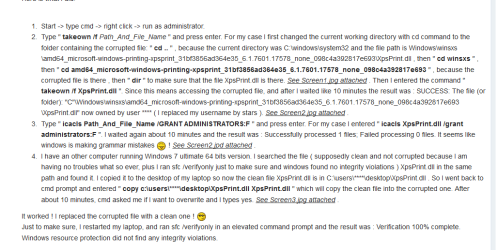
IF its not cleared then if your happy to change permissions try the following

Roy
 

Attachments

  • xpsdll.PNG
    xpsdll.PNG
    31.8 KB · Views: 2

My Computer My Computer

At a glance

W7 home premium 32bit/W7HP 64bit/w10 tp insid...E5300 dual core3gbNvidia Geforce 7100 Nforce 630i
Computer type
PC/Desktop
Computer Manufacturer/Model Number
medionl/Aspire 6930G/acer x55a
OS
W7 home premium 32bit/W7HP 64bit/w10 tp insider ring
CPU
E5300 dual core
Motherboard
medion MS7366
Memory
3gb
Graphics Card(s)
Nvidia Geforce 7100 Nforce 630i
Monitor(s) Displays
avixc
Internet Speed
n (isp resticted to 72)
Antivirus
mse/pands
Browser
palemoon
Other Info
Belkin Fd7050 n USB using Railink RT2870 drivers, more upto date
Hi, thanks again for your continued help, much appreciated.

1. Tried IE11 with standalone installer, it did not work. It says it needs to updates some files first - and it fails on the Win7 Platform update (KB267083), Download Platform Update for Windows 7 from Official Microsoft Download Center. The install starts but at the end it simply says the update was not installed with no error code or further indication what went wrong.

2. I unchecked the XPS lines (both were checked) and re-ran scandsk. It again reported corruptions and was unable to fix them.

3. I do could not find my Win 7 disk anymore, no clue where I put them. I am getting an ISO image as we speak, so I will have a disk again. Would love to avoid reinstalling Windows and hosing every installed program in the process.

4. With KB267083 apparently a requirement, and a failure for THAT to install, is that maybe the cause of it all? Any thoughts or suggestion on how to resolved?

5. I have not done the steps shows in the image above as I was unsure about the XPS files being involved and also not having my Win 7 CD.
 
Last edited:

My Computer My Computer

At a glance

Win 7 Ultimate x64 (SP1)Intel I5 2500K (overclocked)16GBAsus GeForce 980
Computer type
PC/Desktop
Computer Manufacturer/Model Number
custom build
OS
Win 7 Ultimate x64 (SP1)
CPU
Intel I5 2500K (overclocked)
Motherboard
ASRock Z68 Extreme3 Gen3
Memory
16GB
Graphics Card(s)
Asus GeForce 980
Sound Card
Onboard Audio
Hard Drives
Primary: SanDisk SSD
Secondary: WDC 500GB
Antivirus
Bitdefender Internet Security
Browser
Firefox, Chrome
Dont use IE11 myself, i've uncheck from the same place as the XPS options.

Another thought goto Devices>delete the XPS printer.

Roy
 

My Computer My Computer

At a glance

W7 home premium 32bit/W7HP 64bit/w10 tp insid...E5300 dual core3gbNvidia Geforce 7100 Nforce 630i
Computer type
PC/Desktop
Computer Manufacturer/Model Number
medionl/Aspire 6930G/acer x55a
OS
W7 home premium 32bit/W7HP 64bit/w10 tp insider ring
CPU
E5300 dual core
Motherboard
medion MS7366
Memory
3gb
Graphics Card(s)
Nvidia Geforce 7100 Nforce 630i
Monitor(s) Displays
avixc
Internet Speed
n (isp resticted to 72)
Antivirus
mse/pands
Browser
palemoon
Other Info
Belkin Fd7050 n USB using Railink RT2870 drivers, more upto date
Not sure XPS is the issue anymore? There are no XPS printers listed under devices (should there be?) I XS files still show up as corrupt though.

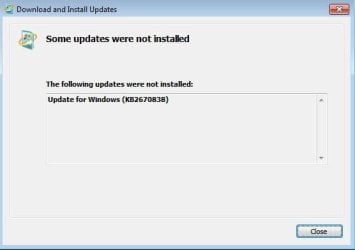
I also need the Win 7 platform update for other programs yet I am not able to install it. The installer error is kind of useless (see screenshot)
 

Attachments

  • Capture.JPG
    Capture.JPG
    20.8 KB · Views: 13
Last edited:

My Computer My Computer

At a glance

Win 7 Ultimate x64 (SP1)Intel I5 2500K (overclocked)16GBAsus GeForce 980
Computer type
PC/Desktop
Computer Manufacturer/Model Number
custom build
OS
Win 7 Ultimate x64 (SP1)
CPU
Intel I5 2500K (overclocked)
Motherboard
ASRock Z68 Extreme3 Gen3
Memory
16GB
Graphics Card(s)
Asus GeForce 980
Sound Card
Onboard Audio
Hard Drives
Primary: SanDisk SSD
Secondary: WDC 500GB
Antivirus
Bitdefender Internet Security
Browser
Firefox, Chrome
I did some more digging and ran the Windows Update Diagnostics tool. Logs attached, it can't repair the XPS manifests because the repair files are unavailable. Not sure how to proceed.
 

Attachments

My Computer My Computer

At a glance

Win 7 Ultimate x64 (SP1)Intel I5 2500K (overclocked)16GBAsus GeForce 980
Computer type
PC/Desktop
Computer Manufacturer/Model Number
custom build
OS
Win 7 Ultimate x64 (SP1)
CPU
Intel I5 2500K (overclocked)
Motherboard
ASRock Z68 Extreme3 Gen3
Memory
16GB
Graphics Card(s)
Asus GeForce 980
Sound Card
Onboard Audio
Hard Drives
Primary: SanDisk SSD
Secondary: WDC 500GB
Antivirus
Bitdefender Internet Security
Browser
Firefox, Chrome
Back
Top