Unable to upgrade IE8 to newer version- Standalone or online install

deadeye762

New member
Local time
2:09 PM
Messages
17
Ok, I will try and give the low down on whats going on without being too windy.

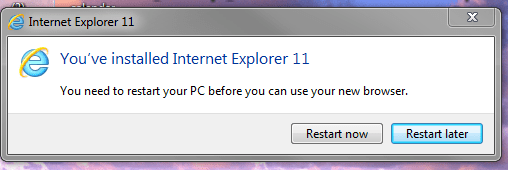
Last Oct, I had a hard drive take a crap on me, long story short, I have a somewhat fresh install of my OS Windows 7 pro. After I finished the installation and the updating of the OS, I moved on to installing all of my old software and files to my new fresh installation. This is where I noticed that I was having issues. I am stuck with IE8. When I try to update to either IE10 or IE11, I get major issues.

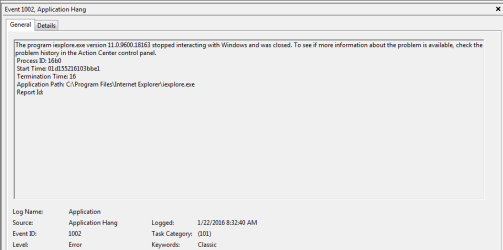
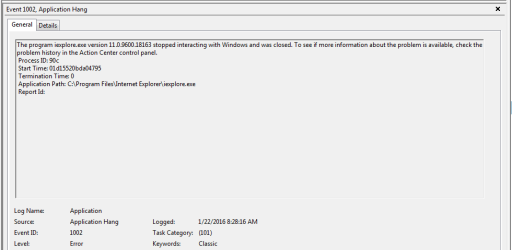
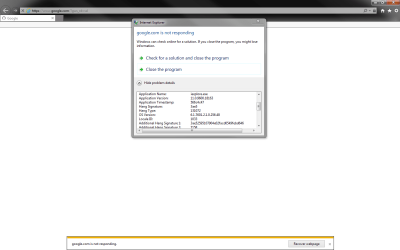
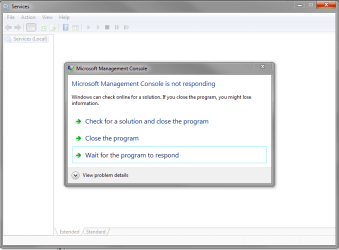
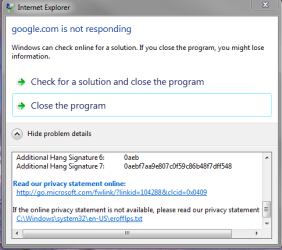
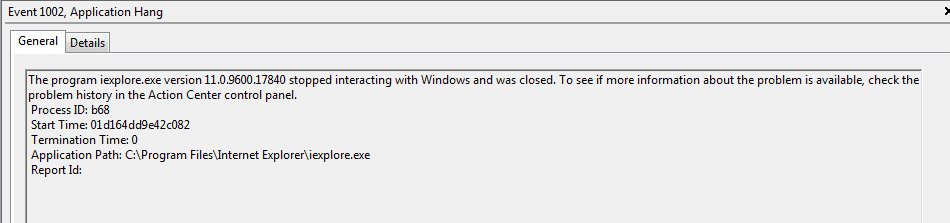
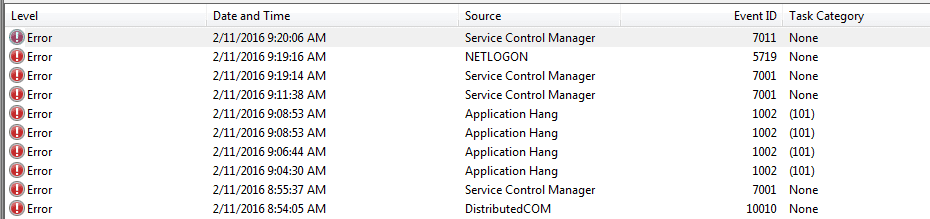
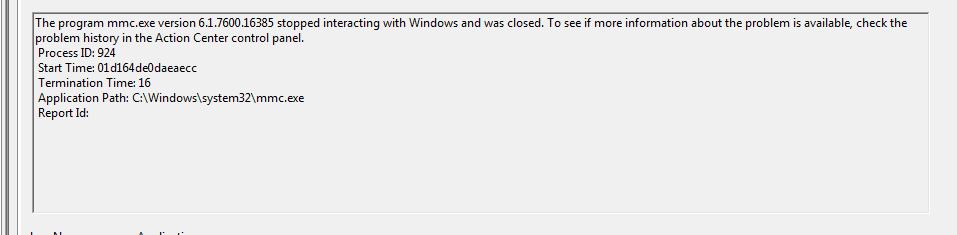
When I completed the upgrade to IE11(all websites are now warning me that im at risk and outdated) I noticed a very slow loadup time and other programs were not opening. When I would open IE11, it would just sit there and think and basically not allow me to do anything. As soon as I click on something, boom, IE shows up as not responding and I have to force it closed. After I force it closed, I try to open the Event Viewer and get an error stating that it cant be started, same thing, not responding. Then I went into services, that too was not working and not responding. I quickly uninstalled the update and reverted my changes and after a reboot, the old trusted and true IE8 was back and all was good with the event viewer and services.

This is where it gets strange, I stopped messing with IE as I was getting frustrated, then I moved on to trying to install the GoPro Studio and Steam. Both of these programs installed without errors and then when I try to open the program nothing happens. The programs dont open, however I see that the process is running for everytime I open the program. Very Odd, Not sure if its related to the IE issue, but seems like it to me. I was able to get the GoPro Studio to work after downloading basically the oldest version I could find. Even though it works, I am unable to update to a newer version as when I try it does the same thing as I mentioned above.

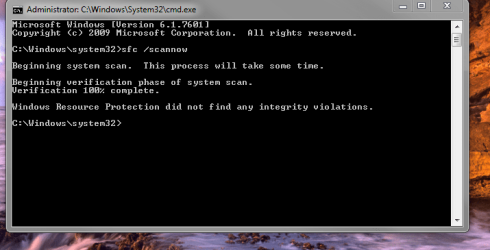
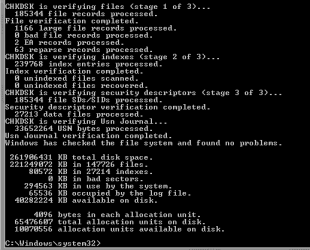
I searched and found some info regarding doing a SFC which I did and it came back clean(img attached)

I'm stumped and would love some ideas. I have tried tons of stuff so as you guys give me ideas/solutions I will give more info if I tried that or not. Oh and also, pc is clean from all of the scans I have done with my malware and virus protection.

My final thoughts are either this is a windows update issue or something to do with .net framework perhaps? I dont know anymore Ive lost hope so any suggestions or ideas would be greatly appreciated.

Thank you in advance

Justin
 

Attachments

  • Capture.PNG
    Capture.PNG
    28.5 KB · Views: 0
  • error2-event log.PNG
    error2-event log.PNG
    8.7 KB · Views: 1
  • last oines.PNG
    last oines.PNG
    8.3 KB · Views: 1
  • last oines1.PNG
    last oines1.PNG
    8.6 KB · Views: 1
  • last oines12.PNG
    last oines12.PNG
    8.4 KB · Views: 0
  • not responding error.PNG
    not responding error.PNG
    27.5 KB · Views: 2
  • IE11_main.log
    IE11_main.log
    36.3 KB · Views: 4
  • error1.PNG
    error1.PNG
    20.8 KB · Views: 0
  • error.PNG
    error.PNG
    11.3 KB · Views: 58

My Computer My Computer

At a glance

Windows 7 Professional SP1 32 BitIntel i34 GB
Computer type
PC/Desktop
Computer Manufacturer/Model Number
Custom
OS
Windows 7 Professional SP1 32 Bit
CPU
Intel i3
Memory
4 GB
The first application hang lists mmc. I didn't know what that was so I went looking
What is MMC.exe and Why is it Running?
explains it and also says it should not be running if you don't have snap-ins.
Check what snap-ins are installed. Perhaps one of them is causing a problem.

IE 11 has had patches almost every month. Perhaps the hanging is due to looking for updates. My Win 7 computers (we have 4) have been very slow looking for updates yesterday and today. One was stuck at 100% CPU usage and I got so disgusted that I turned it off for several hours because I couldn't do anything on it.
 

My Computer My Computer

At a glance

Home Premium and Pro 32 bit and 64 bit (4 com...
Computer type
PC/Desktop
Computer Manufacturer/Model Number
Dell, Acer, eMachine
OS
Home Premium and Pro 32 bit and 64 bit (4 computers)
Browser
Palemoon
Hmm..interesting...what I find odd about the MMC.exe is that I do not get this error/issue when I revert back to IE8 or if I dont open IE11 at all?

Keep em coming! Lots of views and only 1 idea makes me feel better about not being a silly easy newb question!
 

My Computer My Computer

At a glance

Windows 7 Professional SP1 32 BitIntel i34 GB
Computer type
PC/Desktop
Computer Manufacturer/Model Number
Custom
OS
Windows 7 Professional SP1 32 Bit
CPU
Intel i3
Memory
4 GB
MMC plus

Hi Deadeye,
MMC is what loads multiple snap-in in your case the event viewer.

Are you sure the error is IE, not explorer.exe, they are 2 completely different things.

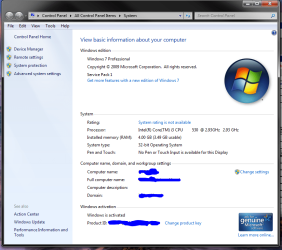
Anyway, in control panel > system is it showing service pack 1.

Can you run the prog in this link and we'll have a look if its an update problem.
http://www.sevenforums.com/windows-...ne-activation-issue-posting-instructions.html
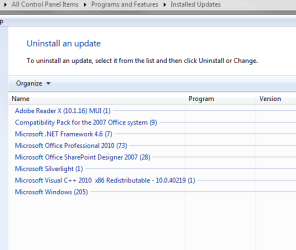
(you should have at least 200 installed AFTER SP1).

Roy
 

My Computer My Computer

At a glance

W7 home premium 32bit/W7HP 64bit/w10 tp insid...E5300 dual core3gbNvidia Geforce 7100 Nforce 630i
Computer type
PC/Desktop
Computer Manufacturer/Model Number
medionl/Aspire 6930G/acer x55a
OS
W7 home premium 32bit/W7HP 64bit/w10 tp insider ring
CPU
E5300 dual core
Motherboard
medion MS7366
Memory
3gb
Graphics Card(s)
Nvidia Geforce 7100 Nforce 630i
Monitor(s) Displays
avixc
Internet Speed
n (isp resticted to 72)
Antivirus
mse/pands
Browser
palemoon
Other Info
Belkin Fd7050 n USB using Railink RT2870 drivers, more upto date
For the record, I am not a newbie and anyone can throw anything at me to try at this point and I will give it a whirl. I have been working/coding/building computers since my first computer (TANDY 1000) dont laugh..I had big speaks and even saved up enough money to buy a HUGE 10MB hard drive! (i was like 9)LOL :geek:

actually this is a first for me even asking for help. I actually have never run into an issue that I was not able to troubleshoot and resolve on my own. So I am truly grateful for all of the help so far and whatever other help in the future. I have been a long time lurker here so it took a lot for me to register!:zip:

Ok, Just to be clear, I do not have any issues with the MMC until I restart my system after installing the upgrade to IE10 or IE11. Once I install that upgrade, I get lots of errors and nothing will load in the browser. It will just sit there and spin the circle on the homepage tab and do nothing until I try to close it out, which at that point I will get the not responding message and just task manager force it closed. Once I revert the change in browser back to IE8, the problem goes away.

If you need any other system information or screenshots I can provide those as well.

I appreciate the help and ideas though..keep em coming, this is driving me nuts!!


Code:
Diagnostic Report (1.9.0027.0):
-----------------------------------------
Windows Validation Data-->

Validation Code: 0
Cached Online Validation Code: N/A, hr = 0xc004f012
Windows Product Key: *****-*****-7BFGP-P3KRH-6HM3R
Windows Product Key Hash: heOYorYlNd5TL8PPtzyo/BUvoW8=
Windows Product ID: 00371-OEM-9044675-30125
Windows Product ID Type: 3
Windows License Type: OEM System Builder
Windows OS version: 6.1.7601.2.00010100.1.0.048
ID: {603F0CF0-9E80-4CBC-A494-8314E0B5A7B1}(1)
Is Admin: Yes
TestCab: 0x0
LegitcheckControl ActiveX: N/A, hr = 0x80070002
Signed By: N/A, hr = 0x80070002
Product Name: Windows 7 Professional
Architecture: 0x00000000
Build lab: 7601.win7sp1_gdr.160121-1718
TTS Error: 
Validation Diagnostic: 
Resolution Status: N/A

Vista WgaER Data-->
ThreatID(s): N/A, hr = 0x80070002
Version: N/A, hr = 0x80070002

Windows XP Notifications Data-->
Cached Result: N/A, hr = 0x80070002
File Exists: No
Version: N/A, hr = 0x80070002
WgaTray.exe Signed By: N/A, hr = 0x80070002
WgaLogon.dll Signed By: N/A, hr = 0x80070002

OGA Notifications Data-->
Cached Result: N/A, hr = 0x80070002
Version: N/A, hr = 0x80070002
OGAExec.exe Signed By: N/A, hr = 0x80070002
OGAAddin.dll Signed By: N/A, hr = 0x80070002

OGA Data-->
Office Status: 100 Genuine
Microsoft Office SharePoint Designer 2007 - 100 Genuine
OGA Version: N/A, 0x80070002
Signed By: N/A, hr = 0x80070002
Office Diagnostics: 025D1FF3-364-80041010_025D1FF3-229-80041010_025D1FF3-230-1_025D1FF3-517-80040154_025D1FF3-237-80040154_025D1FF3-238-2_025D1FF3-244-80070002_025D1FF3-258-3

Browser Data-->
Proxy settings: N/A
User Agent: Mozilla/4.0 (compatible; MSIE 8.0; Win32)
Default Browser: C:\Program Files\Internet Explorer\iexplore.exe
Download signed ActiveX controls: Prompt
Download unsigned ActiveX controls: Disabled
Run ActiveX controls and plug-ins: Allowed
Initialize and script ActiveX controls not marked as safe: Disabled
Allow scripting of Internet Explorer Webbrowser control: Disabled
Active scripting: Allowed
Script ActiveX controls marked as safe for scripting: Allowed

File Scan Data-->
File Mismatch: C:\Windows\system32\wat\watadminsvc.exe[Hr = 0x80070003]
File Mismatch: C:\Windows\system32\wat\npwatweb.dll[Hr = 0x80070003]
File Mismatch: C:\Windows\system32\wat\watux.exe[Hr = 0x80070003]
File Mismatch: C:\Windows\system32\wat\watweb.dll[Hr = 0x80070003]

Other data-->
Office Details: <GenuineResults><MachineData><UGUID>{603F0CF0-9E80-4CBC-A494-8314E0B5A7B1}</UGUID><Version>1.9.0027.0</Version><OS>6.1.7601.2.00010100.1.0.048</OS><Architecture>x32</Architecture><PKey>*****-*****-*****-*****-6HM3R</PKey><PID>00371-OEM-9044675-30125</PID><PIDType>3</PIDType><SID>S-1-5-21-1397378445-2236912864-540837843</SID><SYSTEM><Manufacturer>System manufacturer</Manufacturer><Model>System Product Name</Model></SYSTEM><BIOS><Manufacturer>American Megatrends Inc.</Manufacturer><Version>0705   </Version><SMBIOSVersion major="2" minor="6"/><Date>20100708000000.000000+000</Date></BIOS><HWID>06E73907018400FC</HWID><UserLCID>0409</UserLCID><SystemLCID>0409</SystemLCID><TimeZone>Central Standard Time(GMT-06:00)</TimeZone><iJoin>1</iJoin><SBID><stat>3</stat><msppid></msppid><name></name><model></model></SBID><OEM/><GANotification/></MachineData><Software><Office><Result>100</Result><Products><Product GUID="{90120000-0017-0000-0000-0000000FF1CE}"><LegitResult>100</LegitResult><Name>Microsoft Office SharePoint Designer 2007</Name><Ver>12</Ver><Val>BC1F9C0EFD8C580</Val><Hash>IZci4eEnvIopCJGPznem4WFgFY4=</Hash><Pid>89394-704-4560015-63251</Pid><PidType>14</PidType></Product></Products><Applications><App Id="17" Version="12" Result="100"/></Applications></Office></Software></GenuineResults>  

Spsys.log Content: 0x80070002

Licensing Data-->
Software licensing service version: 6.1.7601.17514

Name: Windows(R) 7, Professional edition
Description: Windows Operating System - Windows(R) 7, OEM_COA_NSLP channel
Activation ID: e120e868-3df2-464a-95a0-b52fa5ada4bf
Application ID: 55c92734-d682-4d71-983e-d6ec3f16059f
Extended PID: 00371-00180-446-730125-02-1033-7600.0000-2702015
Installation ID: 017991361382118624595150216105986324018051805203791716
Processor Certificate URL: http://go.microsoft.com/fwlink/?LinkID=88338
Machine Certificate URL: http://go.microsoft.com/fwlink/?LinkID=88339
Use License URL: http://go.microsoft.com/fwlink/?LinkID=88341
Product Key Certificate URL: http://go.microsoft.com/fwlink/?LinkID=88340
Partial Product Key: 6HM3R
License Status: Licensed
Remaining Windows rearm count: 4
Trusted time: 2/10/2016 2:53:15 PM

Windows Activation Technologies-->
HrOffline: 0x00000000
HrOnline: N/A
HealthStatus: 0x0000000000000000
Event Time Stamp: N/A
ActiveX: Not Registered - 0x80040154
Admin Service: Not Registered - 0x80040154
HealthStatus Bitmask Output:


HWID Data-->
HWID Hash Current: NAAAAAEABgABAAEAAAABAAAAAQABAAEA6GFkj/DtQsaAluJfyt4cv9ajPEjezfrPkplcXQ==

OEM Activation 1.0 Data-->
N/A

OEM Activation 2.0 Data-->
BIOS valid for OA 2.0: yes, but no SLIC table
Windows marker version: N/A
OEMID and OEMTableID Consistent: N/A
BIOS Information: 
  ACPI Table Name    OEMID Value    OEMTableID Value
  APIC            070810        APIC1025
  FACP            070810        FACP1025
  HPET            070810        OEMHPET 
  MCFG            070810        OEMMCFG 
  OEMB            070810        OEMB1025
  SSDT            DpgPmm        CpuPm
 

Attachments

  • updatelisting.PNG
    updatelisting.PNG
    11 KB · Views: 46
  • 123456.PNG
    123456.PNG
    52.8 KB · Views: 0

My Computer My Computer

At a glance

Windows 7 Professional SP1 32 BitIntel i34 GB
Computer type
PC/Desktop
Computer Manufacturer/Model Number
Custom
OS
Windows 7 Professional SP1 32 Bit
CPU
Intel i3
Memory
4 GB
analysis

Well according to that report you have not registerd that comp.
follow this MS link

Roy
 

My Computer My Computer

At a glance

W7 home premium 32bit/W7HP 64bit/w10 tp insid...E5300 dual core3gbNvidia Geforce 7100 Nforce 630i
Computer type
PC/Desktop
Computer Manufacturer/Model Number
medionl/Aspire 6930G/acer x55a
OS
W7 home premium 32bit/W7HP 64bit/w10 tp insider ring
CPU
E5300 dual core
Motherboard
medion MS7366
Memory
3gb
Graphics Card(s)
Nvidia Geforce 7100 Nforce 630i
Monitor(s) Displays
avixc
Internet Speed
n (isp resticted to 72)
Antivirus
mse/pands
Browser
palemoon
Other Info
Belkin Fd7050 n USB using Railink RT2870 drivers, more upto date
No link in your last reply
 

My Computer My Computer

At a glance

Windows 7 Professional SP1 32 BitIntel i34 GB
Computer type
PC/Desktop
Computer Manufacturer/Model Number
Custom
OS
Windows 7 Professional SP1 32 Bit
CPU
Intel i3
Memory
4 GB

My Computer My Computer

At a glance

W7 home premium 32bit/W7HP 64bit/w10 tp insid...E5300 dual core3gbNvidia Geforce 7100 Nforce 630i
Computer type
PC/Desktop
Computer Manufacturer/Model Number
medionl/Aspire 6930G/acer x55a
OS
W7 home premium 32bit/W7HP 64bit/w10 tp insider ring
CPU
E5300 dual core
Motherboard
medion MS7366
Memory
3gb
Graphics Card(s)
Nvidia Geforce 7100 Nforce 630i
Monitor(s) Displays
avixc
Internet Speed
n (isp resticted to 72)
Antivirus
mse/pands
Browser
palemoon
Other Info
Belkin Fd7050 n USB using Railink RT2870 drivers, more upto date
After looking into the registration process...seems to me like a way to get lots of Microsoft advertising and more junk mail. It's optional and I dont understand how that could be part of my issue.

What is registration?

Registration is the process of providing information to Microsoft (such as your e‑mail address) to sign up for update information, tips and tools, and other news about Windows.


How do I register Windows?

To register your copy of Windows, go to the Windows registration website, fill in the requested information, and you're done.


Is registration required?

No, registration is optional.


Is registration the same as activation?

No. Activation is required to use Windows, but registration is not. Activation is the process that helps ensure that your copy of Windows is used according to the Microsoft Software License Terms. Registration is the process of providing information (such as your e‑mail address) to sign up for information, tips and tools, and other news about Windows. For more information, see Activating Windows 7: frequently asked questions.
 

My Computer My Computer

At a glance

Windows 7 Professional SP1 32 BitIntel i34 GB
Computer type
PC/Desktop
Computer Manufacturer/Model Number
Custom
OS
Windows 7 Professional SP1 32 Bit
CPU
Intel i3
Memory
4 GB
Also, not to mention the fact when I followed the links from Microsoft to goto the registration page it directs me to a newsletter signup page (lol Not exactly registration)

Windows newsletter - Microsoft Windows
 

My Computer My Computer

At a glance

Windows 7 Professional SP1 32 BitIntel i34 GB
Computer type
PC/Desktop
Computer Manufacturer/Model Number
Custom
OS
Windows 7 Professional SP1 32 Bit
CPU
Intel i3
Memory
4 GB
no more updates

Up to you,
But as i said you need to install KB971033.
Other wise the errors in the copy of your MGAdiag, will NOT allow updates

File Scan Data-->
File Mismatch: C:\Windows\system32\wat\watadminsvc.exe[Hr = 0x80070003]
File Mismatch: C:\Windows\system32\wat\npwatweb.dll[Hr = 0x80070003]
File Mismatch: C:\Windows\system32\wat\watux.exe[Hr = 0x80070003]
File Mismatch: C:\Windows\system32\wat\watweb.dll[Hr = 0x80070003]
ActiveX: Not Registered - 0x80040154 Admin Service: Not Registered -

Roy
 

My Computer My Computer

At a glance

W7 home premium 32bit/W7HP 64bit/w10 tp insid...E5300 dual core3gbNvidia Geforce 7100 Nforce 630i
Computer type
PC/Desktop
Computer Manufacturer/Model Number
medionl/Aspire 6930G/acer x55a
OS
W7 home premium 32bit/W7HP 64bit/w10 tp insider ring
CPU
E5300 dual core
Motherboard
medion MS7366
Memory
3gb
Graphics Card(s)
Nvidia Geforce 7100 Nforce 630i
Monitor(s) Displays
avixc
Internet Speed
n (isp resticted to 72)
Antivirus
mse/pands
Browser
palemoon
Other Info
Belkin Fd7050 n USB using Railink RT2870 drivers, more upto date
Ok, I have installed and corrected the registration issue. Should I now try to run the update for IE11 now ? Or you have some other things to check first?

Code:
Diagnostic Report (1.9.0027.0):
-----------------------------------------
Windows Validation Data-->

Validation Code: 0
Cached Online Validation Code: N/A, hr = 0xc004f012
Windows Product Key: *****-*****-7BFGP-P3KRH-6HM3R
Windows Product Key Hash: heOYorYlNd5TL8PPtzyo/BUvoW8=
Windows Product ID: 00371-OEM-9044675-30125
Windows Product ID Type: 3
Windows License Type: OEM System Builder
Windows OS version: 6.1.7601.2.00010100.1.0.048
ID: {603F0CF0-9E80-4CBC-A494-8314E0B5A7B1}(3)
Is Admin: Yes
TestCab: 0x0
LegitcheckControl ActiveX: N/A, hr = 0x80070002
Signed By: N/A, hr = 0x80070002
Product Name: Windows 7 Professional
Architecture: 0x00000000
Build lab: 7601.win7sp1_gdr.160121-1718
TTS Error: 
Validation Diagnostic: 
Resolution Status: N/A

Vista WgaER Data-->
ThreatID(s): N/A, hr = 0x80070002
Version: N/A, hr = 0x80070002

Windows XP Notifications Data-->
Cached Result: N/A, hr = 0x80070002
File Exists: No
Version: N/A, hr = 0x80070002
WgaTray.exe Signed By: N/A, hr = 0x80070002
WgaLogon.dll Signed By: N/A, hr = 0x80070002

OGA Notifications Data-->
Cached Result: N/A, hr = 0x80070002
Version: N/A, hr = 0x80070002
OGAExec.exe Signed By: N/A, hr = 0x80070002
OGAAddin.dll Signed By: N/A, hr = 0x80070002

OGA Data-->
Office Status: 100 Genuine
Microsoft Office SharePoint Designer 2007 - 100 Genuine
OGA Version: N/A, 0x80070002
Signed By: N/A, hr = 0x80070002
Office Diagnostics: 025D1FF3-364-80041010_025D1FF3-229-80041010_025D1FF3-230-1_025D1FF3-517-80040154_025D1FF3-237-80040154_025D1FF3-238-2_025D1FF3-244-80070002_025D1FF3-258-3

Browser Data-->
Proxy settings: N/A
User Agent: Mozilla/4.0 (compatible; MSIE 8.0; Win32)
Default Browser: C:\Program Files\Internet Explorer\iexplore.exe
Download signed ActiveX controls: Prompt
Download unsigned ActiveX controls: Disabled
Run ActiveX controls and plug-ins: Allowed
Initialize and script ActiveX controls not marked as safe: Disabled
Allow scripting of Internet Explorer Webbrowser control: Disabled
Active scripting: Allowed
Script ActiveX controls marked as safe for scripting: Allowed

File Scan Data-->

Other data-->
Office Details: <GenuineResults><MachineData><UGUID>{603F0CF0-9E80-4CBC-A494-8314E0B5A7B1}</UGUID><Version>1.9.0027.0</Version><OS>6.1.7601.2.00010100.1.0.048</OS><Architecture>x32</Architecture><PKey>*****-*****-*****-*****-6HM3R</PKey><PID>00371-OEM-9044675-30125</PID><PIDType>3</PIDType><SID>S-1-5-21-1397378445-2236912864-540837843</SID><SYSTEM><Manufacturer>System manufacturer</Manufacturer><Model>System Product Name</Model></SYSTEM><BIOS><Manufacturer>American Megatrends Inc.</Manufacturer><Version>0705   </Version><SMBIOSVersion major="2" minor="6"/><Date>20100708000000.000000+000</Date></BIOS><HWID>06E73907018400FC</HWID><UserLCID>0409</UserLCID><SystemLCID>0409</SystemLCID><TimeZone>Central Standard Time(GMT-06:00)</TimeZone><iJoin>1</iJoin><SBID><stat>3</stat><msppid></msppid><name></name><model></model></SBID><OEM/><GANotification/></MachineData><Software><Office><Result>100</Result><Products><Product GUID="{90120000-0017-0000-0000-0000000FF1CE}"><LegitResult>100</LegitResult><Name>Microsoft Office SharePoint Designer 2007</Name><Ver>12</Ver><Val>BC1F9C0EFD8C580</Val><Hash>IZci4eEnvIopCJGPznem4WFgFY4=</Hash><Pid>89394-704-4560015-63251</Pid><PidType>14</PidType></Product></Products><Applications><App Id="17" Version="12" Result="100"/></Applications></Office></Software></GenuineResults>  

Spsys.log Content: 0x80070002

Licensing Data-->
Software licensing service version: 6.1.7601.17514

Name: Windows(R) 7, Professional edition
Description: Windows Operating System - Windows(R) 7, OEM_COA_NSLP channel
Activation ID: e120e868-3df2-464a-95a0-b52fa5ada4bf
Application ID: 55c92734-d682-4d71-983e-d6ec3f16059f
Extended PID: 00371-00180-446-730125-02-1033-7600.0000-2702015
Installation ID: 017991361382118624595150216105986324018051805203791716
Processor Certificate URL: http://go.microsoft.com/fwlink/?LinkID=88338
Machine Certificate URL: http://go.microsoft.com/fwlink/?LinkID=88339
Use License URL: http://go.microsoft.com/fwlink/?LinkID=88341
Product Key Certificate URL: http://go.microsoft.com/fwlink/?LinkID=88340
Partial Product Key: 6HM3R
License Status: Licensed
Remaining Windows rearm count: 4
Trusted time: 2/10/2016 4:27:09 PM

Windows Activation Technologies-->
HrOffline: 0x00000000
HrOnline: N/A
HealthStatus: 0x0000000000000000
Event Time Stamp: N/A
ActiveX: Registered, Version: 7.1.7600.16395
Admin Service: Registered, Version: 7.1.7600.16395
HealthStatus Bitmask Output:


HWID Data-->
HWID Hash Current: NAAAAAEABgABAAEAAAABAAAAAQABAAEA6GFkj/DtQsaAluJfyt4cv9ajPEjezfrPkplcXQ==

OEM Activation 1.0 Data-->
N/A

OEM Activation 2.0 Data-->
BIOS valid for OA 2.0: yes, but no SLIC table
Windows marker version: N/A
OEMID and OEMTableID Consistent: N/A
BIOS Information: 
  ACPI Table Name    OEMID Value    OEMTableID Value
  APIC            070810        APIC1025
  FACP            070810        FACP1025
  HPET            070810        OEMHPET 
  MCFG            070810        OEMMCFG 
  OEMB            070810        OEMB1025
  SSDT            DpgPmm        CpuPm
 

My Computer My Computer

At a glance

Windows 7 Professional SP1 32 BitIntel i34 GB
Computer type
PC/Desktop
Computer Manufacturer/Model Number
Custom
OS
Windows 7 Professional SP1 32 Bit
CPU
Intel i3
Memory
4 GB
Found this

Hi Jason,
That looks better.
You could try running SFC /scannow, from an elevated command mode, and chkdsk.

Then reboot.

see if you can open the event viewer

Roy
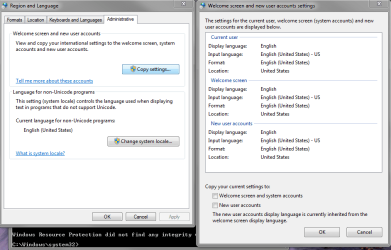
Are you running more than 1 language pack??
 

My Computer My Computer

At a glance

W7 home premium 32bit/W7HP 64bit/w10 tp insid...E5300 dual core3gbNvidia Geforce 7100 Nforce 630i
Computer type
PC/Desktop
Computer Manufacturer/Model Number
medionl/Aspire 6930G/acer x55a
OS
W7 home premium 32bit/W7HP 64bit/w10 tp insider ring
CPU
E5300 dual core
Motherboard
medion MS7366
Memory
3gb
Graphics Card(s)
Nvidia Geforce 7100 Nforce 630i
Monitor(s) Displays
avixc
Internet Speed
n (isp resticted to 72)
Antivirus
mse/pands
Browser
palemoon
Other Info
Belkin Fd7050 n USB using Railink RT2870 drivers, more upto date
I buy Windows 7 Pro FPP license, don't buy OEM, you are must buy FPP ( Full Package license) n turn off system restore before installing IE 11.
 

My Computer My Computer

At a glance

Windows 7i7 3970XTeam Xtreem 16 GBGTX 980 Ti
Computer type
PC/Desktop
Computer Manufacturer/Model Number
Gigabyte
OS
Windows 7
CPU
i7 3970X
Motherboard
GIGABYTE G1 Assassin 2
Memory
Team Xtreem 16 GB
Graphics Card(s)
GTX 980 Ti
Hard Drives
Seagate
Antivirus
Symantec
Browser
IE 11
deadeye762,

torchwood is giving you a good path to go down. I'm going to stick my nose in and then go back to lurking.


1 - Uninstall any antivirus apps and/or security suites. Restart computer.


2 - Search installed updates for each IE11 prerequisite update mentioned on this website. Uninstall any that are found. Restart computer.


3 - Select a clean boot via these steps:
http://www.sevenforums.com/tutorial...ation-conflicts-performing-clean-startup.html
Restart the computer.


4 - Complete step 1 from this post:
http://www.sevenforums.com/windows-...4840-windows-update-posting-instructions.html


5 - Use the offline installer to installer IE11. Sadly, that installer will just download a newer installer.


6 - Test your surfing and opening apps before installing your antivirus app.
 

My Computer My Computer

At a glance

W7 Pro SP1 64biti78GBIntel HD Graphics
Computer type
Laptop
Computer Manufacturer/Model Number
Employer provided Dell Latitude
OS
W7 Pro SP1 64bit
CPU
i7
Memory
8GB
Graphics Card(s)
Intel HD Graphics
Hard Drives
crappy SSD
Antivirus
Employer mandated Symantec Endpoint Protection
Browser
Pale Moon 64bit, IE11 64bit & Chrome 64bit
Well I followed the steps that were suggested and as soon as I was done, It acted the exact same way. I opened IE11 and it just sits there and thinks (see screen shots) Then when I try to check the event viewer to see what is new, I get the error on loading the MMC. Again I reverted back to IE8 and everything worked correctly!

Im baffled and sooo frustrated....any other reports/logs you all need?
 

Attachments

  • Capture123.PNG
    Capture123.PNG
    13.3 KB · Views: 37
  • still not working.PNG
    still not working.PNG
    15 KB · Views: 0
  • chkdsk results.PNG
    chkdsk results.PNG
    5.9 KB · Views: 37
  • results.PNG
    results.PNG
    27.4 KB · Views: 0
  • 58456.PNG
    58456.PNG
    4.3 KB · Views: 0
  • 5416.PNG
    5416.PNG
    5.2 KB · Views: 0
  • 12345.PNG
    12345.PNG
    5.6 KB · Views: 0
  • 23.PNG
    23.PNG
    3.3 KB · Views: 0
  • errors from install.PNG
    errors from install.PNG
    6.9 KB · Views: 0
  • 7898.PNG
    7898.PNG
    4.6 KB · Views: 0
  • IE11_HardwareCheck.log
    IE11_HardwareCheck.log
    4.6 KB · Views: 3
  • IE11_NR_Setup.log
    IE11_NR_Setup.log
    31.5 KB · Views: 4

My Computer My Computer

At a glance

Windows 7 Professional SP1 32 BitIntel i34 GB
Computer type
PC/Desktop
Computer Manufacturer/Model Number
Custom
OS
Windows 7 Professional SP1 32 Bit
CPU
Intel i3
Memory
4 GB
Do you have any files in this folder:
..\Windows\winsxs\Temp\PendingDeletes

I'm not sure what else to try.
 

My Computer My Computer

At a glance

W7 Pro SP1 64biti78GBIntel HD Graphics
Computer type
Laptop
Computer Manufacturer/Model Number
Employer provided Dell Latitude
OS
W7 Pro SP1 64bit
CPU
i7
Memory
8GB
Graphics Card(s)
Intel HD Graphics
Hard Drives
crappy SSD
Antivirus
Employer mandated Symantec Endpoint Protection
Browser
Pale Moon 64bit, IE11 64bit & Chrome 64bit
Negative. There is nothing in the Windows\winsxs\Temp folder except for an empty folder called PendingRenames which is an empty folder as well.
 

My Computer My Computer

At a glance

Windows 7 Professional SP1 32 BitIntel i34 GB
Computer type
PC/Desktop
Computer Manufacturer/Model Number
Custom
OS
Windows 7 Professional SP1 32 Bit
CPU
Intel i3
Memory
4 GB
Thanks for looking/reporting.

Let's see what torchwood has in mind next.
 

My Computer My Computer

At a glance

W7 Pro SP1 64biti78GBIntel HD Graphics
Computer type
Laptop
Computer Manufacturer/Model Number
Employer provided Dell Latitude
OS
W7 Pro SP1 64bit
CPU
i7
Memory
8GB
Graphics Card(s)
Intel HD Graphics
Hard Drives
crappy SSD
Antivirus
Employer mandated Symantec Endpoint Protection
Browser
Pale Moon 64bit, IE11 64bit & Chrome 64bit
Hi Jason,

In the screenshot you posted I would like to see the Keyboard & Language page, not Admin.

According to the CBS log there are pending SXS files that cannot be deleted.
I have a way to do it, but id like to see that K&L page first.

Roy
 

My Computer My Computer

At a glance

W7 home premium 32bit/W7HP 64bit/w10 tp insid...E5300 dual core3gbNvidia Geforce 7100 Nforce 630i
Computer type
PC/Desktop
Computer Manufacturer/Model Number
medionl/Aspire 6930G/acer x55a
OS
W7 home premium 32bit/W7HP 64bit/w10 tp insider ring
CPU
E5300 dual core
Motherboard
medion MS7366
Memory
3gb
Graphics Card(s)
Nvidia Geforce 7100 Nforce 630i
Monitor(s) Displays
avixc
Internet Speed
n (isp resticted to 72)
Antivirus
mse/pands
Browser
palemoon
Other Info
Belkin Fd7050 n USB using Railink RT2870 drivers, more upto date
Back
Top