Unable to view Context Menu on mouse!

akashinobi

New member
Local time
10:05 PM
Messages
8
Location
Singapore
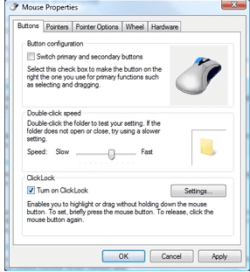
Hi, i've a problem with my mouse not able to right-click after a reboot ytdy. It's surprising as it never happened before. I've tried going into gpedit.msc and select Disabled on the options shown but to no avail. It's still not able to show out when i right-clicked my mouse. Tried going to regedit as well and i can't find the ViewContextMenu anywhere too. Appreciate it if anyone can offer me some suggestions. ):
 

My Computer

OS
Windows 7 Ultimate 32-bit
CPU
Intel(R) Pentium(R) Dual CPU E2140 @ 1.6GHz
Motherboard
GIGABYTE P31-DS3L
Memory
4GB DDR2
Graphics Card(s)
NVIDIA GeForce 9600 GT
Sound Card
Realtek HD Audio
Monitor(s) Displays
Samsung BX2231 LED Monitor
Case
Cooler Master
Keyboard
Microsoft Internet Keyboard
Mouse
Microsoft Intellisoft Mouse
Checked your actual mouse?

Is it wireless or wired? If wireless, have you checked the batteries to see if they're dying? Or check for any obstructions in the laser? Uninstalled and reinstalled your mouse drivers from device manager? Tried a different mouse to see if the same happens?
 

My Computer

Computer type
PC/Desktop
Computer Manufacturer/Model Number
Airbot 2.0
OS
Windows 7 Ultimate x64 SP1
CPU
Core i7 920 (D0) @ 4Ghz, *26c idle *65c full load on air
Motherboard
Asus P6X58D Premium - Sata 6Gb/s - USB 3.0
Memory
12GB DDR3 Corsair Dominator -CMD12GX3M6A1600C8 at 1600MHz
Graphics Card(s)
Zotac Geforce GTX 770
Sound Card
ASUS Xonar D2X
Monitor(s) Displays
1 LG 24" Flatron W2453V-PF 1 Samsung 24" P2450H both 2ms RT
Screen Resolution
1920x1080@60hz
Hard Drives
1 Samsung 250GB 840 Evo SSD
1 OCZ Vertex2 180GB SSD
1 TB Samsung Spinpoint F1 7200RPM 32MB cache
2 500GB WD Caviar Blacks 7200RPM 32MB cache (WD5001AALS)

Pioneer DVD Burner DVR-S18M
PSU
Corsair HX1000W
Case
Cooler Master HAF 932
Cooling
Case Fans *3 230mm, *1 140mm/CPU - *Tuniq Tower 120 Extreme
Keyboard
Logitech Wireless MK700
Mouse
Logitech Wireless MK700
Internet Speed
DL 15 Mbps UL 0.98 Mbps
Antivirus
None
Browser
Firefox Nightly
Other Info
Processor-7.7 *RAM- 7.9 *Graphics-7.9 *Gaming Graphics- 7.9 *SSD- 7.8 W.E.I final score= 7.7
*Phone- LG Nexus 5
1) It's a wired USB mouse.

2) No Batteries as it's wired.

3) No obstructions in the laser but when i shake the mouse abit i do hear it being "shaky" or sounds "loose" ?

4) I've already done uninstallation and installation and reboot after each step. I've also tried ShellExView BUT is not clear on how to detect the culprit. What i did when i use the program ShellExView is to disable all the context menu that's non-Microsoft and reboot after i enable each file to no avail.

5) Nope. I don't have an extra mouse to test it. :/

What's the next step to check if i REALLY NEED to change my mouse (which i hope not as only the right-click doesn't work.)
 

My Computer

OS
Windows 7 Ultimate 32-bit
CPU
Intel(R) Pentium(R) Dual CPU E2140 @ 1.6GHz
Motherboard
GIGABYTE P31-DS3L
Memory
4GB DDR2
Graphics Card(s)
NVIDIA GeForce 9600 GT
Sound Card
Realtek HD Audio
Monitor(s) Displays
Samsung BX2231 LED Monitor
Case
Cooler Master
Keyboard
Microsoft Internet Keyboard
Mouse
Microsoft Intellisoft Mouse
Hi akashinobi, welcome to 7F :)

3) No obstructions in the laser but when i shake the mouse abit i do hear it being "shaky" or sounds "loose" ?
That's not a good sign.
Do you know if anyone or thing has been rough with it lately, Like a pet?
 

My Computer

Computer type
PC/Desktop
Computer Manufacturer/Model Number
Gateway DX4831-01e (Mid-Tower Desktop)
OS
Originally Win 7 Hm Prem x64 Ver 6.1.7600 Build 7601-SP1 | Upgraded to Windows 10 December 14, 2019
CPU
Intel i3 530 2.93GHz, 2933MHz 2 Cores 4 Logical Processors
Motherboard
Gateway H57M01 133 megahertz
Memory
6GB of 1,333MHz DDR3 SDRAM
Graphics Card(s)
32MB Intel Graphics Media Accelerator HD IGChip
Sound Card
Realtek High Definition Audio
Monitor(s) Displays
Gateway HX2000 20inch TFT active matrix TN
Screen Resolution
1600 x 900 x 59 hertz
Hard Drives
WDC WD10EADS-00M2B0 [HDD] (1000.20 GB) -- drive 0,
HL-DT-ST DVDRAM GH41N [CD-ROM dr]
Four card readers, and Four USB 2.0
PSU
300watts.
Case
Mid-Tower Desktop
Cooling
Stock from Gateway
Keyboard
Natural Ergonomic Keyboard 4000, see Other Info
Mouse
Orig. Gateway wore out now using Insignia USB wired optical
Internet Speed
Vz FIOS 10ms png 57.64Mbps down 65.53Mbps up Speedtest.org
Antivirus
Zamana Anti-logger with Anti-malware, MSE, Windows Firewall,
Browser
IE11.0.9600.19399-Upd ver11.0.135, Firefox 68.0.1 x64
Other Info
System Specs by Belarc.

BIOS: American Megatrends Inc. P01-A0 11/17/2009

Replaced the MS 'Natural' Standard PS/2 Enhanced 101-102 Keyboard with a new Natural Ergonomic Keyboard 4000 on August 1st 2014.

Canon Pixma MG3222 Printer.

Updated to IE11 on 12102015 | Fios Quantum Router g1100

Additional AV: SpywareBlaster, manual Mbam, SAS
Hi akashinobi, welcome to 7F :)

3) No obstructions in the laser but when i shake the mouse abit i do hear it being "shaky" or sounds "loose" ?
That's not a good sign.
Do you know if anyone or thing has been rough with it lately, Like a pet?

Hi Anak, :D Thanks for welcoming me here. :)


Nope i don't have any pets but i have other users besides me like my big bro and my younger sister. Hmm..
 

My Computer

OS
Windows 7 Ultimate 32-bit
CPU
Intel(R) Pentium(R) Dual CPU E2140 @ 1.6GHz
Motherboard
GIGABYTE P31-DS3L
Memory
4GB DDR2
Graphics Card(s)
NVIDIA GeForce 9600 GT
Sound Card
Realtek HD Audio
Monitor(s) Displays
Samsung BX2231 LED Monitor
Case
Cooler Master
Keyboard
Microsoft Internet Keyboard
Mouse
Microsoft Intellisoft Mouse
1. Try a different USB port and see if that helps!
2. Get a mouse for your use Only! Let them deal with the shaky one especially if it's your computer.
 

My Computer

Computer Manufacturer/Model Number
HP M9077c
OS
Windows 7 Home Premium 64bit
CPU
Intel(R)Core(TM)2 quad [email protected] 2.39GHz
Motherboard
ASUSeK
Memory
6GB DDR2 6400
Graphics Card(s)
GeForce 8500/512MB
Sound Card
Realtek High Def Audio
Monitor(s) Displays
HP w2408 LCD 24" widescreen
Screen Resolution
1920x1200
Cooling
6 pack of Bud
Keyboard
MS wireless Inteli
Mouse
MS wireless Inteli
Well.....Let's not be too hasty here. ;)

There are parts inside of the mouse that can make slight sounds such as you describe, but if it sounds like a "rattle" that's not good.

If you look at some of the pixs in my link you will see wheels, shafts, and pivot points all of which can wear out, and break, and I have experienced all three.
I've even had a micro-switch come loose from its mount. I fixed that by re-gluing it.

There's no one else in your family that has an extra mouse or can loan you one to rule this out?

It would make an excellent ice-breaker with a neighbor. Just explain what's up and see if you can get a loaner.
Most households have a PC now-a-days, heck, even my 90year old neighbor has one.

Darn shame you don't live next to me, I have four I could give to you.....

See 3D Mouse:
3d model PC mouse with inside mechanism mechanical max 3ds by Jiinoo
 

My Computer

Computer type
PC/Desktop
Computer Manufacturer/Model Number
Gateway DX4831-01e (Mid-Tower Desktop)
OS
Originally Win 7 Hm Prem x64 Ver 6.1.7600 Build 7601-SP1 | Upgraded to Windows 10 December 14, 2019
CPU
Intel i3 530 2.93GHz, 2933MHz 2 Cores 4 Logical Processors
Motherboard
Gateway H57M01 133 megahertz
Memory
6GB of 1,333MHz DDR3 SDRAM
Graphics Card(s)
32MB Intel Graphics Media Accelerator HD IGChip
Sound Card
Realtek High Definition Audio
Monitor(s) Displays
Gateway HX2000 20inch TFT active matrix TN
Screen Resolution
1600 x 900 x 59 hertz
Hard Drives
WDC WD10EADS-00M2B0 [HDD] (1000.20 GB) -- drive 0,
HL-DT-ST DVDRAM GH41N [CD-ROM dr]
Four card readers, and Four USB 2.0
PSU
300watts.
Case
Mid-Tower Desktop
Cooling
Stock from Gateway
Keyboard
Natural Ergonomic Keyboard 4000, see Other Info
Mouse
Orig. Gateway wore out now using Insignia USB wired optical
Internet Speed
Vz FIOS 10ms png 57.64Mbps down 65.53Mbps up Speedtest.org
Antivirus
Zamana Anti-logger with Anti-malware, MSE, Windows Firewall,
Browser
IE11.0.9600.19399-Upd ver11.0.135, Firefox 68.0.1 x64
Other Info
System Specs by Belarc.

BIOS: American Megatrends Inc. P01-A0 11/17/2009

Replaced the MS 'Natural' Standard PS/2 Enhanced 101-102 Keyboard with a new Natural Ergonomic Keyboard 4000 on August 1st 2014.

Canon Pixma MG3222 Printer.

Updated to IE11 on 12102015 | Fios Quantum Router g1100

Additional AV: SpywareBlaster, manual Mbam, SAS
1. Try a different USB port and see if that helps!
2. Get a mouse for your use Only! Let them deal with the shaky one especially if it's your computer.

Tried and rebooted. It's still the same man. And it's my own PC but so far it has only dropped once by my gf yet still working which was like early this year in May. Thus, it's only recently that after i rebooted my PC and it just wouldn't right-click to open up a context menu. So i thought it could be a conflict or something and rebooted till it load windows and i plugged into a different USB port but same problem persists. It just won't appear the context menu for me. Sigh.

Well.....Let's not be too hasty here. ;)

There are parts inside of the mouse that can make slight sounds such as you describe, but if it sounds like a "rattle" that's not good.

If you look at some of the pixs in my link you will see wheels, shafts, and pivot points all of which can wear out, and break, and I have experienced all three.
I've even had a micro-switch come loose from its mount. I fixed that by re-gluing it.

There's no one else in your family that has an extra mouse or can loan you one to rule this out?

It would make an excellent ice-breaker with a neighbor. Just explain what's up and see if you can get a loaner.
Most households have a PC now-a-days, heck, even my 90year old neighbor has one.

Darn shame you don't live next to me, I have four I could give to you.....

See 3D Mouse:
3d model PC mouse with inside mechanism mechanical max 3ds by Jiinoo


Nope, there's no one else as they are not that knowledgeable in IT except the basic stuffs. It's quiet here on my floor level as the neighbours tend to do their own stuffs and kept their distance of privacy.

I'll see if i can borrow from my cousin and see if that helps. Else i'll have to whip out greens for another mouse. Sheesh.. though it's still in good condition. I've used it for 3 years or so and it's buttons are still fine and working. Except for the right-click problem that i'm facing which doesn't work anywhere in windows for me to view context menu to save my stuffs or open links on another tab though i can press ctrl+left click. But it's a pain if i need to multitask on my work.

I'll get back to you guys when i've done it. Sorry for the late reply as i'm working on shifts and got part-time classes in the evening as well. I'll look into the advice that you both have told me. Thanks. :)
 

My Computer

OS
Windows 7 Ultimate 32-bit
CPU
Intel(R) Pentium(R) Dual CPU E2140 @ 1.6GHz
Motherboard
GIGABYTE P31-DS3L
Memory
4GB DDR2
Graphics Card(s)
NVIDIA GeForce 9600 GT
Sound Card
Realtek HD Audio
Monitor(s) Displays
Samsung BX2231 LED Monitor
Case
Cooler Master
Keyboard
Microsoft Internet Keyboard
Mouse
Microsoft Intellisoft Mouse

Attachments

  • z.PNG
    z.PNG
    41.9 KB · Views: 1
Last edited:

My Computer

Computer Manufacturer/Model Number
packard bell IXTREME M5722
OS
Operating System : Windows 7 Home Premium Edition 6.01.7600 SP1 (x64)
CPU
Processor : Intel Core 2 Quad Q8300 @ 2500 MHz
Motherboard
Mainboard : Packard Bell (Acer EG43M )
Memory
Physical Memory :8GB Corsair4x 2GB 800MHz C5 DDR2
Graphics Card(s)
Video Card : XFX 6700 AMD
Monitor(s) Displays
Maestro 234DL - BenQ V2220 - BenQ VW2420H
Screen Resolution
Current Display :1920x1080p pixels at 60 Hz in HD LED
Hard Drives
Hard Disks : WDC (1000 GB)
Drive C: (Hard Disk) : 428 GB available on 491 GB
Drive D: (Hard Disk) : 426 GB available on 492 GB
SAMSUNG spinpoint HD103SJ 1000.2 GB
(X 2) KINGSTON SSD NOW V 30GB
PSU
XFX ProSeries 550W PSU
Case
PACKARD BELL IXTREME
Cooling
System Blower Current: 150mA Air Flow16CFM ;Akasa 90mm rear
Keyboard
Gigabyte Aivia K8100
Mouse
TRUST-Wireless Laser Mouse - Carbon edition MI-7770C
Internet Speed
TP-LINK > TL-WN951N / AV500 Gigabit Powerline Adapters
Browser
chrome dev
Other Info
EXTRA COOLING>(FAN CONTROLLER) PC Bay Cooler 3 x 40mm fans; Akasa AK-HD-BL Blue hard drive cooler 2 x 40 mm fan 4500 rpm 29.7 dBA
Bios> American Megatrends Inc.
Version : P01-A1
Date : 08/31/2009
Thank you bz for posting. I zeroed in on the mouse, and forgot 'bout a work-around until the OP could get his working, thought 'bout it, but forgot.
 

My Computer

Computer type
PC/Desktop
Computer Manufacturer/Model Number
Gateway DX4831-01e (Mid-Tower Desktop)
OS
Originally Win 7 Hm Prem x64 Ver 6.1.7600 Build 7601-SP1 | Upgraded to Windows 10 December 14, 2019
CPU
Intel i3 530 2.93GHz, 2933MHz 2 Cores 4 Logical Processors
Motherboard
Gateway H57M01 133 megahertz
Memory
6GB of 1,333MHz DDR3 SDRAM
Graphics Card(s)
32MB Intel Graphics Media Accelerator HD IGChip
Sound Card
Realtek High Definition Audio
Monitor(s) Displays
Gateway HX2000 20inch TFT active matrix TN
Screen Resolution
1600 x 900 x 59 hertz
Hard Drives
WDC WD10EADS-00M2B0 [HDD] (1000.20 GB) -- drive 0,
HL-DT-ST DVDRAM GH41N [CD-ROM dr]
Four card readers, and Four USB 2.0
PSU
300watts.
Case
Mid-Tower Desktop
Cooling
Stock from Gateway
Keyboard
Natural Ergonomic Keyboard 4000, see Other Info
Mouse
Orig. Gateway wore out now using Insignia USB wired optical
Internet Speed
Vz FIOS 10ms png 57.64Mbps down 65.53Mbps up Speedtest.org
Antivirus
Zamana Anti-logger with Anti-malware, MSE, Windows Firewall,
Browser
IE11.0.9600.19399-Upd ver11.0.135, Firefox 68.0.1 x64
Other Info
System Specs by Belarc.

BIOS: American Megatrends Inc. P01-A0 11/17/2009

Replaced the MS 'Natural' Standard PS/2 Enhanced 101-102 Keyboard with a new Natural Ergonomic Keyboard 4000 on August 1st 2014.

Canon Pixma MG3222 Printer.

Updated to IE11 on 12102015 | Fios Quantum Router g1100

Additional AV: SpywareBlaster, manual Mbam, SAS

Attachments

  • zz.PNG
    zz.PNG
    26.7 KB · Views: 61

My Computer

Computer Manufacturer/Model Number
packard bell IXTREME M5722
OS
Operating System : Windows 7 Home Premium Edition 6.01.7600 SP1 (x64)
CPU
Processor : Intel Core 2 Quad Q8300 @ 2500 MHz
Motherboard
Mainboard : Packard Bell (Acer EG43M )
Memory
Physical Memory :8GB Corsair4x 2GB 800MHz C5 DDR2
Graphics Card(s)
Video Card : XFX 6700 AMD
Monitor(s) Displays
Maestro 234DL - BenQ V2220 - BenQ VW2420H
Screen Resolution
Current Display :1920x1080p pixels at 60 Hz in HD LED
Hard Drives
Hard Disks : WDC (1000 GB)
Drive C: (Hard Disk) : 428 GB available on 491 GB
Drive D: (Hard Disk) : 426 GB available on 492 GB
SAMSUNG spinpoint HD103SJ 1000.2 GB
(X 2) KINGSTON SSD NOW V 30GB
PSU
XFX ProSeries 550W PSU
Case
PACKARD BELL IXTREME
Cooling
System Blower Current: 150mA Air Flow16CFM ;Akasa 90mm rear
Keyboard
Gigabyte Aivia K8100
Mouse
TRUST-Wireless Laser Mouse - Carbon edition MI-7770C
Internet Speed
TP-LINK > TL-WN951N / AV500 Gigabit Powerline Adapters
Browser
chrome dev
Other Info
EXTRA COOLING>(FAN CONTROLLER) PC Bay Cooler 3 x 40mm fans; Akasa AK-HD-BL Blue hard drive cooler 2 x 40 mm fan 4500 rpm 29.7 dBA
Bios> American Megatrends Inc.
Version : P01-A1
Date : 08/31/2009
there are shortcuts to get the context menu up have a read here :ar: Keyboard Shortcut to open Right Click Context Menu
also i found this thats worth a read :ar: Suddenly the right-click function doesn't work
there is a key on the keyboard (as in pic) and you use the arrow keys and enter

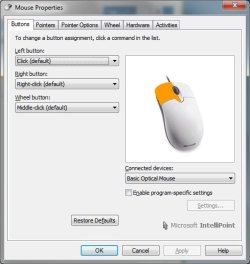
Hi Brian, i followed the link and the suggestions to switching left handed to right handed for the mouse detection on the right and left clicks. It worked on the left click that shows the context menu and doesn't happen for the right click after i switch it back. So i supposed it's the mouse problem and not the driver. And yeah i knew about the shortcuts but preferable it on the mouse itself. Saves time. (:

Currently running the sfc /scannow and running diskcleaup as well. I'll reply back with my findings later. Thanks!:D
 
Last edited:

My Computer

OS
Windows 7 Ultimate 32-bit
CPU
Intel(R) Pentium(R) Dual CPU E2140 @ 1.6GHz
Motherboard
GIGABYTE P31-DS3L
Memory
4GB DDR2
Graphics Card(s)
NVIDIA GeForce 9600 GT
Sound Card
Realtek HD Audio
Monitor(s) Displays
Samsung BX2231 LED Monitor
Case
Cooler Master
Keyboard
Microsoft Internet Keyboard
Mouse
Microsoft Intellisoft Mouse

Attachments

  • mouse.jpg
    mouse.jpg
    29.7 KB · Views: 2

My Computer

OS
Windows 7 Ultimate 32-bit
CPU
Intel(R) Pentium(R) Dual CPU E2140 @ 1.6GHz
Motherboard
GIGABYTE P31-DS3L
Memory
4GB DDR2
Graphics Card(s)
NVIDIA GeForce 9600 GT
Sound Card
Realtek HD Audio
Monitor(s) Displays
Samsung BX2231 LED Monitor
Case
Cooler Master
Keyboard
Microsoft Internet Keyboard
Mouse
Microsoft Intellisoft Mouse
Hi all, sorry to reply this late as i was pretty busy and things happen. Well i've used another mouse and it's working fine so i guess it's the mouse right-click that's spoilt. So thanks again everyone who contributed to my posts with their suggestions. Appreciate the help! Thanks! :)
 

My Computer

OS
Windows 7 Ultimate 32-bit
CPU
Intel(R) Pentium(R) Dual CPU E2140 @ 1.6GHz
Motherboard
GIGABYTE P31-DS3L
Memory
4GB DDR2
Graphics Card(s)
NVIDIA GeForce 9600 GT
Sound Card
Realtek HD Audio
Monitor(s) Displays
Samsung BX2231 LED Monitor
Case
Cooler Master
Keyboard
Microsoft Internet Keyboard
Mouse
Microsoft Intellisoft Mouse
Glad to hear that you have it fixed!
 

My Computer

Computer type
PC/Desktop
Computer Manufacturer/Model Number
Gateway DX4831-01e (Mid-Tower Desktop)
OS
Originally Win 7 Hm Prem x64 Ver 6.1.7600 Build 7601-SP1 | Upgraded to Windows 10 December 14, 2019
CPU
Intel i3 530 2.93GHz, 2933MHz 2 Cores 4 Logical Processors
Motherboard
Gateway H57M01 133 megahertz
Memory
6GB of 1,333MHz DDR3 SDRAM
Graphics Card(s)
32MB Intel Graphics Media Accelerator HD IGChip
Sound Card
Realtek High Definition Audio
Monitor(s) Displays
Gateway HX2000 20inch TFT active matrix TN
Screen Resolution
1600 x 900 x 59 hertz
Hard Drives
WDC WD10EADS-00M2B0 [HDD] (1000.20 GB) -- drive 0,
HL-DT-ST DVDRAM GH41N [CD-ROM dr]
Four card readers, and Four USB 2.0
PSU
300watts.
Case
Mid-Tower Desktop
Cooling
Stock from Gateway
Keyboard
Natural Ergonomic Keyboard 4000, see Other Info
Mouse
Orig. Gateway wore out now using Insignia USB wired optical
Internet Speed
Vz FIOS 10ms png 57.64Mbps down 65.53Mbps up Speedtest.org
Antivirus
Zamana Anti-logger with Anti-malware, MSE, Windows Firewall,
Browser
IE11.0.9600.19399-Upd ver11.0.135, Firefox 68.0.1 x64
Other Info
System Specs by Belarc.

BIOS: American Megatrends Inc. P01-A0 11/17/2009

Replaced the MS 'Natural' Standard PS/2 Enhanced 101-102 Keyboard with a new Natural Ergonomic Keyboard 4000 on August 1st 2014.

Canon Pixma MG3222 Printer.

Updated to IE11 on 12102015 | Fios Quantum Router g1100

Additional AV: SpywareBlaster, manual Mbam, SAS
Thanks! :D
 

My Computer

OS
Windows 7 Ultimate 32-bit
CPU
Intel(R) Pentium(R) Dual CPU E2140 @ 1.6GHz
Motherboard
GIGABYTE P31-DS3L
Memory
4GB DDR2
Graphics Card(s)
NVIDIA GeForce 9600 GT
Sound Card
Realtek HD Audio
Monitor(s) Displays
Samsung BX2231 LED Monitor
Case
Cooler Master
Keyboard
Microsoft Internet Keyboard
Mouse
Microsoft Intellisoft Mouse
Back
Top