Unallocated Space in Disk Management

inwell

New member
Member
Local time
10:14 PM
Messages
53
Hello,
I have installed Win7 Ultimate (x86) on my 350GB SATA HDD.(2 partitions NTFS) and one old IDE HDD is used as slave (two partitions NTFS) (both disks MBR) (OLD HDD has WinXP Pro installed)

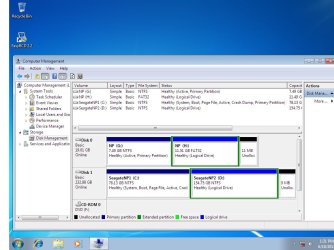
Win 7 disk management shows 8mb and 9mb space as unallocated at the end of partitions (on both HDD).
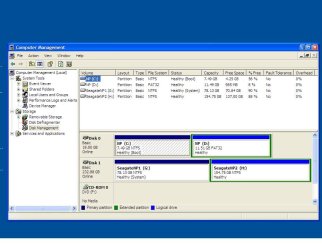
but the same disks wont show such unallocated disk space when checked through Win XP disk management

what is the reason ? what actually is the real case ? some space unallocated or not ?

regards
 

My Computer

OS
Windows 7 Pro x64 ,Windows 8 Ent x64 and Windows Xp SP2
CPU
AMD FX-8150
Motherboard
ASUS M5A97 R2.0
Memory
32Gb
Hard Drives
500Gb Seagate 7200 rpm
PSU
Coolermaster 600Watt 80+
Case
Coolermaster 690 ii
Keyboard
Logitech
Mouse
Logitech
Post screenshot please so I can see it
 

My Computer

Computer type
Laptop
Computer Manufacturer/Model Number
ACER ASPIRE 5742G
OS
Microsoft Windows 7 Home Premium 64-bits 7601 Multiprocessor Free Service Pack 1
CPU
Intel(R) Core(TM) i3 CPU M 370 @ 2.40GHz
Motherboard
Acer Aspire 5742G
Memory
4,00 GB
Graphics Card(s)
ATI Mobility Radeon HD 5400 Series
Sound Card
(1) AMD High Definition Audio Device (2) Realtek High Defi
Screen Resolution
1366 x 768 x 32 bits (4294967296 colors) @ 60 Hz
Hard Drives
WDC WD5000BEVT-22ZAT0

Attachments

  • Win7_diskmgmt.jpg
    Win7_diskmgmt.jpg
    88.5 KB · Views: 23
  • WinXP_diskmgmt.JPG
    WinXP_diskmgmt.JPG
    70.5 KB · Views: 14

My Computer

OS
Windows 7 Pro x64 ,Windows 8 Ent x64 and Windows Xp SP2
CPU
AMD FX-8150
Motherboard
ASUS M5A97 R2.0
Memory
32Gb
Hard Drives
500Gb Seagate 7200 rpm
PSU
Coolermaster 600Watt 80+
Case
Coolermaster 690 ii
Keyboard
Logitech
Mouse
Logitech

My Computer

Computer type
Laptop
Computer Manufacturer/Model Number
ACER ASPIRE 5742G
OS
Microsoft Windows 7 Home Premium 64-bits 7601 Multiprocessor Free Service Pack 1
CPU
Intel(R) Core(TM) i3 CPU M 370 @ 2.40GHz
Motherboard
Acer Aspire 5742G
Memory
4,00 GB
Graphics Card(s)
ATI Mobility Radeon HD 5400 Series
Sound Card
(1) AMD High Definition Audio Device (2) Realtek High Defi
Screen Resolution
1366 x 768 x 32 bits (4294967296 colors) @ 60 Hz
Hard Drives
WDC WD5000BEVT-22ZAT0
You may not be able to eliminate those leftover bits.

I've had that issue occur when I have resized partitions.
Even unallocated space at the end of partitions, couldn't be reintegrated into the existing ones.

The only way (that I've found) that works 100% of the time, is to obliterate everything and repartition the drive from scratch (it isn't worth the effort for a few MB).

I suspect that it must be due to some sort of "rounding" issues.
For example, when you create partitions using GParted, it has an option like "Round to nearest cylinder" (the wording might not be correct/exact).
 

My Computer

Computer type
PC/Desktop
Computer Manufacturer/Model Number
n/a
OS
W7 Ultimate SP1, LM19.2 MATE, W10 Home 1703, W10 Pro 1703 VM, #All 64 bit
CPU
AMD Phenom II x6 1100T, 3.3 GHz
Motherboard
ASUS M4A88T-M/USB3 (AM3)
Memory
12GB DDR3 1333 G-Skill (4GB x 2), G-Skill (2GB x 2)
Graphics Card(s)
NVIDIA GeForce GTX 660
Sound Card
Realtek?
Monitor(s) Displays
Samsung S23B350
Screen Resolution
1920x1080
Hard Drives
WD Green 2TB (SATA), WD Green 3TB (SATA), WD Blue 4TB (SATA), WD Blue 6TB (SATA)
PSU
Cooler Master
Case
Antec GX300 Tower
Cooling
3x Antec TRICOOL 120mm Fans
Mouse
Wired Optical
Internet Speed
DSL
Antivirus
Avast
Browser
Pale Moon (64 bit)
Other Info
2018-12-27 Upgraded HDDs
2015-12-10 Upgraded case, graphics card, storage
2015-08-15 Upgraded motherboard & RAM
2015-07-15 Upgraded LM17.1 to LM17.2

My Computer

OS
Windows 7 Pro x64 ,Windows 8 Ent x64 and Windows Xp SP2
CPU
AMD FX-8150
Motherboard
ASUS M5A97 R2.0
Memory
32Gb
Hard Drives
500Gb Seagate 7200 rpm
PSU
Coolermaster 600Watt 80+
Case
Coolermaster 690 ii
Keyboard
Logitech
Mouse
Logitech
That`s just what you get when you install XP on a drive.

You won't see the unallocated from XP, but you will from 7.

It`s totally normal.
 

My Computer

Computer type
PC/Desktop
Computer Manufacturer/Model Number
Skylake Special #666
OS
Windows 10 Pro x64
CPU
Intel Core i7 6700K
Motherboard
Asus Sabertooth Z170 Mark 1
Memory
GSkill TridentZ RGB 16GB 3600 16-16-16-36
Graphics Card(s)
EVGA GTX 980 Ti SC x2
Sound Card
Realtek High Definition
Monitor(s) Displays
AOC G2460PG
Screen Resolution
1920 x 1080 144Hz
Hard Drives
Samsung 860 Pro 256GB, Seagate Barracuda 4TB x2
PSU
EVGA 1000 P2, EVGA White Custom Braided Cables
Case
Corsair Vengeance C70 Gunmetal Black
Cooling
Corsair H100i v2, Corsair ML120 x2, Thermal Grizzly Kryonaut
Keyboard
Logitech G910 Orion Spectrum
Mouse
Logitech G700s
Internet Speed
Verizon Fios Quantum Gateway 75/75
Antivirus
Windows Defender, Malwarebytes Free 3.8.3
Browser
Chrome
Other Info
Corsair SP120 x4, LG Blu-ray Drive, Durabrand HT-395 100 Watt Dolby Digital Amp, Corsair H2100 Wireless 7.1 Headset
I ran into the same thing with the 2TB WD Black from my old XP machine (may the old machine rest in h...ah...peace). I would up with a single 9MB unallocated partition I couldn't get rid of for love nor money (nor creative language). After fooling around with the piece of...with it in Disk Misman...er...Management and the free version of Minitool Partition Wizard, I managed to make the unallocated partition 54MB (mutter mutter, mumble mumble). I tried formatting the unallocated space and somehow wound up, not only formatting it, but spanning it with the other partition (censored)! I was able to delete the partition, after which Minitool was able to expand the remaining partition into the unallocated volume. I now have just one volume on the drive.

My suggestion would be to try to format the unallocated space, then delete the new partition, then try to expand the other partition into the space. Apparently formatting erases whatever was in the way...I guess. Heck, I don't know; I'm just glad I got the stupid thing fixed!
 

My Computer

Computer type
PC/Desktop
Computer Manufacturer/Model Number
Custom Build
OS
Win 7 Ultimate 64 bit
CPU
Intel i7-3930K
Motherboard
ASUS P9X79 WS
Memory
Kingston HyperX Genesis 32GB Kit (8x4GB Modules) 1600MHz DDR
Graphics Card(s)
MSI R7850 Twin Frozr 2GD5/OC Radeon HD 7850 2GB 256-bit GDDR
Sound Card
Asus Xonar Essence STX
Monitor(s) Displays
3x Asus VG248QE 24", Vizio 32" TV
Screen Resolution
1920 x 1080, ?
Hard Drives
Samsung 128GB 840 Pro SSD (1),
Samsung 4TB 850 EVO SSDs (4)
Samsung 4TB 850 EVO SSDs (16) external backup drives used in 2.5" hot swap bays in the computer.
PSU
Corsair HX750w
Case
Antec Two Hundred v2 (modified)
Cooling
Cooler Master GeminII S524 120mm (fan replaced with a 140mm)
Keyboard
Logitech G510s
Mouse
Logitech M525 (two in use)
Internet Speed
=< 32Mbps down, 8Mbps up
Antivirus
AVAST!, MBAM, SAS, Spybot S&D (all but MBAM free) Glary Util
Browser
IE11
Other Info
LSI 9211-8i HBA card (8 SATA III ports), 2.5" & 3.5" Hot Swap Bays, HooToo HT-CR001 PCI-E to USB 3.0 Internal Hub + 6 Slot Card Reader, and LG Model CH12LS28 BD-ROM Optical Drive. Also, ScanSnap S1500 ADF duplexing scanner, Canon 9000F flat bed scanner, Corsair SP2500 2.1 speakers, Samsung CLP 415nw laser color printer, Cyberpower PP2200SW UPS
I believe this space is reserved for the use of Dynamic disk. When a disk is converted to Dynamic disk it uses this space to store volume information and other information. Without this reserved space the conversion would not be possible.
 

My Computer

Computer type
PC/Desktop
Computer Manufacturer/Model Number
HP
OS
Windows 7 Pro 64 bit
CPU
Xeon W3520
Memory
8 GB
Graphics Card(s)
Nvidia Geforce 210
I believe this space is reserved for the use of Dynamic disk. When a disk is converted to Dynamic disk it uses this space to store volume information and other information. Without this reserved space the conversion would not be possible.

Curious, especially since when I get rid of the space (or it's not there in the first place) the HDD works just fine. Now, the unallocated space that shows up when installing an OD is a whole 'nuther story. It is necessary but, even then, there is a way to get rid of it (actually, incorporate it in the C:/ partition itself).
 

My Computer

Computer type
PC/Desktop
Computer Manufacturer/Model Number
Custom Build
OS
Win 7 Ultimate 64 bit
CPU
Intel i7-3930K
Motherboard
ASUS P9X79 WS
Memory
Kingston HyperX Genesis 32GB Kit (8x4GB Modules) 1600MHz DDR
Graphics Card(s)
MSI R7850 Twin Frozr 2GD5/OC Radeon HD 7850 2GB 256-bit GDDR
Sound Card
Asus Xonar Essence STX
Monitor(s) Displays
3x Asus VG248QE 24", Vizio 32" TV
Screen Resolution
1920 x 1080, ?
Hard Drives
Samsung 128GB 840 Pro SSD (1),
Samsung 4TB 850 EVO SSDs (4)
Samsung 4TB 850 EVO SSDs (16) external backup drives used in 2.5" hot swap bays in the computer.
PSU
Corsair HX750w
Case
Antec Two Hundred v2 (modified)
Cooling
Cooler Master GeminII S524 120mm (fan replaced with a 140mm)
Keyboard
Logitech G510s
Mouse
Logitech M525 (two in use)
Internet Speed
=< 32Mbps down, 8Mbps up
Antivirus
AVAST!, MBAM, SAS, Spybot S&D (all but MBAM free) Glary Util
Browser
IE11
Other Info
LSI 9211-8i HBA card (8 SATA III ports), 2.5" & 3.5" Hot Swap Bays, HooToo HT-CR001 PCI-E to USB 3.0 Internal Hub + 6 Slot Card Reader, and LG Model CH12LS28 BD-ROM Optical Drive. Also, ScanSnap S1500 ADF duplexing scanner, Canon 9000F flat bed scanner, Corsair SP2500 2.1 speakers, Samsung CLP 415nw laser color printer, Cyberpower PP2200SW UPS
Hi there
sometimes this happens because you are using "Logical Volumes in an Extended partition". Personally I would run everything as Primary partitions -- but I don't think I'd bother for the sake of a few measly MB. I also wouldn't mic FAT32 and NTFS partitions on the same physical drive either -- however that's just my preference.

Cheers
jimbo
 

My Computer

Computer type
PC/Desktop
Computer Manufacturer/Model Number
Custom built, several laptops HP/ASUS
OS
Linux CENTOS 7 / various Windows OS'es and servers
CPU
Intel i7 Intel i5
Memory
8GB, 16GB
Graphics Card(s)
On Motherboard
Sound Card
Realtek HD audio
Monitor(s) Displays
Apple Cinema display, Samsung LCD
Screen Resolution
1920 X 1080
Hard Drives
4 X 1TB SATA
Mouse
Toshiba wireless laser
Internet Speed
> 20MB up
Curious, especially since when I get rid of the space (or it's not there in the first place) the HDD works just fine. Now, the unallocated space that shows up when installing an OD is a whole 'nuther story. It is necessary but, even then, there is a way to get rid of it (actually, incorporate it in the C:/ partition itself).

The drive will work fine with absolutely no issues, unless you try to convert the drive to Dynamic Disk. Them the conversion will fail.
 

My Computer

Computer type
PC/Desktop
Computer Manufacturer/Model Number
HP
OS
Windows 7 Pro 64 bit
CPU
Xeon W3520
Memory
8 GB
Graphics Card(s)
Nvidia Geforce 210
But you can convert the Logicals to Primary using Partition Wizard to set partition as Primary or Logical
if you want to test the theory that Logicals cause this problem, and the steps I proposed earlier fail.

It would be nice to finally know what causes this. Dynamic is another theory. Did you have a Dynamic Disk at any time because it is not now.

If this cannot be resolved then the next time you have the chance I would wipe the HD with Diskpart Clean Command but you must of course have your data backed up, along with a System Image if you are not reinstalling.
 
Back
Top