
Solved unallocated space in the STARTING

viiicky

New member
Local time
7:28 PM
Messages
3
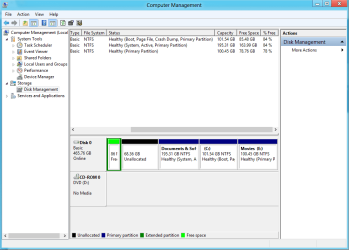
I have the similar problem for unallocated memory but the problem is that simply making new partion is not working...and the second method that can be used by extending the memory cant be used as the unallocated memory is in the starting that is there is no drive adjacent to it...
what sholud i do in this case????....please help me....????????????????
 

Attachments
  • unallctd.PNG
    unallctd.PNG
    22.3 KB · Views: 23

My Computer My Computer

OS
Windows 8 32bit
Hello viiicky, welcome to Seven Forums!


Here's what to do, first in Windows 7 disk management right click that green "Free Space" and click delete, that should make it all "Unallocated Space".


Then using this method to open a command window and type the following commands ...


diskpart

select disk 0

create partition primary

exit

exit - to close the command window
Then use Windows disk management to format the newly created partition.

That should be all there is to create a 4th (fourth) Primary partition for use and be sure to post back with any further questions you may have and to keep us informed.
 

My Computer My Computer

Computer Manufacturer/Model Number
* BFK Customs *
OS
W 7 64-bit Ultimate
CPU
Intel Q9550 Yorkfield
Motherboard
ASUS P5Q Pro
Memory
8GB Dominator 8500C5D
Graphics Card(s)
ATI : XFX 5870
Sound Card
Realtek HD Audio 7-1
Monitor(s) Displays
1x 47" LCD HDMI & 3x 26" LCD HDMI
Screen Resolution
1920x1080P & 1920x1200
Hard Drives
1x 80GB Intel X25-M G2 SSD : 1x 500GB & 1x 640GB WD Caviar Black(s)
PSU
Corsair 620HX
Case
Cooler Master RC-690
Cooling
Tuniq Tower 120, 2x 140mm and 3x 120mm case fans
Keyboard
Microsoft 500
Mouse
Razer Diamondback 3G
Internet Speed
14 Mb/s
Other Info
1x Koutech 3Gb/s SATA HDD Hot Swap Rack
thnx...thnx a lot...
it worked
only deleting that free space and then simply creating new partition by right click on the unallocated space has solved the problem
thnx a lot I m too glad that I got my 70gb back without rebooting my entire system
luv u...:)
 

My Computer My Computer

OS
Windows 8 32bit
Hello again.


I'm pleased you got it sorted and if you're happy with an Extended partition instead of a Primary partition then I'm happy too, thanks for the update.

It is possible to break that Extended partition into many Logical drives, have a look at Method One #2 of this tutorial linked below to see the process and be sure to post back with any further questions.


My Computer My Computer

Computer Manufacturer/Model Number
* BFK Customs *
OS
W 7 64-bit Ultimate
CPU
Intel Q9550 Yorkfield
Motherboard
ASUS P5Q Pro
Memory
8GB Dominator 8500C5D
Graphics Card(s)
ATI : XFX 5870
Sound Card
Realtek HD Audio 7-1
Monitor(s) Displays
1x 47" LCD HDMI & 3x 26" LCD HDMI
Screen Resolution
1920x1080P & 1920x1200
Hard Drives
1x 80GB Intel X25-M G2 SSD : 1x 500GB & 1x 640GB WD Caviar Black(s)
PSU
Corsair 620HX
Case
Cooler Master RC-690
Cooling
Tuniq Tower 120, 2x 140mm and 3x 120mm case fans
Keyboard
Microsoft 500
Mouse
Razer Diamondback 3G
Internet Speed
14 Mb/s
Other Info
1x Koutech 3Gb/s SATA HDD Hot Swap Rack
I have one more query but its related to WINDOWS 8...
so am I allowed to ask something abt windows 8???
 

My Computer My Computer

OS
Windows 8 32bit
I have one more query but its related to WINDOWS 8...
so am I allowed to ask something abt windows 8???


Yeah mate, I'll see if I can answer it for you.

We do have a Windows 8 forum you can visit / join if you are so inclined, at the link below.


My Computer My Computer

Computer Manufacturer/Model Number
* BFK Customs *
OS
W 7 64-bit Ultimate
CPU
Intel Q9550 Yorkfield
Motherboard
ASUS P5Q Pro
Memory
8GB Dominator 8500C5D
Graphics Card(s)
ATI : XFX 5870
Sound Card
Realtek HD Audio 7-1
Monitor(s) Displays
1x 47" LCD HDMI & 3x 26" LCD HDMI
Screen Resolution
1920x1080P & 1920x1200
Hard Drives
1x 80GB Intel X25-M G2 SSD : 1x 500GB & 1x 640GB WD Caviar Black(s)
PSU
Corsair 620HX
Case
Cooler Master RC-690
Cooling
Tuniq Tower 120, 2x 140mm and 3x 120mm case fans
Keyboard
Microsoft 500
Mouse
Razer Diamondback 3G
Internet Speed
14 Mb/s
Other Info
1x Koutech 3Gb/s SATA HDD Hot Swap Rack
Back
Top