Solved Uncontrolled RAM usage

Belvadier

New member
Local time
1:26 PM
Messages
11
Hi,

I am have been having some problems recently with RAM usage. Normally when my computer is just sitting at the desktop it is using about 23% of my total RAM (which is 8gb) However, within the last day or so whenever I boot up the computer will start at about the normal 23% but then work its way up to the 40-60% range.

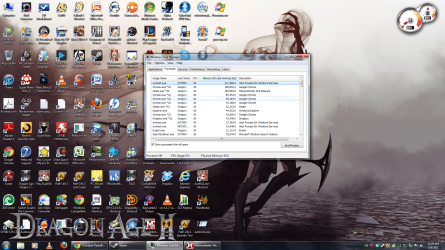
This will happen even if I am not using the computer or even if I just let it boot up and then sit there if I come back a few hours later the RAM use is sky high. In the process manager once I click the "show processes for all users" button and sort by the amount of memory being used I get an svchost.exe at the top and the RAM usage for this process will just grow and grow and continue to grow until I restart my computer.

Again, this happens even if I don't use my computer to do anything.

When I right-click on this process and select the "go to services" option the services that are listed are:

UxSms
TrkWks
HomeGroupListener
Netman
IPBusEnum
WPDBusEnum
PcaSvc
Sysmain
AudioEndpointBuilder
wudfsvc

Malwarebytes scan and Norton scan reveal no virus or malware.

The most recent piece of software I installed was Alpha Protocol via Steam, however I did uninstall this software and re-boot to test and see if it was the problem and it still did it with it uninstalled.

I am running windows 7 home premium 64 bit fully updated

The most annoying and strange thing is that it will start off low and then just keep growing and growing until a reboot, even if I don't use programs and just let it sit at the desktop.

Sorry for the somewhat wordy description, I just didn't want to leave anything out. Any suggestions would be greatly appreciated.

(I attached a screen capture of the offending process just in case that helps out and in the picture i do realize that there are more things using my RAM there than just that process but I think you get the point)

EDIT: I just thought of this: my Norton Security Suite (provided by Comcast) just went through a MAJOR update where the whole program was basically changed. Not sure if this could be causing the problem or not, just thought I'd mention it.
 

Attachments
  • ram problem.png
    ram problem.png
    680.8 KB · Views: 59

My Computer

OS
Windows 7 Home Premium 64 bit
CPU
Core i7 920
Memory
8gb DDR3
Graphics Card(s)
nVidia gts 250 1024 RAM
Sound Card
integrated
Monitor(s) Displays
Asus 24"
Screen Resolution
1920 x 1080
Internet Speed
Cable 9-14mbps down 3-5 mbps up

My Computer

Computer type
PC/Desktop
Computer Manufacturer/Model Number
Dell XPS 420
OS
Windows 10, Home Clean Install
CPU
Intel Core2 processsor Q8200(2.33Ghz 1333FSB) Quad Core Tech
Motherboard
Dell
Memory
6 gb
Graphics Card(s)
ATI Radeon 256MB HD3650
Sound Card
Intergrated 7.1 Channel Audio
Monitor(s) Displays
Dell SP2009W 20"
Hard Drives
640 GB Serial ATA Hard drive
Cooling
Fan
Keyboard
Dell USB Keyboard
Mouse
Dell Premium Optical USB
Internet Speed
DSL 2.85
Belvadier,

I've found RESMON and the CPU tab to be quite informative.

Is a possibility to 100% disable Norton and use Microsoft Security Essentials? That way we rule out any Norton-related problems.

There is a link in my sig for Microsoft Security Essentials and also for CCleaner which I'm going to ask you to use for the following:
LIST OF STARTUP PROGRAMS USING CCLEANER


CCleaner | Tasks icon | Startup tab | click on Save to text file button (bottom right side)

Using the PAPER CLIP icon in the top panel of a Message Reply window, attach the .txt file generated by CCleaner.
 

My Computer

Computer Manufacturer/Model Number
Toshiba Satellite S875D-S7239 laptop
OS
MS Windows 7 Ultimate SP1 64-bit
CPU
AMD A10-4600M
Motherboard
AMD Pumori (Socket FT1)
Memory
6.00 GB Dual-Channel DDR3 @ 798MHz (11-11-12-28)
Graphics Card(s)
AMD Radeon HD 7660G
Sound Card
High Definition Audio Device
Monitor(s) Displays
Generic PnP Monitor (1600x900@60Hz)
Screen Resolution
1600x900@60Hz
Hard Drives
SSD 119GB Corsair CSSD-V128GB2 ATA Device
Keyboard
Standard PS/2 Keyboard
Mouse
HP Wireless Optical Mobile Mouse Model FHA-3410
Internet Speed
What the local pub, local coffee shop offers.
Other Info
Optical Drive:MATSHITA BD-CMB UJ160B ATA Device


Also have an Asus ha1002xp netbook with Win 7 Ultimate installed.
Your computer is hardly idle. Why do you think your computer is idled with 96 processes running?
And I wouldn't be surprised if your desktop is taking a huge chuck with all those icons.
 

My Computer

Computer type
PC/Desktop
Computer Manufacturer/Model Number
Alienware Aurora ALX R4
OS
Windows 10 Pro (x64)
CPU
Intel Core i7-3930K (3.2GHz - 4.5GHz)
Motherboard
Alienware Aurora-R4 x79
Memory
4x Samsung 4GB PC3-12800 DDR3 (16GB 1600MHz)
Graphics Card(s)
Nvidia Geforce GTX 690
Sound Card
SteelSeries Siberia Elite
Monitor(s) Displays
Dell UltraSharp U3011
Screen Resolution
2560x1600
Hard Drives
Samsung 850 Pro 256 GB, Seagate 1TB Desktop Hybrid HDD, 2x Western Digital 4TB Green HDD
PSU
875W Some Dell PSU <.<
Case
Alienware Aurora ALX
Cooling
Custom Liquid Cooling (EK CPU & GPU blocks) dual EK 480RAD
Keyboard
Logitech G710+ Mechanical
Mouse
Logitech G700s
Internet Speed
Verizon Fios (50 mbps average)
Other Info
Server: Intel NUC D54250WYK: i5-4250U, 16GB, 256 GB mSATA, Windows Server 2012 R2
Welcome
Step one is a full test with memtest.
Run it for 8 passes. Then test each slot for 8 passes
Guide to using Memtest86+ - Geeks to Go Forums


Memtest ran and it passed with no errors


Belvadier,

I've found RESMON and the CPU tab to be quite informative.

Is a possibility to 100% disable Norton and use Microsoft Security Essentials? That way we rule out any Norton-related problems.

There is a link in my sig for Microsoft Security Essentials and also for CCleaner which I'm going to ask you to use for the following:
LIST OF STARTUP PROGRAMS USING CCLEANER


CCleaner | Tasks icon | Startup tab | click on Save to text file button (bottom right side)

Using the PAPER CLIP icon in the top panel of a Message Reply window, attach the .txt file generated by CCleaner.

Startup list is enclosed as requested.

I think the only way to be sure Norton is 100% turned off is to uninstall it. I can turn off the individual items such as the real-time protection, etc. but the program itself is still running...
 

Attachments

My Computer

OS
Windows 7 Home Premium 64 bit
CPU
Core i7 920
Memory
8gb DDR3
Graphics Card(s)
nVidia gts 250 1024 RAM
Sound Card
integrated
Monitor(s) Displays
Asus 24"
Screen Resolution
1920 x 1080
Internet Speed
Cable 9-14mbps down 3-5 mbps up
Your computer is hardly idle. Why do you think your computer is idled with 96 processes running?

I did say in my OP that I was aware that at the time of the screen shot I had many other things open and that that was just used to show the specific process that was continuously growing out of control.

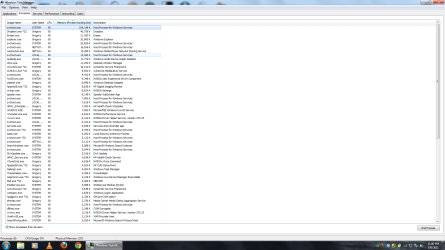
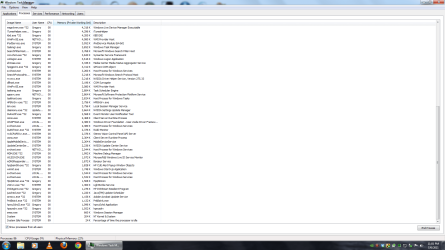
I had several chrome windows open, steam, my dropbox, etc. at the time of the shot however maybe I have some processes running that shouldn't be running? I don't know. I can take a screen capture after a fresh reboot before I do anything listing all of the processes if that helps...

Looking back I probably shouldn't have used that image for this post as i do have a lot of other stuff open.

EDIT: attached two screen shots of my entire process list after clicking the button to show processes for all users right after a reboot. Norton, dropbox and eraser do load at startup, other than that I've no real idea what everything else is. If it helps the only way for me to demonstrate what happens would be to take a shot of the list with the growing svc host after a fresh re-boot before i go to bed and then leave it on all night without doing anything (other than taking the screen shot) and show how much the usage has grown which I can do that if it will be helpful)
 

Attachments

  • process list 1.png
    process list 1.png
    85.8 KB · Views: 38
  • process list 2.png
    process list 2.png
    84.2 KB · Views: 19

My Computer

OS
Windows 7 Home Premium 64 bit
CPU
Core i7 920
Memory
8gb DDR3
Graphics Card(s)
nVidia gts 250 1024 RAM
Sound Card
integrated
Monitor(s) Displays
Asus 24"
Screen Resolution
1920 x 1080
Internet Speed
Cable 9-14mbps down 3-5 mbps up
Your memory may be fine, but that test takes at least 8 hours to do properly.
 

My Computer

Computer type
PC/Desktop
Computer Manufacturer/Model Number
Dell XPS 420
OS
Windows 10, Home Clean Install
CPU
Intel Core2 processsor Q8200(2.33Ghz 1333FSB) Quad Core Tech
Motherboard
Dell
Memory
6 gb
Graphics Card(s)
ATI Radeon 256MB HD3650
Sound Card
Intergrated 7.1 Channel Audio
Monitor(s) Displays
Dell SP2009W 20"
Hard Drives
640 GB Serial ATA Hard drive
Cooling
Fan
Keyboard
Dell USB Keyboard
Mouse
Dell Premium Optical USB
Internet Speed
DSL 2.85
The highest process is under 250 MB even in your first screenshot. I suspect the problem is something else, something that Task Manager cannot see because it is not associated with a process, a memory leak for example.

Lets see what RAMMap shows.
RAMMap
 

My Computer

Computer type
PC/Desktop
Computer Manufacturer/Model Number
Alienware Aurora ALX R4
OS
Windows 10 Pro (x64)
CPU
Intel Core i7-3930K (3.2GHz - 4.5GHz)
Motherboard
Alienware Aurora-R4 x79
Memory
4x Samsung 4GB PC3-12800 DDR3 (16GB 1600MHz)
Graphics Card(s)
Nvidia Geforce GTX 690
Sound Card
SteelSeries Siberia Elite
Monitor(s) Displays
Dell UltraSharp U3011
Screen Resolution
2560x1600
Hard Drives
Samsung 850 Pro 256 GB, Seagate 1TB Desktop Hybrid HDD, 2x Western Digital 4TB Green HDD
PSU
875W Some Dell PSU <.<
Case
Alienware Aurora ALX
Cooling
Custom Liquid Cooling (EK CPU & GPU blocks) dual EK 480RAD
Keyboard
Logitech G710+ Mechanical
Mouse
Logitech G700s
Internet Speed
Verizon Fios (50 mbps average)
Other Info
Server: Intel NUC D54250WYK: i5-4250U, 16GB, 256 GB mSATA, Windows Server 2012 R2
Your memory may be fine, but that test takes at least 8 hours to do properly.

My apologies, I did not notice that you said to let it run 8 passes, that is something I think I will have to save until tomorrow.

The highest process is under 250 MB even in your first screenshot. I suspect the problem is something else, something that Task Manager cannot see because it is not associated with a process, a memory leak for example.

Lets see what RAMMap shows.
RAMMap

I got RAMMap but unfortunately I have no idea what all it is that I am looking at...

is there a log file I should post of screen shots? and if screen shots, which sections would you want to see?
 

My Computer

OS
Windows 7 Home Premium 64 bit
CPU
Core i7 920
Memory
8gb DDR3
Graphics Card(s)
nVidia gts 250 1024 RAM
Sound Card
integrated
Monitor(s) Displays
Asus 24"
Screen Resolution
1920 x 1080
Internet Speed
Cable 9-14mbps down 3-5 mbps up
When in RamMap go to File > Save... That will create a snapshot anyone with RamMap can open and look at every single pane as it was when saved.
 

My Computer

Computer type
PC/Desktop
Computer Manufacturer/Model Number
Alienware Aurora ALX R4
OS
Windows 10 Pro (x64)
CPU
Intel Core i7-3930K (3.2GHz - 4.5GHz)
Motherboard
Alienware Aurora-R4 x79
Memory
4x Samsung 4GB PC3-12800 DDR3 (16GB 1600MHz)
Graphics Card(s)
Nvidia Geforce GTX 690
Sound Card
SteelSeries Siberia Elite
Monitor(s) Displays
Dell UltraSharp U3011
Screen Resolution
2560x1600
Hard Drives
Samsung 850 Pro 256 GB, Seagate 1TB Desktop Hybrid HDD, 2x Western Digital 4TB Green HDD
PSU
875W Some Dell PSU <.<
Case
Alienware Aurora ALX
Cooling
Custom Liquid Cooling (EK CPU & GPU blocks) dual EK 480RAD
Keyboard
Logitech G710+ Mechanical
Mouse
Logitech G700s
Internet Speed
Verizon Fios (50 mbps average)
Other Info
Server: Intel NUC D54250WYK: i5-4250U, 16GB, 256 GB mSATA, Windows Server 2012 R2
What version of Norton Internet Security are you using? 360 or NIS?


It may be worth running Live Update, and also Check for a New Version.
 

My Computer

Computer Manufacturer/Model Number
Custom (Self Build)
OS
Windows 7 Home Premium 64bit
CPU
Intel Core i7 2700k
Motherboard
eVGA P67 SLI
Memory
8GB Mushkin Redline Ridgebacks @1866
Graphics Card(s)
EVGA GTX570 SC
Sound Card
XiFi Titanium HD
Monitor(s) Displays
LG W2453V
Screen Resolution
1920x1080
Hard Drives
Intel 320 80GB -- Intel X25-V 40GB --WD Black 1TB x2 -- WD Blue 640GB
PSU
Seasonic x750
Case
Corsair 600T SE White
Cooling
eVGA Superclocked CPU Cooler
Keyboard
Saitek Cyborg
Antivirus
Kaspersky
Browser
IE
Other Info
LG BD/DVD
Perfect, there ya go! thanks for all your help so far, also. I'm sorry it's 101mb too...not sure if this is the normal size of these files or not but that is quite large. the upload was stalling when i tried to attach it so i'm just going to link to the file in my dropbox if that's OK...

http://dl.dropbox.com/u/26434728/RAMMap%207.7.11.RMP

if getting it from my dropbox is a problem let me know...
 

My Computer

OS
Windows 7 Home Premium 64 bit
CPU
Core i7 920
Memory
8gb DDR3
Graphics Card(s)
nVidia gts 250 1024 RAM
Sound Card
integrated
Monitor(s) Displays
Asus 24"
Screen Resolution
1920 x 1080
Internet Speed
Cable 9-14mbps down 3-5 mbps up
What version of Norton Internet Security are you using? 360 or NIS?


It may be worth running Live Update, and also Check for a New Version.


Well, LiveUpdate says everything is up to date. It used to be NIS that Comcast gave us but now (since the update about a week ago) it's just called "Norton Security Suite".
 

My Computer

OS
Windows 7 Home Premium 64 bit
CPU
Core i7 920
Memory
8gb DDR3
Graphics Card(s)
nVidia gts 250 1024 RAM
Sound Card
integrated
Monitor(s) Displays
Asus 24"
Screen Resolution
1920 x 1080
Internet Speed
Cable 9-14mbps down 3-5 mbps up
Took me a bit, had to install a 64bit version on Windows for RamMap a snapshot from a 64bit version. Yay for Native VHD support in Windows 7 for that. Anyways...

I don't see much of anything wrong, the numbers all look good. I wonder now tho, I probably should have asked this from the beginning. Are you having any actual performance issues? Is the machine slowing down? Stuttering, having hicups? Sending weapons of mass destruction to various places?

If not...then you should be happy that most of your RAM is actually being used. Making all that money you spent worth while. Course...you could send me 4 GBs so that will be 4 GBs less of what you have to worry about being used. :D
 

My Computer

Computer type
PC/Desktop
Computer Manufacturer/Model Number
Alienware Aurora ALX R4
OS
Windows 10 Pro (x64)
CPU
Intel Core i7-3930K (3.2GHz - 4.5GHz)
Motherboard
Alienware Aurora-R4 x79
Memory
4x Samsung 4GB PC3-12800 DDR3 (16GB 1600MHz)
Graphics Card(s)
Nvidia Geforce GTX 690
Sound Card
SteelSeries Siberia Elite
Monitor(s) Displays
Dell UltraSharp U3011
Screen Resolution
2560x1600
Hard Drives
Samsung 850 Pro 256 GB, Seagate 1TB Desktop Hybrid HDD, 2x Western Digital 4TB Green HDD
PSU
875W Some Dell PSU <.<
Case
Alienware Aurora ALX
Cooling
Custom Liquid Cooling (EK CPU & GPU blocks) dual EK 480RAD
Keyboard
Logitech G710+ Mechanical
Mouse
Logitech G700s
Internet Speed
Verizon Fios (50 mbps average)
Other Info
Server: Intel NUC D54250WYK: i5-4250U, 16GB, 256 GB mSATA, Windows Server 2012 R2
Took me a bit, had to install a 64bit version on Windows for RamMap a snapshot from a 64bit version. Yay for Native VHD support in Windows 7 for that. Anyways...

I don't see much of anything wrong, the numbers all look good. I wonder now tho, I probably should have asked this from the beginning. Are you having any actual performance issues? Is the machine slowing down? Stuttering, having hicups? Sending weapons of mass destruction to various places?

If not...then you should be happy that most of your RAM is actually being used. Making all that money you spent worth while. Course...you could send me 4 GBs so that will be 4 GBs less of what you have to worry about being used. :D

Well thanks for going through all that trouble to read my RAMMap save. There hasn't really been anything detrimental that has happened to my computer because of this so far. All my programs still execute as they should, games play fluidly, no detectable hit to performance, it was just the irregularity in the fact that for over a year it has been operating at a certain level of ram usage and now it has suddenly changed and I don't know why...
 

My Computer

OS
Windows 7 Home Premium 64 bit
CPU
Core i7 920
Memory
8gb DDR3
Graphics Card(s)
nVidia gts 250 1024 RAM
Sound Card
integrated
Monitor(s) Displays
Asus 24"
Screen Resolution
1920 x 1080
Internet Speed
Cable 9-14mbps down 3-5 mbps up
Belvadier,
WiN | MSCONFIG | STARTUP tab | uncheck ALL except for:
Sidebar C:\Program Files\Windows Sidebar\sidebar.exe /autoRun


This will not delete any programs. Simply stop them from running at startup time. You will be pleasantly surprised with the performance improvment.

Next. Download Microsoft Security Essentials (link in my sig). Delete, that is, uninstall Norton. Install and use the most compatible and least interfering AV and security program available, Microsoft Security Essentials. This is the only one I use and I've tried them all. It's the only one I will install on anyones computer.
 

My Computer

Computer Manufacturer/Model Number
Toshiba Satellite S875D-S7239 laptop
OS
MS Windows 7 Ultimate SP1 64-bit
CPU
AMD A10-4600M
Motherboard
AMD Pumori (Socket FT1)
Memory
6.00 GB Dual-Channel DDR3 @ 798MHz (11-11-12-28)
Graphics Card(s)
AMD Radeon HD 7660G
Sound Card
High Definition Audio Device
Monitor(s) Displays
Generic PnP Monitor (1600x900@60Hz)
Screen Resolution
1600x900@60Hz
Hard Drives
SSD 119GB Corsair CSSD-V128GB2 ATA Device
Keyboard
Standard PS/2 Keyboard
Mouse
HP Wireless Optical Mobile Mouse Model FHA-3410
Internet Speed
What the local pub, local coffee shop offers.
Other Info
Optical Drive:MATSHITA BD-CMB UJ160B ATA Device


Also have an Asus ha1002xp netbook with Win 7 Ultimate installed.
Ok, well I uninstalled norton and got MSE, we'll see if that helps, probably a good chance that it will I'm guessing since the only things I've changed about my computer since this started happening was Alpha Protocol (not the problem, already uninstalled to see if it was) and the new version of Norton so I guess we'll see. Thanks for the suggestion!
 

My Computer

OS
Windows 7 Home Premium 64 bit
CPU
Core i7 920
Memory
8gb DDR3
Graphics Card(s)
nVidia gts 250 1024 RAM
Sound Card
integrated
Monitor(s) Displays
Asus 24"
Screen Resolution
1920 x 1080
Internet Speed
Cable 9-14mbps down 3-5 mbps up
Did you follow the suggestion regarding MSCONFIG? Yes or No
 

My Computer

Computer Manufacturer/Model Number
Toshiba Satellite S875D-S7239 laptop
OS
MS Windows 7 Ultimate SP1 64-bit
CPU
AMD A10-4600M
Motherboard
AMD Pumori (Socket FT1)
Memory
6.00 GB Dual-Channel DDR3 @ 798MHz (11-11-12-28)
Graphics Card(s)
AMD Radeon HD 7660G
Sound Card
High Definition Audio Device
Monitor(s) Displays
Generic PnP Monitor (1600x900@60Hz)
Screen Resolution
1600x900@60Hz
Hard Drives
SSD 119GB Corsair CSSD-V128GB2 ATA Device
Keyboard
Standard PS/2 Keyboard
Mouse
HP Wireless Optical Mobile Mouse Model FHA-3410
Internet Speed
What the local pub, local coffee shop offers.
Other Info
Optical Drive:MATSHITA BD-CMB UJ160B ATA Device


Also have an Asus ha1002xp netbook with Win 7 Ultimate installed.
Did you follow the suggestion regarding MSCONFIG? Yes or No

Well, to a certain extent yes. I also allowed MSE, dropbox and eraser in addition to the sidebar because those are things that I would like to start up automatically...
 

My Computer

OS
Windows 7 Home Premium 64 bit
CPU
Core i7 920
Memory
8gb DDR3
Graphics Card(s)
nVidia gts 250 1024 RAM
Sound Card
integrated
Monitor(s) Displays
Asus 24"
Screen Resolution
1920 x 1080
Internet Speed
Cable 9-14mbps down 3-5 mbps up
MSE you should allow. Try unchecking dropbox and eraser.
 

My Computer

Computer Manufacturer/Model Number
Toshiba Satellite S875D-S7239 laptop
OS
MS Windows 7 Ultimate SP1 64-bit
CPU
AMD A10-4600M
Motherboard
AMD Pumori (Socket FT1)
Memory
6.00 GB Dual-Channel DDR3 @ 798MHz (11-11-12-28)
Graphics Card(s)
AMD Radeon HD 7660G
Sound Card
High Definition Audio Device
Monitor(s) Displays
Generic PnP Monitor (1600x900@60Hz)
Screen Resolution
1600x900@60Hz
Hard Drives
SSD 119GB Corsair CSSD-V128GB2 ATA Device
Keyboard
Standard PS/2 Keyboard
Mouse
HP Wireless Optical Mobile Mouse Model FHA-3410
Internet Speed
What the local pub, local coffee shop offers.
Other Info
Optical Drive:MATSHITA BD-CMB UJ160B ATA Device


Also have an Asus ha1002xp netbook with Win 7 Ultimate installed.
Back
Top