Understanding Windows Live Mail - Documentation

abredt

New member
Member
Local time
12:03 PM
Messages
80
I am using Windows 7 Home Premium with Live 2011.

My ISP is Time Warner Roadrunner POP/SMTP. On my Vista computer, Windows Mail emails were saved on their server until I downloaded them to my computer. Then they were saved on my computer until I deleted them.

It sounds like WLM saves them on their server. But are they still on that server after Time Warner downloads them to me?
I am trying to understand how it works.

Is there documentation on things like:
Where are the messages stored?
How long messages stay on the server?
etc??

Thanks, cb
 

My Computer

Computer Manufacturer/Model Number
Dell 15R Laptop
OS
Windows 7 Home Premium
CPU
Intel Core i5
Memory
6 GB
There are two types of service
If you have POP3, you download it and it is no longer on their server
If you have IMAP, you download and it remains on their server, too.
This should explain it all, plus a third option to have POP3 and the email stays on the server after download
http://www.ntchosting.com/email/pop3-imap-email-account.html
 

My Computer

Computer type
PC/Desktop
Computer Manufacturer/Model Number
Dell XPS 420
OS
Windows 10, Home Clean Install
CPU
Intel Core2 processsor Q8200(2.33Ghz 1333FSB) Quad Core Tech
Motherboard
Dell
Memory
6 gb
Graphics Card(s)
ATI Radeon 256MB HD3650
Sound Card
Intergrated 7.1 Channel Audio
Monitor(s) Displays
Dell SP2009W 20"
Hard Drives
640 GB Serial ATA Hard drive
Cooling
Fan
Keyboard
Dell USB Keyboard
Mouse
Dell Premium Optical USB
Internet Speed
DSL 2.85
Roadrunner is POP3.
It looks like WLM is IMAP (?)
I will have some email that I want to save locally and back it up.

I'll have to do some tests to see what stays where.

Thanks, cb
 

My Computer

Computer Manufacturer/Model Number
Dell 15R Laptop
OS
Windows 7 Home Premium
CPU
Intel Core i5
Memory
6 GB
WLM will accept either imap or POP3
 

My Computer

Computer type
PC/Desktop
Computer Manufacturer/Model Number
Dell XPS 420
OS
Windows 10, Home Clean Install
CPU
Intel Core2 processsor Q8200(2.33Ghz 1333FSB) Quad Core Tech
Motherboard
Dell
Memory
6 gb
Graphics Card(s)
ATI Radeon 256MB HD3650
Sound Card
Intergrated 7.1 Channel Audio
Monitor(s) Displays
Dell SP2009W 20"
Hard Drives
640 GB Serial ATA Hard drive
Cooling
Fan
Keyboard
Dell USB Keyboard
Mouse
Dell Premium Optical USB
Internet Speed
DSL 2.85
So, Jack sends me an email and it sits on the Roadrunner POP3 server.

I open Windows Live Mail and WLM goes to the Roadrunner server and shows me the email.

Where does the email "live" at that point? Is it still on the roadrunner server? Does it ever live on the Microsoft server?

Can I get it onto my Windows 7 computer? I want to save it locally so I can back it up. I don't want to permanently delete it. Roadrunner only gives me 100MB of storage, then will refuse to accept emails.

Thanks for your patience, cb
 

My Computer

Computer Manufacturer/Model Number
Dell 15R Laptop
OS
Windows 7 Home Premium
CPU
Intel Core i5
Memory
6 GB
So, Jack sends me an email and it sits on the Roadrunner POP3 server.

I open Windows Live Mail and WLM goes to the Roadrunner server and shows me the email.

Where does the email "live" at that point? Is it still on the roadrunner server? Does it ever live on the Microsoft server?

Can I get it onto my Windows 7 computer? I want to save it locally so I can back it up. I don't want to permanently delete it. Roadrunner only gives me 100MB of storage, then will refuse to accept emails.

Thanks for your patience, cb
We can communicate better and better understand each other if you look up what type of mail you have, is it POP3? Then we can talk about that.
go accounts >properties>servers in Windows Mail
 

My Computer

Computer type
PC/Desktop
Computer Manufacturer/Model Number
Dell XPS 420
OS
Windows 10, Home Clean Install
CPU
Intel Core2 processsor Q8200(2.33Ghz 1333FSB) Quad Core Tech
Motherboard
Dell
Memory
6 gb
Graphics Card(s)
ATI Radeon 256MB HD3650
Sound Card
Intergrated 7.1 Channel Audio
Monitor(s) Displays
Dell SP2009W 20"
Hard Drives
640 GB Serial ATA Hard drive
Cooling
Fan
Keyboard
Dell USB Keyboard
Mouse
Dell Premium Optical USB
Internet Speed
DSL 2.85
So, Jack sends me an email and it sits on the Roadrunner POP3 server.

I open Windows Live Mail and WLM goes to the Roadrunner server and shows me the email.

Where does the email "live" at that point? Is it still on the roadrunner server? Does it ever live on the Microsoft server?

Can I get it onto my Windows 7 computer? I want to save it locally so I can back it up. I don't want to permanently delete it. Roadrunner only gives me 100MB of storage, then will refuse to accept emails.

Thanks for your patience, cb
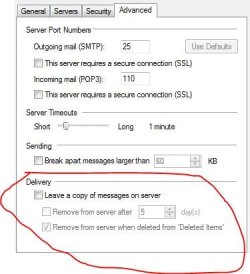
Go to email accounts, click on your account then properties click advanced tab and you will have the option check or uncheck leave mail on sever at the bottom.

1.JPG

Is this of any help
 

My Computer

Computer Manufacturer/Model Number
Put together
OS
Win7 Pro-64 Bit
CPU
i7-2600-3.4GHz
Motherboard
ASRock Z68M
Memory
8 GIG DDR3
Graphics Card(s)
onboard
Sound Card
onboard
Hard Drives
Seagate 1TB 7200RPM
PSU
680 W
Case
black
Cooling
stock fans
Keyboard
Microsoft
Mouse
Microsoft optical
Does that remove it from the Roadrunner server?

Does it stay on the Windows Live server? If so,
How long does it stay there?
Is there a maximum size for the stuff on that server?

Thanks, cb
 

My Computer

Computer Manufacturer/Model Number
Dell 15R Laptop
OS
Windows 7 Home Premium
CPU
Intel Core i5
Memory
6 GB
So, Jack sends me an email and it sits on the Roadrunner POP3 server.

I open Windows Live Mail and WLM goes to the Roadrunner server and shows me the email.

Where does the email "live" at that point? Is it still on the roadrunner server? Does it ever live on the Microsoft server?

Can I get it onto my Windows 7 computer? I want to save it locally so I can back it up. I don't want to permanently delete it. Roadrunner only gives me 100MB of storage, then will refuse to accept emails.

Thanks for your patience, cb

1. Emails will be store at server if you enable..."Leave a copy of messages at server " option.

Open WLM > top left, click the blue button > Options > E-mail Accounts > click your RR account > Properties > Advanced tab > under Delivery heading, check or un-check "Leave a copy of messages at server " > OK.

2. " I want to save it locally " ....you can do so by creating sub-folders, each with a name such as "Joe Adams ", Mary Jo "etc.> after you have read them,you can then drag/drop them to the corresponding sub-folders.

Open WLM > left side (Folder list ), right click at your rr account > New folder > enter a name > OK

P.S. Your mail server is roadrunner, there is no such thing as Microsoft server.
 

My Computer

Computer Manufacturer/Model Number
Acer Aspire 7741Z
OS
Windows 7 Home Premium 64-bit, SP1
CPU
Intel Pentium P6200, Cores 2, 2.13 GHz
Memory
4 GB
Graphics Card(s)
Intel HD
Sound Card
unknown
Monitor(s) Displays
17.3 inches
Screen Resolution
1600 x 900
Hard Drives
640 GB, 5400 PRM
Back
Top