
How to Create a Bootable Live Linux USB Using UNetbootin
Information
In this tutorial you'll learn how to create a bootable Live USB drive for Ubuntu, Fedora, and other Linux distributions without burning a CD.
This article may helps you to choose best Linux distro for you.
Choosing the Best Linux Distro for You
This article may helps you to choose best Linux distro for you.
Choosing the Best Linux Distro for You
Note
This program can be downloaded from here UNetbootin .
I'm using version 5.27
Before starting with the turorial make sure that you have inserted a USB in your computer.
This will delete all the data on usb,so before doing this,backup your files.
I'm using version 5.27
Before starting with the turorial make sure that you have inserted a USB in your computer.
This will delete all the data on usb,so before doing this,backup your files.
The current version(5.27) has built-in support for automatically downloading and loading the following distributions:
Code:
[LIST]
[*][URL="http://www.ubuntu.com/"]Ubuntu[/URL] (and official derivatives)
[LIST]
[*]6.06 LTS
[*]6.10
[*]7.04
[*]7.10
[*]8.04 LTS
[*]8.10
[*]9.04
[*]9.10
[*]10.04 LTS
[*]10.10
[*]Daily CD Images
[/LIST]

[*][URL="http://www.debian.org/"]Debian[/URL]
[LIST]
[*]Stable/Lenny
[*]Testing/Squeeze
[*]Unstable/Sid
[/LIST]

[*][URL="http://linuxmint.com/"]Linux Mint[/URL]
[LIST]
[*]3.1
[*]4.0
[*]5-r1
[*]6
[*]7
[*]8
[*]9
[/LIST]

[*][URL="http://www.opensuse.org/"]openSUSE[/URL]
[LIST]
[*]10.2
[*]10.3
[*]11.0
[*]11.1
[*]Factory
[/LIST]

[*][URL="http://www.archlinux.org/"]Arch Linux[/URL]
[LIST]
[*]2007.08
[/LIST]

[*][URL="http://www.damnsmalllinux.org/"]Damn Small Linux[/URL]
[LIST]
[*]4.4
[/LIST]

[*][URL="http://www.slitaz.org/en/"]SliTaz[/URL]
[LIST]
[*]Stable
[*]Cooking
[/LIST]

[*][URL="http://www.puppylinux.org/"]Puppy Linux[/URL]
[LIST]
[*]4.00
[/LIST]

[*][URL="http://www.gnewsense.org/"]gNewSense[/URL]
[LIST]
[*]deltah-2.1
[/LIST]

[*][URL="http://www.freebsd.org/"]FreeBSD[/URL]
[LIST]
[*]6.3
[*]7.0
[*]7.2
[*]8.0
[/LIST]

[*][URL="http://www.netbsd.org/"]NetBSD[/URL]
[LIST]
[*]4.0
[/LIST]

[/LIST]

[LIST]
[*][URL="http://fedoraproject.org/"]Fedora[/URL]
[LIST]
[*]7
[*]8
[*]9
[*]10
[*]11
[*]12
[*]13
[*]Rawhide
[/LIST]

[*][URL="http://www.pclinuxos.com/"]PCLinuxOS[/URL]
[LIST]
[*]2010
[/LIST]

[*][URL="http://www.sabayonlinux.org/"]Sabayon Linux[/URL]
[LIST]
[*]5.1
[*]5.2
[/LIST]

[*][URL="http://www.gentoo.org/"]Gentoo[/URL]
[LIST]
[*]2007.0
[*]2008.0
[/LIST]

[*][URL="http://www.mepis.org/"]MEPIS[/URL]
[LIST]
[*]SimplyMEPIS 8
[*]AntiX 8
[/LIST]

[*][URL="http://www.zenwalk.org/"]Zenwalk[/URL]
[LIST]
[*]5.2
[/LIST]

[*][URL="http://www.slax.org/"]Slax[/URL]
[LIST]
[*]6
[/LIST]

[*][URL="http://www.dreamlinux.com.br/"]Dreamlinux[/URL]
[LIST]
[*]3.2
[/LIST]

[*][URL="http://www.elivecd.org/"]Elive[/URL]
[LIST]
[*]Development
[/LIST]

[*][URL="http://www.centos.org/"]CentOS[/URL]
[LIST]
[*]4
[*]5
[/LIST]

[*][URL="http://www.mandriva.com/"]Mandriva[/URL]
[LIST]
[*]2007.1
[*]2008.0
[*]2008.1
[/LIST]

[*][URL="http://linuxconsole.org/"]LinuxConsole[/URL]
[LIST]
[*]1.0.2009
[/LIST]

[*][URL="http://frugalware.org/"]Frugalware Linux[/URL]
[LIST]
[*]Stable
[*]Testing
[*]Current
[/LIST]

[*][URL="http://www.xpud.org/"]xPUD[/URL]
[LIST]
[*]0.9.2
[/LIST]

[/LIST]2. Selecting an image file with the OS from your hard drive.
PART ONE
Downloading the Distro
1. After you downloaded the program,start it. You'll see the main window of the tool.
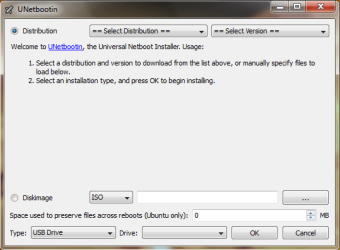
In Distribution you can select one of the offered distros. And the version in other tab.
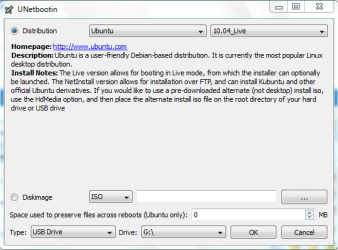
After you select the distro that you want,click OK,and you'll see this window.

This is a part when the distribution is downloading. This will take some time,depending on your internet speed. After first step finish it will automaticly forward to other steps,or Extracting and Copying Files,Installing Bootloader and the last one Installation Complete,Reboot.
When all is finished you'll see this image
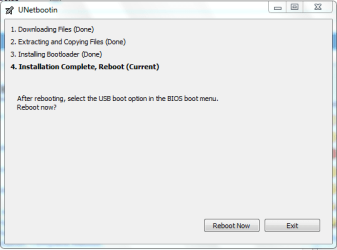
After that just reboot your pc and boot from usb drive.
PART TWO
Selecting an Image File with the OS from your Hard Drive
1. The second way is to select an image file from your hdd to install. Here you shoud click on Diskimage.
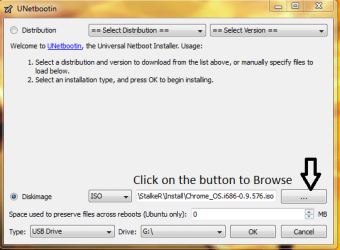
After you'll locate the image file,click OK.
Then will start the proccess. It's simmilar to that with step1 but now we don't have the first step, Downloading Files.
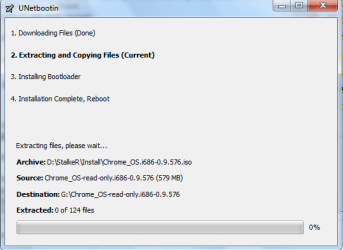
This also can take a while,so be patient. After completing that 4 steps,you'll see this window.
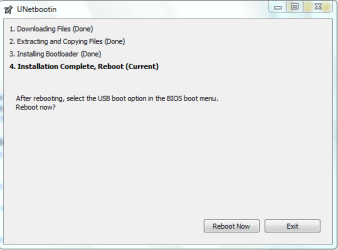
So the proccess is completed. Next is to reboot the pc and boot from USB.
That's all. Hope you like it. 
Last edited:

 Bootable linux is the lifesaver sometimes ! I must try it .

