Unfixable Unmountable Boot Volume

boweasel

New member
Power User
Local time
10:01 AM
Messages
678
I've made my brother's laptop worse, and I need some guidance.

He has a Dell Inspiron 1750 running Windows 7 Home Premium. I see no indication anywhere as to whether it is a 32 or 64 bit system, and he doesn't know.

He asked me to look at it because it'd been extremely sluggish, and it had occassionally rebooted on hlm in the last week.

When I started it the system suggested that I run a chkdsk, which I did. I replaced 5 bad clusters on stage 4, and stage 5 took another 8 hours to complete. When it finally restarted I ran a full Malwarebytes scan, and we got over 1100 bits of malware, all of them PUPs. It removed them and rebooted, but it still seemed very slow. I then turned off real time protection on MSE, downloaded and ran ComboFix. It deleted a bunch of files, most of them pointing to some sort of PC optimizer my brother had downloaded.

When I rebooted I got a BSOD with an Unmountable Boot Volume. I haven't been able to get past that. When I boot normally I'm offered a choice of Repairing the Computer (rcommended) or Starting Normally. Since door number 2 always gives me the BSOD, I selected Repair. It loaded files and eventually took me to a nice blue sky scene with some clouds and contrails. And it just sat there for well over an hour. It wasn't frozen, since the mouse worked, but eventually I turned it off. I got pretty much the same result when I booted from a Windows 7 disk (I tried both 32 and 64 bit disks). It would ask the language and keyboard and would take me to a screen where I could Install or Repair. I've only tried Repair, but that soon led me to that same sky scene where nothing happened.

I think all I have to do is to get to a DOS screen where a fixboot and a fixmbr should take care of the problem. I just don't know how to get to there from here.

(I've also used F8 on startup and tried Last Configuration That Worked, and Directory Services Restore. Both give me a quick flash of BSOD.
 

My Computer

Computer type
Laptop
OS
Windows 7 home premium 64 bit
CPU
AMD K10
Motherboard
Hewlett-Packard 1444 (Socket S1G4)
Memory
3.00GB Dual-Channel DDR3 @ 532MHz
Graphics Card(s)
ATI AMD M880G with ATI Mobility Radeon HD 4250 (HP)
Sound Card
Realtek
Screen Resolution
1366 x 768
Hard Drives
465GB Western Digital
Antivirus
MSE
Hum maybe try these too mate

http://www.superantispyware.com/

http://www.bleepingcomputer.com/download/adwcleaner/

ADW download from bleepingcomputer delete any rubbish found


1100 pieces found with MBAM sounds an awful lot and I would even run the Emisisoft Emergency Kit scanner and command line scan.
https://www.emsisoft.com/en/software/download/

At a pinch I would myself run the Kaspersky rescue disk from this list and see what it may come up with if you are concerned re malware. 5 Bootable AntiVirus Rescue CD for Windows: Free Download It does take a while to run but is thorough.

At least it will eliminate a lot of stuff.
 

My Computer

Computer type
PC/Desktop
Computer Manufacturer/Model Number
Own build (new) Desk1 / Asus ROG Win 7 / Desk2 1st build
OS
Desk1 7 Home Prem / Desk2 10 Pro / Main lap Asus ROG 10 Pro 2 laptop Toshiba 7 Pro Asus P2520 7 & 10
CPU
Desk1 i5 3750K / Laptop i7 GTX 860M / Desk2 i5 2500
Motherboard
Desk1 Asus P877-V / Desk2 Gigabyte H67 UD3H / Laptop ?
Memory
Desk1 8GB (1866) / Desk2 16GB (1333) / Laptop 8Gb DDR3
Graphics Card(s)
Desk 1& 2NVidia GTX 650 & Laptops on board Intel
Sound Card
Desk 1 & 2 -XONAR DG Realtek High Def audio Laptop
Monitor(s) Displays
Desk 1 Benq HD 2450 / Desk2 Philips 24" / Laptop 17.5"
Screen Resolution
1920x1080 D1 & D2 & Laptop 1
Hard Drives
Desk1 Samsung 120GB 830 SSD
Asus ROG 256GB 850 Pro SSD
Desk2 Samsung 840 256 SSD
Toshiba 120GB EVO
PSU
Desk 1 Corsair HX 1050/ Laptop ? / Desk 2 Corsair HX 650
Case
Desk 1 Cooler HAF XM ? Toshiba laptop / Desk2 Coolermaster
Cooling
Fans on all Desk1 -2 Desk2 - all Coolermasters 5 Laptop ?
Keyboard
Desk 1 MS Sidewinder X6 Desk 2 MS Sidewinder X 4
Mouse
Desk 1&2 - Gigabyte MS 900 gamer - laptop - Logitec wireless
Internet Speed
ADSL2+
Other Info
One other Desktop (tester) and spare Toshba laptop both with SSD's
Running Kaspersky 2016 ISS on all machines config'd identically
Logitec audio stereo systems on each machine (x3)
Canon MG5250MFC
Router/modem TP-Link running WPA2SK
I finally got to that DOS screen with a Spotmau BootSuite disk. I then did the Fixboot and Fixmbr and rebooted into Windows. So that part is okay. The fact that it wants to perform a chkdsk on every boot IS a problem. Even when I hit a key to skip the disk check, we're still getting little popups about a possible disk failure.

He just had a new hard drive put in about a year ago. If I just keep running chkdsk /r over and over will it eventually simply make all those bad sectors inaccessible, and let the laptop operate normally?
 

My Computer

Computer type
Laptop
OS
Windows 7 home premium 64 bit
CPU
AMD K10
Motherboard
Hewlett-Packard 1444 (Socket S1G4)
Memory
3.00GB Dual-Channel DDR3 @ 532MHz
Graphics Card(s)
ATI AMD M880G with ATI Mobility Radeon HD 4250 (HP)
Sound Card
Realtek
Screen Resolution
1366 x 768
Hard Drives
465GB Western Digital
Antivirus
MSE
That I don't know boweasel and in my tiny mind having to do tat would be very tedious and just how many repairs will it have to do??

First thing I would be doing is backing up the data and then maybe run some hard drive tests like

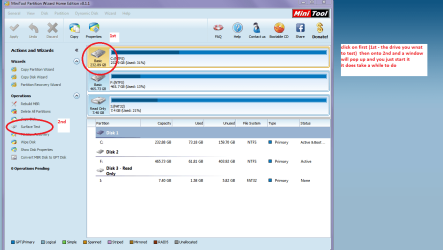
http://www.seagate.com/au/en/support/downloads/item/seatools-win-master/ - as I don't know what brand the drive is mate and even a physical surface test with the Partition Wizard http://www.partitionwizard.com/free-partition-manager.html see my pic - takes a while but at least it will eliminate the drive unless it is going south.

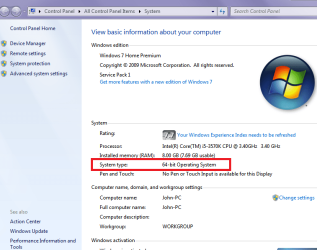
As to whether it is 32 or 64bit just go into Control Panel > System and it will tell you what bit system it is running. You can also run Speccy to do the same thing Speccy - Download < download from piriform
 

Attachments

  • SYS.PNG
    SYS.PNG
    36.4 KB · Views: 0
  • SURFACE TEST.PNG
    SURFACE TEST.PNG
    47.5 KB · Views: 0

My Computer

Computer type
PC/Desktop
Computer Manufacturer/Model Number
Own build (new) Desk1 / Asus ROG Win 7 / Desk2 1st build
OS
Desk1 7 Home Prem / Desk2 10 Pro / Main lap Asus ROG 10 Pro 2 laptop Toshiba 7 Pro Asus P2520 7 & 10
CPU
Desk1 i5 3750K / Laptop i7 GTX 860M / Desk2 i5 2500
Motherboard
Desk1 Asus P877-V / Desk2 Gigabyte H67 UD3H / Laptop ?
Memory
Desk1 8GB (1866) / Desk2 16GB (1333) / Laptop 8Gb DDR3
Graphics Card(s)
Desk 1& 2NVidia GTX 650 & Laptops on board Intel
Sound Card
Desk 1 & 2 -XONAR DG Realtek High Def audio Laptop
Monitor(s) Displays
Desk 1 Benq HD 2450 / Desk2 Philips 24" / Laptop 17.5"
Screen Resolution
1920x1080 D1 & D2 & Laptop 1
Hard Drives
Desk1 Samsung 120GB 830 SSD
Asus ROG 256GB 850 Pro SSD
Desk2 Samsung 840 256 SSD
Toshiba 120GB EVO
PSU
Desk 1 Corsair HX 1050/ Laptop ? / Desk 2 Corsair HX 650
Case
Desk 1 Cooler HAF XM ? Toshiba laptop / Desk2 Coolermaster
Cooling
Fans on all Desk1 -2 Desk2 - all Coolermasters 5 Laptop ?
Keyboard
Desk 1 MS Sidewinder X6 Desk 2 MS Sidewinder X 4
Mouse
Desk 1&2 - Gigabyte MS 900 gamer - laptop - Logitec wireless
Internet Speed
ADSL2+
Other Info
One other Desktop (tester) and spare Toshba laptop both with SSD's
Running Kaspersky 2016 ISS on all machines config'd identically
Logitec audio stereo systems on each machine (x3)
Canon MG5250MFC
Router/modem TP-Link running WPA2SK
Yeah, I'm sorry for not mentioning that after it successfully booted I checked the properties of the C: drive. It is 64 bit.

But that seems to be a moot point, now. I think the drive has died. It was about 90 minutes into a full MSI scan when it turned off. When I powered on I got a status of 0xc000000e and info of The boot selection failed because a required device is inaccessible
 

My Computer

Computer type
Laptop
OS
Windows 7 home premium 64 bit
CPU
AMD K10
Motherboard
Hewlett-Packard 1444 (Socket S1G4)
Memory
3.00GB Dual-Channel DDR3 @ 532MHz
Graphics Card(s)
ATI AMD M880G with ATI Mobility Radeon HD 4250 (HP)
Sound Card
Realtek
Screen Resolution
1366 x 768
Hard Drives
465GB Western Digital
Antivirus
MSE
Boweasel you might try this then to recover data.


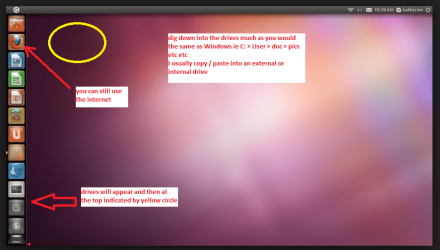
BOOTABLEUBUNTU

Makea bootable Ubuntu disk http://www.ubuntu.com/download

Setthe BIOS to boot from the optical when the machine boots it will show you ascreen with TRY or INSTALL > select TRY

Whenit is finished - it takes very little time you will get a screen like in thepic .

Openthe drive you want > User and dig down until you get to the data / settingsyou may be able to copy / paste the material you want to an external source orother installed drive doing this.

Iam not sure if it will but I have recovered tons of data etc using this methodboth on "dead" or just plain drives that you cannot get data fromusing Windows.

See my pic/s
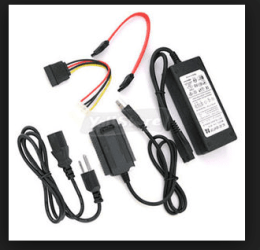
PS Meant to say you might need to use another machine with the drive installed or using the gadget in the pic
 

Attachments

  • UBUTUX.PNG
    UBUTUX.PNG
    130.7 KB · Views: 0
  • ADAPTOR.PNG
    ADAPTOR.PNG
    30.6 KB · Views: 17

My Computer

Computer type
PC/Desktop
Computer Manufacturer/Model Number
Own build (new) Desk1 / Asus ROG Win 7 / Desk2 1st build
OS
Desk1 7 Home Prem / Desk2 10 Pro / Main lap Asus ROG 10 Pro 2 laptop Toshiba 7 Pro Asus P2520 7 & 10
CPU
Desk1 i5 3750K / Laptop i7 GTX 860M / Desk2 i5 2500
Motherboard
Desk1 Asus P877-V / Desk2 Gigabyte H67 UD3H / Laptop ?
Memory
Desk1 8GB (1866) / Desk2 16GB (1333) / Laptop 8Gb DDR3
Graphics Card(s)
Desk 1& 2NVidia GTX 650 & Laptops on board Intel
Sound Card
Desk 1 & 2 -XONAR DG Realtek High Def audio Laptop
Monitor(s) Displays
Desk 1 Benq HD 2450 / Desk2 Philips 24" / Laptop 17.5"
Screen Resolution
1920x1080 D1 & D2 & Laptop 1
Hard Drives
Desk1 Samsung 120GB 830 SSD
Asus ROG 256GB 850 Pro SSD
Desk2 Samsung 840 256 SSD
Toshiba 120GB EVO
PSU
Desk 1 Corsair HX 1050/ Laptop ? / Desk 2 Corsair HX 650
Case
Desk 1 Cooler HAF XM ? Toshiba laptop / Desk2 Coolermaster
Cooling
Fans on all Desk1 -2 Desk2 - all Coolermasters 5 Laptop ?
Keyboard
Desk 1 MS Sidewinder X6 Desk 2 MS Sidewinder X 4
Mouse
Desk 1&2 - Gigabyte MS 900 gamer - laptop - Logitec wireless
Internet Speed
ADSL2+
Other Info
One other Desktop (tester) and spare Toshba laptop both with SSD's
Running Kaspersky 2016 ISS on all machines config'd identically
Logitec audio stereo systems on each machine (x3)
Canon MG5250MFC
Router/modem TP-Link running WPA2SK
The Partition Wizard Mini-Tool's Surface Test is only at 59 point something % complete. The timer on the tool says that it's been running for almost 11 hours, but I don't trust that - whenever it hits an error time seems to stand still, and it's hit 56 so far. I'm not really sure what practical purpose this never-ending test will serve - I already knew that the drive had some bad areas. If there's any kind of facility in PW to render these error areas unusable, then I certainly see the benefit, otherwise it's just re-stating the obvious and wasting a great deal of time. (I think I have a tool on a Hiren's boot disk that will repair bad clusters - I'd forgotten about it until I started running PW's Surface Test).
 

My Computer

Computer type
Laptop
OS
Windows 7 home premium 64 bit
CPU
AMD K10
Motherboard
Hewlett-Packard 1444 (Socket S1G4)
Memory
3.00GB Dual-Channel DDR3 @ 532MHz
Graphics Card(s)
ATI AMD M880G with ATI Mobility Radeon HD 4250 (HP)
Sound Card
Realtek
Screen Resolution
1366 x 768
Hard Drives
465GB Western Digital
Antivirus
MSE
Good idea to boot ubuntu off thumb drive and save what files you wish. Then just wipe and reinstall windows.

IF you have a reinstall disc, IMO, not worth repairing, who knows what lurks beneath that these scanners will miss.

'1100 pieces found with MBAM ' amazing it ran at all.
 

My Computer

OS
Windows 7 Ultimate x64
Yep sorry mate I agree with you 100% that test has whenever I have used it taken about three hours and I can only sincerely apologise for not making that known to you when I suggested it should at least only run for that sort of time limit. It is after all just a physical test on the disk surface and I can only assume there is some / a fair bit of that.

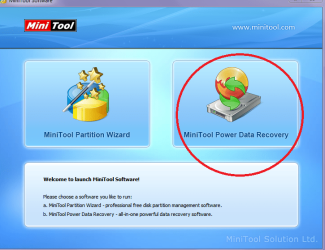
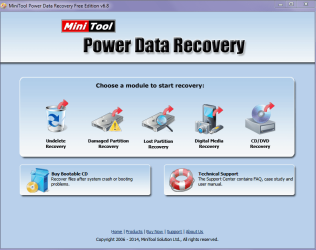
I am not aware of any function or feature in PW to do what you ask (unless it is in the Mini Partition Data recovery Tool - which unfortunately I have never had to use so am not sure what it can do) and I think it must be assume that the disk is beyond redemption. Now the only thing I can suggest is and I am no expert is to recover what you can from the drive and just replace it with a new one and recover any data you need using that Ubuntu I use - unless you have been running an image like I do once a week with the Macrium tutorial.
http://www.sevenforums.com/tutorials/73828-imaging-free-macrium.html?ltr=I

Again my apologies or the time wasting.

John

PS Might be worth running those other malware scans if you haven't already too. There is the Kaspersky rescue disk that scans from boot but it is another long test - I know I tried it on my tester machine but it is here http://www.thewindowsclub.com/bootable-antivirus-rescue-cd-windows-free-download
 

Attachments

  • MINI1.PNG
    MINI1.PNG
    80 KB · Views: 2
  • MINI2.PNG
    MINI2.PNG
    39.4 KB · Views: 0

My Computer

Computer type
PC/Desktop
Computer Manufacturer/Model Number
Own build (new) Desk1 / Asus ROG Win 7 / Desk2 1st build
OS
Desk1 7 Home Prem / Desk2 10 Pro / Main lap Asus ROG 10 Pro 2 laptop Toshiba 7 Pro Asus P2520 7 & 10
CPU
Desk1 i5 3750K / Laptop i7 GTX 860M / Desk2 i5 2500
Motherboard
Desk1 Asus P877-V / Desk2 Gigabyte H67 UD3H / Laptop ?
Memory
Desk1 8GB (1866) / Desk2 16GB (1333) / Laptop 8Gb DDR3
Graphics Card(s)
Desk 1& 2NVidia GTX 650 & Laptops on board Intel
Sound Card
Desk 1 & 2 -XONAR DG Realtek High Def audio Laptop
Monitor(s) Displays
Desk 1 Benq HD 2450 / Desk2 Philips 24" / Laptop 17.5"
Screen Resolution
1920x1080 D1 & D2 & Laptop 1
Hard Drives
Desk1 Samsung 120GB 830 SSD
Asus ROG 256GB 850 Pro SSD
Desk2 Samsung 840 256 SSD
Toshiba 120GB EVO
PSU
Desk 1 Corsair HX 1050/ Laptop ? / Desk 2 Corsair HX 650
Case
Desk 1 Cooler HAF XM ? Toshiba laptop / Desk2 Coolermaster
Cooling
Fans on all Desk1 -2 Desk2 - all Coolermasters 5 Laptop ?
Keyboard
Desk 1 MS Sidewinder X6 Desk 2 MS Sidewinder X 4
Mouse
Desk 1&2 - Gigabyte MS 900 gamer - laptop - Logitec wireless
Internet Speed
ADSL2+
Other Info
One other Desktop (tester) and spare Toshba laptop both with SSD's
Running Kaspersky 2016 ISS on all machines config'd identically
Logitec audio stereo systems on each machine (x3)
Canon MG5250MFC
Router/modem TP-Link running WPA2SK
Guess I waited too long to back up my brother's data - I removed the HDD (Toshiba) and hooked it up to a USB enclosure like you pictured above. The drive was not recognized.

I then took an 320GB drive out of an old Everest Windows XP latop, deleted the partitions, formatted, and installed Windows 7 Home Premium 64.

It's now in the midst of installing 145 updates, and I guess the stuff from his old Toshiba drive is gone....
 

My Computer

Computer type
Laptop
OS
Windows 7 home premium 64 bit
CPU
AMD K10
Motherboard
Hewlett-Packard 1444 (Socket S1G4)
Memory
3.00GB Dual-Channel DDR3 @ 532MHz
Graphics Card(s)
ATI AMD M880G with ATI Mobility Radeon HD 4250 (HP)
Sound Card
Realtek
Screen Resolution
1366 x 768
Hard Drives
465GB Western Digital
Antivirus
MSE
Fraid so mate and all the bloat too but that in itself is a good thing as they put one heck of a lot on Toshiba's and make it to look indispensable which of course it isn't unless you have some masochistic wish to be weighed down with crap.

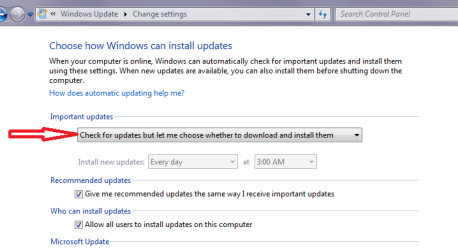
Now the updates mate I don't probably have to tell you be careful with the amount you download and I always set my machines to let me know they are available but let me pick which to download and install. I always do them in small batches and if something goes south there isnt so much ground to go over again.
 

Attachments

  • UPDATE SETTING.PNG
    UPDATE SETTING.PNG
    13.8 KB · Views: 0

My Computer

Computer type
PC/Desktop
Computer Manufacturer/Model Number
Own build (new) Desk1 / Asus ROG Win 7 / Desk2 1st build
OS
Desk1 7 Home Prem / Desk2 10 Pro / Main lap Asus ROG 10 Pro 2 laptop Toshiba 7 Pro Asus P2520 7 & 10
CPU
Desk1 i5 3750K / Laptop i7 GTX 860M / Desk2 i5 2500
Motherboard
Desk1 Asus P877-V / Desk2 Gigabyte H67 UD3H / Laptop ?
Memory
Desk1 8GB (1866) / Desk2 16GB (1333) / Laptop 8Gb DDR3
Graphics Card(s)
Desk 1& 2NVidia GTX 650 & Laptops on board Intel
Sound Card
Desk 1 & 2 -XONAR DG Realtek High Def audio Laptop
Monitor(s) Displays
Desk 1 Benq HD 2450 / Desk2 Philips 24" / Laptop 17.5"
Screen Resolution
1920x1080 D1 & D2 & Laptop 1
Hard Drives
Desk1 Samsung 120GB 830 SSD
Asus ROG 256GB 850 Pro SSD
Desk2 Samsung 840 256 SSD
Toshiba 120GB EVO
PSU
Desk 1 Corsair HX 1050/ Laptop ? / Desk 2 Corsair HX 650
Case
Desk 1 Cooler HAF XM ? Toshiba laptop / Desk2 Coolermaster
Cooling
Fans on all Desk1 -2 Desk2 - all Coolermasters 5 Laptop ?
Keyboard
Desk 1 MS Sidewinder X6 Desk 2 MS Sidewinder X 4
Mouse
Desk 1&2 - Gigabyte MS 900 gamer - laptop - Logitec wireless
Internet Speed
ADSL2+
Other Info
One other Desktop (tester) and spare Toshba laptop both with SSD's
Running Kaspersky 2016 ISS on all machines config'd identically
Logitec audio stereo systems on each machine (x3)
Canon MG5250MFC
Router/modem TP-Link running WPA2SK
Normally I would be in 100% agreement, but this is my brother's laptop, and he went to a computer shop about 16 - 18 months ago and had them replace his hard drive. That would make this the third HDD in this Dell Inspiron in under 2 years (That PC shop replaced whatever his original drive make was with one from Toshiba). So I don't really care at this point - I'm letting it do all 145 updates at once. We're going out for the evening and I don't intend to babysit this thing.
 

My Computer

Computer type
Laptop
OS
Windows 7 home premium 64 bit
CPU
AMD K10
Motherboard
Hewlett-Packard 1444 (Socket S1G4)
Memory
3.00GB Dual-Channel DDR3 @ 532MHz
Graphics Card(s)
ATI AMD M880G with ATI Mobility Radeon HD 4250 (HP)
Sound Card
Realtek
Screen Resolution
1366 x 768
Hard Drives
465GB Western Digital
Antivirus
MSE
No probs mate and if you want my opinion for what it is worth steer clear of Toshiba drives I had nothing but absolute grief with both my laptops until I changed them myself to Seagates then I have now SSD's in them of course as I don't need a great deal of data storage.

Good luck and let us know how you go.
 

My Computer

Computer type
PC/Desktop
Computer Manufacturer/Model Number
Own build (new) Desk1 / Asus ROG Win 7 / Desk2 1st build
OS
Desk1 7 Home Prem / Desk2 10 Pro / Main lap Asus ROG 10 Pro 2 laptop Toshiba 7 Pro Asus P2520 7 & 10
CPU
Desk1 i5 3750K / Laptop i7 GTX 860M / Desk2 i5 2500
Motherboard
Desk1 Asus P877-V / Desk2 Gigabyte H67 UD3H / Laptop ?
Memory
Desk1 8GB (1866) / Desk2 16GB (1333) / Laptop 8Gb DDR3
Graphics Card(s)
Desk 1& 2NVidia GTX 650 & Laptops on board Intel
Sound Card
Desk 1 & 2 -XONAR DG Realtek High Def audio Laptop
Monitor(s) Displays
Desk 1 Benq HD 2450 / Desk2 Philips 24" / Laptop 17.5"
Screen Resolution
1920x1080 D1 & D2 & Laptop 1
Hard Drives
Desk1 Samsung 120GB 830 SSD
Asus ROG 256GB 850 Pro SSD
Desk2 Samsung 840 256 SSD
Toshiba 120GB EVO
PSU
Desk 1 Corsair HX 1050/ Laptop ? / Desk 2 Corsair HX 650
Case
Desk 1 Cooler HAF XM ? Toshiba laptop / Desk2 Coolermaster
Cooling
Fans on all Desk1 -2 Desk2 - all Coolermasters 5 Laptop ?
Keyboard
Desk 1 MS Sidewinder X6 Desk 2 MS Sidewinder X 4
Mouse
Desk 1&2 - Gigabyte MS 900 gamer - laptop - Logitec wireless
Internet Speed
ADSL2+
Other Info
One other Desktop (tester) and spare Toshba laptop both with SSD's
Running Kaspersky 2016 ISS on all machines config'd identically
Logitec audio stereo systems on each machine (x3)
Canon MG5250MFC
Router/modem TP-Link running WPA2SK
Back
Top