
unhidden files NOT showing

calemus

New member
Local time
8:27 AM
Messages
7
i am very familiar wit the tools>folder options>view>show hidden files, folders, operating system files /uncheck ALL hidden restrictions/display full size and path/always show menus/show drive letters

these settings are among the first on a long list of user mods i alter to begin with.

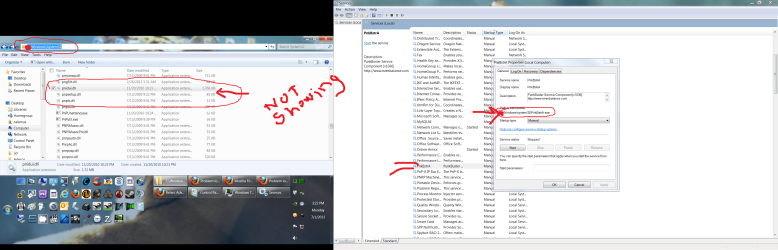
BUT my problem is that I am frequently finding files that can not be seen. hidden beyond even these alterations
SS for an example :

so, as this is a continuing and extremely frustrating problem i need advice on how to make ALL files and folders visible.

tyvm LBB 4 the instruction.
 

Attachments
  • unhidden files NOT showing.png
    unhidden files NOT showing.png
    318.1 KB · Views: 13
Last edited:

My Computer My Computer

Computer Manufacturer/Model Number
my own brand
OS
win7 pro / xp pro x2/ ubuntu
CPU
3.4 amd quad core/2.5 celeron/1.2 pentium 4
Motherboard
asus
Memory
4 gig/2 gig/2.2 gig
Graphics Card(s)
3 difrent nvideas
Sound Card
2 soundblasters/1ob
Monitor(s) Displays
a few
Hard Drives
a few

My Computer My Computer

Computer type
PC/Desktop
Computer Manufacturer/Model Number
Home made Desktop
OS
Windows 10 Pro. 64/ version 1709 Windows 7 Pro/64
CPU
Intel i7-6800K @ 4.3
Motherboard
ASUS X-99 Deluxe II
Memory
Corsair Platinum 16 gig @2400
Graphics Card(s)
EVGA GTX 1070 OC
Monitor(s) Displays
Asus 27" LED LCD/VE278Q
Screen Resolution
1920-1080 or 1280-720 HDMI
Hard Drives
INTEL SSD 730-240 Gb Sata 3.0/
PSU
EVGA Platium 1200W
Case
Phanteks Luxe Tempered Glass 8 fans/ one radiator
Cooling
XSPC/ Water Cooled CPU
Keyboard
Das 4 Professional
Mouse
Logitech M705/MX Anywhere 2-S
Internet Speed
100 mbits
Antivirus
Microsoft Security Essentials/ Malwarebytes Premium 3.0/ SAS
Browser
I.E. 11 default/Firefox/ ISP Time Warner Cable/Spectrum
Other Info
LG BluRay Burner/
Sound system-KLipsch-THX/
Icy Dock ssd Hot Swap bays.
bump

bump thread, still need help
 

My Computer My Computer

Computer Manufacturer/Model Number
my own brand
OS
win7 pro / xp pro x2/ ubuntu
CPU
3.4 amd quad core/2.5 celeron/1.2 pentium 4
Motherboard
asus
Memory
4 gig/2 gig/2.2 gig
Graphics Card(s)
3 difrent nvideas
Sound Card
2 soundblasters/1ob
Monitor(s) Displays
a few
Hard Drives
a few
bump thread, still need help
 

My Computer My Computer

Computer Manufacturer/Model Number
my own brand
OS
win7 pro / xp pro x2/ ubuntu
CPU
3.4 amd quad core/2.5 celeron/1.2 pentium 4
Motherboard
asus
Memory
4 gig/2 gig/2.2 gig
Graphics Card(s)
3 difrent nvideas
Sound Card
2 soundblasters/1ob
Monitor(s) Displays
a few
Hard Drives
a few
Does the file of interest show within Task Manager?

If so, what happens if you right-click on it and select Open File Location?
 

My Computer My Computer

Computer type
Laptop
Computer Manufacturer/Model Number
Employer provided Dell Latitude
OS
W7 Pro SP1 64bit
CPU
i7
Memory
8GB
Graphics Card(s)
Intel HD Graphics
Hard Drives
crappy SSD
Antivirus
Employer mandated Symantec Endpoint Protection
Browser
Pale Moon 64bit, IE11 64bit & Chrome 64bit
no, the particular file i am using does not show in the task manager while it is being used.
BUT it does show (as in the screen shot i posted, on the right hand side) under services, and THAT gives the file location
that file location is in the screen shot, on the left hand side, and there is no reference to the particular file in topic.
 

My Computer My Computer

Computer Manufacturer/Model Number
my own brand
OS
win7 pro / xp pro x2/ ubuntu
CPU
3.4 amd quad core/2.5 celeron/1.2 pentium 4
Motherboard
asus
Memory
4 gig/2 gig/2.2 gig
Graphics Card(s)
3 difrent nvideas
Sound Card
2 soundblasters/1ob
Monitor(s) Displays
a few
Hard Drives
a few
Maybe because the file in question is blatantly lying and it is laughing at you from C:\Windows\SysWOW64 ?
I found it there with Everything search engine (yes I have Punkbuster as well). Already helped me find other tricksters. :p
 

My Computer My Computer

Computer type
PC/Desktop
Computer Manufacturer/Model Number
custom built
OS
Win 7 Pro 64-bit 7601
CPU
AMD Phenom 9650 QuadCore, revision DR-B3
Motherboard
ASUS M4A78
Memory
5 GB yes I run 2x 2GB and 1x 1GB, different brand, spank me.
Graphics Card(s)
NVIDIA GeForce 9800 GT 512 Mb, unknown manufacturer.
Sound Card
Crappy Realtek Integrated Audio
Monitor(s) Displays
Fujitsu Siemens P19-3P
Screen Resolution
1280 x 1024 x 32 bits @ 60 Hz Oh yeah, 4:3 rocks!
Hard Drives
(1) MAXTOR S TM3320613AS SATA Disk Device (2) STM35004 18AS SATA Disk Device (3) TOSHIBA USB 2.5"-HDD
PSU
whatever, around 450w
Case
Scavenged from old company PC, 10+ years old
Cooling
CPU fan, GPU fan, case fan, nothing fancy
Keyboard
Microsoft, PS/2, white.
Mouse
Optical, logitec.
Internet Speed
effective max speeds: 70-ish kB/s down 30-ish kB/s up
Antivirus
Avira, free edition.
Browser
Firefox with FXChrome to make it look like Google Chrome :P
Other Info
Was discarded by previous owner due to "horrible performance".
Was running Win Xp from a IDE drive. Yeah. Was a pain.
SATA II drive and Win7 and it zips away! Yay!
Wow, people grant PunkBuster access to every file on their computer(s). Scary.
 

My Computer My Computer

Computer type
Laptop
Computer Manufacturer/Model Number
Employer provided Dell Latitude
OS
W7 Pro SP1 64bit
CPU
i7
Memory
8GB
Graphics Card(s)
Intel HD Graphics
Hard Drives
crappy SSD
Antivirus
Employer mandated Symantec Endpoint Protection
Browser
Pale Moon 64bit, IE11 64bit & Chrome 64bit
Since Punkbuster is supposed to stop cheating when playing online, it does need all the access it can possibly have. As aimbots and all other sorts of cheat programs abound and would ruin greatly the game experience for the non-lame people that play legit.

Quite a few game servers disconnect you if they don't detect it running in your system.
And we aren't talking of crappy indie titles. Here a full list
 

My Computer My Computer

Computer type
PC/Desktop
Computer Manufacturer/Model Number
custom built
OS
Win 7 Pro 64-bit 7601
CPU
AMD Phenom 9650 QuadCore, revision DR-B3
Motherboard
ASUS M4A78
Memory
5 GB yes I run 2x 2GB and 1x 1GB, different brand, spank me.
Graphics Card(s)
NVIDIA GeForce 9800 GT 512 Mb, unknown manufacturer.
Sound Card
Crappy Realtek Integrated Audio
Monitor(s) Displays
Fujitsu Siemens P19-3P
Screen Resolution
1280 x 1024 x 32 bits @ 60 Hz Oh yeah, 4:3 rocks!
Hard Drives
(1) MAXTOR S TM3320613AS SATA Disk Device (2) STM35004 18AS SATA Disk Device (3) TOSHIBA USB 2.5"-HDD
PSU
whatever, around 450w
Case
Scavenged from old company PC, 10+ years old
Cooling
CPU fan, GPU fan, case fan, nothing fancy
Keyboard
Microsoft, PS/2, white.
Mouse
Optical, logitec.
Internet Speed
effective max speeds: 70-ish kB/s down 30-ish kB/s up
Antivirus
Avira, free edition.
Browser
Firefox with FXChrome to make it look like Google Chrome :P
Other Info
Was discarded by previous owner due to "horrible performance".
Was running Win Xp from a IDE drive. Yeah. Was a pain.
SATA II drive and Win7 and it zips away! Yay!
I understand that, but given the privacy concerns as well as the potential for abuse by others - I would opt not to play such games - but that is just me.
 

My Computer My Computer

Computer type
Laptop
Computer Manufacturer/Model Number
Employer provided Dell Latitude
OS
W7 Pro SP1 64bit
CPU
i7
Memory
8GB
Graphics Card(s)
Intel HD Graphics
Hard Drives
crappy SSD
Antivirus
Employer mandated Symantec Endpoint Protection
Browser
Pale Moon 64bit, IE11 64bit & Chrome 64bit
I know this is off topic ... but ... but ... that is a six column taskbar(!!) in the left screenshot, calemus.Surely that can not be practical? I suppose it could perhaps work out with Taskbar Eliminator (a simple and excellent program)or some other equivalent?Or ,of course, the built-in Windows 7 auto-hide option (though the occsional accidental triggering when the cursor reaches the bottom of the screen can be irksome- a problem remedied by Taskbar Eliminator ).
 

My Computer My Computer

Computer Manufacturer/Model Number
Dell
OS
Windows 7 Home Premium 64bit
It appears to be a multi-monitor setup. Primary monitor is the smaller one with the big taskbar, secondary monitor is the bigger one.
 

My Computer My Computer

Computer type
PC/Desktop
Computer Manufacturer/Model Number
custom built
OS
Win 7 Pro 64-bit 7601
CPU
AMD Phenom 9650 QuadCore, revision DR-B3
Motherboard
ASUS M4A78
Memory
5 GB yes I run 2x 2GB and 1x 1GB, different brand, spank me.
Graphics Card(s)
NVIDIA GeForce 9800 GT 512 Mb, unknown manufacturer.
Sound Card
Crappy Realtek Integrated Audio
Monitor(s) Displays
Fujitsu Siemens P19-3P
Screen Resolution
1280 x 1024 x 32 bits @ 60 Hz Oh yeah, 4:3 rocks!
Hard Drives
(1) MAXTOR S TM3320613AS SATA Disk Device (2) STM35004 18AS SATA Disk Device (3) TOSHIBA USB 2.5"-HDD
PSU
whatever, around 450w
Case
Scavenged from old company PC, 10+ years old
Cooling
CPU fan, GPU fan, case fan, nothing fancy
Keyboard
Microsoft, PS/2, white.
Mouse
Optical, logitec.
Internet Speed
effective max speeds: 70-ish kB/s down 30-ish kB/s up
Antivirus
Avira, free edition.
Browser
Firefox with FXChrome to make it look like Google Chrome :P
Other Info
Was discarded by previous owner due to "horrible performance".
Was running Win Xp from a IDE drive. Yeah. Was a pain.
SATA II drive and Win7 and it zips away! Yay!
Thank you for explaining,bobafetthotmail. I understand now how the huge taskbar is not an impediment for the OP.
 

My Computer My Computer

Computer Manufacturer/Model Number
Dell
OS
Windows 7 Home Premium 64bit
Back
Top