Unidentified Network, Clean Win7 install, tried several NICs

Heyl

New member
Local time
6:36 AM
Messages
18
Okay, so here's the deal.
I recently built a new computer and proceeded to install Windows 7 Ultimate x64.
After installing the drivers for the built in Realtek NIC the computer connects (wired connection) to an Unidentified Network (which also is set to public) and therefor no internet access.
However, from time to time it does say I have internet access but it's not working.
After hours and hours of googling on the issue and trying many of the solutions posted I thought that it might be something weird with the built in card.
So I bought a USB powered network-card and installed the drivers. Same problem.
Then I thought, maybe if I tried going wireless. So I tested a wireless network USB stick. Same problem.

I can see other computers on the network and I can ping them (and they can ping me) but I can't ping google for example.

I have spoken to my ISP and they say they can see my computer getting an IP so no problem on their part.

Things I have tried:
-Unchecking the ipv6-box
-Changing the default gateway to some random number
-disabling the firewall
-no bonjour service (as it is a clean install)
-reseting stacks
-changing NIC (as I stated)
-reinstalling Win7

The other computers on the network (both wired and wireless (one running win7, one vista and one OSx)) are working

Submitted is my ipconfig /all:

Windows IP Configuration

Host Name . . . . . . . . . . . . : Esmeralda
Primary Dns Suffix . . . . . . . :
Node Type . . . . . . . . . . . . : Hybrid
IP Routing Enabled. . . . . . . . : No
WINS Proxy Enabled. . . . . . . . : No
DNS Suffix Search List. . . . . . : bredbandsbolaget.se

Ethernet adapter Local Area Connection 2:

Connection-specific DNS Suffix . : bredbandsbolaget.se
Description . . . . . . . . . . . : ASIX AX88772 USB2.0 to Fast Ethernet Adap
ter
Physical Address. . . . . . . . . : 00-50-B6-4E-FE-DF
DHCP Enabled. . . . . . . . . . . : Yes
Autoconfiguration Enabled . . . . : Yes
Link-local IPv6 Address . . . . . : fe80::a065:7615:628:fa50%14(Preferred)
IPv4 Address. . . . . . . . . . . : 85.228.195.148(Preferred)
Subnet Mask . . . . . . . . . . . : 255.255.240.0
Lease Obtained. . . . . . . . . . : den 31 augusti 2011 11:14:11
Lease Expires . . . . . . . . . . : den 31 augusti 2011 12:19:05
Default Gateway . . . . . . . . . : 85.228.192.1
DHCP Server . . . . . . . . . . . : 85.228.192.1
DHCPv6 IAID . . . . . . . . . . . : 318787766
DHCPv6 Client DUID. . . . . . . . : 00-01-00-01-15-EE-DB-08-00-25-22-B4-2D-01

DNS Servers . . . . . . . . . . . : 195.54.122.204
81.26.226.3
NetBIOS over Tcpip. . . . . . . . : Enabled

Tunnel adapter isatap.bredbandsbolaget.se:

Media State . . . . . . . . . . . : Media disconnected
Connection-specific DNS Suffix . : bredbandsbolaget.se
Description . . . . . . . . . . . : Microsoft ISATAP Adapter
Physical Address. . . . . . . . . : 00-00-00-00-00-00-00-E0
DHCP Enabled. . . . . . . . . . . : No
Autoconfiguration Enabled . . . . : Yes

Tunnel adapter 6TO4 Adapter:

Connection-specific DNS Suffix . : bredbandsbolaget.se
Description . . . . . . . . . . . : Microsoft 6to4 Adapter
Physical Address. . . . . . . . . : 00-00-00-00-00-00-00-E0
DHCP Enabled. . . . . . . . . . . : No
Autoconfiguration Enabled . . . . : Yes
IPv6 Address. . . . . . . . . . . : 2002:55e4:c394::55e4:c394(Preferred)
Default Gateway . . . . . . . . . :
DNS Servers . . . . . . . . . . . : 195.54.122.204
81.26.226.3
NetBIOS over Tcpip. . . . . . . . : Disabled
 

My Computer My Computer

At a glance

Windows 7 Ultimate x64i5 2500KCorsair Venegance DDR3 8GB2x ASUS Radeon 6870 1GB
OS
Windows 7 Ultimate x64
CPU
i5 2500K
Motherboard
ASRock extreme4 p67
Memory
Corsair Venegance DDR3 8GB
Graphics Card(s)
2x ASUS Radeon 6870 1GB
Hard Drives
120GB Corsair Force 3 SSD
2TB Seagate Barracuda Green
PSU
FSP Aurum 700W
Case
Fractal Define R3
Cooling
Cooler Master Hyper 212+
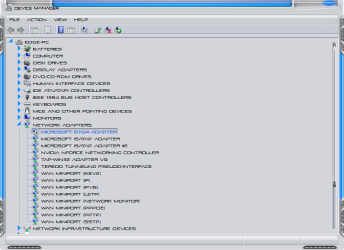
Go into device manager and in the view check view hidden devices and in you networking adapter disable the microsoft 6to4 adapter and see if that makes a difference for you please:
 

Attachments

  • 8-31-2011 8-46-52 AM.png
    8-31-2011 8-46-52 AM.png
    24.3 KB · Views: 45

My Computer My Computer

At a glance

Windows 7 Ultimate x64I76 x 1.5V DDR3 DIMM sockets supporting up to 2...GeForce GTX 580
Computer Manufacturer/Model Number
Alienware
OS
Windows 7 Ultimate x64
CPU
I7
Motherboard
GA-X58-USB3
Memory
6 x 1.5V DDR3 DIMM sockets supporting up to 24 GB of system
Graphics Card(s)
GeForce GTX 580
Sound Card
Realtek ALC892 codec 2/4/5.1/7.1-channel
Monitor(s) Displays
NEC Display Solutions E321 Black 32"
Screen Resolution
1366 x 768
Hard Drives
OCZ Colossus LT Series OCZSSD2-1CLSLT1T 3.5" 1TB SATA II MLC Internal Solid State Drive
PSU
XFX Black Edition XPS-850W-BES 850W ATX12V
Case
Antec
Cooling
Zalman
Keyboard
Microsoft
Mouse
Microsoft
I tried it but did not work :(

A peculiar thing I've noticed is that when I disable/enable the adapter and the computer is identifying the network it first shows up as Unidentified and public with no internet access. However when I change from public to home and join the homegroup, it still says Unidentified Network but it states that I do in fact have internet access which I don't.
 

My Computer My Computer

At a glance

Windows 7 Ultimate x64i5 2500KCorsair Venegance DDR3 8GB2x ASUS Radeon 6870 1GB
OS
Windows 7 Ultimate x64
CPU
i5 2500K
Motherboard
ASRock extreme4 p67
Memory
Corsair Venegance DDR3 8GB
Graphics Card(s)
2x ASUS Radeon 6870 1GB
Hard Drives
120GB Corsair Force 3 SSD
2TB Seagate Barracuda Green
PSU
FSP Aurum 700W
Case
Fractal Define R3
Cooling
Cooler Master Hyper 212+
Are you connected with a router and if so what happens when you bypass it and connect directly with your cable? I'm just trying to eliminate a few things..
 

My Computer My Computer

At a glance

Windows 7 Ultimate x64I76 x 1.5V DDR3 DIMM sockets supporting up to 2...GeForce GTX 580
Computer Manufacturer/Model Number
Alienware
OS
Windows 7 Ultimate x64
CPU
I7
Motherboard
GA-X58-USB3
Memory
6 x 1.5V DDR3 DIMM sockets supporting up to 24 GB of system
Graphics Card(s)
GeForce GTX 580
Sound Card
Realtek ALC892 codec 2/4/5.1/7.1-channel
Monitor(s) Displays
NEC Display Solutions E321 Black 32"
Screen Resolution
1366 x 768
Hard Drives
OCZ Colossus LT Series OCZSSD2-1CLSLT1T 3.5" 1TB SATA II MLC Internal Solid State Drive
PSU
XFX Black Edition XPS-850W-BES 850W ATX12V
Case
Antec
Cooling
Zalman
Keyboard
Microsoft
Mouse
Microsoft
I am connected via a gateway provided by my isp. As I've understood it, it does not work like a router, it merely passes along the IP's it gets from the ISP.

I have tried running a cable directly from the outlet to the computer, still Unidentified.
Could it be something with the MB? I mean, I use the onboard NIC and the other NICs I have tried are connected via usb.
Just a thought
 

My Computer My Computer

At a glance

Windows 7 Ultimate x64i5 2500KCorsair Venegance DDR3 8GB2x ASUS Radeon 6870 1GB
OS
Windows 7 Ultimate x64
CPU
i5 2500K
Motherboard
ASRock extreme4 p67
Memory
Corsair Venegance DDR3 8GB
Graphics Card(s)
2x ASUS Radeon 6870 1GB
Hard Drives
120GB Corsair Force 3 SSD
2TB Seagate Barracuda Green
PSU
FSP Aurum 700W
Case
Fractal Define R3
Cooling
Cooler Master Hyper 212+
I don't think that there is anything wrong with the mobo, is your connection dsl and is it filtered and how old is the gateway they do go bad and you do need it for a proper connection. Also you said you can see other computers and are they connected to the same gateway sry yes it look like.
 

My Computer My Computer

At a glance

Windows 7 Ultimate x64I76 x 1.5V DDR3 DIMM sockets supporting up to 2...GeForce GTX 580
Computer Manufacturer/Model Number
Alienware
OS
Windows 7 Ultimate x64
CPU
I7
Motherboard
GA-X58-USB3
Memory
6 x 1.5V DDR3 DIMM sockets supporting up to 24 GB of system
Graphics Card(s)
GeForce GTX 580
Sound Card
Realtek ALC892 codec 2/4/5.1/7.1-channel
Monitor(s) Displays
NEC Display Solutions E321 Black 32"
Screen Resolution
1366 x 768
Hard Drives
OCZ Colossus LT Series OCZSSD2-1CLSLT1T 3.5" 1TB SATA II MLC Internal Solid State Drive
PSU
XFX Black Edition XPS-850W-BES 850W ATX12V
Case
Antec
Cooling
Zalman
Keyboard
Microsoft
Mouse
Microsoft
Have you tried turning off the other computers to see if they might be interfering with yours try it and see if the results change at all..When I used to set up my windows I would always disconnect the other computers on the network so that the one I'm setting up would be completely isolated and free from anything interfering with it. I know that sounds weird but from time to time I would have issues if others were connected when I was setting up on a dsl connection. Open a elevated command prompt and run a sfc /scannow you may have some system files corrupted. If that doesn't help then I'll place a post in the vip section asking someone with more knowledge than me to see if they can help you with this issue.
 

My Computer My Computer

At a glance

Windows 7 Ultimate x64I76 x 1.5V DDR3 DIMM sockets supporting up to 2...GeForce GTX 580
Computer Manufacturer/Model Number
Alienware
OS
Windows 7 Ultimate x64
CPU
I7
Motherboard
GA-X58-USB3
Memory
6 x 1.5V DDR3 DIMM sockets supporting up to 24 GB of system
Graphics Card(s)
GeForce GTX 580
Sound Card
Realtek ALC892 codec 2/4/5.1/7.1-channel
Monitor(s) Displays
NEC Display Solutions E321 Black 32"
Screen Resolution
1366 x 768
Hard Drives
OCZ Colossus LT Series OCZSSD2-1CLSLT1T 3.5" 1TB SATA II MLC Internal Solid State Drive
PSU
XFX Black Edition XPS-850W-BES 850W ATX12V
Case
Antec
Cooling
Zalman
Keyboard
Microsoft
Mouse
Microsoft
I have tried being 'alone' on the network but still nothing.
Yes, they are on the same gateway.
I'd say the gateway is about one year old and the ISP provided me with one so I guess you need either that or a router.
 

My Computer My Computer

At a glance

Windows 7 Ultimate x64i5 2500KCorsair Venegance DDR3 8GB2x ASUS Radeon 6870 1GB
OS
Windows 7 Ultimate x64
CPU
i5 2500K
Motherboard
ASRock extreme4 p67
Memory
Corsair Venegance DDR3 8GB
Graphics Card(s)
2x ASUS Radeon 6870 1GB
Hard Drives
120GB Corsair Force 3 SSD
2TB Seagate Barracuda Green
PSU
FSP Aurum 700W
Case
Fractal Define R3
Cooling
Cooler Master Hyper 212+
Well does the gateway have a reset button on it where it can be set to factory default settings? If so reset it and start from scratch I'm pretty sure it's a gateway problem.
 

My Computer My Computer

At a glance

Windows 7 Ultimate x64I76 x 1.5V DDR3 DIMM sockets supporting up to 2...GeForce GTX 580
Computer Manufacturer/Model Number
Alienware
OS
Windows 7 Ultimate x64
CPU
I7
Motherboard
GA-X58-USB3
Memory
6 x 1.5V DDR3 DIMM sockets supporting up to 24 GB of system
Graphics Card(s)
GeForce GTX 580
Sound Card
Realtek ALC892 codec 2/4/5.1/7.1-channel
Monitor(s) Displays
NEC Display Solutions E321 Black 32"
Screen Resolution
1366 x 768
Hard Drives
OCZ Colossus LT Series OCZSSD2-1CLSLT1T 3.5" 1TB SATA II MLC Internal Solid State Drive
PSU
XFX Black Edition XPS-850W-BES 850W ATX12V
Case
Antec
Cooling
Zalman
Keyboard
Microsoft
Mouse
Microsoft
I have tried resetting the gateway, no luck.
The weird thing is that if the gateway was the problem, how come the other computer works? (also connected by cable from the same gateway)
 

My Computer My Computer

At a glance

Windows 7 Ultimate x64i5 2500KCorsair Venegance DDR3 8GB2x ASUS Radeon 6870 1GB
OS
Windows 7 Ultimate x64
CPU
i5 2500K
Motherboard
ASRock extreme4 p67
Memory
Corsair Venegance DDR3 8GB
Graphics Card(s)
2x ASUS Radeon 6870 1GB
Hard Drives
120GB Corsair Force 3 SSD
2TB Seagate Barracuda Green
PSU
FSP Aurum 700W
Case
Fractal Define R3
Cooling
Cooler Master Hyper 212+
How many ports do you have on the gateway? Try swapping ports and cables sometimes ports break and cables go bad. Other than that I don't know what else could be the issue..
 

My Computer My Computer

At a glance

Windows 7 Ultimate x64I76 x 1.5V DDR3 DIMM sockets supporting up to 2...GeForce GTX 580
Computer Manufacturer/Model Number
Alienware
OS
Windows 7 Ultimate x64
CPU
I7
Motherboard
GA-X58-USB3
Memory
6 x 1.5V DDR3 DIMM sockets supporting up to 24 GB of system
Graphics Card(s)
GeForce GTX 580
Sound Card
Realtek ALC892 codec 2/4/5.1/7.1-channel
Monitor(s) Displays
NEC Display Solutions E321 Black 32"
Screen Resolution
1366 x 768
Hard Drives
OCZ Colossus LT Series OCZSSD2-1CLSLT1T 3.5" 1TB SATA II MLC Internal Solid State Drive
PSU
XFX Black Edition XPS-850W-BES 850W ATX12V
Case
Antec
Cooling
Zalman
Keyboard
Microsoft
Mouse
Microsoft
Hi Heyl,

However when I change from public to home and join the homegroup, it still says Unidentified Network but it states that I do in fact have internet access which I don't.
Pls. try changing it again to home and see what happens?
How to Change Network Type in Windows 7
Unidentified Network (which also is set to public) and therefor no internet access.
Also, what type of AV or Security Software do you have installed?
 

My Computer My Computer

At a glance

Win7 & Win8 64bitIntel i5
Computer Manufacturer/Model Number
Lenovo Desktop/Samsung Laptop
OS
Win7 & Win8 64bit
CPU
Intel i5
Internet Speed
Charter-20 Mbps
Antivirus
Avast
Browser
FF, IE9 and Chrome
I have four ports, tried switching ports, still no luck. Also tried different cables.
Another thing worth noting is that it worked with the same cable, same port with the old computer, I merely replaced the old computer with the new.

Yes, I have tried changing it to Home, that's when I am able to join a home group and it tells me I have Internet Access but I don't.

I do not have any AV installed, just the built in firewall (as I can't connect to the internet to download anything)
 

My Computer My Computer

At a glance

Windows 7 Ultimate x64i5 2500KCorsair Venegance DDR3 8GB2x ASUS Radeon 6870 1GB
OS
Windows 7 Ultimate x64
CPU
i5 2500K
Motherboard
ASRock extreme4 p67
Memory
Corsair Venegance DDR3 8GB
Graphics Card(s)
2x ASUS Radeon 6870 1GB
Hard Drives
120GB Corsair Force 3 SSD
2TB Seagate Barracuda Green
PSU
FSP Aurum 700W
Case
Fractal Define R3
Cooling
Cooler Master Hyper 212+
Have you tried to uninstall/reinstall the network adapter from Device Manager and install the latest driver?
 

My Computer My Computer

At a glance

Win7 & Win8 64bitIntel i5
Computer Manufacturer/Model Number
Lenovo Desktop/Samsung Laptop
OS
Win7 & Win8 64bit
CPU
Intel i5
Internet Speed
Charter-20 Mbps
Antivirus
Avast
Browser
FF, IE9 and Chrome
Aye that would help, if you could download the current driver for your adapter.
 

My Computer My Computer

At a glance

Windows 7 Ultimate x64I76 x 1.5V DDR3 DIMM sockets supporting up to 2...GeForce GTX 580
Computer Manufacturer/Model Number
Alienware
OS
Windows 7 Ultimate x64
CPU
I7
Motherboard
GA-X58-USB3
Memory
6 x 1.5V DDR3 DIMM sockets supporting up to 24 GB of system
Graphics Card(s)
GeForce GTX 580
Sound Card
Realtek ALC892 codec 2/4/5.1/7.1-channel
Monitor(s) Displays
NEC Display Solutions E321 Black 32"
Screen Resolution
1366 x 768
Hard Drives
OCZ Colossus LT Series OCZSSD2-1CLSLT1T 3.5" 1TB SATA II MLC Internal Solid State Drive
PSU
XFX Black Edition XPS-850W-BES 850W ATX12V
Case
Antec
Cooling
Zalman
Keyboard
Microsoft
Mouse
Microsoft
Also, how are you connected to your modem or router?
Mine is: Modem=> Router=> Computer
 

My Computer My Computer

At a glance

Win7 & Win8 64bitIntel i5
Computer Manufacturer/Model Number
Lenovo Desktop/Samsung Laptop
OS
Win7 & Win8 64bit
CPU
Intel i5
Internet Speed
Charter-20 Mbps
Antivirus
Avast
Browser
FF, IE9 and Chrome
Yes, I downloaded the latest driver on my laptop and transferred it to the computer and installed it. Tried uninstalling and re-installing many times.
Also, I have tried different network adapters which came with driver cds.

Fiber-outlet ==> gateway ==> computer
 

My Computer My Computer

At a glance

Windows 7 Ultimate x64i5 2500KCorsair Venegance DDR3 8GB2x ASUS Radeon 6870 1GB
OS
Windows 7 Ultimate x64
CPU
i5 2500K
Motherboard
ASRock extreme4 p67
Memory
Corsair Venegance DDR3 8GB
Graphics Card(s)
2x ASUS Radeon 6870 1GB
Hard Drives
120GB Corsair Force 3 SSD
2TB Seagate Barracuda Green
PSU
FSP Aurum 700W
Case
Fractal Define R3
Cooling
Cooler Master Hyper 212+
From the fiber outlet, is the network cable plugged in to the WAN or Internet Port of the Gateway, then your computer plugged in to the Gateway's LAN Port (usually 4 Ports). Have you Power cycled?

Fiber-outlet ==> gateway ==> computer
 

My Computer My Computer

At a glance

Win7 & Win8 64bitIntel i5
Computer Manufacturer/Model Number
Lenovo Desktop/Samsung Laptop
OS
Win7 & Win8 64bit
CPU
Intel i5
Internet Speed
Charter-20 Mbps
Antivirus
Avast
Browser
FF, IE9 and Chrome
It is connected from the outlet to the WAN-port and the computers are connected via the LAN ports.
Edit: I have not power cycled, will try that in the morning.
 

My Computer My Computer

At a glance

Windows 7 Ultimate x64i5 2500KCorsair Venegance DDR3 8GB2x ASUS Radeon 6870 1GB
OS
Windows 7 Ultimate x64
CPU
i5 2500K
Motherboard
ASRock extreme4 p67
Memory
Corsair Venegance DDR3 8GB
Graphics Card(s)
2x ASUS Radeon 6870 1GB
Hard Drives
120GB Corsair Force 3 SSD
2TB Seagate Barracuda Green
PSU
FSP Aurum 700W
Case
Fractal Define R3
Cooling
Cooler Master Hyper 212+
I tried with the powercycling, did not work :(
 

My Computer My Computer

At a glance

Windows 7 Ultimate x64i5 2500KCorsair Venegance DDR3 8GB2x ASUS Radeon 6870 1GB
OS
Windows 7 Ultimate x64
CPU
i5 2500K
Motherboard
ASRock extreme4 p67
Memory
Corsair Venegance DDR3 8GB
Graphics Card(s)
2x ASUS Radeon 6870 1GB
Hard Drives
120GB Corsair Force 3 SSD
2TB Seagate Barracuda Green
PSU
FSP Aurum 700W
Case
Fractal Define R3
Cooling
Cooler Master Hyper 212+
Back
Top