Unidentified Network No Internet Access

jonny2400

New member
Local time
8:53 PM
Messages
1
Hi Guys

Am new to this forum but I just had to post to speak with some knowledgeable chaps. I really hope you can help me with this issue as am at my wits end.

A few months ago I got a New Dell 570 desktop which shipped with Windows 7. I fitted a Beklin Wireless Pen, downloaded the drivers, and it connected to my internet no issue. Fast Forward a month or two and I go to use the system again, No Internet Access.

I have spend all week trying to fix this, I have been on the blower for about 3hr with my internet provided with no joy, I have tried wireless & Hard wired.

The System picks up my router, on both wireless & Wired and connects. But I can not access any web pages, I get full signal with the yellow ! sign.

I have put in Manually ISP address details changed from Wap to Wep, to no router password. I have done a system restore, deleted the Lan / Wireless card drivers & reinstalled.

Turned off Firewall & deleted McFee Security

Am lost & really need your help.

Jonny
 

My Computer

Computer Manufacturer/Model Number
Dell
OS
Windows 7 Home Premium 64bit
CPU
AMD
Memory
6 GB
Graphics Card(s)
1GB
Hard Drives
500GB
Hi Guys

Am new to this forum but I just had to post to speak with some knowledgeable chaps. I really hope you can help me with this issue as am at my wits end.

A few months ago I got a New Dell 570 desktop which shipped with Windows 7. I fitted a Beklin Wireless Pen, downloaded the drivers, and it connected to my internet no issue. Fast Forward a month or two and I go to use the system again, No Internet Access.

I have spend all week trying to fix this, I have been on the blower for about 3hr with my internet provided with no joy, I have tried wireless & Hard wired.

The System picks up my router, on both wireless & Wired and connects. But I can not access any web pages, I get full signal with the yellow ! sign.

I have put in Manually ISP address details changed from Wap to Wep, to no router password. I have done a system restore, deleted the Lan / Wireless card drivers & reinstalled.

Turned off Firewall & deleted McFee Security

Am lost & really need your help.

Jonny

Try pinging google. (in search >cmd>ping google.com) If you get a result to the ping but cant connect to web pages it may still be Mcfee, or the windows firewall.

Type cmd>ipconfig /all make a screenshot and upload the output.


Ken
 

My Computer

Computer Manufacturer/Model Number
HP Pavillion dv-7 1005 Tx
OS
Win 8 Release candidate 8400
CPU
[email protected]
Memory
4 gigs
Graphics Card(s)
Nvidia 9600M
Sound Card
HD built-in
Monitor(s) Displays
17" Wxga
Screen Resolution
1440x900
Cooling
none
Internet Speed
45Mb down 5Mb up
Hi Guys

Am new to this forum but I just had to post to speak with some knowledgeable chaps. I really hope you can help me with this issue as am at my wits end.

A few months ago I got a New Dell 570 desktop which shipped with Windows 7. I fitted a Beklin Wireless Pen, downloaded the drivers, and it connected to my internet no issue. Fast Forward a month or two and I go to use the system again, No Internet Access.

I have spend all week trying to fix this, I have been on the blower for about 3hr with my internet provided with no joy, I have tried wireless & Hard wired.

The System picks up my router, on both wireless & Wired and connects. But I can not access any web pages, I get full signal with the yellow ! sign.

I have put in Manually ISP address details changed from Wap to Wep, to no router password. I have done a system restore, deleted the Lan / Wireless card drivers & reinstalled.

Turned off Firewall & deleted McFee Security

Am lost & really need your help.

Jonny

Hello Jonny
If you can type "ipconfig /all" without the quotes into your command prompt and post a screen shot here of the output it would be most helpful. :)
 

My Computer

Computer type
PC/Desktop
Computer Manufacturer/Model Number
Home built
OS
Windows 7 Ult, Windows 8.1 Pro,
CPU
Q9650-4.275GHz, E8600 4.5GHz, E6750-3.8GHz
Motherboard
Evga 780i FTW
Memory
G.Skill PC2 9600 1200Mhz 5 5 5 15 2T
Graphics Card(s)
GTX480
Sound Card
Asus Xonar D2
Monitor(s) Displays
HannsG
Screen Resolution
1680X1050
Hard Drives
GSkill Phoenix Pro 120GB SSD
PSU
ThermalTake Toughpower 1000Watt modular
Case
ThermalTake XaserV
Cooling
Xigmatek S1283
Keyboard
Logitech G15
Mouse
Logitech G9
Internet Speed
T1
i have had this problem for over 1 year gone through new hubs changed cables pci wireless adapters usb adapters but it still happens tried all the tweaks that forums give out but it still happens the best way i sort is is to go and reset the hub and reboot pc works every time.
what i have found is people turning off bonjour in system services and un-installing apple software seem to cure it for them i dont use apple products on my windows 7 machine and i don't have bonjour in services also try and change the wireless channel you are on within the router itself your neighbours may have routers using the same channel here is a program that will show you that called wirelessmon
PassMark WirelessMon - Wireless 802.11 WiFi monitoring software
unidentified network is to do with the mac address of router/hub.

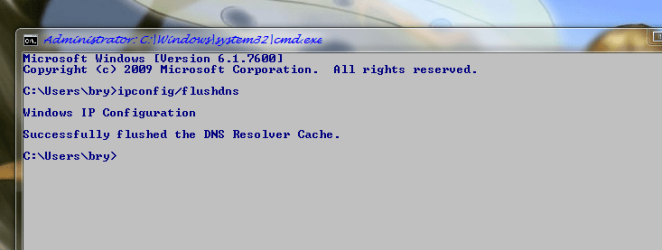
also try and flush the dns out using elevated cmd prompt using admin rights
win key + r
type cmd + enter
type ipconfig/flushdns + enter

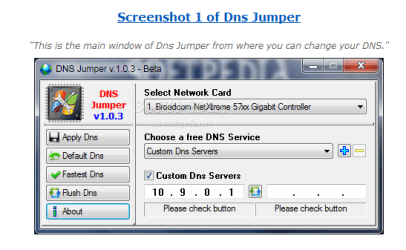
also you may try this for changing the dns a program called DNS jumper
http://www.sordum.com/?p=4573
 

Attachments

  • wirelessmon.PNG
    wirelessmon.PNG
    28.5 KB · Views: 15
  • ipconfig.PNG
    ipconfig.PNG
    21.3 KB · Views: 11
  • dns jumper.PNG
    dns jumper.PNG
    20.1 KB · Views: 15
Last edited:

My Computer

Computer Manufacturer/Model Number
packard bell IXTREME M5722
OS
Operating System : Windows 7 Home Premium Edition 6.01.7600 SP1 (x64)
CPU
Processor : Intel Core 2 Quad Q8300 @ 2500 MHz
Motherboard
Mainboard : Packard Bell (Acer EG43M )
Memory
Physical Memory :8GB Corsair4x 2GB 800MHz C5 DDR2
Graphics Card(s)
Video Card : XFX 6700 AMD
Monitor(s) Displays
Maestro 234DL - BenQ V2220 - BenQ VW2420H
Screen Resolution
Current Display :1920x1080p pixels at 60 Hz in HD LED
Hard Drives
Hard Disks : WDC (1000 GB)
Drive C: (Hard Disk) : 428 GB available on 491 GB
Drive D: (Hard Disk) : 426 GB available on 492 GB
SAMSUNG spinpoint HD103SJ 1000.2 GB
(X 2) KINGSTON SSD NOW V 30GB
PSU
XFX ProSeries 550W PSU
Case
PACKARD BELL IXTREME
Cooling
System Blower Current: 150mA Air Flow16CFM ;Akasa 90mm rear
Keyboard
Gigabyte Aivia K8100
Mouse
TRUST-Wireless Laser Mouse - Carbon edition MI-7770C
Internet Speed
TP-LINK > TL-WN951N / AV500 Gigabit Powerline Adapters
Browser
chrome dev
Other Info
EXTRA COOLING>(FAN CONTROLLER) PC Bay Cooler 3 x 40mm fans; Akasa AK-HD-BL Blue hard drive cooler 2 x 40 mm fan 4500 rpm 29.7 dBA
Bios> American Megatrends Inc.
Version : P01-A1
Date : 08/31/2009
Back
Top