
Solved Unidentified Network/Public - Exhausted other options

kmyers8807

New member
Local time
3:04 PM
Messages
1
Long time lurker but could not find a solution to this one. Have 7 Home Premium, upgraded to 10. After the Network wasnt working, returning the Unidentified Network, Public. Went back to 7. Same issue here. Ip seems odd but Im not sure what to do after browsing the forums and tring several things to no avail. Any help much appreciated.
 

Attachments
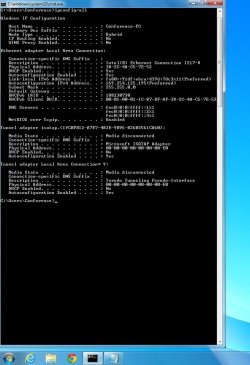
  • Untitled.jpg
    Untitled.jpg
    107.2 KB · Views: 0

My Computer My Computer

At a glance

Windows 7 Home Premium
Computer type
PC/Desktop
Computer Manufacturer/Model Number
Asus
OS
Windows 7 Home Premium
That IP address is called an APIPA (Automatic Private IP Address). Happens when you can't get an IP address from the DHCP server.

Tried resetting the router?
Also try with another cable just in case.
You can also try uninstall the network adapter in Device Manager (check to uninstall the driver software too) and let Windows install after a restart.
 

My Computer My Computer

At a glance

Windows 7 Ultimate x64 SP1AMD Phenom 2 1090T2x8GB Kingston HyperX Fury Black 1600Mhz Unga...MSI GTX 970 Gaming 4G
Computer type
PC/Desktop
Computer Manufacturer/Model Number
Custom Build
OS
Windows 7 Ultimate x64 SP1
CPU
AMD Phenom 2 1090T
Motherboard
Gigabyte GA-890FXA-UD5
Memory
2x8GB Kingston HyperX Fury Black 1600Mhz Unganged
Graphics Card(s)
MSI GTX 970 Gaming 4G
Sound Card
Realtek On-Board HD 7.1 Audio / Logitech G35
Monitor(s) Displays
3xAcer GD245HQ
Screen Resolution
1920x1080
Hard Drives
Samsung 850 Pro 512GB SSD - OS /
WD Caviar Black SATA 3 - 1 TBx2 - Dynamic RAID 0 /
WD Caviar Green SATA 2 - 640GBx2 - Dynamic RAID 0 /
WD Caviar Green SATA 2 - 640GB - Internal Backup /
Seagate Barracude SATA 3 - 3TB - External Backup/ Sync
PSU
HighPower 1000W
Case
Cooler Master HAF 932
Cooling
Noctua NH-D14
Keyboard
Logitech G19
Mouse
Logitech G500
Internet Speed
100/4 Mbit Cable (100GB quota)
Antivirus
ZoneAlarm Extreme Security / MBAM Pro / MBAE Free / SAS Free
Browser
IE 11 - Firefox - Chrome
Other Info
Logitech F710/ G27/ G940/ Z5500 // TrackIR 5 // Nvidia 3D Surround Vision
Also, if you have another system you can verify the network connection with that to rule out a problem with your router.

Other things you can try are clearing the IP address and cache and renewing. In a command prompt window type the following, press enter after each line.

ipconfig /release
ipconfig /flushdns
ipconfig /renew
netsh int ip reest (it will say you need to reboot, do the last command then reboot)
netsh winsock reset catalog

If that fails, i'd backup all the data on the laptop and install Win10 from scratch. Win10 upgrade from Win7 seems to have quite a few glitches.
 

My Computer My Computer

At a glance

Win 7 Enterprise x64Intel i7-4810MQ @ 2.80 GHz32 GBnVidia Quadro K2100M
Computer type
Laptop
OS
Win 7 Enterprise x64
CPU
Intel i7-4810MQ @ 2.80 GHz
Memory
32 GB
Graphics Card(s)
nVidia Quadro K2100M
Monitor(s) Displays
3x Dell P2414H
Hard Drives
Crucial M4-CT512 GB SSD
Back
Top