Solved unidentified network - public network Windows 7 64bit

Villas

New member
Local time
10:48 AM
Messages
21
Location
Australia
Hello all,
I have tried all the similar solutions to my problem but non eworks.

I have just installed WIndows 7 Home 64bit.
Wireless works (slooooooow).
The cable from my Billion router/modem is recognised but does not work.

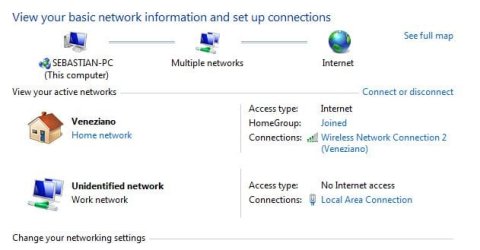
In network and sharing centre I can see Wireless as Home Network and cable as:

Unidentified network - Public Network (no link = can't change it).
The 4 TCP/IPv4 is set at automatic. Even if I put the Billion default address 192.168.1.254 and subnet and gateway nothing.

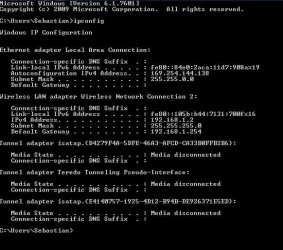
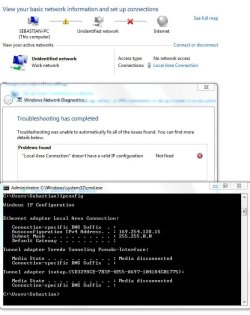
Tried going into ipconfig and it gives me a 169.254.176.23 (=no internet connection then, but I knew that).

The wireless IP is correct at 192.168.1.2

From what I have understood from all the fora I have to change the network from Public to Home.

How do I do it?

I would be very grateful for any sort of help.
 

My Computer My Computer

Computer Manufacturer/Model Number
Windows 7
OS
64
CPU
i5 2500K
Motherboard
Asus P8Z68-v pro
Memory
8 gb 1600
Graphics Card(s)
Asus Gtx260

My Computer My Computer

Computer Manufacturer/Model Number
acer aspire 5935g
OS
Windows 7 Home Premium x64 SP1
CPU
intel(R)core(TM)2 duo CPU T6600 @ 2.20GHz
Motherboard
intel gm45/gm47 revision 07
Memory
3 gb ddr3
Graphics Card(s)
ati radeon hd4570/512mb
Monitor(s) Displays
lop156wh2-tle1 15.3 flat
Screen Resolution
1366x768
Hard Drives
OCZ-Agility3 60gig ssd
320gig external hdd
500gig external hdd
Mouse
Optical
Internet Speed
30Mbps Down/30Mbps Up
Hi Danny,

I have WIndows 7 Home premium, so no Local Security Policy option for me....

The Public Network under the Unidentified network is not a link, just plain writing.

I have also disabled windows firewall.
 

My Computer My Computer

Computer Manufacturer/Model Number
Windows 7
OS
64
CPU
i5 2500K
Motherboard
Asus P8Z68-v pro
Memory
8 gb 1600
Graphics Card(s)
Asus Gtx260
Ok like I said this is not my area but if your wireless works but is slow have you tried updating your wireless card drivers.

Danny

Ive requested someone with more knowledge on this to have a look for you.Just hang fire!!
 
Last edited:

My Computer My Computer

Computer Manufacturer/Model Number
acer aspire 5935g
OS
Windows 7 Home Premium x64 SP1
CPU
intel(R)core(TM)2 duo CPU T6600 @ 2.20GHz
Motherboard
intel gm45/gm47 revision 07
Memory
3 gb ddr3
Graphics Card(s)
ati radeon hd4570/512mb
Monitor(s) Displays
lop156wh2-tle1 15.3 flat
Screen Resolution
1366x768
Hard Drives
OCZ-Agility3 60gig ssd
320gig external hdd
500gig external hdd
Mouse
Optical
Internet Speed
30Mbps Down/30Mbps Up
Hello Villas, welcome to SF, I saw Danny's call fro help and would be glad to... but have some questions..

You have a mobo (motherboard) that has integrated LAN yet you're talking about a wireless connection, not a LAN...
Can you please fully update system specs so we look at the right info?
If possible the make and version of all the components that you use in the network connection that you are trying to accomplish.. thx.
 

My Computer My Computer

Computer Manufacturer/Model Number
custom build
OS
Windows 7 64b Ultimate
CPU
I7-2600 3.40GHz - testing various OC levels..
Motherboard
ASUS Sabretooth
Memory
2x 4Gb DDR3/1333
Graphics Card(s)
GTX570 - testing OC levels
Sound Card
motherboard 7.1 DIG.
Monitor(s) Displays
2x Ilyama 24" E2409HDS-B1 2ms/DVI
Screen Resolution
1920 x 1080
Hard Drives
120 GB Intel Elmcrest SSD
1 TB SATAII 7200RPM/32MB
External 2TB USB3
PSU
Corsair Pro HX850W
Cooling
Coolermaster Hyper V8
Keyboard
Logitech G110
Mouse
Logitech G700
Internet Speed
25Mb
Other Info
CPU: 7,7 RAM: 7,7 GTX: 7,9 GTX 3D : 7,9 SSD 7,6
Overall 7,6 ...... now to speed up the SSD... ;)

Also use a Dell XPS M1710 on Vista 32b
Asus LT on Vista 32
3 older machines still doing fine on Linux/ubuntu but not used much anymore...
Hi MvdP,

I have the following network components:

Billion Bipac 7404 VGP
Asus P8Z68-v-Pro

The LAN connection (via cable) doesn't work, so I put the old wireless card (Linskys Wireless G- PCI adaptor) in and I have very slow connectivity (distance from router to room with PC).

I have attached a snapshot also of the IP COnfiguration.

I disconnected the Bluetooth in the mean time, to no avail.
Fiddling round I also worsened the issue and instead of Public Network now I have Work network (still no link).
 

Attachments

  • VILLAS ipconfig.JPG
    VILLAS ipconfig.JPG
    54.5 KB · Views: 159

My Computer My Computer

Computer Manufacturer/Model Number
Windows 7
OS
64
CPU
i5 2500K
Motherboard
Asus P8Z68-v pro
Memory
8 gb 1600
Graphics Card(s)
Asus Gtx260
P.S.: I also tried:

troubleshooting options......
disabling/enabling connection
re-installing Lan drivers
 

My Computer My Computer

Computer Manufacturer/Model Number
Windows 7
OS
64
CPU
i5 2500K
Motherboard
Asus P8Z68-v pro
Memory
8 gb 1600
Graphics Card(s)
Asus Gtx260
Thx, Is the fact that you LAN connection does not work an accepted fact? I mean do you already know your lan connection on your mobo is broke? Or is the real prob that you'd like that fixed....?

And, just to make sure we're talking about the same 'things here'... could you define slow?
If I'm not mistaken, your modem/router can only do a max of 8Mbps download/ 1 Mbps upload. do you have/use a way to measure what your speed really is?

-----
OK. On your LAN connection, does the orange led light burn at all? If you connect a LAN cable, does ANYTHING happen? Does a second light start to flicker?
 
Last edited:

My Computer My Computer

Computer Manufacturer/Model Number
custom build
OS
Windows 7 64b Ultimate
CPU
I7-2600 3.40GHz - testing various OC levels..
Motherboard
ASUS Sabretooth
Memory
2x 4Gb DDR3/1333
Graphics Card(s)
GTX570 - testing OC levels
Sound Card
motherboard 7.1 DIG.
Monitor(s) Displays
2x Ilyama 24" E2409HDS-B1 2ms/DVI
Screen Resolution
1920 x 1080
Hard Drives
120 GB Intel Elmcrest SSD
1 TB SATAII 7200RPM/32MB
External 2TB USB3
PSU
Corsair Pro HX850W
Cooling
Coolermaster Hyper V8
Keyboard
Logitech G110
Mouse
Logitech G700
Internet Speed
25Mb
Other Info
CPU: 7,7 RAM: 7,7 GTX: 7,9 GTX 3D : 7,9 SSD 7,6
Overall 7,6 ...... now to speed up the SSD... ;)

Also use a Dell XPS M1710 on Vista 32b
Asus LT on Vista 32
3 older machines still doing fine on Linux/ubuntu but not used much anymore...
Thanks for the prompt reply!

LAN connection: I mean that it doesn't work because I don't have internet connection. I bought the Mobo yesterday and set Windows up today. For a VERY SHORT moment between installs it WORKED!

Wireless is defined as slow because: I take less time to use the portable than the PC to communicate and browse. It works, just bad reception (on the other end of the apartment, small as it is!).

LAN connection: green light.

Before the change of Mobo and software (from Vista to 7) the LAN worked perfectly.

What else could I tell you to identify the problem?

Regards
 

My Computer My Computer

Computer Manufacturer/Model Number
Windows 7
OS
64
CPU
i5 2500K
Motherboard
Asus P8Z68-v pro
Memory
8 gb 1600
Graphics Card(s)
Asus Gtx260
Here is the image of the Networking and Sharing Centre.
 

Attachments

  • VILLAS Network.JPG
    VILLAS Network.JPG
    29.5 KB · Views: 441

My Computer My Computer

Computer Manufacturer/Model Number
Windows 7
OS
64
CPU
i5 2500K
Motherboard
Asus P8Z68-v pro
Memory
8 gb 1600
Graphics Card(s)
Asus Gtx260
OK, Please take out the wireless, that (at this point) would only confuse our search for the problem.

Delete the network connection(s) you currently have. Point is to force W7 to identify a new connection. Reboot, boot up with the lan cable connected (for the first time).

Please check that, when you connect the lan cable, the green light stays on and the orange starts to flicker.

Make a note of all the LAN related things W7 asks or shows you upon booting.

post back any results...
 

My Computer My Computer

Computer Manufacturer/Model Number
custom build
OS
Windows 7 64b Ultimate
CPU
I7-2600 3.40GHz - testing various OC levels..
Motherboard
ASUS Sabretooth
Memory
2x 4Gb DDR3/1333
Graphics Card(s)
GTX570 - testing OC levels
Sound Card
motherboard 7.1 DIG.
Monitor(s) Displays
2x Ilyama 24" E2409HDS-B1 2ms/DVI
Screen Resolution
1920 x 1080
Hard Drives
120 GB Intel Elmcrest SSD
1 TB SATAII 7200RPM/32MB
External 2TB USB3
PSU
Corsair Pro HX850W
Cooling
Coolermaster Hyper V8
Keyboard
Logitech G110
Mouse
Logitech G700
Internet Speed
25Mb
Other Info
CPU: 7,7 RAM: 7,7 GTX: 7,9 GTX 3D : 7,9 SSD 7,6
Overall 7,6 ...... now to speed up the SSD... ;)

Also use a Dell XPS M1710 on Vista 32b
Asus LT on Vista 32
3 older machines still doing fine on Linux/ubuntu but not used much anymore...
Hi,

I disabled the wireless card. No connection

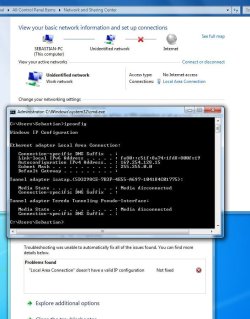
Rebooted and this is what I have.

The orange light on the router shows there is internet connection and the green light on the LAN 1 port shows I'm connecting with the PC.
 

Attachments

  • Only LAN VILLAS.JPG
    Only LAN VILLAS.JPG
    85.5 KB · Views: 149

My Computer My Computer

Computer Manufacturer/Model Number
Windows 7
OS
64
CPU
i5 2500K
Motherboard
Asus P8Z68-v pro
Memory
8 gb 1600
Graphics Card(s)
Asus Gtx260
Thx, this shows that you do have a LAN wired connection with your router... but, for some reason, are not connected to Internet. What is the resulting message when you click on that red X and let it try to fix the internet connection?

+ Have you tried allowing the modem to reset by taking it off power for 30 sec's?

These are two simple first steps, we'll get a bit more technical if this doesn't help....:D
 

My Computer My Computer

Computer Manufacturer/Model Number
custom build
OS
Windows 7 64b Ultimate
CPU
I7-2600 3.40GHz - testing various OC levels..
Motherboard
ASUS Sabretooth
Memory
2x 4Gb DDR3/1333
Graphics Card(s)
GTX570 - testing OC levels
Sound Card
motherboard 7.1 DIG.
Monitor(s) Displays
2x Ilyama 24" E2409HDS-B1 2ms/DVI
Screen Resolution
1920 x 1080
Hard Drives
120 GB Intel Elmcrest SSD
1 TB SATAII 7200RPM/32MB
External 2TB USB3
PSU
Corsair Pro HX850W
Cooling
Coolermaster Hyper V8
Keyboard
Logitech G110
Mouse
Logitech G700
Internet Speed
25Mb
Other Info
CPU: 7,7 RAM: 7,7 GTX: 7,9 GTX 3D : 7,9 SSD 7,6
Overall 7,6 ...... now to speed up the SSD... ;)

Also use a Dell XPS M1710 on Vista 32b
Asus LT on Vista 32
3 older machines still doing fine on Linux/ubuntu but not used much anymore...
Hello,

Nothing on the Red cross. No links or possibilities of repair.

Tried to turn on and off the the modem many times!

Difficult case, I'm afraid :cry:
 

My Computer My Computer

Computer Manufacturer/Model Number
Windows 7
OS
64
CPU
i5 2500K
Motherboard
Asus P8Z68-v pro
Memory
8 gb 1600
Graphics Card(s)
Asus Gtx260
Ok next step: reboot in Safemode W/networking on and test again. Let's see if standard W7 will do it...Safe Mode - Windows 7 Forums

Also please update us on any firewall etc software and settings you have.
 

My Computer My Computer

Computer Manufacturer/Model Number
custom build
OS
Windows 7 64b Ultimate
CPU
I7-2600 3.40GHz - testing various OC levels..
Motherboard
ASUS Sabretooth
Memory
2x 4Gb DDR3/1333
Graphics Card(s)
GTX570 - testing OC levels
Sound Card
motherboard 7.1 DIG.
Monitor(s) Displays
2x Ilyama 24" E2409HDS-B1 2ms/DVI
Screen Resolution
1920 x 1080
Hard Drives
120 GB Intel Elmcrest SSD
1 TB SATAII 7200RPM/32MB
External 2TB USB3
PSU
Corsair Pro HX850W
Cooling
Coolermaster Hyper V8
Keyboard
Logitech G110
Mouse
Logitech G700
Internet Speed
25Mb
Other Info
CPU: 7,7 RAM: 7,7 GTX: 7,9 GTX 3D : 7,9 SSD 7,6
Overall 7,6 ...... now to speed up the SSD... ;)

Also use a Dell XPS M1710 on Vista 32b
Asus LT on Vista 32
3 older machines still doing fine on Linux/ubuntu but not used much anymore...
Re booted and started in Safe Mode with Network.

No change. Tried troubleshooting but nothing came up due to the Safemode.

I only have WIndows, Office, ASUS Mobo suite (AI Suite II), the GPU Nvidia drivers and the Linksys wireless driver as programs.

No quicktime or Acrobat.

Windows Firewall: both (home and private), off.
 

My Computer My Computer

Computer Manufacturer/Model Number
Windows 7
OS
64
CPU
i5 2500K
Motherboard
Asus P8Z68-v pro
Memory
8 gb 1600
Graphics Card(s)
Asus Gtx260
Well now for the technical stuff, this should fix it... Read carefully and if unsure... don't just try but post back your questions please....

1. Click Start

2. All Programs\Accessories and right click on Command Prompt

3. Select "Run as Administrator" to open a command prompt.

In the command prompt window that opens, type the following commands, each followed by the Enter key:

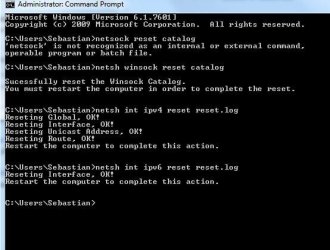
Reset WINSOCK entries to installation defaults: netsh winsock reset catalog

Reset IPv4 TCP/IP stack to installation defaults. netsh int ipv4 reset reset.log

Reset IPv6 TCP/IP stack to installation defaults. netsh int ipv6 reset reset.log

Reboot the machine. This should help.
 

My Computer My Computer

Computer Manufacturer/Model Number
custom build
OS
Windows 7 64b Ultimate
CPU
I7-2600 3.40GHz - testing various OC levels..
Motherboard
ASUS Sabretooth
Memory
2x 4Gb DDR3/1333
Graphics Card(s)
GTX570 - testing OC levels
Sound Card
motherboard 7.1 DIG.
Monitor(s) Displays
2x Ilyama 24" E2409HDS-B1 2ms/DVI
Screen Resolution
1920 x 1080
Hard Drives
120 GB Intel Elmcrest SSD
1 TB SATAII 7200RPM/32MB
External 2TB USB3
PSU
Corsair Pro HX850W
Cooling
Coolermaster Hyper V8
Keyboard
Logitech G110
Mouse
Logitech G700
Internet Speed
25Mb
Other Info
CPU: 7,7 RAM: 7,7 GTX: 7,9 GTX 3D : 7,9 SSD 7,6
Overall 7,6 ...... now to speed up the SSD... ;)

Also use a Dell XPS M1710 on Vista 32b
Asus LT on Vista 32
3 older machines still doing fine on Linux/ubuntu but not used much anymore...
Unluckily, no.

I reset as indicate but to no avail.
 

Attachments

  • VILLAS Reset.JPG
    VILLAS Reset.JPG
    40.3 KB · Views: 43
  • VILLAS fail.JPG
    VILLAS fail.JPG
    56.7 KB · Views: 48

My Computer My Computer

Computer Manufacturer/Model Number
Windows 7
OS
64
CPU
i5 2500K
Motherboard
Asus P8Z68-v pro
Memory
8 gb 1600
Graphics Card(s)
Asus Gtx260
mmm... and you did reboot.
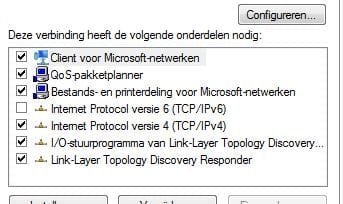
In that case go to the network center, click on Lan connection, next on properties (elevated perms) and in the ext screen, turn off IP6, press OK and try again...:
 

Attachments

  • ip6.JPG
    ip6.JPG
    22.6 KB · Views: 12

My Computer My Computer

Computer Manufacturer/Model Number
custom build
OS
Windows 7 64b Ultimate
CPU
I7-2600 3.40GHz - testing various OC levels..
Motherboard
ASUS Sabretooth
Memory
2x 4Gb DDR3/1333
Graphics Card(s)
GTX570 - testing OC levels
Sound Card
motherboard 7.1 DIG.
Monitor(s) Displays
2x Ilyama 24" E2409HDS-B1 2ms/DVI
Screen Resolution
1920 x 1080
Hard Drives
120 GB Intel Elmcrest SSD
1 TB SATAII 7200RPM/32MB
External 2TB USB3
PSU
Corsair Pro HX850W
Cooling
Coolermaster Hyper V8
Keyboard
Logitech G110
Mouse
Logitech G700
Internet Speed
25Mb
Other Info
CPU: 7,7 RAM: 7,7 GTX: 7,9 GTX 3D : 7,9 SSD 7,6
Overall 7,6 ...... now to speed up the SSD... ;)

Also use a Dell XPS M1710 on Vista 32b
Asus LT on Vista 32
3 older machines still doing fine on Linux/ubuntu but not used much anymore...
Good morning,

Early start full of hope before work, but nothing. Still not identifying network.
 

Attachments

  • VILLAS last try.JPG
    VILLAS last try.JPG
    68.6 KB · Views: 47

My Computer My Computer

Computer Manufacturer/Model Number
Windows 7
OS
64
CPU
i5 2500K
Motherboard
Asus P8Z68-v pro
Memory
8 gb 1600
Graphics Card(s)
Asus Gtx260
Back
Top