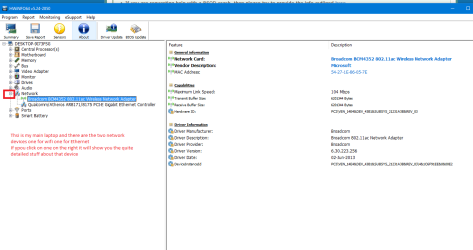
Hi all, I'm overwhelmed with this issue as I have been dealing with it for about 3 months now. Tried all sorts of things from this and other forums. I have an HP dv7-3160us laptop with Windows 7 Home premium.
I have deleted and reinstalled drivers on my Realtek and Qualcomm adapters.
Tried all sorts of things in cmd.
I have uninstalled Bonjour.
I have tried tons of things but nothing fixes this issue.
I have a gateway 2wire moden and no router with this laptop, a desk top and 2 tablets. The desktop experiences the same thing only sometimes but the tablets and phones are fine.
Let me know what other information you need.
I'm sick of it. I'm mostly tied to a wired connection.
Here is my cmd ipdonfig information:
Microsoft Windows [Version 6.1.7601]
Copyright (c) 2009 Microsoft Corporation. All rights reserved.
C:\Windows\system32>ipconfig
Windows IP Configuration
Ethernet adapter Local Area Connection:
Media State . . . . . . . . . . . : Media disconnected
Connection-specific DNS Suffix . :
Wireless LAN adapter Wireless Network Connection 5:
Media State . . . . . . . . . . . : Media disconnected
Connection-specific DNS Suffix . :
Wireless LAN adapter Wireless Network Connection:
Connection-specific DNS Suffix . : gateway.2wire.net
Link-local IPv6 Address . . . . . : fe80::9911:2756:d1fa:61c5%22
IPv4 Address. . . . . . . . . . . : 192.168.2.15
Subnet Mask . . . . . . . . . . . : 255.255.255.0
Default Gateway . . . . . . . . . :
Ethernet adapter Local Area Connection 2:
Connection-specific DNS Suffix . :
Link-local IPv6 Address . . . . . : fe80::dd9a:823d:f940:3be4%19
IPv4 Address. . . . . . . . . . . : 10.152.1.6
Subnet Mask . . . . . . . . . . . : 255.255.255.252
Default Gateway . . . . . . . . . : 10.152.1.5
Ethernet adapter Local Area Connection* 11:
Media State . . . . . . . . . . . : Media disconnected
Connection-specific DNS Suffix . :
Tunnel adapter isatap.phub.net.cable.rogers.com:
Media State . . . . . . . . . . . : Media disconnected
Connection-specific DNS Suffix . :
Tunnel adapter Teredo Tunneling Pseudo-Interface:
Media State . . . . . . . . . . . : Media disconnected
Connection-specific DNS Suffix . :
C:\Windows\system32>
I have deleted and reinstalled drivers on my Realtek and Qualcomm adapters.
Tried all sorts of things in cmd.
I have uninstalled Bonjour.
I have tried tons of things but nothing fixes this issue.
I have a gateway 2wire moden and no router with this laptop, a desk top and 2 tablets. The desktop experiences the same thing only sometimes but the tablets and phones are fine.
Let me know what other information you need.
I'm sick of it. I'm mostly tied to a wired connection.
Here is my cmd ipdonfig information:
Microsoft Windows [Version 6.1.7601]
Copyright (c) 2009 Microsoft Corporation. All rights reserved.
C:\Windows\system32>ipconfig
Windows IP Configuration
Ethernet adapter Local Area Connection:
Media State . . . . . . . . . . . : Media disconnected
Connection-specific DNS Suffix . :
Wireless LAN adapter Wireless Network Connection 5:
Media State . . . . . . . . . . . : Media disconnected
Connection-specific DNS Suffix . :
Wireless LAN adapter Wireless Network Connection:
Connection-specific DNS Suffix . : gateway.2wire.net
Link-local IPv6 Address . . . . . : fe80::9911:2756:d1fa:61c5%22
IPv4 Address. . . . . . . . . . . : 192.168.2.15
Subnet Mask . . . . . . . . . . . : 255.255.255.0
Default Gateway . . . . . . . . . :
Ethernet adapter Local Area Connection 2:
Connection-specific DNS Suffix . :
Link-local IPv6 Address . . . . . : fe80::dd9a:823d:f940:3be4%19
IPv4 Address. . . . . . . . . . . : 10.152.1.6
Subnet Mask . . . . . . . . . . . : 255.255.255.252
Default Gateway . . . . . . . . . : 10.152.1.5
Ethernet adapter Local Area Connection* 11:
Media State . . . . . . . . . . . : Media disconnected
Connection-specific DNS Suffix . :
Tunnel adapter isatap.phub.net.cable.rogers.com:
Media State . . . . . . . . . . . : Media disconnected
Connection-specific DNS Suffix . :
Tunnel adapter Teredo Tunneling Pseudo-Interface:
Media State . . . . . . . . . . . : Media disconnected
Connection-specific DNS Suffix . :
C:\Windows\system32>
My Computer
- Computer type
- PC/Desktop
- Computer Manufacturer/Model Number
- HP dv7
- OS
- Windows 7 64 bit
- Antivirus
- MacAfee
- Browser
- Firefox