Solved Uninstall Vista (Native OS), but leave Windows 7 (Secondary OS)

cdmoomaw

Enginerd
Member
Local time
7:52 AM
Messages
70
Location
Alabama
Hi, I have searched these forums all day and can't seem to find answers relevant to my particular situation, so here goes.

My current machine (HP Pavilion dv7) natively runs Windows Vista Home Premium x64. Just over a year ago, I decided to install Windows 7 Pro x64 via dual boot, as I still needed some of the programs installed on Vista. Now I have reached the point where I no longer need the Windows Vista. What I need to know is how to uninstall Windows Vista, But still be able to boot Windows 7 (I would really appreciate it if I didn't have to reinstall Windows 7). If it helps, these OSes are installed on two separate physical drives, as opposed to a single disk, partitioned. I am familiar with the registry, command line, and other power user tools.
 

My Computer My Computer

At a glance

Windows 10 + Ubuntu + macOSIntel i7-6700k32 GiBnVidia GTX 1070
Computer type
PC/Desktop
Computer Manufacturer/Model Number
Custom build, 2015 15" Macbook Pro
OS
Windows 10 + Ubuntu + macOS
CPU
Intel i7-6700k
Motherboard
ASUS Prime x270
Memory
32 GiB
Graphics Card(s)
nVidia GTX 1070
Monitor(s) Displays
Multiple
Screen Resolution
3840 x 2160
Hard Drives
20 TiB
PSU
Pretty good
Case
Some sort of Fractal Design Tower
Cooling
Could be better
Keyboard
Microsoft Sculpt
Mouse
MX Master
Internet Speed
100 Mbit/s down -- 4 Mbit/s up
Browser
Firefox
Other Info
Arial >> Calibri
Hello cdmoomaw, welcome to Seven Forums!


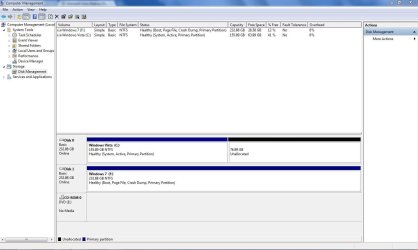
Before we make any specific recommendations will you please post a snip/screen-shot of the entire disk management drive map with a full description as to which drive/partition is which, so we can see what you have going on as there may be a fairly simple way to resolve the situation.

In the Windows start menu right click computer and click manage, in the left pane of the "Computer Management" window that opens click disk management and post a maximized snip of that.


How to Upload and Post a Screenshot and File in Seven Forums
 

My Computer My Computer

At a glance

W 7 64-bit UltimateIntel Q9550 Yorkfield8GB Dominator 8500C5DATI : XFX 5870
Computer Manufacturer/Model Number
* BFK Customs *
OS
W 7 64-bit Ultimate
CPU
Intel Q9550 Yorkfield
Motherboard
ASUS P5Q Pro
Memory
8GB Dominator 8500C5D
Graphics Card(s)
ATI : XFX 5870
Sound Card
Realtek HD Audio 7-1
Monitor(s) Displays
1x 47" LCD HDMI & 3x 26" LCD HDMI
Screen Resolution
1920x1080P & 1920x1200
Hard Drives
1x 80GB Intel X25-M G2 SSD : 1x 500GB & 1x 640GB WD Caviar Black(s)
PSU
Corsair 620HX
Case
Cooler Master RC-690
Cooling
Tuniq Tower 120, 2x 140mm and 3x 120mm case fans
Keyboard
Microsoft 500
Mouse
Razer Diamondback 3G
Internet Speed
14 Mb/s
Other Info
1x Koutech 3Gb/s SATA HDD Hot Swap Rack
Since you have installed Win 7 on a separate drive, all you have to do is remove the dual boot option (msconfig) Boot Tab in Win 7. You can then physically remove the Vista drive or reformat it (or whatever you want to do with it). I did that on my PC, I had Vista on one hard drive, I installed Windows 7 on a new (separate) hard drive. When I wanted to remove Vista I did exactly what I've stated.

Click the start button and then enter msconfig and press the enter key. The System Configuration Panel will come up and click on the "Boot" Tab. Highlight the Vista entry and then click the Delete key.
 

My Computer My Computer

At a glance

Windows 10 64 bitIntel i7 6700K16GB Corsair DominatorIntel CPU Graphics
Computer type
PC/Desktop
Computer Manufacturer/Model Number
My Own Build
OS
Windows 10 64 bit
CPU
Intel i7 6700K
Motherboard
ASUS ROG Maximus VIII Hero
Memory
16GB Corsair Dominator
Graphics Card(s)
Intel CPU Graphics
Sound Card
RealTek
Monitor(s) Displays
27" Dell S2719dgf
Screen Resolution
2560X1440
Hard Drives
1 TB Samsung 850 EVO SSD for Win 10 Pro
500GB Samsung 850 EVO SSD for Win 10 Insider
2 TB drive for backup
PSU
EVGA Supernova 750G2
Case
BeQuiet Silent Base 600
Cooling
Deepcool Captain 120EX
Keyboard
Microsoft Wireless 2000
Mouse
Microsoft wireless
Internet Speed
100 MB/sec (Cable)
Antivirus
Microsoft Defender and Malwarebytes
Browser
Edge/Firefox
Other Info
Cakewalk (Sonar) by BandLab and Studio One 4.1 Pro recording studio software. MOTU 896Mk3 Hybrid recording interface, Frontier Tranzport wireless control unit, Behringer X-Touch Control Surface.
Five USB connected optical drives for CD Audio production using Nero BurningROM
Since you have installed Win 7 on a separate drive, all you have to do is remove the dual boot option (msconfig) Boot Tab in Win 7. You can then physically remove the Vista drive or reformat it (or whatever you want to do with it).

Click the start button and then enter msconfig and press the enter key. The System Configuration Panel will come up and click on the "Boot" Tab. Highlight the Vista entry and then click the Delete key.

This probably won't work as I'm sure the "System" boot files are on the Vista partition and will have to be recreated to the Windows 7 partition or the new Windows 7 System Reserved partition if it is present on the Windows 7 HDD.
 

My Computer My Computer

At a glance

W 7 64-bit UltimateIntel Q9550 Yorkfield8GB Dominator 8500C5DATI : XFX 5870
Computer Manufacturer/Model Number
* BFK Customs *
OS
W 7 64-bit Ultimate
CPU
Intel Q9550 Yorkfield
Motherboard
ASUS P5Q Pro
Memory
8GB Dominator 8500C5D
Graphics Card(s)
ATI : XFX 5870
Sound Card
Realtek HD Audio 7-1
Monitor(s) Displays
1x 47" LCD HDMI & 3x 26" LCD HDMI
Screen Resolution
1920x1080P & 1920x1200
Hard Drives
1x 80GB Intel X25-M G2 SSD : 1x 500GB & 1x 640GB WD Caviar Black(s)
PSU
Corsair 620HX
Case
Cooler Master RC-690
Cooling
Tuniq Tower 120, 2x 140mm and 3x 120mm case fans
Keyboard
Microsoft 500
Mouse
Razer Diamondback 3G
Internet Speed
14 Mb/s
Other Info
1x Koutech 3Gb/s SATA HDD Hot Swap Rack
Already had the window open. The unallocated space was previously used for linux. I will expand it later.
 

Attachments

  • Capture.JPG
    Capture.JPG
    87 KB · Views: 33

My Computer My Computer

At a glance

Windows 10 + Ubuntu + macOSIntel i7-6700k32 GiBnVidia GTX 1070
Computer type
PC/Desktop
Computer Manufacturer/Model Number
Custom build, 2015 15" Macbook Pro
OS
Windows 10 + Ubuntu + macOS
CPU
Intel i7-6700k
Motherboard
ASUS Prime x270
Memory
32 GiB
Graphics Card(s)
nVidia GTX 1070
Monitor(s) Displays
Multiple
Screen Resolution
3840 x 2160
Hard Drives
20 TiB
PSU
Pretty good
Case
Some sort of Fractal Design Tower
Cooling
Could be better
Keyboard
Microsoft Sculpt
Mouse
MX Master
Internet Speed
100 Mbit/s down -- 4 Mbit/s up
Browser
Firefox
Other Info
Arial >> Calibri
What I stated worked for my system. The dual boot option was in Windows 7
 

My Computer My Computer

At a glance

Windows 10 64 bitIntel i7 6700K16GB Corsair DominatorIntel CPU Graphics
Computer type
PC/Desktop
Computer Manufacturer/Model Number
My Own Build
OS
Windows 10 64 bit
CPU
Intel i7 6700K
Motherboard
ASUS ROG Maximus VIII Hero
Memory
16GB Corsair Dominator
Graphics Card(s)
Intel CPU Graphics
Sound Card
RealTek
Monitor(s) Displays
27" Dell S2719dgf
Screen Resolution
2560X1440
Hard Drives
1 TB Samsung 850 EVO SSD for Win 10 Pro
500GB Samsung 850 EVO SSD for Win 10 Insider
2 TB drive for backup
PSU
EVGA Supernova 750G2
Case
BeQuiet Silent Base 600
Cooling
Deepcool Captain 120EX
Keyboard
Microsoft Wireless 2000
Mouse
Microsoft wireless
Internet Speed
100 MB/sec (Cable)
Antivirus
Microsoft Defender and Malwarebytes
Browser
Edge/Firefox
Other Info
Cakewalk (Sonar) by BandLab and Studio One 4.1 Pro recording studio software. MOTU 896Mk3 Hybrid recording interface, Frontier Tranzport wireless control unit, Behringer X-Touch Control Surface.
Five USB connected optical drives for CD Audio production using Nero BurningROM
If it's a desktop.

First in Windows 7 disk management mark the Windows 7 partition as Active, then power down the PC and disconnect the Vista HDD and connect the Windows 7 HDD to the #1 SATA port of the motherboard and set it as the second boot device in the BIOS after the CD/DVD drive.

Then run the 3 separate startup repairs outlined in the main body of this tutorial at the link below to recreate the "System" boot files to the Windows 7 partition.

Startup Repair - Run 3 Separate Times


Then this method clean all (#7) can be used to wipe the Vista HDD if needed from within Windows 7.

Disk - Clean and Clean All with Diskpart Command


Then have a look at Option One in this tutorial for additional storage options.

Partition / Extended : Logical Drives
 

My Computer My Computer

At a glance

W 7 64-bit UltimateIntel Q9550 Yorkfield8GB Dominator 8500C5DATI : XFX 5870
Computer Manufacturer/Model Number
* BFK Customs *
OS
W 7 64-bit Ultimate
CPU
Intel Q9550 Yorkfield
Motherboard
ASUS P5Q Pro
Memory
8GB Dominator 8500C5D
Graphics Card(s)
ATI : XFX 5870
Sound Card
Realtek HD Audio 7-1
Monitor(s) Displays
1x 47" LCD HDMI & 3x 26" LCD HDMI
Screen Resolution
1920x1080P & 1920x1200
Hard Drives
1x 80GB Intel X25-M G2 SSD : 1x 500GB & 1x 640GB WD Caviar Black(s)
PSU
Corsair 620HX
Case
Cooler Master RC-690
Cooling
Tuniq Tower 120, 2x 140mm and 3x 120mm case fans
Keyboard
Microsoft 500
Mouse
Razer Diamondback 3G
Internet Speed
14 Mb/s
Other Info
1x Koutech 3Gb/s SATA HDD Hot Swap Rack
It is a notebook computer with two internal SATA bays, will this still work?
 

My Computer My Computer

At a glance

Windows 10 + Ubuntu + macOSIntel i7-6700k32 GiBnVidia GTX 1070
Computer type
PC/Desktop
Computer Manufacturer/Model Number
Custom build, 2015 15" Macbook Pro
OS
Windows 10 + Ubuntu + macOS
CPU
Intel i7-6700k
Motherboard
ASUS Prime x270
Memory
32 GiB
Graphics Card(s)
nVidia GTX 1070
Monitor(s) Displays
Multiple
Screen Resolution
3840 x 2160
Hard Drives
20 TiB
PSU
Pretty good
Case
Some sort of Fractal Design Tower
Cooling
Could be better
Keyboard
Microsoft Sculpt
Mouse
MX Master
Internet Speed
100 Mbit/s down -- 4 Mbit/s up
Browser
Firefox
Other Info
Arial >> Calibri
"bcdboot" was not recognized as a valid command. Any suggestions (I am now running on the Vista side of my computer.)
 

My Computer My Computer

At a glance

Windows 10 + Ubuntu + macOSIntel i7-6700k32 GiBnVidia GTX 1070
Computer type
PC/Desktop
Computer Manufacturer/Model Number
Custom build, 2015 15" Macbook Pro
OS
Windows 10 + Ubuntu + macOS
CPU
Intel i7-6700k
Motherboard
ASUS Prime x270
Memory
32 GiB
Graphics Card(s)
nVidia GTX 1070
Monitor(s) Displays
Multiple
Screen Resolution
3840 x 2160
Hard Drives
20 TiB
PSU
Pretty good
Case
Some sort of Fractal Design Tower
Cooling
Could be better
Keyboard
Microsoft Sculpt
Mouse
MX Master
Internet Speed
100 Mbit/s down -- 4 Mbit/s up
Browser
Firefox
Other Info
Arial >> Calibri
If I am not mistaken, I do believe that Vista still used boot.ini, and that Windows 7 is the only OS (for now) that is different.

My apologies on the other thread, I figured that it was another issue in itself.:confused:
 

My Computer My Computer

At a glance

Windows 10 + Ubuntu + macOSIntel i7-6700k32 GiBnVidia GTX 1070
Computer type
PC/Desktop
Computer Manufacturer/Model Number
Custom build, 2015 15" Macbook Pro
OS
Windows 10 + Ubuntu + macOS
CPU
Intel i7-6700k
Motherboard
ASUS Prime x270
Memory
32 GiB
Graphics Card(s)
nVidia GTX 1070
Monitor(s) Displays
Multiple
Screen Resolution
3840 x 2160
Hard Drives
20 TiB
PSU
Pretty good
Case
Some sort of Fractal Design Tower
Cooling
Could be better
Keyboard
Microsoft Sculpt
Mouse
MX Master
Internet Speed
100 Mbit/s down -- 4 Mbit/s up
Browser
Firefox
Other Info
Arial >> Calibri
Nice try BFK.

The simplest way is to make sure the windows 7 drive is the first Active partition in boot order.

Then boot the 7 dvd/repair disc and run startup repair - takes up to 3 runs.

I don't usually bother trying to give people commands any more in straightforward cases.
 

My Computers My Computers

  • At a glance

    7 X64i5 84002x8gb 3200mhz
    Computer type
    PC/Desktop
    OS
    7 X64
    CPU
    i5 8400
    Motherboard
    gigabyte b365m ds3h
    Memory
    2x8gb 3200mhz
    Hard Drives
    various
    PSU
    pure power 11 400w cm
    Case
    Coolermaster
    Cooling
    cryorig m9i
  • At a glance

    7x64g54008gb ddr4 2400
    Computer type
    PC/Desktop
    OS
    7x64
    CPU
    g5400
    Motherboard
    ga b365m ds3h
    Memory
    8gb ddr4 2400
    PSU
    xfx pro 450w
As I noted what I did, disconnect the Vista drive and then see if you can boot with the Windows 7 drive. And, if all is well that proves what I said that they are totally separate and other than the possible dual boot in Windows 7 (and I outlined how to get rid of that) there is nothing else you have to do. You can take the second physical hard drive, remove it or reformat it and use it for whatever.
 

My Computer My Computer

At a glance

Windows 10 64 bitIntel i7 6700K16GB Corsair DominatorIntel CPU Graphics
Computer type
PC/Desktop
Computer Manufacturer/Model Number
My Own Build
OS
Windows 10 64 bit
CPU
Intel i7 6700K
Motherboard
ASUS ROG Maximus VIII Hero
Memory
16GB Corsair Dominator
Graphics Card(s)
Intel CPU Graphics
Sound Card
RealTek
Monitor(s) Displays
27" Dell S2719dgf
Screen Resolution
2560X1440
Hard Drives
1 TB Samsung 850 EVO SSD for Win 10 Pro
500GB Samsung 850 EVO SSD for Win 10 Insider
2 TB drive for backup
PSU
EVGA Supernova 750G2
Case
BeQuiet Silent Base 600
Cooling
Deepcool Captain 120EX
Keyboard
Microsoft Wireless 2000
Mouse
Microsoft wireless
Internet Speed
100 MB/sec (Cable)
Antivirus
Microsoft Defender and Malwarebytes
Browser
Edge/Firefox
Other Info
Cakewalk (Sonar) by BandLab and Studio One 4.1 Pro recording studio software. MOTU 896Mk3 Hybrid recording interface, Frontier Tranzport wireless control unit, Behringer X-Touch Control Surface.
Five USB connected optical drives for CD Audio production using Nero BurningROM
Hello SIW.

So he would mark the Windows 7 partition active and set Disk 1 as the first boot device in the main BIOS and use the esc key (one-time boot menu for HP) to select to boot the CD/DVD drive and do the startup repairs.


It's a lappy and he can't disconnect a HDD without taking the thing apart.

If he did remove the Vista HDD the PC wouldn't boot at all as that's the "System" partition.
 

My Computer My Computer

At a glance

W 7 64-bit UltimateIntel Q9550 Yorkfield8GB Dominator 8500C5DATI : XFX 5870
Computer Manufacturer/Model Number
* BFK Customs *
OS
W 7 64-bit Ultimate
CPU
Intel Q9550 Yorkfield
Motherboard
ASUS P5Q Pro
Memory
8GB Dominator 8500C5D
Graphics Card(s)
ATI : XFX 5870
Sound Card
Realtek HD Audio 7-1
Monitor(s) Displays
1x 47" LCD HDMI & 3x 26" LCD HDMI
Screen Resolution
1920x1080P & 1920x1200
Hard Drives
1x 80GB Intel X25-M G2 SSD : 1x 500GB & 1x 640GB WD Caviar Black(s)
PSU
Corsair 620HX
Case
Cooler Master RC-690
Cooling
Tuniq Tower 120, 2x 140mm and 3x 120mm case fans
Keyboard
Microsoft 500
Mouse
Razer Diamondback 3G
Internet Speed
14 Mb/s
Other Info
1x Koutech 3Gb/s SATA HDD Hot Swap Rack
Yeah.....about that. One problem, no install disc. Anything else?
 

My Computer My Computer

At a glance

Windows 10 + Ubuntu + macOSIntel i7-6700k32 GiBnVidia GTX 1070
Computer type
PC/Desktop
Computer Manufacturer/Model Number
Custom build, 2015 15" Macbook Pro
OS
Windows 10 + Ubuntu + macOS
CPU
Intel i7-6700k
Motherboard
ASUS Prime x270
Memory
32 GiB
Graphics Card(s)
nVidia GTX 1070
Monitor(s) Displays
Multiple
Screen Resolution
3840 x 2160
Hard Drives
20 TiB
PSU
Pretty good
Case
Some sort of Fractal Design Tower
Cooling
Could be better
Keyboard
Microsoft Sculpt
Mouse
MX Master
Internet Speed
100 Mbit/s down -- 4 Mbit/s up
Browser
Firefox
Other Info
Arial >> Calibri
That's exactly right BFK.

Hello SIW.

So he would mark the Windows 7 partition active and set Disk 1 as the first boot device in the main BIOS and use the esc key (one-time boot menu for HP) to select to boot the CD/DVD drive and do the startup repairs.


It's a lappy and he can't disconnect a HDD without taking the thing apart.

If he did remove the Vista HDD the PC wouldn't boot at all as that's the "System" partition.
 

My Computers My Computers

  • At a glance

    7 X64i5 84002x8gb 3200mhz
    Computer type
    PC/Desktop
    OS
    7 X64
    CPU
    i5 8400
    Motherboard
    gigabyte b365m ds3h
    Memory
    2x8gb 3200mhz
    Hard Drives
    various
    PSU
    pure power 11 400w cm
    Case
    Coolermaster
    Cooling
    cryorig m9i
  • At a glance

    7x64g54008gb ddr4 2400
    Computer type
    PC/Desktop
    OS
    7x64
    CPU
    g5400
    Motherboard
    ga b365m ds3h
    Memory
    8gb ddr4 2400
    PSU
    xfx pro 450w

My Computer My Computer

At a glance

W 7 64-bit UltimateIntel Q9550 Yorkfield8GB Dominator 8500C5DATI : XFX 5870
Computer Manufacturer/Model Number
* BFK Customs *
OS
W 7 64-bit Ultimate
CPU
Intel Q9550 Yorkfield
Motherboard
ASUS P5Q Pro
Memory
8GB Dominator 8500C5D
Graphics Card(s)
ATI : XFX 5870
Sound Card
Realtek HD Audio 7-1
Monitor(s) Displays
1x 47" LCD HDMI & 3x 26" LCD HDMI
Screen Resolution
1920x1080P & 1920x1200
Hard Drives
1x 80GB Intel X25-M G2 SSD : 1x 500GB & 1x 640GB WD Caviar Black(s)
PSU
Corsair 620HX
Case
Cooler Master RC-690
Cooling
Tuniq Tower 120, 2x 140mm and 3x 120mm case fans
Keyboard
Microsoft 500
Mouse
Razer Diamondback 3G
Internet Speed
14 Mb/s
Other Info
1x Koutech 3Gb/s SATA HDD Hot Swap Rack
I was going to link you to the Neosmart download - but you can run off your own as you can still boot into 7.

The tutorial BFK linked shows you how.

[For those who don't have a cdrom drive - there will almost certainly be an inbuilt recovery disc creator of some kind so you can create a bootable flash - assuming your 7 was preinstalled.]
 

My Computers My Computers

  • At a glance

    7 X64i5 84002x8gb 3200mhz
    Computer type
    PC/Desktop
    OS
    7 X64
    CPU
    i5 8400
    Motherboard
    gigabyte b365m ds3h
    Memory
    2x8gb 3200mhz
    Hard Drives
    various
    PSU
    pure power 11 400w cm
    Case
    Coolermaster
    Cooling
    cryorig m9i
  • At a glance

    7x64g54008gb ddr4 2400
    Computer type
    PC/Desktop
    OS
    7x64
    CPU
    g5400
    Motherboard
    ga b365m ds3h
    Memory
    8gb ddr4 2400
    PSU
    xfx pro 450w
I HAD an installation disc, but where it is now, I couldn't tell you.
 

My Computer My Computer

At a glance

Windows 10 + Ubuntu + macOSIntel i7-6700k32 GiBnVidia GTX 1070
Computer type
PC/Desktop
Computer Manufacturer/Model Number
Custom build, 2015 15" Macbook Pro
OS
Windows 10 + Ubuntu + macOS
CPU
Intel i7-6700k
Motherboard
ASUS Prime x270
Memory
32 GiB
Graphics Card(s)
nVidia GTX 1070
Monitor(s) Displays
Multiple
Screen Resolution
3840 x 2160
Hard Drives
20 TiB
PSU
Pretty good
Case
Some sort of Fractal Design Tower
Cooling
Could be better
Keyboard
Microsoft Sculpt
Mouse
MX Master
Internet Speed
100 Mbit/s down -- 4 Mbit/s up
Browser
Firefox
Other Info
Arial >> Calibri
I HAD an installation disc, but where it is now, I couldn't tell you.


Create the repair disk within Windows 7 I linked to in the previous post, that'll work.
 

My Computer My Computer

At a glance

W 7 64-bit UltimateIntel Q9550 Yorkfield8GB Dominator 8500C5DATI : XFX 5870
Computer Manufacturer/Model Number
* BFK Customs *
OS
W 7 64-bit Ultimate
CPU
Intel Q9550 Yorkfield
Motherboard
ASUS P5Q Pro
Memory
8GB Dominator 8500C5D
Graphics Card(s)
ATI : XFX 5870
Sound Card
Realtek HD Audio 7-1
Monitor(s) Displays
1x 47" LCD HDMI & 3x 26" LCD HDMI
Screen Resolution
1920x1080P & 1920x1200
Hard Drives
1x 80GB Intel X25-M G2 SSD : 1x 500GB & 1x 640GB WD Caviar Black(s)
PSU
Corsair 620HX
Case
Cooler Master RC-690
Cooling
Tuniq Tower 120, 2x 140mm and 3x 120mm case fans
Keyboard
Microsoft 500
Mouse
Razer Diamondback 3G
Internet Speed
14 Mb/s
Other Info
1x Koutech 3Gb/s SATA HDD Hot Swap Rack
In addition to marking Win7 partition Active in Disk mgmt, if you can't move Win7 HD into DISK0 slot then you'll need to mark Vista partition Inactive using Diskpart from Win7 command Line: Partition - Mark as Active - Windows 7 Forums

Otherwise running the Win7 Startup Repairs will continue to write the System Boot Files to Vista partition since it will remain the first Active partition.

If you want to delete Vista partition at this time, you can also wipe it first using Diskpart Clean All command from Win7 DVD/Repair CD which will remove it as an issue:
Clean and Clean All with Diskpart Command
Elevated Command Prompt - Windows 7 Forums
 
Last edited:
Back
Top