Solved Uninstall Vista (Native OS), but leave Windows 7 (Secondary OS)

Okay, let me make sure I have this right:

- (from win7) mark the win7 partition as active
- mark the vista partition as inactive (can only be done from cmd)
- create a restore disc
- boot from the restore disc
- run startup repair from whatever menu comes up
- repeat the previous step 3 times

If this is correct, it will be what I try tonight when I get home.
 

My Computer My Computer

At a glance

Windows 10 + Ubuntu + macOSIntel i7-6700k32 GiBnVidia GTX 1070
Computer type
PC/Desktop
Computer Manufacturer/Model Number
Custom build, 2015 15" Macbook Pro
OS
Windows 10 + Ubuntu + macOS
CPU
Intel i7-6700k
Motherboard
ASUS Prime x270
Memory
32 GiB
Graphics Card(s)
nVidia GTX 1070
Monitor(s) Displays
Multiple
Screen Resolution
3840 x 2160
Hard Drives
20 TiB
PSU
Pretty good
Case
Some sort of Fractal Design Tower
Cooling
Could be better
Keyboard
Microsoft Sculpt
Mouse
MX Master
Internet Speed
100 Mbit/s down -- 4 Mbit/s up
Browser
Firefox
Other Info
Arial >> Calibri
Its Saturday night Greg - have you been drinking?

LOL enjoy.

@cdmoomaw - follow BFK's post.

You will be fine to do it like this if you like:

- (from Windows 7) mark the Windows 7 partition as active
- mark the vista partition as inactive (can only be done from cmd)
- create a restore disc
- boot from the restore disc
- run startup repair from whatever menu comes up
- repeat the previous step 3 times

Otherwise, you could just mark win 7 partition Active, then go into Bios setup and make sure windows 7 drive is the first HD listed in bios boot order.

Then run the startup repairs.

Whichever is easiest for you.
 

My Computers My Computers

  • At a glance

    7 X64i5 84002x8gb 3200mhz
    Computer type
    PC/Desktop
    OS
    7 X64
    CPU
    i5 8400
    Motherboard
    gigabyte b365m ds3h
    Memory
    2x8gb 3200mhz
    Hard Drives
    various
    PSU
    pure power 11 400w cm
    Case
    Coolermaster
    Cooling
    cryorig m9i
  • At a glance

    7x64g54008gb ddr4 2400
    Computer type
    PC/Desktop
    OS
    7x64
    CPU
    g5400
    Motherboard
    ga b365m ds3h
    Memory
    8gb ddr4 2400
    PSU
    xfx pro 450w
Thanks for asking SIW2 but I've been clean and sober for 17 years. I'm swimming with my Lab at the beach right now. Before that I was running a triathlon.

Was there something about the steps I gave that was incorrect? I was trying to include ridding Vista which was stated intention in OP.

And if Vista is not first marked Inactive, how would Startup Repair write boot files to Win7 when Vista is first Active partition?

Just askin.
 
No, not really - just amusing .

In your eagerness to help - you may just have added some confusion.

No point in joining in when BFK has it under control - I only posted because I was asked.

I don't drink either , btw.


You might have missed the posts where making 7 drive first in bios boot order was mentioned.
 

My Computers My Computers

  • At a glance

    7 X64i5 84002x8gb 3200mhz
    Computer type
    PC/Desktop
    OS
    7 X64
    CPU
    i5 8400
    Motherboard
    gigabyte b365m ds3h
    Memory
    2x8gb 3200mhz
    Hard Drives
    various
    PSU
    pure power 11 400w cm
    Case
    Coolermaster
    Cooling
    cryorig m9i
  • At a glance

    7x64g54008gb ddr4 2400
    Computer type
    PC/Desktop
    OS
    7x64
    CPU
    g5400
    Motherboard
    ga b365m ds3h
    Memory
    8gb ddr4 2400
    PSU
    xfx pro 450w
I plan to wipe the drive using diskpart clean all.
 

My Computer My Computer

At a glance

Windows 10 + Ubuntu + macOSIntel i7-6700k32 GiBnVidia GTX 1070
Computer type
PC/Desktop
Computer Manufacturer/Model Number
Custom build, 2015 15" Macbook Pro
OS
Windows 10 + Ubuntu + macOS
CPU
Intel i7-6700k
Motherboard
ASUS Prime x270
Memory
32 GiB
Graphics Card(s)
nVidia GTX 1070
Monitor(s) Displays
Multiple
Screen Resolution
3840 x 2160
Hard Drives
20 TiB
PSU
Pretty good
Case
Some sort of Fractal Design Tower
Cooling
Could be better
Keyboard
Microsoft Sculpt
Mouse
MX Master
Internet Speed
100 Mbit/s down -- 4 Mbit/s up
Browser
Firefox
Other Info
Arial >> Calibri
Why - is there a problem with just deleting it and recreating partitions of whatever sizes you need ?
 

My Computers My Computers

  • At a glance

    7 X64i5 84002x8gb 3200mhz
    Computer type
    PC/Desktop
    OS
    7 X64
    CPU
    i5 8400
    Motherboard
    gigabyte b365m ds3h
    Memory
    2x8gb 3200mhz
    Hard Drives
    various
    PSU
    pure power 11 400w cm
    Case
    Coolermaster
    Cooling
    cryorig m9i
  • At a glance

    7x64g54008gb ddr4 2400
    Computer type
    PC/Desktop
    OS
    7x64
    CPU
    g5400
    Motherboard
    ga b365m ds3h
    Memory
    8gb ddr4 2400
    PSU
    xfx pro 450w
True. Say, would it work to just delete the vista partition, rather than mark it as inactive?
 

My Computer My Computer

At a glance

Windows 10 + Ubuntu + macOSIntel i7-6700k32 GiBnVidia GTX 1070
Computer type
PC/Desktop
Computer Manufacturer/Model Number
Custom build, 2015 15" Macbook Pro
OS
Windows 10 + Ubuntu + macOS
CPU
Intel i7-6700k
Motherboard
ASUS Prime x270
Memory
32 GiB
Graphics Card(s)
nVidia GTX 1070
Monitor(s) Displays
Multiple
Screen Resolution
3840 x 2160
Hard Drives
20 TiB
PSU
Pretty good
Case
Some sort of Fractal Design Tower
Cooling
Could be better
Keyboard
Microsoft Sculpt
Mouse
MX Master
Internet Speed
100 Mbit/s down -- 4 Mbit/s up
Browser
Firefox
Other Info
Arial >> Calibri
You might have missed the posts where making 7 drive first in bios boot order was mentioned.

How would marking 7 first in BIOS Boot Order (given) keep Repair from writing the boot files to Vista again if it were not marked Inactive?

What I tried to add is that OP could preempt the need to mark Vista Inactive if he wants to wipe (or delete) Vista first.

I doubt whether Ted would feel I am horning in any more than I do when we tag team in most threads.
 
You can't delete it from within windows while it is still system.

You need to make 7 partition System first.

Do that exactly the way you were already going to.

Then boot into 7 and just delete Vista partition.
 

My Computers My Computers

  • At a glance

    7 X64i5 84002x8gb 3200mhz
    Computer type
    PC/Desktop
    OS
    7 X64
    CPU
    i5 8400
    Motherboard
    gigabyte b365m ds3h
    Memory
    2x8gb 3200mhz
    Hard Drives
    various
    PSU
    pure power 11 400w cm
    Case
    Coolermaster
    Cooling
    cryorig m9i
  • At a glance

    7x64g54008gb ddr4 2400
    Computer type
    PC/Desktop
    OS
    7x64
    CPU
    g5400
    Motherboard
    ga b365m ds3h
    Memory
    8gb ddr4 2400
    PSU
    xfx pro 450w
You'd run Diskpart Delete Partition Override, Clean or Clean ALL from 7 DVD/Repair CD Command Line on the Vista System Partition, not run it from Win7.

Repair should write System boot files to first marked-Active partition, whether old System partition is marked Inactive, deleted or wiped.

Si, are you saying that setting Win7 HD as first to boot in BIOS setup alone would have sufficed, without marking Vista Inactive or deleting it first? How so?
 
Yes that would have done the job Greg - if 7 partition was marked Active first.

Just like you said here:

Repair should write System boot files to first marked-Active partition. Shouldn't matter whether old System partition is marked Inactive, deleted or wiped.
 

My Computers My Computers

  • At a glance

    7 X64i5 84002x8gb 3200mhz
    Computer type
    PC/Desktop
    OS
    7 X64
    CPU
    i5 8400
    Motherboard
    gigabyte b365m ds3h
    Memory
    2x8gb 3200mhz
    Hard Drives
    various
    PSU
    pure power 11 400w cm
    Case
    Coolermaster
    Cooling
    cryorig m9i
  • At a glance

    7x64g54008gb ddr4 2400
    Computer type
    PC/Desktop
    OS
    7x64
    CPU
    g5400
    Motherboard
    ga b365m ds3h
    Memory
    8gb ddr4 2400
    PSU
    xfx pro 450w
Okay, now I'm confused.

I think it goes something like this:

- Boot to Vista
- Mark Win7 Partition as Active
- Boot to Win7
- Delete Vista Partition
- Boot to Restore Disc
- Run Startup Repair
- Repeat last 2 Steps 3 Times
- Remove Disc and Boot to Win7
- Create Partition on Former Vista Drive

???
 

My Computer My Computer

At a glance

Windows 10 + Ubuntu + macOSIntel i7-6700k32 GiBnVidia GTX 1070
Computer type
PC/Desktop
Computer Manufacturer/Model Number
Custom build, 2015 15" Macbook Pro
OS
Windows 10 + Ubuntu + macOS
CPU
Intel i7-6700k
Motherboard
ASUS Prime x270
Memory
32 GiB
Graphics Card(s)
nVidia GTX 1070
Monitor(s) Displays
Multiple
Screen Resolution
3840 x 2160
Hard Drives
20 TiB
PSU
Pretty good
Case
Some sort of Fractal Design Tower
Cooling
Could be better
Keyboard
Microsoft Sculpt
Mouse
MX Master
Internet Speed
100 Mbit/s down -- 4 Mbit/s up
Browser
Firefox
Other Info
Arial >> Calibri
Okay, now I'm confused.

Now there's a surprise. LOL.

Try this:

- Boot to Windows 7
- Mark Windows 7 Partition as Active
- Either:
1. Mark Vista partition inactive (using diskpart)
OR
2. Restart, go into bios and make sure win7 drive is first HD in boot order
OR
3. Both 1 and 2 if you like
- Boot to Restore Disc
- Run Startup Repair up to 3 times
- Boot into windows 7
- Delete Vista Partition
 

My Computers My Computers

  • At a glance

    7 X64i5 84002x8gb 3200mhz
    Computer type
    PC/Desktop
    OS
    7 X64
    CPU
    i5 8400
    Motherboard
    gigabyte b365m ds3h
    Memory
    2x8gb 3200mhz
    Hard Drives
    various
    PSU
    pure power 11 400w cm
    Case
    Coolermaster
    Cooling
    cryorig m9i
  • At a glance

    7x64g54008gb ddr4 2400
    Computer type
    PC/Desktop
    OS
    7x64
    CPU
    g5400
    Motherboard
    ga b365m ds3h
    Memory
    8gb ddr4 2400
    PSU
    xfx pro 450w
Indeed. :D

Thanks, I am now at home, so this I will try.
 

My Computer My Computer

At a glance

Windows 10 + Ubuntu + macOSIntel i7-6700k32 GiBnVidia GTX 1070
Computer type
PC/Desktop
Computer Manufacturer/Model Number
Custom build, 2015 15" Macbook Pro
OS
Windows 10 + Ubuntu + macOS
CPU
Intel i7-6700k
Motherboard
ASUS Prime x270
Memory
32 GiB
Graphics Card(s)
nVidia GTX 1070
Monitor(s) Displays
Multiple
Screen Resolution
3840 x 2160
Hard Drives
20 TiB
PSU
Pretty good
Case
Some sort of Fractal Design Tower
Cooling
Could be better
Keyboard
Microsoft Sculpt
Mouse
MX Master
Internet Speed
100 Mbit/s down -- 4 Mbit/s up
Browser
Firefox
Other Info
Arial >> Calibri
Yes that would have done the job Greg - if 7 partition was marked Active first.

Just like you said here:

Repair should write System boot files to first marked-Active partition. Shouldn't matter whether old System partition is marked Inactive, deleted or wiped.

But it would need one of those three choices to get rid of Vista Active to work, not just mark Win7 Active and set to boot first?

Because if Vista on DISK0 remains first Active partition, what would cause Repair to write boot files to Win7? Are you saying marking it Active and set first to boot override the fact that Vista is still first Active partition?

(cdmoomaw: please excuse the asides but we help literally hundreds of people with these fixes and SIW2 is our prime teacher)
 

My Computer My Computer

At a glance

ME/XP/Vista/Win7
OS
ME/XP/Vista/Win7
Yes, Win7 partition would need to be Active - and need to be first in bios boot order.


Was Win7 (Disk1) first in boot order, BFK?
 

My Computers My Computers

  • At a glance

    7 X64i5 84002x8gb 3200mhz
    Computer type
    PC/Desktop
    OS
    7 X64
    CPU
    i5 8400
    Motherboard
    gigabyte b365m ds3h
    Memory
    2x8gb 3200mhz
    Hard Drives
    various
    PSU
    pure power 11 400w cm
    Case
    Coolermaster
    Cooling
    cryorig m9i
  • At a glance

    7x64g54008gb ddr4 2400
    Computer type
    PC/Desktop
    OS
    7x64
    CPU
    g5400
    Motherboard
    ga b365m ds3h
    Memory
    8gb ddr4 2400
    PSU
    xfx pro 450w
I sure hope the OP reports back.

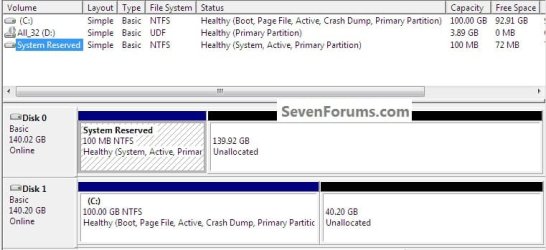
I did a simulation in VirtualBox last night with Vista as the "System" on Disk 0 and Windows 7 on Disk 1.

Booted to diskpart and did a clean all to Disk 0 and marked the Disk 1 Windows 7 partition as active then did the startup repairs.

To recap ...

Disk 0 was unallocated space and the Windows 7 partition was active.


The startup repairs created a System Reserved partition on Disk 0 and made that the "System" partition, as can be seen in this snip.


click to enlarge
sim.jpg
 

My Computer My Computer

At a glance

W 7 64-bit UltimateIntel Q9550 Yorkfield8GB Dominator 8500C5DATI : XFX 5870
Computer Manufacturer/Model Number
* BFK Customs *
OS
W 7 64-bit Ultimate
CPU
Intel Q9550 Yorkfield
Motherboard
ASUS P5Q Pro
Memory
8GB Dominator 8500C5D
Graphics Card(s)
ATI : XFX 5870
Sound Card
Realtek HD Audio 7-1
Monitor(s) Displays
1x 47" LCD HDMI & 3x 26" LCD HDMI
Screen Resolution
1920x1080P & 1920x1200
Hard Drives
1x 80GB Intel X25-M G2 SSD : 1x 500GB & 1x 640GB WD Caviar Black(s)
PSU
Corsair 620HX
Case
Cooler Master RC-690
Cooling
Tuniq Tower 120, 2x 140mm and 3x 120mm case fans
Keyboard
Microsoft 500
Mouse
Razer Diamondback 3G
Internet Speed
14 Mb/s
Other Info
1x Koutech 3Gb/s SATA HDD Hot Swap Rack
Hi BFK
This is one of reasons, it is best to have OS on Disk 0.
Ray.
 

My Computer My Computer

At a glance

ME/XP/Vista/Win7
OS
ME/XP/Vista/Win7
Hello SIW.


No I have not installed/added a BIOS into VB, that is something I would like to sort/pursue in future though if you have any pointers on the best way to do so, I know it's possible as I've had a look at the VB FAQs on the method already.

I think though this may be a good work-around for those that are in a similar situation and can't, for whatever reason change the BIOS boot order on their OEM lappy.

Your thoughts on any of this would be appreciated.


I totally agree Ray! ;)
 

My Computer My Computer

At a glance

W 7 64-bit UltimateIntel Q9550 Yorkfield8GB Dominator 8500C5DATI : XFX 5870
Computer Manufacturer/Model Number
* BFK Customs *
OS
W 7 64-bit Ultimate
CPU
Intel Q9550 Yorkfield
Motherboard
ASUS P5Q Pro
Memory
8GB Dominator 8500C5D
Graphics Card(s)
ATI : XFX 5870
Sound Card
Realtek HD Audio 7-1
Monitor(s) Displays
1x 47" LCD HDMI & 3x 26" LCD HDMI
Screen Resolution
1920x1080P & 1920x1200
Hard Drives
1x 80GB Intel X25-M G2 SSD : 1x 500GB & 1x 640GB WD Caviar Black(s)
PSU
Corsair 620HX
Case
Cooler Master RC-690
Cooling
Tuniq Tower 120, 2x 140mm and 3x 120mm case fans
Keyboard
Microsoft 500
Mouse
Razer Diamondback 3G
Internet Speed
14 Mb/s
Other Info
1x Koutech 3Gb/s SATA HDD Hot Swap Rack
Back
Top