Solved Uninstalled Linux OS dual boot with Windows 7 now boot issue.

GARoss

New member
Power User
VIP
Local time
10:15 PM
Messages
359
Location
Michigan - USA
Tried Ubuntu & didn't like it so wanted to remove it completely. After deleting & recovering that portion of (G: ) which is where Ubuntu was installed, I couldn't boot in Windows 7. I was able to use my install disk to load into repair. The OS it found was-

OS -Windows 7
Partition Size - 122,001Mb
Location - (F: )

(F: ) struck me odd as I thought this would be (C: ) I then when to Command promp & used Bootrec.exe /fixmbr enter - then Bootrec.exe /fixboot enter then restarted. The PC booted in Windows 7 & all seems OK but still wondered if the location was correct. I reloaded the install disk as before & when into repair & it still says location as (F: ) which is my backup drive.

OK, my PC boots but shouldn't the location be (C: ) not (F: )? After all, if (F: ) is removed or goes bad I'd have the non-boot issue again, wouldn't I? If so, how do I write it to (C: )
 

My Computer My Computer

Computer type
PC/Desktop
Computer Manufacturer/Model Number
Custom built 2011
OS
Windows 7 64-bit
CPU
Intel Core i5-2500K 3300 Mhz
Motherboard
Gigabyte P67A-UD3-B3
Memory
16Gb Patriot PC3-12800 1600 Mhz
Graphics Card(s)
EVGA GeForce GTX 560 Ti (Fermi)
Sound Card
On Motherboard
Monitor(s) Displays
Dell U2412M & NEC EA232WMi
Screen Resolution
DELL 1920x1200 - NEC 1920x1080
Hard Drives
Crucial 128 Gb SSD
Hitachi Deskstar 2Tb 7200 RPM 32MB Cache
Seagate Barracuda 500Gb 7200 RPM
Hitachi GST Deskstar 1.5TB 7200 RPM 64MB Cache
PSU
Seasonic M1211-620 Bronze
Case
Antec Solo
Cooling
Tuniq Tower 120 Extreme Rev 1
Keyboard
Apple
Mouse
Microsoft
Internet Speed
5mbs
Other Info
Sunbeam PL-RS-3 Rheosmart 3 Fan Controller 3.5" Bay 3 Channel 30W Fan Controller Panel
Dual-booting 2 or more Operating Systems can mess up the drive lettering, especially when 1 or more are uninstalled. If Windows is working properly the only issue will be in assuring program installations point to the drive Windows is on. The earlier versions of Windows such as Win98, WinME, etc., were particular as to the drive or partition they were installed on. Part of the situation may be affected by the newer motherboards and HDDs that use SATA connections instead of the older PATA, SATA has only one drive per socket on the board while PATA have one data cable for each socket and can have one or two drives on each cable.

The easiest/less time-consuming way I've found with such an issue is to backup any user data then boot to a GPARTED CD and wipe the HDDs that have or had an OS installed followed by connecting only one HDD for installing the OS then reconnecting the storage drives. Leaving any of the boot files of a previous OS on an HDD can mess up the boot process, sometimes slows things down when booting.
 

My Computer My Computer

Computer type
PC/Desktop
Computer Manufacturer/Model Number
Customs, Dell, Gateway, HP, Toshiba, Acer, ASUS
OS
Windows 7 Ultimate 64-bit, Windows 8.1 64-bit, Mac OS X 10.10, Linux Mint 17, Windows 10 Pro TP
Keyboard
Microsoft
Mouse
Microsoft
Is there a way to use the command prompt window with Windows 7 up & running to "find" the MBR?

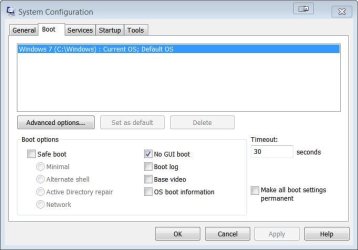
I used msconfig & got this. Does this verify that MBR is actuall on C: ?
 

Attachments

  • Capture.JPG
    Capture.JPG
    39.7 KB · Views: 33

My Computer My Computer

Computer type
PC/Desktop
Computer Manufacturer/Model Number
Custom built 2011
OS
Windows 7 64-bit
CPU
Intel Core i5-2500K 3300 Mhz
Motherboard
Gigabyte P67A-UD3-B3
Memory
16Gb Patriot PC3-12800 1600 Mhz
Graphics Card(s)
EVGA GeForce GTX 560 Ti (Fermi)
Sound Card
On Motherboard
Monitor(s) Displays
Dell U2412M & NEC EA232WMi
Screen Resolution
DELL 1920x1200 - NEC 1920x1080
Hard Drives
Crucial 128 Gb SSD
Hitachi Deskstar 2Tb 7200 RPM 32MB Cache
Seagate Barracuda 500Gb 7200 RPM
Hitachi GST Deskstar 1.5TB 7200 RPM 64MB Cache
PSU
Seasonic M1211-620 Bronze
Case
Antec Solo
Cooling
Tuniq Tower 120 Extreme Rev 1
Keyboard
Apple
Mouse
Microsoft
Internet Speed
5mbs
Other Info
Sunbeam PL-RS-3 Rheosmart 3 Fan Controller 3.5" Bay 3 Channel 30W Fan Controller Panel
I used msconfig & got this. Does this verify that MBR is actuall on C: ?
You got this all wrong. The MBR is on the first 512 bytes of the Disk - not on a Partition. I guess what you are looking for is the bootmgr. But that would normally be on the system partition and not on C. The C partition is the OS partition and that's what your msconfig says.

Do as Greg suggested - post a picture of disk management.
 

My Computer My Computer

Computer Manufacturer/Model Number
HP, Dell, Gateway, Toshiba - 4 laptops and 2 desktops
OS
Vista, Windows7, Mint Mate, Zorin, Windows 8
CPU
from 1.6GHz Duo to i7
Monitor(s) Displays
2x HP w2207
Hard Drives
5x HDD, 7x SSD, 12x Externals
Keyboard
with trackball - no mices
Mouse
Trackball mice
Internet Speed
DSL 6000
Drive letters are often different in WinRE.

Please post back a screenshot of Disk Mgmt http://www.sevenforums.com/tutorials/274797-disk-management-post-screen-capture-image.html

I used msconfig & got this. Does this verify that MBR is actuall on C: ?
You got this all wrong. The MBR is on the first 512 bytes of the Disk - not on a Partition. I guess what you are looking for is the bootmgr. But that would normally be on the system partition and not on C. The C partition is the OS partition and that's what your msconfig says.

Do as Greg suggested - post a picture of disk management.

Thank you both for helping me!

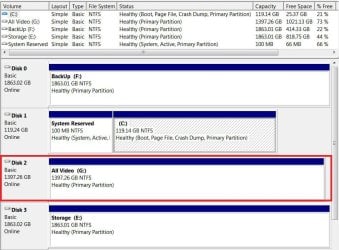
Here Disk Management screen grab. G drive is when Linux was installed. As I said in my 1st post, I'm concerned that while repairing boot using the install disk the OS it found said Windows 7 location was F: which I assumed would be C:

OS -Windows 7
Partition Size - 122,001Mb
Location - (F: )


F: is where all my PC backup is stored (Oops Backup). If it means anything the PC seems normal & boots without a glitch.

Disk Management says boot is on C: . Is that the same as MBR? Also, G drive no longer a Primary Partition but a simple volume. Is that OK?
 

Attachments

  • Capture.JPG
    Capture.JPG
    123.5 KB · Views: 2

My Computer My Computer

Computer type
PC/Desktop
Computer Manufacturer/Model Number
Custom built 2011
OS
Windows 7 64-bit
CPU
Intel Core i5-2500K 3300 Mhz
Motherboard
Gigabyte P67A-UD3-B3
Memory
16Gb Patriot PC3-12800 1600 Mhz
Graphics Card(s)
EVGA GeForce GTX 560 Ti (Fermi)
Sound Card
On Motherboard
Monitor(s) Displays
Dell U2412M & NEC EA232WMi
Screen Resolution
DELL 1920x1200 - NEC 1920x1080
Hard Drives
Crucial 128 Gb SSD
Hitachi Deskstar 2Tb 7200 RPM 32MB Cache
Seagate Barracuda 500Gb 7200 RPM
Hitachi GST Deskstar 1.5TB 7200 RPM 64MB Cache
PSU
Seasonic M1211-620 Bronze
Case
Antec Solo
Cooling
Tuniq Tower 120 Extreme Rev 1
Keyboard
Apple
Mouse
Microsoft
Internet Speed
5mbs
Other Info
Sunbeam PL-RS-3 Rheosmart 3 Fan Controller 3.5" Bay 3 Channel 30W Fan Controller Panel
This all looks pretty normal except for disk 3 which is a dynamic disk. Is that a spanned disk (one partition spanning 2 volumes) ??

For MBR, you might wan to read up on here:
Master boot record - Wikipedia, the free encyclopedia

"Boot is on C" only means that the OS is on C. But the bootmgr is on the active partition which is the 100MB system partition.
 

My Computer My Computer

Computer Manufacturer/Model Number
HP, Dell, Gateway, Toshiba - 4 laptops and 2 desktops
OS
Vista, Windows7, Mint Mate, Zorin, Windows 8
CPU
from 1.6GHz Duo to i7
Monitor(s) Displays
2x HP w2207
Hard Drives
5x HDD, 7x SSD, 12x Externals
Keyboard
with trackball - no mices
Mouse
Trackball mice
Internet Speed
DSL 6000
This all looks pretty normal except for disk 3 which is a dynamic disk. Is that a spanned disk (one partition spanning 2 volumes) ??

For MBR, you might wan to read up on here:
Master boot record - Wikipedia, the free encyclopedia

"Boot is on C" only means that the OS is on C. But the bootmgr is on the active partition which is the 100MB system partition.

whs, thanks for your post.

If bootmgr is located on C: in the 100Mb system partition & Windows OS is also on C: , why did it appear as F: while doing the repair? I know you are correct but I don't get that one. :confused:

As for G: disk 3; this is when Linux was installed. I deleted 19Gb ext4 partition & also a 2Gb swap partition, then Extended the volume. G: seems normal but should something else be done to elevate it to a Primary Partition like the other drives?
 

Attachments

  • Capture.JPG
    Capture.JPG
    149.9 KB · Views: 2

My Computer My Computer

Computer type
PC/Desktop
Computer Manufacturer/Model Number
Custom built 2011
OS
Windows 7 64-bit
CPU
Intel Core i5-2500K 3300 Mhz
Motherboard
Gigabyte P67A-UD3-B3
Memory
16Gb Patriot PC3-12800 1600 Mhz
Graphics Card(s)
EVGA GeForce GTX 560 Ti (Fermi)
Sound Card
On Motherboard
Monitor(s) Displays
Dell U2412M & NEC EA232WMi
Screen Resolution
DELL 1920x1200 - NEC 1920x1080
Hard Drives
Crucial 128 Gb SSD
Hitachi Deskstar 2Tb 7200 RPM 32MB Cache
Seagate Barracuda 500Gb 7200 RPM
Hitachi GST Deskstar 1.5TB 7200 RPM 64MB Cache
PSU
Seasonic M1211-620 Bronze
Case
Antec Solo
Cooling
Tuniq Tower 120 Extreme Rev 1
Keyboard
Apple
Mouse
Microsoft
Internet Speed
5mbs
Other Info
Sunbeam PL-RS-3 Rheosmart 3 Fan Controller 3.5" Bay 3 Channel 30W Fan Controller Panel

My Computer My Computer

Computer type
PC/Desktop
Computer Manufacturer/Model Number
Custom built 2011
OS
Windows 7 64-bit
CPU
Intel Core i5-2500K 3300 Mhz
Motherboard
Gigabyte P67A-UD3-B3
Memory
16Gb Patriot PC3-12800 1600 Mhz
Graphics Card(s)
EVGA GeForce GTX 560 Ti (Fermi)
Sound Card
On Motherboard
Monitor(s) Displays
Dell U2412M & NEC EA232WMi
Screen Resolution
DELL 1920x1200 - NEC 1920x1080
Hard Drives
Crucial 128 Gb SSD
Hitachi Deskstar 2Tb 7200 RPM 32MB Cache
Seagate Barracuda 500Gb 7200 RPM
Hitachi GST Deskstar 1.5TB 7200 RPM 64MB Cache
PSU
Seasonic M1211-620 Bronze
Case
Antec Solo
Cooling
Tuniq Tower 120 Extreme Rev 1
Keyboard
Apple
Mouse
Microsoft
Internet Speed
5mbs
Other Info
Sunbeam PL-RS-3 Rheosmart 3 Fan Controller 3.5" Bay 3 Channel 30W Fan Controller Panel
If bootmgr is located on C: in the 100Mb system partition
You are again confusing things. The bootmgr is in the system partition. That is an independent partition and not C.

When C was F that means that C was not the running OS at that moment but some other OS was running (or perceived as running). C is always the currently running OS.

For the G partition do what Greg suggested. But there is no need to make it a primary, can be a logical partition. On your whole installation only one single primary partition is a must - and that is the system partition. Only the partition that contains the bootmgr must be a primary. All other primaries are kind of 'optional' and do not really serve a purpose. They could all be logical partitions and would function just as well. But you can leave it as is - no harm done on your configuration.
 

My Computer My Computer

Computer Manufacturer/Model Number
HP, Dell, Gateway, Toshiba - 4 laptops and 2 desktops
OS
Vista, Windows7, Mint Mate, Zorin, Windows 8
CPU
from 1.6GHz Duo to i7
Monitor(s) Displays
2x HP w2207
Hard Drives
5x HDD, 7x SSD, 12x Externals
Keyboard
with trackball - no mices
Mouse
Trackball mice
Internet Speed
DSL 6000
If bootmgr is located on C: in the 100Mb system partition
You are again confusing things. The bootmgr is in the system partition. That is an independent partition and not C.

When C was F that means that C was not the running OS at that moment but some other OS was running (or perceived as running). C is always the currently running OS.

For the G partition do what Greg suggested. But there is no need to make it a primary, can be a logical partition. On your whole installation only one single primary partition is a must - and that is the system partition. Only the partition that contains the bootmgr must be a primary. All other primaries are kind of 'optional' and do not really serve a purpose. They could all be logical partitions and would function just as well. But you can leave it as is - no harm done on your configuration.

Thanks, I'll do that. My terminology is all wrong. I meant to say that system reserve & C driver were on the same hard drive.
 

My Computer My Computer

Computer type
PC/Desktop
Computer Manufacturer/Model Number
Custom built 2011
OS
Windows 7 64-bit
CPU
Intel Core i5-2500K 3300 Mhz
Motherboard
Gigabyte P67A-UD3-B3
Memory
16Gb Patriot PC3-12800 1600 Mhz
Graphics Card(s)
EVGA GeForce GTX 560 Ti (Fermi)
Sound Card
On Motherboard
Monitor(s) Displays
Dell U2412M & NEC EA232WMi
Screen Resolution
DELL 1920x1200 - NEC 1920x1080
Hard Drives
Crucial 128 Gb SSD
Hitachi Deskstar 2Tb 7200 RPM 32MB Cache
Seagate Barracuda 500Gb 7200 RPM
Hitachi GST Deskstar 1.5TB 7200 RPM 64MB Cache
PSU
Seasonic M1211-620 Bronze
Case
Antec Solo
Cooling
Tuniq Tower 120 Extreme Rev 1
Keyboard
Apple
Mouse
Microsoft
Internet Speed
5mbs
Other Info
Sunbeam PL-RS-3 Rheosmart 3 Fan Controller 3.5" Bay 3 Channel 30W Fan Controller Panel
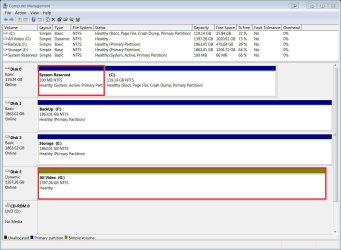
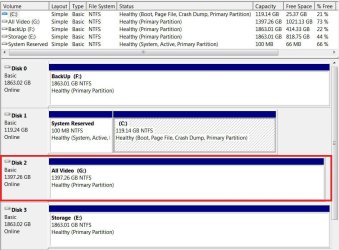
Success!

As a precaution I moved all data to another drive then processed. All went without a glitch. Thanks! :thumbsup:
 

Attachments

  • Capture.JPG
    Capture.JPG
    121.6 KB · Views: 1

My Computer My Computer

Computer type
PC/Desktop
Computer Manufacturer/Model Number
Custom built 2011
OS
Windows 7 64-bit
CPU
Intel Core i5-2500K 3300 Mhz
Motherboard
Gigabyte P67A-UD3-B3
Memory
16Gb Patriot PC3-12800 1600 Mhz
Graphics Card(s)
EVGA GeForce GTX 560 Ti (Fermi)
Sound Card
On Motherboard
Monitor(s) Displays
Dell U2412M & NEC EA232WMi
Screen Resolution
DELL 1920x1200 - NEC 1920x1080
Hard Drives
Crucial 128 Gb SSD
Hitachi Deskstar 2Tb 7200 RPM 32MB Cache
Seagate Barracuda 500Gb 7200 RPM
Hitachi GST Deskstar 1.5TB 7200 RPM 64MB Cache
PSU
Seasonic M1211-620 Bronze
Case
Antec Solo
Cooling
Tuniq Tower 120 Extreme Rev 1
Keyboard
Apple
Mouse
Microsoft
Internet Speed
5mbs
Other Info
Sunbeam PL-RS-3 Rheosmart 3 Fan Controller 3.5" Bay 3 Channel 30W Fan Controller Panel
Looks fine but If possible I'd swap cables between Disks 0 and 1 so that Win7 HD is in Disk0 position, otherwise during Repairs or Reinstall it may derail the System flag to the first-in-order Primary partition. Make sure Win7 drive remains set first to boot in BIOS setup.
 

My Computer My Computer

Computer Manufacturer/Model Number
HP, Dell, Gateway, Toshiba - 4 laptops and 2 desktops
OS
Vista, Windows7, Mint Mate, Zorin, Windows 8
CPU
from 1.6GHz Duo to i7
Monitor(s) Displays
2x HP w2207
Hard Drives
5x HDD, 7x SSD, 12x Externals
Keyboard
with trackball - no mices
Mouse
Trackball mice
Internet Speed
DSL 6000
Yes I am aware of that. But most are able to make this switch easily enough, avoiding the risk of Primary partitions preceding Win7.
 
Agree if the Sata III port is port 0 - which is rarely the case. And a primary partition that is not active can preced Win7 - no harm done.
 

My Computer My Computer

Computer Manufacturer/Model Number
HP, Dell, Gateway, Toshiba - 4 laptops and 2 desktops
OS
Vista, Windows7, Mint Mate, Zorin, Windows 8
CPU
from 1.6GHz Duo to i7
Monitor(s) Displays
2x HP w2207
Hard Drives
5x HDD, 7x SSD, 12x Externals
Keyboard
with trackball - no mices
Mouse
Trackball mice
Internet Speed
DSL 6000
I think it was important to return G: to Basic because eventually I'll have to upgrade to Windows 10 which I don't believe to be compatible with Dynamic drives.

I think I understand now why G: became a "Dynamic" drive. After deleting the Linux & swap partitions, I Expanded G: without formatting these to NTFS first. All appeared OK but 21Gb of data space was in purgatory, so to speak ;). I discovered this when moving data off G: as a precaution while converting G: to Basic. File info indicated 21Gb of additional data remained on G: even after everything had been copied to another drive.

It easy enough to move C: to Port 0. Thanks again!
 

My Computer My Computer

Computer type
PC/Desktop
Computer Manufacturer/Model Number
Custom built 2011
OS
Windows 7 64-bit
CPU
Intel Core i5-2500K 3300 Mhz
Motherboard
Gigabyte P67A-UD3-B3
Memory
16Gb Patriot PC3-12800 1600 Mhz
Graphics Card(s)
EVGA GeForce GTX 560 Ti (Fermi)
Sound Card
On Motherboard
Monitor(s) Displays
Dell U2412M & NEC EA232WMi
Screen Resolution
DELL 1920x1200 - NEC 1920x1080
Hard Drives
Crucial 128 Gb SSD
Hitachi Deskstar 2Tb 7200 RPM 32MB Cache
Seagate Barracuda 500Gb 7200 RPM
Hitachi GST Deskstar 1.5TB 7200 RPM 64MB Cache
PSU
Seasonic M1211-620 Bronze
Case
Antec Solo
Cooling
Tuniq Tower 120 Extreme Rev 1
Keyboard
Apple
Mouse
Microsoft
Internet Speed
5mbs
Other Info
Sunbeam PL-RS-3 Rheosmart 3 Fan Controller 3.5" Bay 3 Channel 30W Fan Controller Panel
Hopefully your port 0 is a 6Gb port - else you may lose SSD speed.
 

My Computer My Computer

Computer Manufacturer/Model Number
HP, Dell, Gateway, Toshiba - 4 laptops and 2 desktops
OS
Vista, Windows7, Mint Mate, Zorin, Windows 8
CPU
from 1.6GHz Duo to i7
Monitor(s) Displays
2x HP w2207
Hard Drives
5x HDD, 7x SSD, 12x Externals
Keyboard
with trackball - no mices
Mouse
Trackball mice
Internet Speed
DSL 6000
View attachment 344404
Hopefully your port 0 is a 6Gb port - else you may lose SSD speed.

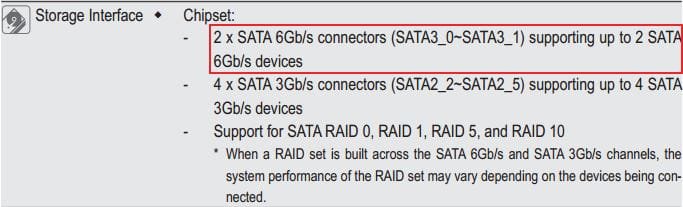
Motherboard is Gigabyte GA-P67-UD3-B3_v1.1 . According to the manual, if I'm reading it correctly (see bottom attachment) , 0-1 are 6Gb while 2-6 are 3GB. CDM indicates C: is on port 1.
 

Attachments

  • Gigabyte GA-P67-UD3-B3_v1.1.JPG
    Gigabyte GA-P67-UD3-B3_v1.1.JPG
    47.4 KB · Views: 11
  • Capture.JPG
    Capture.JPG
    121.6 KB · Views: 1

My Computer My Computer

Computer type
PC/Desktop
Computer Manufacturer/Model Number
Custom built 2011
OS
Windows 7 64-bit
CPU
Intel Core i5-2500K 3300 Mhz
Motherboard
Gigabyte P67A-UD3-B3
Memory
16Gb Patriot PC3-12800 1600 Mhz
Graphics Card(s)
EVGA GeForce GTX 560 Ti (Fermi)
Sound Card
On Motherboard
Monitor(s) Displays
Dell U2412M & NEC EA232WMi
Screen Resolution
DELL 1920x1200 - NEC 1920x1080
Hard Drives
Crucial 128 Gb SSD
Hitachi Deskstar 2Tb 7200 RPM 32MB Cache
Seagate Barracuda 500Gb 7200 RPM
Hitachi GST Deskstar 1.5TB 7200 RPM 64MB Cache
PSU
Seasonic M1211-620 Bronze
Case
Antec Solo
Cooling
Tuniq Tower 120 Extreme Rev 1
Keyboard
Apple
Mouse
Microsoft
Internet Speed
5mbs
Other Info
Sunbeam PL-RS-3 Rheosmart 3 Fan Controller 3.5" Bay 3 Channel 30W Fan Controller Panel
Back
Top